Block 1 - Start
- Type / Role
- n8n-nodes-base.manualTrigger - manualTrigger
- Config choices
- Version 1


 Early Deal
This workflow is provided as-is. Please review and test before using in production.
This workflow contains community nodes that are only compatible with the self hosted version of n8n. AI Blog Automation for Shopify is a workflow that automatically transforms your Shopify products...
n8n-nodes-base.manualtrigger, n8n-nodes-base.httprequest, n8n-nodes-base.wait, @n8n/n8n-nodes-langchain.chainllm, n8n-nodes-base.shopify, @n8n/n8n-nodes-langchain.lmchatopenai, @n8n/n8n-nodes-langchain.outputparserstructured, n8n-nodes-base.shopifytrigger
This workflow is cataloged by N8N Workflows and links back to its original n8n.io source page by Khairul Muhtadin.
Original n8n.io sourceThis workflow contains community nodes that are only compatible with the self-hosted version of n8n.
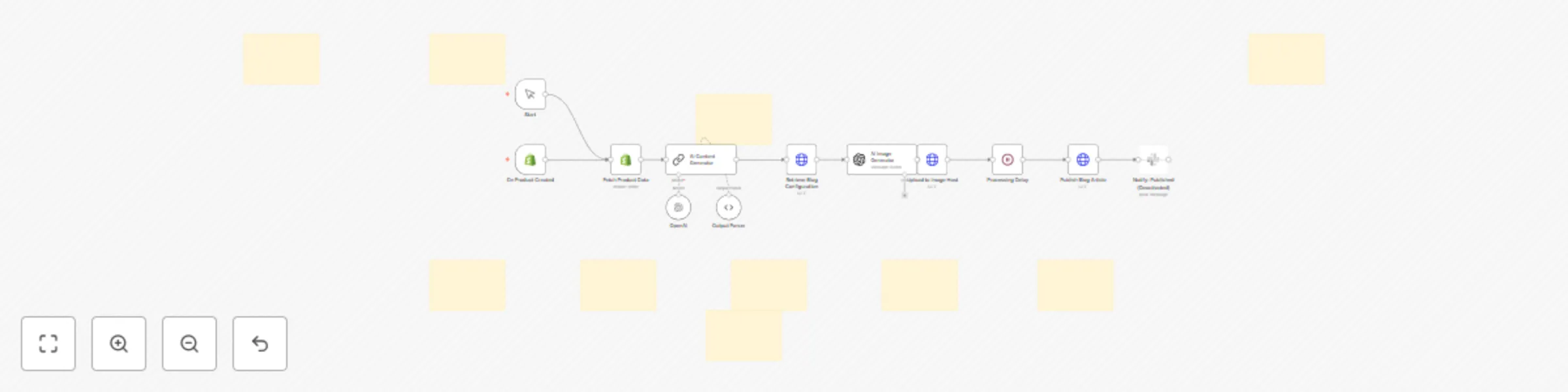
AI Blog Automation for Shopify is a n8n workflow that automatically transforms your Shopify products into engaging, problem-focused blog posts.
Say goodbye to spending 5+ hours per article – this workflow generates SEO-optimized content that addresses customer pain points, not just product features.
🎯 Who is this for?
🚨 Problem Solved Creating quality blog content is time-consuming and expensive. Most store owners either skip blogging entirely or burn out after a few posts. This workflow solves it by:
⚙️ What This Workflow Does
| Feature | Description |
|---|---|
| Triggers | - Manual execution for existing products - Automatic trigger when new products are created |
| Analyzes Products | Uses LangChain + OpenAI to: - Identify core problems the product solves - Analyze customer pain points - Generate problem-focused angles |
| Creates Content | GPT-4o-mini generates 1000-1500 word articles: - Problem-first approach (not product-first) - SEO-optimized structure - Natural product integration - Soft call-to-actions |
| Generates Images | DALL-E 3 creates blog hero images: - Matches blog theme (not just product) - Brand-consistent styling - Mobile-optimized dimensions |
| Hosts Images | Uploads to ImgBB (free CDN): - No expiration - Fast global delivery - Direct URL integration |
| Publishes | Posts directly to Shopify blog: - Proper HTML formatting - SEO meta descriptions - Relevant tags - Mobile-responsive images |
🚀 Setup Instructions
🔐 Credentials Needed
read_products, write_content, read_content scopes)🔧 Shopify Configuration
read_products - Read product datawrite_content - Create blog posts read_content - Access blog configurationshpat_)🧩 Node Setup
🛠️ Customization Tips
| Feature | How to Customize |
|---|---|
| Content Length | Adjust word count in AI Content Generator prompt |
| Image Style | Modify DALL-E prompt for brand colors/aesthetics |
| Author Name | Change author field in Publish Blog Article node |
| Blog Selection | Update blog ID to target specific Shopify blog |
| Publishing | Set isPublished: false to save as drafts |
| Brand Voice | Customize tone and style in content prompts |
📦 Pre-Requirements
@n8n/n8n-nodes-langchain🔧 Nodes Used
Manual TriggerShopify TriggerShopifyLangChain LLMOpenAI Chat ModelStructured Output ParserHTTP RequestOpenAI (DALL-E)Wait✅ Test the Workflow
💰 Expected Results
Made by: Khaisa Studio Tags: shopify, blog, automation, ai, content-marketing, seo Category: E-commerce Automation, Content Marketing Need customization? contact me on LinkedIn or Web
This catalog entry is organized from the workflow JSON. The node-level section below shows the executable blocks available for review before importing the template.
| Workflow | Auto-generate problem-focused blog posts for Shopify products with AI |
|---|---|
| Complexity | advanced |
| Nodes | 22 |
| Categories | Content Creation, Multimodal AI |
| Author | Khairul Muhtadin |
| Published | 21 Jun 2025 |
Use the JSON export at /data/workflows/5107/5107.json as the source template for this automation.
Open n8n, import the downloaded JSON, and review each node before activating the workflow.
Replace placeholder credentials, API keys, webhook URLs, account IDs, and environment-specific values with your own settings.
Run the workflow manually or in a staging workspace, inspect node output, and confirm downstream systems receive the expected data.
Enable the workflow only after testing, then monitor executions, errors, and rate limits during the first production runs.
Review imported nodes carefully before activation. This catalog entry is intended to help you inspect the workflow structure, understand required services, and find related templates faster.
Node names, credentials, schedules, webhook paths, and external service limits may need adjustment for your workspace.
This workflow contains community nodes that are only compatible with the self hosted version of n8n. AI Blog Automation for Shopify is a workflow that automatically transforms your Shopify products...
Review the workflow JSON, configure any required credentials in n8n, and test the automation in a safe workspace before using it in production.
Yes. Use the block-by-block analysis and the downloadable JSON to inspect each node, then adjust credentials, prompts, schedules, filters, or destinations for your Content Creation, Multimodal AI use case.