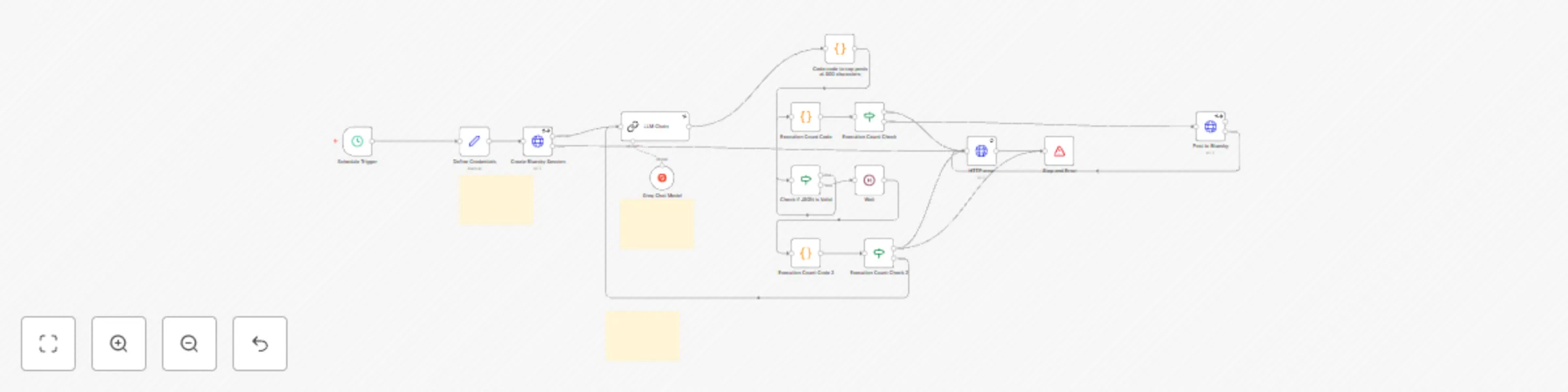
Auto-generate and post social media content to Bluesky using Groq LLM

Workflow preview

Workflow preview
100%
Auto-generate and post social media content to Bluesky using Groq LLM preview
Open on n8n.io

Important notice

This workflow is provided as-is. Please review and test before using in production.

1. Workflow Overview

Automatically Generate Content and Post to Bluesky with LLM Workflow Unlock the power of automation with the Automatically Generate Content and Post to Bluesky with LLM Workflow , an n8n powered so...

Best for

  • Content Creation automation workflows
  • Multimodal AI automation workflows
  • advanced n8n builders looking for reusable templates

Tools used

n8n-nodes-base.httprequest, n8n-nodes-base.set, n8n-nodes-base.scheduletrigger, @n8n/n8n-nodes-langchain.lmchatgroq, n8n-nodes-base.wait, n8n-nodes-base.stopanderror, n8n-nodes-base.stickynote, @n8n/n8n-nodes-langchain.chainllm

Source and attribution

This workflow is cataloged by N8N Workflows and links back to its original n8n.io source page by Mehdi.

Original n8n.io source

1.1 Workflow description

Title
Auto-generate and post social media content to Bluesky using Groq LLM
Workflow name
Auto-generate and post social media content to Bluesky using Groq LLM

Automatically Generate Content and Post to Bluesky with LLM Workflow

Unlock the power of automation with the Automatically Generate Content and Post to Bluesky with LLM Workflow, an n8n-powered solution that uses Large Language Model (LLM) APIs to create engaging content and seamlessly posts it to Bluesky. Say goodbye to manual content creation and posting—streamline your social media presence in minutes!


How It Works

This workflow harnesses an LLM API (like Openai or your preferred model) to generate tailored content based on your input prompts. Once the content is created, it’s formatted to fit Bluesky’s requirements (e.g., under 300 characters), authenticated via the Bluesky API, and posted automatically. Built-in checks ensure error-free execution, making your content strategy seamless and efficient.


Set Up Steps (10-15 Minutes)
  1. Authenticate Bluesky: Add your Bluesky API credentials (username and app password in your Bluesky settings).
  2. Configure LLM API: Connect your chosen LLM API (e.g., Groq) with your API key.
  3. Set Prompt: Define a system prompt in the LLM node (e.g., “Write a witty Bluesky post about AI automation”).
  4. Test Workflow: Run it manually to verify content generation and posting.
  5. Schedule (Optional): Set a cron node to automate posts (e.g., daily at 9 AM).

Total setup time: 10-15 minutes, depending on familiarity with n8n.


Features
  • LLM-Powered Content: Generate unique, high-quality posts using any LLM API.
  • Bluesky Automation: Posts directly to Bluesky with proper formatting and authentication.
  • Character Limit Safety: Ensures posts stay under 300 characters with built-in validation.
  • Error Handling: Stops execution on errors to prevent unwanted posts.
  • Customizable Scheduling: Post instantly or schedule content at your preferred intervals.
  • Scalable Design: Easily adapt for multiple platforms or content types.

Perfect for Creators Who Want To
  • Save time by automating content creation and posting.
  • Maintain a consistent Bluesky presence without manual effort.
  • Experiment with AI-generated content tailored to their brand.
  • Focus on strategy and engagement rather than repetitive tasks.

Suggested Enhancements
  • Multi-Platform Support: Extend the workflow to post to Twitter, Mastodon, or LinkedIn simultaneously.
  • Content Variety: Add nodes to generate images (e.g., via DALL-E) alongside text for richer posts.
  • Analytics Integration: Track post performance with a Bluesky API feedback loop.
  • Dynamic Prompts: Incorporate trending topics or keywords from the web for timely content.
  • Approval Step: Add a manual review node before posting for extra control.

1.2 Logical Blocks

This catalog entry is organized from the workflow JSON. The node-level section below shows the executable blocks available for review before importing the template.

2. Block-by-Block Analysis

Block 1 - Create Bluesky Session

Type / Role
n8n-nodes-base.httpRequest - httpRequest
Config choices
Version 4.2

Block 2 - Post to Bluesky

Type / Role
n8n-nodes-base.httpRequest - httpRequest
Config choices
Version 4.2

Block 3 - Define Credentials

Type / Role
n8n-nodes-base.set - set
Config choices
Version 3.4

Block 4 - Schedule Trigger

Type / Role
n8n-nodes-base.scheduleTrigger - scheduleTrigger
Config choices
Version 1.2

Block 5 - Groq Chat Model

Type / Role
@n8n/n8n-nodes-langchain.lmChatGroq - lmChatGroq
Config choices
Version 1

Block 6 - HTTP error

Type / Role
n8n-nodes-base.httpRequest - httpRequest
Config choices
Version 4.2

Block 7 - Wait

Type / Role
n8n-nodes-base.wait - wait
Config choices
Version 1.1

Block 8 - Stop and Error

Type / Role
n8n-nodes-base.stopAndError - stopAndError
Config choices
Version 1

Block 9 - Sticky Note

Type / Role
n8n-nodes-base.stickyNote - stickyNote
Config choices
Version 1

Block 10 - Sticky Note1

Type / Role
n8n-nodes-base.stickyNote - stickyNote
Config choices
Version 1

Block 11 - LLM Chain

Type / Role
@n8n/n8n-nodes-langchain.chainLlm - chainLlm
Config choices
Version 1.5

Block 12 - Execution Count Code

Type / Role
n8n-nodes-base.code - code
Config choices
Version 2

Block 13 - Execution Count Check

Type / Role
n8n-nodes-base.if - if
Config choices
Version 2.2

Block 14 - Check if JSON is Valid

Type / Role
n8n-nodes-base.if - if
Config choices
Version 2.2

Block 15 - Code code to cap posts at 300 characters

Type / Role
n8n-nodes-base.code - code
Config choices
Version 2

Block 16 - Execution Count Code 2

Type / Role
n8n-nodes-base.code - code
Config choices
Version 2

Block 17 - Execution Count Check 2

Type / Role
n8n-nodes-base.if - if
Config choices
Version 2.2

Block 18 - Sticky Note2

Type / Role
n8n-nodes-base.stickyNote - stickyNote
Config choices
Version 1

3. Summary Table

Workflow Auto-generate and post social media content to Bluesky using Groq LLM
Complexity advanced
Nodes 18
Categories Content Creation, Multimodal AI
Author Mehdi
Published 07 Apr 2025

4. Reproducing the Workflow from Scratch

  1. 1. Download the workflow JSON

    Use the JSON export at /data/workflows/3455/3455.json as the source template for this automation.

  2. 2. Import the template into n8n

    Open n8n, import the downloaded JSON, and review each node before activating the workflow.

  3. 3. Configure credentials and variables

    Replace placeholder credentials, API keys, webhook URLs, account IDs, and environment-specific values with your own settings.

  4. 4. Test with sample data

    Run the workflow manually or in a staging workspace, inspect node output, and confirm downstream systems receive the expected data.

  5. 5. Activate and monitor

    Enable the workflow only after testing, then monitor executions, errors, and rate limits during the first production runs.

5. General Notes & Resources

Review imported nodes carefully before activation. This catalog entry is intended to help you inspect the workflow structure, understand required services, and find related templates faster.

Node names, credentials, schedules, webhook paths, and external service limits may need adjustment for your workspace.

Frequently asked questions

What does Auto-generate and post social media content to Bluesky using Groq LLM do?

Automatically Generate Content and Post to Bluesky with LLM Workflow Unlock the power of automation with the Automatically Generate Content and Post to Bluesky with LLM Workflow , an n8n powered so...

What do I need before importing this workflow?

Review the workflow JSON, configure any required credentials in n8n, and test the automation in a safe workspace before using it in production.

Can I customize this workflow?

Yes. Use the block-by-block analysis and the downloadable JSON to inspect each node, then adjust credentials, prompts, schedules, filters, or destinations for your Content Creation, Multimodal AI use case.