Block 1 - Telegram Trigger
- Type / Role
- n8n-nodes-base.telegramTrigger - telegramTrigger
- Config choices
- Version 1.2


 Early Deal
This workflow is provided as-is. Please review and test before using in production.
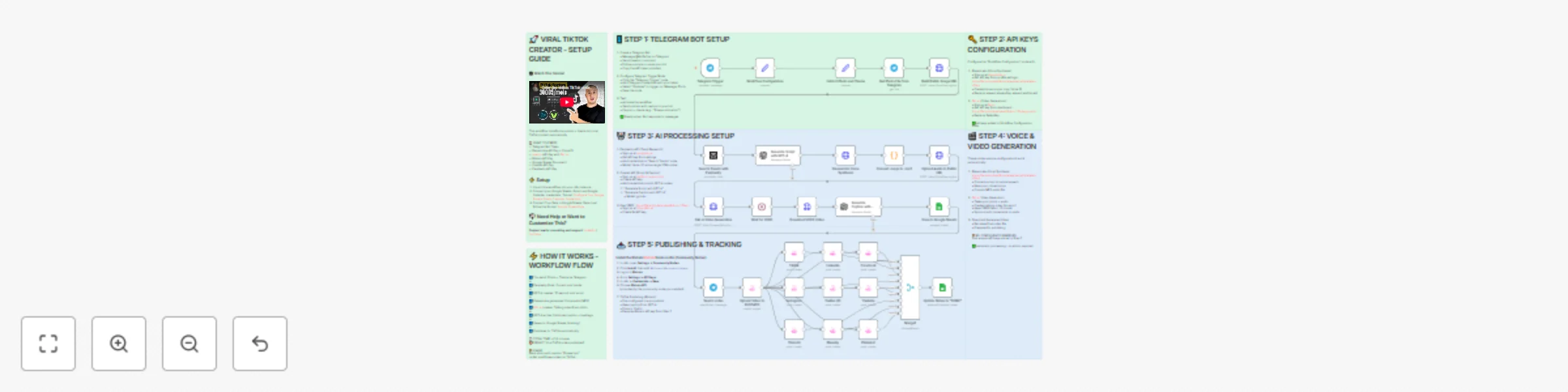
Viral TikTok Video Machine: Auto Create Videos with Your AI Avatar Who is this for? This workflow is for content creators, mar...
n8n-nodes-base.telegramtrigger, n8n-nodes-base.set, n8n-nodes-base.perplexity, @n8n/n8n-nodes-langchain.openai, n8n-nodes-base.httprequest, n8n-nodes-base.googlesheets, n8n-nodes-base.stickynote, n8n-nodes-base.telegram
This workflow is cataloged by N8N Workflows and links back to its original n8n.io source page by Dr. Firas.
Original n8n.io sourceThis workflow is for content creators, marketers, and agencies who want to use Veed.io’s AI avatar technology to produce short, engaging TikTok videos automatically.
It’s ideal for creators who want to appear on camera without recording themselves, and for teams managing multiple brands who need to generate videos at scale.
Manually creating videos for TikTok can take hours — finding trends, writing scripts, recording, and editing.
By combining Veed.io, ElevenLabs, and GPT-4, this workflow transforms a simple Telegram input into a ready-to-post TikTok video featuring your AI avatar powered by Veed.io — speaking naturally with your cloned voice.
This automation links Veed.io’s video-generation API with multiple AI tools:
Telegram Bot
Connect Veed.io
Other APIs
In just a few seconds after sending your photo and theme, this workflow — powered by Veed.io — creates a fully automated TikTok video featuring your AI avatar with natural lip-sync and voice.
The result is a continuous stream of viral short videos, made without cameras, editing, or effort.
✅ Import the JSON file in n8n, add your API keys (including Veed.io via FAL.ai), and start generating viral TikTok videos starring your AI avatar today!
📄 Documentation: Notion Guide
This catalog entry is organized from the workflow JSON. The node-level section below shows the executable blocks available for review before importing the template.
Showing the first 24 of 35 workflow blocks. Download the JSON for the full node graph.
| Workflow | Auto-create TikTok videos with VEED.io AI avatars, ElevenLabs & GPT-4 |
|---|---|
| Complexity | advanced |
| Nodes | 35 |
| Categories | Content Creation, Multimodal AI |
| Author | Dr. Firas |
| Published | 21 Oct 2025 |
Use the JSON export at /data/workflows/10000/10000.json as the source template for this automation.
Open n8n, import the downloaded JSON, and review each node before activating the workflow.
Replace placeholder credentials, API keys, webhook URLs, account IDs, and environment-specific values with your own settings.
Run the workflow manually or in a staging workspace, inspect node output, and confirm downstream systems receive the expected data.
Enable the workflow only after testing, then monitor executions, errors, and rate limits during the first production runs.
Review imported nodes carefully before activation. This catalog entry is intended to help you inspect the workflow structure, understand required services, and find related templates faster.
Node names, credentials, schedules, webhook paths, and external service limits may need adjustment for your workspace.
Viral TikTok Video Machine: Auto Create Videos with Your AI Avatar Who is this for? This workflow is for content creators, mar...
Review the workflow JSON, configure any required credentials in n8n, and test the automation in a safe workspace before using it in production.
Yes. Use the block-by-block analysis and the downloadable JSON to inspect each node, then adjust credentials, prompts, schedules, filters, or destinations for your Content Creation, Multimodal AI use case.