Auto-collect WooCommerce orders to Discord & Google Sheets

Workflow preview

Workflow preview
100%
Auto-collect WooCommerce orders to Discord & Google Sheets preview
Open on n8n.io

Important notice

This workflow is provided as-is. Please review and test before using in production.

1. Workflow Overview

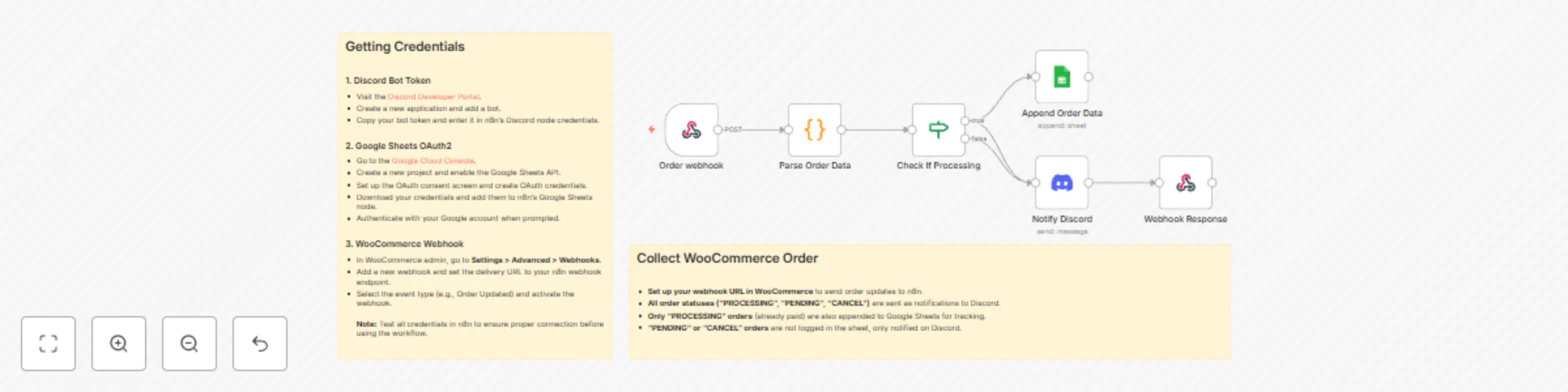
This n8n workflow automates WooCommerce order processing by capturing order updates via webhook and converting them into Discord notifications and Google Sheets entries. What This Workflow Does Aut...

Best for

  • CRM automation workflows
  • intermediate n8n builders looking for reusable templates

Tools used

n8n-nodes-base.webhook, n8n-nodes-base.code, n8n-nodes-base.if, n8n-nodes-base.discord, n8n-nodes-base.respondtowebhook, n8n-nodes-base.googlesheets, n8n-nodes-base.stickynote

Source and attribution

This workflow is cataloged by N8N Workflows and links back to its original n8n.io source page by Khairul Muhtadin.

Original n8n.io source

1.1 Workflow description

Title
Auto-collect WooCommerce orders to Discord & Google Sheets
Workflow name
Auto-collect WooCommerce orders to Discord & Google Sheets

This n8n workflow automates WooCommerce order processing by capturing order updates via webhook and converting them into Discord notifications and Google Sheets entries.

What This Workflow Does

Automatically captures WooCommerce orders and sends real-time Discord notifications while logging paid orders to Google Sheets for tracking and reporting.

Key Benefits

  • Save 90% Time: Eliminates manual order logging and monitoring
  • Never Miss Orders: Instant Discord alerts for all order activities
  • 80% Faster Response: Team gets structured order info immediately
  • Dual Tracking: Real-time alerts + permanent spreadsheet records

Perfect For

  • Ecommerce Teams: Monitor orders without constantly checking admin panel
  • Small Business Owners: Professional order tracking without extra staff
  • Fulfillment Teams: Get organized order data for quick processing

How It Works

  1. WooCommerce sends order webhook to n8n
  2. Order data is parsed and formatted beautifully
  3. All orders trigger Discord notifications (color-coded by status)
  4. Paid orders (PROCESSING status) are logged to Google Sheets
  5. Webhook confirms successful receipt to WooCommerce

Features

  • Smart Status Colors: Yellow (pending), Blue (processing), Green (completed), Gray (cancelled)
  • Rich Discord Embeds: Customer info, items, shipping, totals - all formatted nicely
  • Flexible Data Parsing: Handles various WooCommerce webhook structures
  • Indonesian Currency: Proper IDR formatting for local businesses
  • Product Thumbnails: Shows product images in Discord notifications

Setup Requirements

  • n8n instance (self-hosted or cloud)
  • Discord server with bot access
  • Google account for Sheets
  • WooCommerce admin access

Quick Setup

  1. Import workflow JSON to n8n
  2. Add Discord bot token
  3. Connect Google Sheets OAuth
  4. Set WooCommerce webhook to n8n endpoint
  5. Create Google Sheet with required columns
  6. Test with a sample order

Customization Options

  • Change Discord embed colors for your brand
  • Modify which order statuses get logged
  • Add custom fields to Google Sheets
  • Adjust currency and language settings
  • Filter orders by specific conditions

Google Sheets Columns

  • Month (order date)
  • Brand Name
  • Web Order Number
  • Expedition (shipping method)
  • Tracking Number
  • Status

Future Enhancement Ideas

  • Add SMS/WhatsApp customer notifications
  • Connect to shipping label services
  • Integrate with CRM for customer insights
  • Add inventory management triggers
  • Create sales analytics dashboard

Support

Created by Khmuhtadin
Need customization? Contact us!

1.2 Logical Blocks

This catalog entry is organized from the workflow JSON. The node-level section below shows the executable blocks available for review before importing the template.

2. Block-by-Block Analysis

Block 1 - Order webhook

Type / Role
n8n-nodes-base.webhook - webhook
Config choices
Version 2.1

Block 2 - Parse Order Data

Type / Role
n8n-nodes-base.code - code
Config choices
Version 2

Block 3 - Check If Processing

Type / Role
n8n-nodes-base.if - if
Config choices
Version 2.2

Block 4 - Notify Discord

Type / Role
n8n-nodes-base.discord - discord
Config choices
Version 2

Block 5 - Webhook Response

Type / Role
n8n-nodes-base.respondToWebhook - respondToWebhook
Config choices
Version 1.4

Block 6 - Append Order Data

Type / Role
n8n-nodes-base.googleSheets - googleSheets
Config choices
Version 4.7

Block 7 - Sticky Note

Type / Role
n8n-nodes-base.stickyNote - stickyNote
Config choices
Version 1

Block 8 - Sticky Note1

Type / Role
n8n-nodes-base.stickyNote - stickyNote
Config choices
Version 1

3. Summary Table

Workflow Auto-collect WooCommerce orders to Discord & Google Sheets
Complexity intermediate
Nodes 8
Categories CRM
Author Khairul Muhtadin
Published 12 Sept 2025

4. Reproducing the Workflow from Scratch

  1. 1. Download the workflow JSON

    Use the JSON export at /data/workflows/8518/8518.json as the source template for this automation.

  2. 2. Import the template into n8n

    Open n8n, import the downloaded JSON, and review each node before activating the workflow.

  3. 3. Configure credentials and variables

    Replace placeholder credentials, API keys, webhook URLs, account IDs, and environment-specific values with your own settings.

  4. 4. Test with sample data

    Run the workflow manually or in a staging workspace, inspect node output, and confirm downstream systems receive the expected data.

  5. 5. Activate and monitor

    Enable the workflow only after testing, then monitor executions, errors, and rate limits during the first production runs.

5. General Notes & Resources

Review imported nodes carefully before activation. This catalog entry is intended to help you inspect the workflow structure, understand required services, and find related templates faster.

Node names, credentials, schedules, webhook paths, and external service limits may need adjustment for your workspace.

Frequently asked questions

What does Auto-collect WooCommerce orders to Discord & Google Sheets do?

This n8n workflow automates WooCommerce order processing by capturing order updates via webhook and converting them into Discord notifications and Google Sheets entries. What This Workflow Does Aut...

What do I need before importing this workflow?

Review the workflow JSON, configure any required credentials in n8n, and test the automation in a safe workspace before using it in production.

Can I customize this workflow?

Yes. Use the block-by-block analysis and the downloadable JSON to inspect each node, then adjust credentials, prompts, schedules, filters, or destinations for your CRM use case.