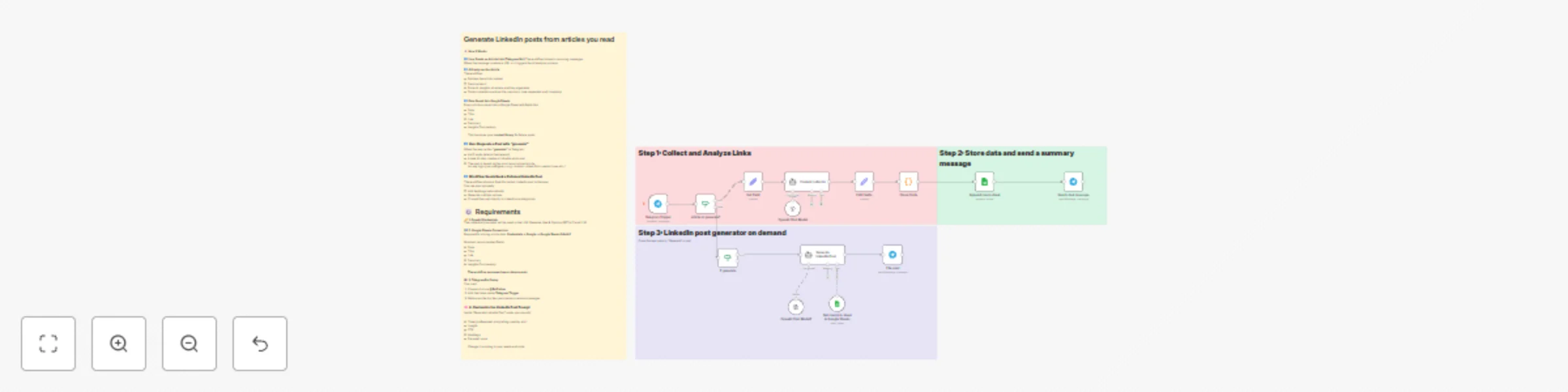
Article to LinkedIn post generator with Telegram, GPT-4 & Google Sheets

Workflow preview

Workflow preview
100%
Article to LinkedIn post generator with Telegram, GPT-4 & Google Sheets preview
Open on n8n.io

Important notice

This workflow is provided as-is. Please review and test before using in production.

1. Workflow Overview

Automated LinkedIn Post Generator from Article Links (Telegram → AI → Google Sheets → LinkedIn) This workflow lets you collect article links through a Telegram bot, automatically analyze and sum...

Best for

  • Content Creation automation workflows
  • Multimodal AI automation workflows
  • advanced n8n builders looking for reusable templates

Tools used

n8n-nodes-base.set, n8n-nodes-base.stickynote, @n8n/n8n-nodes-langchain.agent, n8n-nodes-base.telegramtrigger, n8n-nodes-base.telegram, n8n-nodes-base.if, n8n-nodes-base.code, n8n-nodes-base.googlesheets

Source and attribution

This workflow is cataloged by N8N Workflows and links back to its original n8n.io source page by Shachar Shamir.

Original n8n.io source

1.1 Workflow description

Title
Article to LinkedIn post generator with Telegram, GPT-4 & Google Sheets
Workflow name
Article to LinkedIn post generator with Telegram, GPT-4 & Google Sheets

🚀 Automated LinkedIn Post Generator from Article Links (Telegram → AI → Google Sheets → LinkedIn)

This workflow lets you collect article links through a Telegram bot, automatically analyze and summarize them with AI, store everything neatly in Google Sheets, and generate polished LinkedIn posts on demand whenever the user types “generate”.

Perfect for creators, marketers, and founders who want to post consistently without spending hours analyzing articles or writing drafts.


🧠 How It Works

1️⃣ User Sends Articles via Telegram

Your Telegram bot is the main input point. Whenever the user drops a link, the workflow:

  • Detects the URL
  • Fetches the content
  • Sends it to AI for analysis

This keeps the process simple.


2️⃣ AI Analyzes & Summarizes the Article

The workflow uses your LLM (OpenAI, Anthropic, etc.) to:

  • Summarize the article
  • Extract key insights
  • Identify main arguments
  • Capture tone and context

It produces a clean, structured dataset for each link.


3️⃣ Everything is Saved into Google Sheets

Each article becomes a new row in your Google Sheet. The sheet serves as your content library with fields like:

  • Date
  • Title
  • Link
  • Summary
  • Insights Commentary

You can save dozens of articles and generate posts from any of them later.


4️⃣ User Requests a Post with “generate”

When the user types “generate”, the workflow will:

  • Pull the latest article(s) from Google Sheets (or any selection logic you choose)
  • Build a LinkedIn-ready post using AI
  • Apply the requested tone/style
  • Format it as a clean, professional post

The final post is sent right back to Telegram — ready to copy/paste into LinkedIn.


🛠️ Setup Steps

🔧 1. Create a Telegram Bot

  1. Go to @BotFather on Telegram
  2. Create a new bot
  3. Copy the API token
  4. Paste the token into the Telegram Trigger node in n8n

🔧 2. Add Your AI Credentials

  1. Go to Credentials → OpenAI (or your provider)
  2. Add your API key
  3. Select this credential in all AI nodes You can switch to GPT-4o, GPT-4o-mini, or any model you prefer.

🔧 3. Connect Google Sheets

  1. Go to Credentials → Google
  2. Authenticate with your Google account
  3. Make sure the sheet contains the required columns:
  • Date
  • Title
  • Link
  • Summary
  • Insights Commentary

You can customize or add additional columns as needed.


🔧 4. Adjust Workflow Logic (Optional)

You can modify:

  • How the AI summarizes
  • The LinkedIn post style
  • How posts are selected (latest, random, specific tone, etc.)
  • Whether you store more metadata
  • Multi-language support

Everything is modular.


🔧 5. Test the Flow

  1. Send yourself a link via the Telegram bot
  2. Check that it appears in Google Sheets
  3. Type “generate”
  4. Receive your LinkedIn post instantly

🎉 You’re Ready!

This workflow helps you build a personal content pipeline that:

  • Collects links
  • Saves ideas
  • Summarizes insights
  • Generates LinkedIn posts on demand

All directly from your phone, inside Telegram.

If you remix or extend this template, I’d love to see what you build!

1.2 Logical Blocks

This catalog entry is organized from the workflow JSON. The node-level section below shows the executable blocks available for review before importing the template.

2. Block-by-Block Analysis

Block 1 - Edit Fields

Type / Role
n8n-nodes-base.set - set
Config choices
Version 3.4

Block 2 - Sticky Note

Type / Role
n8n-nodes-base.stickyNote - stickyNote
Config choices
Version 1

Block 3 - Content collector

Type / Role
@n8n/n8n-nodes-langchain.agent - agent
Config choices
Version 2.1

Block 4 - Telegram Trigger

Type / Role
n8n-nodes-base.telegramTrigger - telegramTrigger
Config choices
Version 1.2

Block 5 - Send a text message

Type / Role
n8n-nodes-base.telegram - telegram
Config choices
Version 1.2

Block 6 - If generate

Type / Role
n8n-nodes-base.if - if
Config choices
Version 2.2

Block 7 - Clean Code

Type / Role
n8n-nodes-base.code - code
Config choices
Version 2

Block 8 - article or generate?

Type / Role
n8n-nodes-base.if - if
Config choices
Version 2.2

Block 9 - Set Field

Type / Role
n8n-nodes-base.set - set
Config choices
Version 3.4

Block 10 - Append row in sheet

Type / Role
n8n-nodes-base.googleSheets - googleSheets
Config choices
Version 4.7

Block 11 - Sticky Note1

Type / Role
n8n-nodes-base.stickyNote - stickyNote
Config choices
Version 1

Block 12 - Get row(s) in sheet in Google Sheets

Type / Role
n8n-nodes-base.googleSheetsTool - googleSheetsTool
Config choices
Version 4.7

Block 13 - The post

Type / Role
n8n-nodes-base.telegram - telegram
Config choices
Version 1.2

Block 14 - Generate LinkedIn Post

Type / Role
@n8n/n8n-nodes-langchain.agent - agent
Config choices
Version 2.1

Block 15 - Sticky Note3

Type / Role
n8n-nodes-base.stickyNote - stickyNote
Config choices
Version 1

Block 16 - OpenAI Chat Model

Type / Role
@n8n/n8n-nodes-langchain.lmChatOpenAi - lmChatOpenAi
Config choices
Version 1.3

Block 17 - OpenAI Chat Model1

Type / Role
@n8n/n8n-nodes-langchain.lmChatOpenAi - lmChatOpenAi
Config choices
Version 1.3

Block 18 - Sticky Note2

Type / Role
n8n-nodes-base.stickyNote - stickyNote
Config choices
Version 1

3. Summary Table

Workflow Article to LinkedIn post generator with Telegram, GPT-4 & Google Sheets
Complexity advanced
Nodes 18
Categories Content Creation, Multimodal AI
Author Shachar Shamir
Published 27 Nov 2025

4. Reproducing the Workflow from Scratch

  1. 1. Download the workflow JSON

    Use the JSON export at /data/workflows/11279/11279.json as the source template for this automation.

  2. 2. Import the template into n8n

    Open n8n, import the downloaded JSON, and review each node before activating the workflow.

  3. 3. Configure credentials and variables

    Replace placeholder credentials, API keys, webhook URLs, account IDs, and environment-specific values with your own settings.

  4. 4. Test with sample data

    Run the workflow manually or in a staging workspace, inspect node output, and confirm downstream systems receive the expected data.

  5. 5. Activate and monitor

    Enable the workflow only after testing, then monitor executions, errors, and rate limits during the first production runs.

5. General Notes & Resources

Review imported nodes carefully before activation. This catalog entry is intended to help you inspect the workflow structure, understand required services, and find related templates faster.

Node names, credentials, schedules, webhook paths, and external service limits may need adjustment for your workspace.

Frequently asked questions

What does Article to LinkedIn post generator with Telegram, GPT-4 & Google Sheets do?

Automated LinkedIn Post Generator from Article Links (Telegram → AI → Google Sheets → LinkedIn) This workflow lets you collect article links through a Telegram bot, automatically analyze and sum...

What do I need before importing this workflow?

Review the workflow JSON, configure any required credentials in n8n, and test the automation in a safe workspace before using it in production.

Can I customize this workflow?

Yes. Use the block-by-block analysis and the downloadable JSON to inspect each node, then adjust credentials, prompts, schedules, filters, or destinations for your Content Creation, Multimodal AI use case.