Analyze food ingredients from Telegram photos using Gemini and Airtable

Workflow preview

Workflow preview
100%
Analyze food ingredients from Telegram photos using Gemini and Airtable preview
Open on n8n.io

Important notice

This workflow is provided as-is. Please review and test before using in production.

1. Workflow Overview

Analyze food ingredients from Telegram photos using Gemini and Airtable ️ Personal Ingredient Bodyguard Turn your Telegram bot into an intelligent food safety sc...

Best for

  • Personal Productivity automation workflows
  • AI Summarization automation workflows
  • advanced n8n builders looking for reusable templates

Tools used

n8n-nodes-base.code, @n8n/n8n-nodes-langchain.agent, @n8n/n8n-nodes-langchain.lmchatopenai, n8n-nodes-base.telegram, n8n-nodes-base.airtable, n8n-nodes-base.telegramtrigger, n8n-nodes-base.noop, @n8n/n8n-nodes-langchain.lmchatgooglegemini

Source and attribution

This workflow is cataloged by N8N Workflows and links back to its original n8n.io source page by Ehsan.

Original n8n.io source

1.1 Workflow description

Title
Analyze food ingredients from Telegram photos using Gemini and Airtable
Workflow name
Analyze food ingredients from Telegram photos using Gemini and Airtable

Analyze food ingredients from Telegram photos using Gemini and Airtable

🛡️ Personal Ingredient Bodyguard

Turn your Telegram bot into an intelligent food safety scanner. This workflow analyzes photos of ingredient labels sent via Telegram, extracts the text using AI, and cross-references it against your personal database of "Good" and "Bad" ingredients in Airtable.

It solves the problem of manually reading tiny, complex labels for allergies or dietary restrictions. Whether you are Vegan, Halal, allergic to nuts, or just avoiding specific additives, this workflow acts as a strict, personalized bodyguard for your diet. It even features a customizable "Persona" (like a Sarcastic Bodyguard) to make safety checks fun.

🎯 Who is it for?

  • People with specific dietary restrictions (Vegan, Gluten-free, Keto).
  • Individuals with food allergies (Nuts, Dairy, Shellfish).
  • Special dietary observers (Halal, Kosher).
  • Health-conscious shoppers avoiding specific additives (e.g., E120, Aspartame).

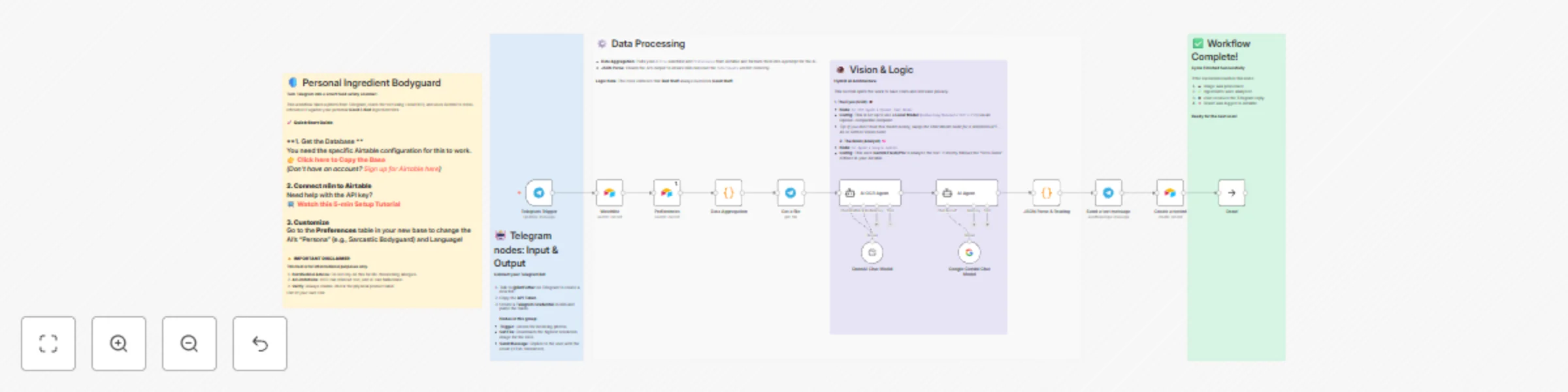
🚀 How it works

  1. Trigger: You send a photo of a product label to your Telegram Bot.
  2. Fetch Rules: The workflow retrieves your active "Watchlist" (Ingredients to avoid/prefer) and "Persona" settings from Airtable.
  3. Vision & Logic: It uses an AI Vision model to extract text from the image (OCR) and Google Gemini to analyze the text against your strict veto rules (e.g., "Safe" only if ZERO bad items are found).
  4. Response: The bot replies instantly on Telegram with a Safe/Unsafe verdict, highlighting detected ingredients using HTML formatting.
  5. Log: The result is saved back to Airtable for your records.

⚙️ How to set up

This workflow relies on a specific Airtable structure to function as the "Brain."

  1. Set up Airtable
  2. Set up Telegram
    • Message @BotFather on Telegram to create a new bot and get your API Token.
    • Add your Telegram credentials in n8n.
  3. Configure AI
    • Add your Google Gemini API credentials.
    • Note on OCR: This template is configured to use a local LLM for OCR to save costs (via the OpenAI-compatible node). If you do not have a local model running, simply swap the "OpenAI Chat Model" node for a standard GPT-4o or Gemini Vision node.

📋 Requirements

  • n8n (Cloud or Self-hosted)
  • Airtable account (Free tier works)
  • Telegram account
  • Google Gemini API Key
  • Local LLM (Optional, for free OCR) OR OpenAI/Gemini Key (for standard Cloud Vision)

🎨 How to customize

  • Change the Persona: Go to the "Preferences" table in Airtable to change the bot's personality (e.g., "Helpful Nutritionist") and output language.
  • Update Ingredients: Add or remove items in the "Watchlist" table. Mark them as "Good Stuff" or "Bad Stuff" and set Status to "Active".
  • Adjust Sensitivity: The AI prompt in the "AI Agent" node is set to strict "Veto" mode (Bad overrides Good). You can modify the system prompt to change this logic.

⚠️ Disclaimer

This tool is for informational purposes only.

  1. Not Medical Advice: Do not rely on this for life-threatening allergies.
  2. AI Limitations: OCR can misread text, and AI can hallucinate.
  3. Verify: Always double-check the physical product label.

Use at your own risk.

1.2 Logical Blocks

This catalog entry is organized from the workflow JSON. The node-level section below shows the executable blocks available for review before importing the template.

2. Block-by-Block Analysis

Block 1 - Data Aggregation

Type / Role
n8n-nodes-base.code - code
Config choices
Version 2

Block 2 - AI Agent

Type / Role
@n8n/n8n-nodes-langchain.agent - agent
Config choices
Version 3

Block 3 - OpenAI Chat Model

Type / Role
@n8n/n8n-nodes-langchain.lmChatOpenAi - lmChatOpenAi
Config choices
Version 1.3

Block 4 - AI OCR Agent

Type / Role
@n8n/n8n-nodes-langchain.agent - agent
Config choices
Version 3

Block 5 - JSON Parse & Routing

Type / Role
n8n-nodes-base.code - code
Config choices
Version 2

Block 6 - Send a text message

Type / Role
n8n-nodes-base.telegram - telegram
Config choices
Version 1.2

Block 7 - Create a record

Type / Role
n8n-nodes-base.airtable - airtable
Config choices
Version 2.1

Block 8 - Get a file

Type / Role
n8n-nodes-base.telegram - telegram
Config choices
Version 1.2

Block 9 - Watchlist

Type / Role
n8n-nodes-base.airtable - airtable
Config choices
Version 2.1

Block 10 - Preferences

Type / Role
n8n-nodes-base.airtable - airtable
Config choices
Version 2.1

Block 11 - Telegram Trigger

Type / Role
n8n-nodes-base.telegramTrigger - telegramTrigger
Config choices
Version 1.2

Block 12 - Done!

Type / Role
n8n-nodes-base.noOp - noOp
Config choices
Version 1

Block 13 - Google Gemini Chat Model

Type / Role
@n8n/n8n-nodes-langchain.lmChatGoogleGemini - lmChatGoogleGemini
Config choices
Version 1

Block 14 - Sticky Note

Type / Role
n8n-nodes-base.stickyNote - stickyNote
Config choices
Version 1

Block 15 - Sticky Note1

Type / Role
n8n-nodes-base.stickyNote - stickyNote
Config choices
Version 1

Block 16 - Sticky Note2

Type / Role
n8n-nodes-base.stickyNote - stickyNote
Config choices
Version 1

Block 17 - Sticky Note3

Type / Role
n8n-nodes-base.stickyNote - stickyNote
Config choices
Version 1

Block 18 - Sticky Note4

Type / Role
n8n-nodes-base.stickyNote - stickyNote
Config choices
Version 1

3. Summary Table

Workflow Analyze food ingredients from Telegram photos using Gemini and Airtable
Complexity advanced
Nodes 18
Categories Personal Productivity, AI Summarization
Author Ehsan
Published 23 Nov 2025

4. Reproducing the Workflow from Scratch

  1. 1. Download the workflow JSON

    Use the JSON export at /data/workflows/11159/11159.json as the source template for this automation.

  2. 2. Import the template into n8n

    Open n8n, import the downloaded JSON, and review each node before activating the workflow.

  3. 3. Configure credentials and variables

    Replace placeholder credentials, API keys, webhook URLs, account IDs, and environment-specific values with your own settings.

  4. 4. Test with sample data

    Run the workflow manually or in a staging workspace, inspect node output, and confirm downstream systems receive the expected data.

  5. 5. Activate and monitor

    Enable the workflow only after testing, then monitor executions, errors, and rate limits during the first production runs.

5. General Notes & Resources

Review imported nodes carefully before activation. This catalog entry is intended to help you inspect the workflow structure, understand required services, and find related templates faster.

Node names, credentials, schedules, webhook paths, and external service limits may need adjustment for your workspace.

Frequently asked questions

What does Analyze food ingredients from Telegram photos using Gemini and Airtable do?

Analyze food ingredients from Telegram photos using Gemini and Airtable ️ Personal Ingredient Bodyguard Turn your Telegram bot into an intelligent food safety sc...

What do I need before importing this workflow?

Review the workflow JSON, configure any required credentials in n8n, and test the automation in a safe workspace before using it in production.

Can I customize this workflow?

Yes. Use the block-by-block analysis and the downloadable JSON to inspect each node, then adjust credentials, prompts, schedules, filters, or destinations for your Personal Productivity, AI Summarization use case.