AI-powered technical analyst with Perplexity R1 research

Workflow preview

Workflow preview
100%
AI-powered technical analyst with Perplexity R1 research preview
Open on n8n.io

Important notice

This workflow is provided as-is. Please review and test before using in production.

1. Workflow Overview

Leverage the latest AI technology to analyze financial charts an...

Best for

  • Crypto Trading automation workflows
  • AI Summarization automation workflows
  • advanced n8n builders looking for reusable templates

Tools used

@n8n/n8n-nodes-langchain.chattrigger, @n8n/n8n-nodes-langchain.memorybufferwindow, n8n-nodes-base.set, n8n-nodes-base.httprequest, @n8n/n8n-nodes-langchain.chainllm, @n8n/n8n-nodes-langchain.lmchatopenrouter, n8n-nodes-base.executeworkflowtrigger, @n8n/n8n-nodes-langchain.toolworkflow

Source and attribution

This workflow is cataloged by N8N Workflows and links back to its original n8n.io source page by Derek Cheung.

Original n8n.io source

1.1 Workflow description

Title
AI-powered technical analyst with Perplexity R1 research
Workflow name
AI-powered technical analyst with Perplexity R1 research

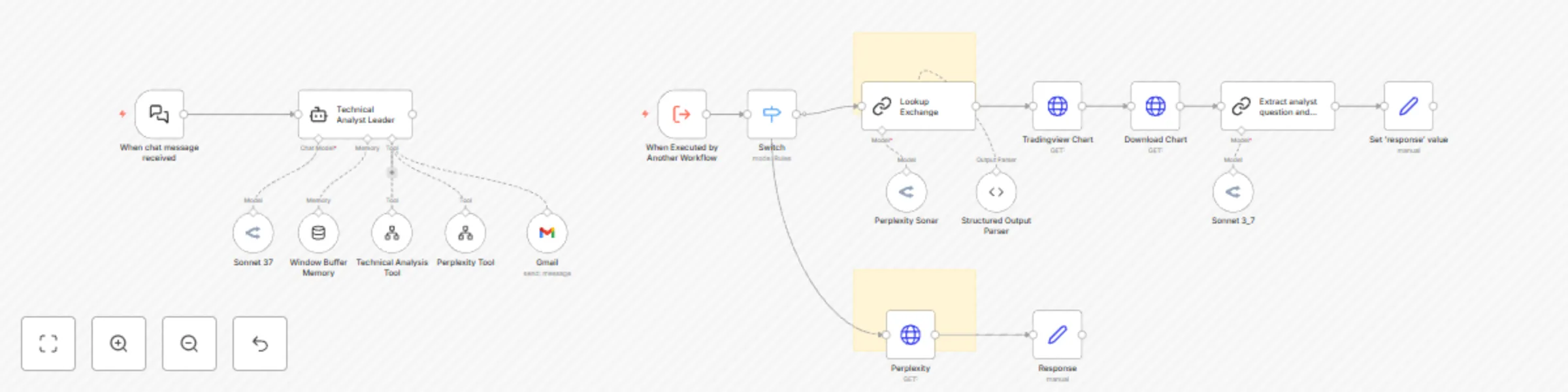
Leverage the latest AI technology to analyze financial charts and make informed trading decisions with our Technical Analysis AI Agent. This powerful workflow combines Claude Sonnet 3.7 vision capabilities with Perplexity deep reasoning and up-to-date internet information to deliver comprehensive market analysis.

Key Capabilities:

  • Visual Chart Analysis - AI vision technology examines technical charts to identify key price points, volume patterns, and trend indicators
  • Fundamental Research Integration - Combines technical analysis with real-time fundamental data using DeepSeek R1 reasoning
  • Fully Cited Reports - Fundamental analysis backed by verifiable sources for confident decision-making
  • Automated Email Delivery - Receive complete analysis reports directly to your inbox

How It Works:

This workflow orchestrates multiple AI components to analyze financial instruments:

  1. The Technical Analysis Leader coordinates the entire analysis process
  2. Chart analysis tool identifies the appropriate exchange and downloads Trading View charts
  3. AI Vision examines the chart for technical indicators including RSI, volume patterns, and support/resistance levels
  4. Perplexity tool conducts fundamental research using DeepSeek R1 reasoning capabilities
  5. All data is synthesized into a comprehensive report with trading recommendations
  6. Results can be automatically emailed for reference

Setup Instructions:

Quick start video included in the template.

  1. Get API key from OpenRouter.ai to access the Sonnet 3.7 model
  2. Get API key from chart-img.com to access tradingview charts
  3. Connect the Gmail node for email delivery functionality

IMPORTANT DISCLAIMER: This tool provides technical analysis for informational purposes only and should not be construed as investment advice. This AI-powered technical analysis tool is designed to assist with market analysis but should not be used as the sole basis for any investment decision

1.2 Logical Blocks

This catalog entry is organized from the workflow JSON. The node-level section below shows the executable blocks available for review before importing the template.

2. Block-by-Block Analysis

Block 1 - When chat message received

Type / Role
@n8n/n8n-nodes-langchain.chatTrigger - chatTrigger
Config choices
Version 1.1

Block 2 - Window Buffer Memory

Type / Role
@n8n/n8n-nodes-langchain.memoryBufferWindow - memoryBufferWindow
Config choices
Version 1.2

Block 3 - Set 'response' value

Type / Role
n8n-nodes-base.set - set
Config choices
Version 3.3

Block 4 - Download Chart

Type / Role
n8n-nodes-base.httpRequest - httpRequest
Config choices
Version 4.2

Block 5 - Tradingview Chart

Type / Role
n8n-nodes-base.httpRequest - httpRequest
Config choices
Version 4.2

Block 6 - Extract analyst question and management response

Type / Role
@n8n/n8n-nodes-langchain.chainLlm - chainLlm
Config choices
Version 1.4

Block 7 - Sonnet 3_7

Type / Role
@n8n/n8n-nodes-langchain.lmChatOpenRouter - lmChatOpenRouter
Config choices
Version 1

Block 8 - When Executed by Another Workflow

Type / Role
n8n-nodes-base.executeWorkflowTrigger - executeWorkflowTrigger
Config choices
Version 1.1

Block 9 - Technical Analysis Tool

Type / Role
@n8n/n8n-nodes-langchain.toolWorkflow - toolWorkflow
Config choices
Version 2

Block 10 - Lookup Exchange

Type / Role
@n8n/n8n-nodes-langchain.chainLlm - chainLlm
Config choices
Version 1.5

Block 11 - Response

Type / Role
n8n-nodes-base.set - set
Config choices
Version 3.4

Block 12 - Switch

Type / Role
n8n-nodes-base.switch - switch
Config choices
Version 3.2

Block 13 - Perplexity Tool

Type / Role
@n8n/n8n-nodes-langchain.toolWorkflow - toolWorkflow
Config choices
Version 2

Block 14 - Perplexity Sonar

Type / Role
@n8n/n8n-nodes-langchain.lmChatOpenRouter - lmChatOpenRouter
Config choices
Version 1

Block 15 - Gmail

Type / Role
n8n-nodes-base.gmailTool - gmailTool
Config choices
Version 2.1

Block 16 - Structured Output Parser

Type / Role
@n8n/n8n-nodes-langchain.outputParserStructured - outputParserStructured
Config choices
Version 1.2

Block 17 - Sticky Note1

Type / Role
n8n-nodes-base.stickyNote - stickyNote
Config choices
Version 1

Block 18 - Sticky Note2

Type / Role
n8n-nodes-base.stickyNote - stickyNote
Config choices
Version 1

Block 19 - Sonnet 37

Type / Role
@n8n/n8n-nodes-langchain.lmChatOpenRouter - lmChatOpenRouter
Config choices
Version 1

Block 20 - Technical Analyst Leader

Type / Role
@n8n/n8n-nodes-langchain.agent - agent
Config choices
Version 1.6

Block 21 - Perplexity

Type / Role
n8n-nodes-base.httpRequest - httpRequest
Config choices
Version 4.2

3. Summary Table

Workflow AI-powered technical analyst with Perplexity R1 research
Complexity advanced
Nodes 21
Categories Crypto Trading, AI Summarization
Author Derek Cheung
Published 14 Mar 2025

4. Reproducing the Workflow from Scratch

  1. 1. Download the workflow JSON

    Use the JSON export at /data/workflows/3160/3160.json as the source template for this automation.

  2. 2. Import the template into n8n

    Open n8n, import the downloaded JSON, and review each node before activating the workflow.

  3. 3. Configure credentials and variables

    Replace placeholder credentials, API keys, webhook URLs, account IDs, and environment-specific values with your own settings.

  4. 4. Test with sample data

    Run the workflow manually or in a staging workspace, inspect node output, and confirm downstream systems receive the expected data.

  5. 5. Activate and monitor

    Enable the workflow only after testing, then monitor executions, errors, and rate limits during the first production runs.

5. General Notes & Resources

Review imported nodes carefully before activation. This catalog entry is intended to help you inspect the workflow structure, understand required services, and find related templates faster.

Node names, credentials, schedules, webhook paths, and external service limits may need adjustment for your workspace.

Frequently asked questions

What does AI-powered technical analyst with Perplexity R1 research do?

Leverage the latest AI technology to analyze financial charts an...

What do I need before importing this workflow?

Review the workflow JSON, configure any required credentials in n8n, and test the automation in a safe workspace before using it in production.

Can I customize this workflow?

Yes. Use the block-by-block analysis and the downloadable JSON to inspect each node, then adjust credentials, prompts, schedules, filters, or destinations for your Crypto Trading, AI Summarization use case.