AI-Powered Post-Sales Call Automated Proposal Generator

Workflow preview

Workflow preview
100%
AI-Powered Post-Sales Call Automated Proposal Generator preview
Open on n8n.io

Important notice

This workflow is provided as-is. Please review and test before using in production.

1. Workflow Overview

AI Powered Proposal Generator Sales Automation Workflow Overview This n8n workflow automates the entire proposal generation process using AI, transfor...

Best for

  • CRM automation workflows
  • Multimodal AI automation workflows
  • intermediate n8n builders looking for reusable templates

Tools used

n8n-nodes-base.googleslides, @n8n/n8n-nodes-langchain.openai, n8n-nodes-base.googledrive, n8n-nodes-base.gmail, n8n-nodes-base.formtrigger, n8n-nodes-base.stickynote

Source and attribution

This workflow is cataloged by N8N Workflows and links back to its original n8n.io source page by Gerald Denor.

Original n8n.io source

1.1 Workflow description

Title
AI-Powered Post-Sales Call Automated Proposal Generator
Workflow name
AI-Powered Post-Sales Call Automated Proposal Generator

AI-Powered Proposal Generator - Sales Automation Workflow

Overview

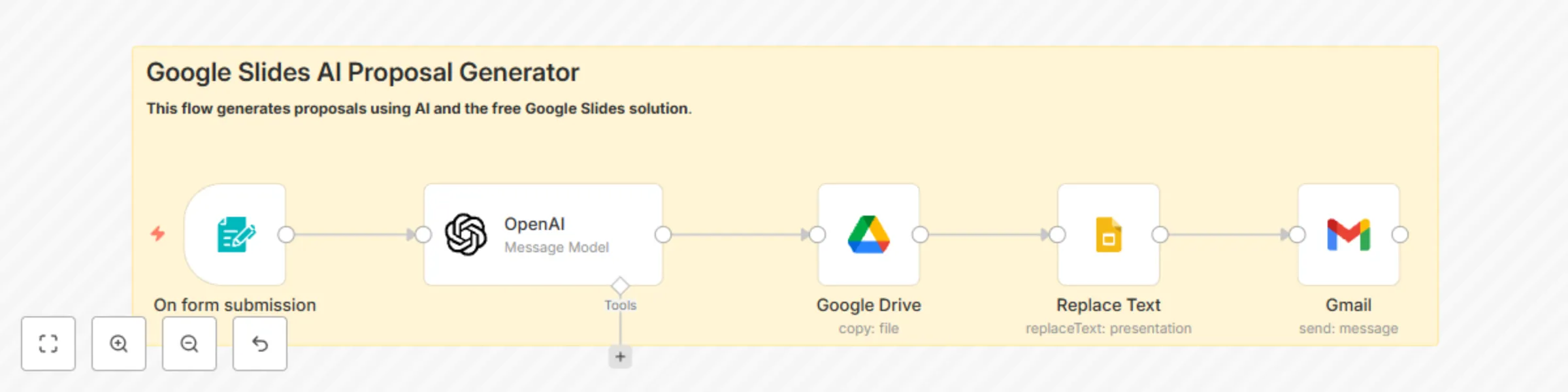
This n8n workflow automates the entire proposal generation process using AI, transforming client requirements into professional, customized proposals delivered via email in seconds.

Use Case

Perfect for agencies, consultants, and sales teams who need to generate high-quality proposals quickly. Instead of spending hours writing proposals manually, this workflow captures client information through a web form and uses GPT-4 to generate contextually relevant, professional proposals.

How It Works

  1. Form Trigger - Captures client information through a customizable web form
  2. OpenAI Integration - Processes form data and generates structured proposal content
  3. Google Drive - Creates a copy of your proposal template
  4. Google Slides - Populates the template with AI-generated content
  5. Gmail - Automatically sends the completed proposal to the client

Key Features

  • AI Content Generation: Uses GPT-4 to create personalized proposal content
  • Professional Templates: Integrates with Google Slides for polished presentations
  • Automated Delivery: Sends proposals directly to clients via email
  • Form Integration: Captures all necessary client data through web forms
  • Customizable Output: Generates structured proposals with multiple sections

Template Sections Generated

  • Proposal title and description
  • Problem summary analysis
  • Three-part solution breakdown
  • Project scope details
  • Milestone timeline with dates
  • Cost integration

Requirements

  • n8n instance (cloud or self-hosted)
  • OpenAI API key for content generation
  • Google Workspace account for Slides and Gmail
  • Basic n8n knowledge for setup and customization

Setup Complexity

Intermediate - Requires API credentials setup and basic workflow customization

Benefits

  • Time Savings: Reduces proposal creation from hours to minutes
  • Consistency: Ensures all proposals follow the same professional structure
  • Personalization: AI analyzes client needs for relevant content
  • Automation: Eliminates manual copy-paste and formatting work
  • Scalability: Handle multiple proposal requests simultaneously

Customization Options

  • Modify AI prompts for different industries or services
  • Customize Google Slides template design
  • Adjust form fields for specific information needs
  • Personalize email templates and signatures
  • Configure milestone templates for different project types

Error Handling

Includes basic error handling for API failures and form validation to ensure reliable operation.

Security Notes

All credentials have been removed from this template. Users must configure their own:

  • OpenAI API credentials
  • Google OAuth2 connections for Slides, Drive, and Gmail
  • Form webhook configuration

This workflow demonstrates practical AI integration in business processes and showcases n8n's capabilities for complex automation scenarios.

1.2 Logical Blocks

This catalog entry is organized from the workflow JSON. The node-level section below shows the executable blocks available for review before importing the template.

2. Block-by-Block Analysis

Block 1 - Replace Text

Type / Role
n8n-nodes-base.googleSlides - googleSlides
Config choices
Version 2

Block 2 - OpenAI

Type / Role
@n8n/n8n-nodes-langchain.openAi - openAi
Config choices
Version 1.6

Block 3 - Google Drive

Type / Role
n8n-nodes-base.googleDrive - googleDrive
Config choices
Version 3

Block 4 - Gmail

Type / Role
n8n-nodes-base.gmail - gmail
Config choices
Version 2.1

Block 5 - On form submission

Type / Role
n8n-nodes-base.formTrigger - formTrigger
Config choices
Version 2.2

Block 6 - Sticky Note

Type / Role
n8n-nodes-base.stickyNote - stickyNote
Config choices
Version 1

3. Summary Table

Workflow AI-Powered Post-Sales Call Automated Proposal Generator
Complexity intermediate
Nodes 6
Categories CRM, Multimodal AI
Author Gerald Denor
Published 24 May 2025

4. Reproducing the Workflow from Scratch

  1. 1. Download the workflow JSON

    Use the JSON export at /data/workflows/4359/4359.json as the source template for this automation.

  2. 2. Import the template into n8n

    Open n8n, import the downloaded JSON, and review each node before activating the workflow.

  3. 3. Configure credentials and variables

    Replace placeholder credentials, API keys, webhook URLs, account IDs, and environment-specific values with your own settings.

  4. 4. Test with sample data

    Run the workflow manually or in a staging workspace, inspect node output, and confirm downstream systems receive the expected data.

  5. 5. Activate and monitor

    Enable the workflow only after testing, then monitor executions, errors, and rate limits during the first production runs.

5. General Notes & Resources

Review imported nodes carefully before activation. This catalog entry is intended to help you inspect the workflow structure, understand required services, and find related templates faster.

Node names, credentials, schedules, webhook paths, and external service limits may need adjustment for your workspace.

Frequently asked questions

What does AI-Powered Post-Sales Call Automated Proposal Generator do?

AI Powered Proposal Generator Sales Automation Workflow Overview This n8n workflow automates the entire proposal generation process using AI, transfor...

What do I need before importing this workflow?

Review the workflow JSON, configure any required credentials in n8n, and test the automation in a safe workspace before using it in production.

Can I customize this workflow?

Yes. Use the block-by-block analysis and the downloadable JSON to inspect each node, then adjust credentials, prompts, schedules, filters, or destinations for your CRM, Multimodal AI use case.