Block 1 - OpenRouter Chat Model
- Type / Role
- @n8n/n8n-nodes-langchain.lmChatOpenRouter - lmChatOpenRouter
- Config choices
- Version 1


 Early Deal
This workflow is provided as-is. Please review and test before using in production.
How It Works The Daily Calendar Brief is an automated n8n workflow designed to prep you each morning with a rich, executive style email summary of your day. It pulls data from your calendar, ema...
@n8n/n8n-nodes-langchain.lmchatopenrouter, n8n-nodes-base.code, @n8n/n8n-nodes-langchain.chainllm, n8n-nodes-base.markdown, @n8n/n8n-nodes-langchain.memorybufferwindow, n8n-nodes-base.stickynote, n8n-nodes-base.scheduletrigger, n8n-nodes-base.googlecalendar
This workflow is cataloged by N8N Workflows and links back to its original n8n.io source page by Nick Loui.
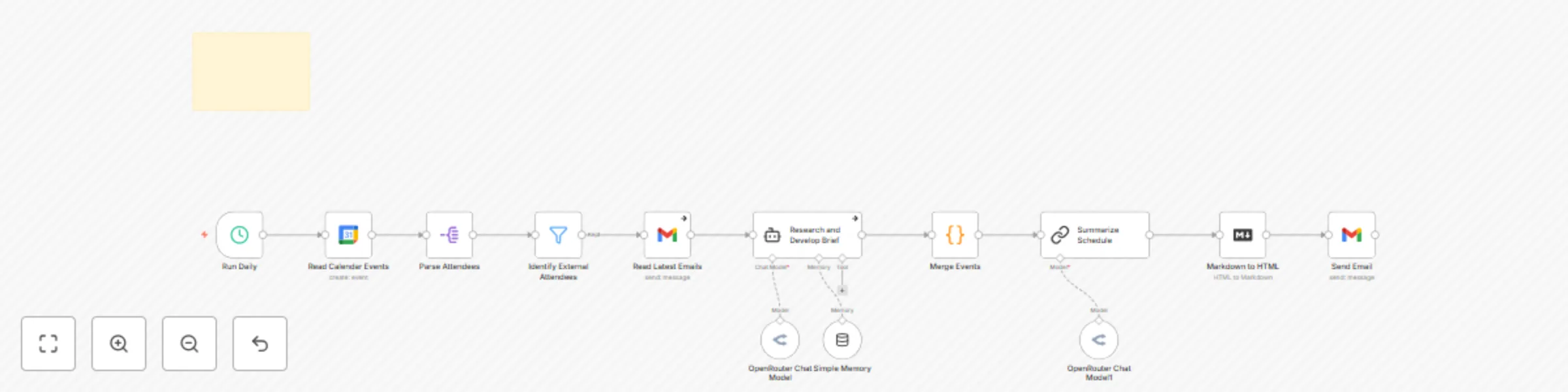
Original n8n.io sourceThe Daily Calendar Brief is an automated n8n workflow designed to prep you each morning with a rich, executive-style email summary of your day. It pulls data from your calendar, email, and external contact sources to deliver a contextualized, prioritized briefing.
Runs every weekday morning at 7:00 AM using a schedule node.
Grabs all Google Calendar events for the day and extracts details like: • Event title, time, and duration • Full attendee list • Meeting description
Filters for external attendees and: • Scrapes recent email threads with them • Uses Hunter and LinkedIn to enrich attendee info with roles, bios, locations, and recent activity
Combines: • Event metadata • Attendee research • Recent conversations
Renders the Markdown as HTML and sends a polished email to your inbox with: • Meeting timeline & attendees • Key takeaways & extra context • Conflicts & FYIs
Prerequisites • n8n instance (self-hosted or cloud) • Google Calendar and Gmail OAuth credentials • OpenRouter key (for GPT-4o or Claude 3.7)
Configuration 1. Authorize Credentials • Connect Google Calendar and Gmail nodes with OAuth2 • Set up OpenRouter credentials for AI processing 2. Set Your Email Update the Send Email node with your preferred destination address (default is [email protected]). 3. Set Your Domain Filter In the “Identify External Attendees” node, adjust the filter value yourcompany.com to your actual domain. 4. Customize Prompts (Optional) You can fine-tune tone, formatting, or limits in the two language model nodes: • Research and Develop Brief (attendee context + email summary) • Summarize Schedule (overall Markdown brief formatting) 5. Activate Workflow
Enable the workflow and test it manually once to validate your setup. Confirm that the email lands correctly.
This catalog entry is organized from the workflow JSON. The node-level section below shows the executable blocks available for review before importing the template.
| Workflow | AI-powered calendar & meeting digest with Gmail and GPT-4o/Claude - daily brief |
|---|---|
| Complexity | intermediate |
| Nodes | 14 |
| Categories | Personal Productivity, AI Summarization |
| Author | Nick Loui |
| Published | 25 May 2025 |
Use the JSON export at /data/workflows/4385/4385.json as the source template for this automation.
Open n8n, import the downloaded JSON, and review each node before activating the workflow.
Replace placeholder credentials, API keys, webhook URLs, account IDs, and environment-specific values with your own settings.
Run the workflow manually or in a staging workspace, inspect node output, and confirm downstream systems receive the expected data.
Enable the workflow only after testing, then monitor executions, errors, and rate limits during the first production runs.
Review imported nodes carefully before activation. This catalog entry is intended to help you inspect the workflow structure, understand required services, and find related templates faster.
Node names, credentials, schedules, webhook paths, and external service limits may need adjustment for your workspace.
How It Works The Daily Calendar Brief is an automated n8n workflow designed to prep you each morning with a rich, executive style email summary of your day. It pulls data from your calendar, ema...
Review the workflow JSON, configure any required credentials in n8n, and test the automation in a safe workspace before using it in production.
Yes. Use the block-by-block analysis and the downloadable JSON to inspect each node, then adjust credentials, prompts, schedules, filters, or destinations for your Personal Productivity, AI Summarization use case.