Block 1 - RSS Feed Read
- Type / Role
- n8n-nodes-base.rssFeedRead - rssFeedRead
- Config choices
- Version 1


 Early Deal
This workflow is provided as-is. Please review and test before using in production.
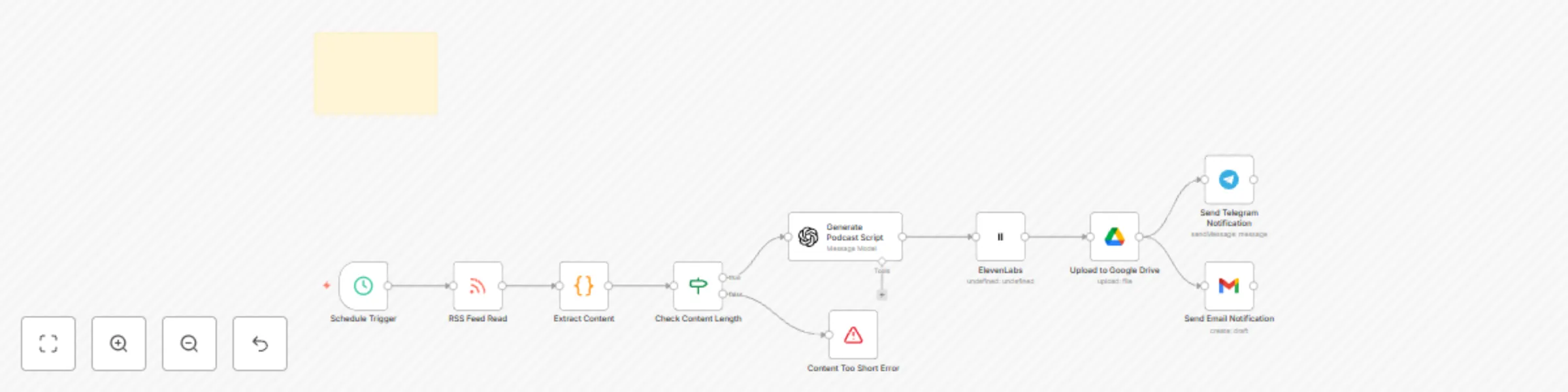
Overview This n8n automation turns any RSS feed into a spoken podcast episode, using OpenAI for summarization and ElevenLabs for voice generation. The final audio is then sent straight to your T...
n8n-nodes-base.rssfeedread, n8n-nodes-base.code, n8n-nodes-base.googledrive, n8n-nodes-base.telegram, n8n-nodes-base.gmail, n8n-nodes-base.if, n8n-nodes-base.stopanderror, @elevenlabs/n8n-nodes-elevenlabs.elevenlabs
This workflow is cataloged by N8N Workflows and links back to its original n8n.io source page by David Olusola.
Original n8n.io sourceThis n8n automation turns any RSS feed into a spoken podcast episode, using OpenAI for summarization and ElevenLabs for voice generation. The final audio is then sent straight to your Telegram for instant publishing or listening.
📌 Works with both self-hosted and cloud-based n8n instances. No-code podcasting made simple. 👥 Who is this for? Podcasters & creators who want to automate content News curators or newsletter writers Agencies turning articles into daily voice updates Anyone who wants to voice AI-generated summaries and distribute via Telegram 🚀 What this workflow automates 📡 Pulls the latest article from your chosen RSS feed 🧠 Uses OpenAI to summarize or rewrite the article 🗣️ Generates a natural-sounding podcast using ElevenLabs 📲 Sends the audio file to your Telegram inbox
🔗 RSS feed link (any source of fresh content) 🔑 ElevenLabs API key (for voice generation) 🧠 OpenAI API key (for summarization or rewriting) 💬 Telegram Bot Token & your personal Chat ID (to receive the audio) 🛠️ Setup Instructions Step 1: Get Your Chat ID & Telegram Bot Token
Open Telegram Search for @BotFather Create a new bot → Copy the token Search for @userinfobot → Copy your chat ID Save both for use in the Telegram node Step 2: Create/Open an ElevenLabs Account
Go to https://www.elevenlabs.io Copy your API key from the dashboard Choose your voice (the voice ID will be used in the workflow) Ensure your plan supports audio generation (free tier includes monthly usage) Step 3: Generate an OpenAI API Key
Log in to https://platform.openai.com Generate your API key Use GPT-4 or GPT-3.5 for best results Step 4: Configure Credentials in n8n
In n8n → Settings → Credentials, set up:
OpenAI API → Add your key HTTP Header Auth → For ElevenLabs Telegram Bot → Add your token Step 5: Import and Configure the Workflow
Go to n8n → Workflows → Import Upload your .json file In the RSS node, replace the default link with your own feed Update the ElevenLabs node with: Your API key Voice ID Update Telegram node with: Your bot token Your personal chat ID 🧩 Customization Tips Change the Feed Source
Swap out the RSS feed URL to pull from different blogs, news sites, or content platforms.
Control Script Style
Edit the OpenAI prompt to:
Make it more casual or formal Add a call-to-action or intro line Include a sign-off (e.g., “Thanks for listening!”) Use Different Voices
In ElevenLabs, you can:
Create a custom voice Choose one with a specific accent or tone Adjust stability or clarity for better results Add Distribution Channels
Send the audio to:
Email Notion Google Drive A podcast host with API support (e.g. Podbean, Buzzsprout)
Problem Solution Audio not generating Check ElevenLabs voice ID and credit limits Telegram not sending Ensure bot token and chat ID are correct RSS not pulling content Verify feed URL and test in browser Summary is too short/long Adjust prompt or temperature in OpenAI node 📣 Getting Support n8n Docs ElevenLabs API Docs OpenAI API Reference n8n Community 💌 Need help or customization? Email: [email protected] 🌟 Enjoyed this template? Give it a ⭐ in the library and help creators automate their podcast workflow with AI and voice tech!
“From RSS feed to voiced podcast in minutes — fully automated.”
This catalog entry is organized from the workflow JSON. The node-level section below shows the executable blocks available for review before importing the template.
| Workflow | AI podcast generator with RSS feed & ElevenLabs voice |
|---|---|
| Complexity | intermediate |
| Nodes | 11 |
| Categories | Content Creation, Multimodal AI |
| Author | David Olusola |
| Published | 21 Jun 2025 |
Use the JSON export at /data/workflows/5084/5084.json as the source template for this automation.
Open n8n, import the downloaded JSON, and review each node before activating the workflow.
Replace placeholder credentials, API keys, webhook URLs, account IDs, and environment-specific values with your own settings.
Run the workflow manually or in a staging workspace, inspect node output, and confirm downstream systems receive the expected data.
Enable the workflow only after testing, then monitor executions, errors, and rate limits during the first production runs.
Review imported nodes carefully before activation. This catalog entry is intended to help you inspect the workflow structure, understand required services, and find related templates faster.
Node names, credentials, schedules, webhook paths, and external service limits may need adjustment for your workspace.
Overview This n8n automation turns any RSS feed into a spoken podcast episode, using OpenAI for summarization and ElevenLabs for voice generation. The final audio is then sent straight to your T...
Review the workflow JSON, configure any required credentials in n8n, and test the automation in a safe workspace before using it in production.
Yes. Use the block-by-block analysis and the downloadable JSON to inspect each node, then adjust credentials, prompts, schedules, filters, or destinations for your Content Creation, Multimodal AI use case.