AI RAG Workflows

Draft and manage academic research papers with GPT-4 and Pinecone
## How It Works This workflow automates academic research processing by routing queries through specialized AI models while maintaining contextual memory. Designed for researchers, faculty, and graduate students, it solves the challenge of managing multiple AI models for different research tasks while preserving conversation context across sessions. The system accepts research queries via webhook, stores them in vector databases for semantic search, and intelligently routes requests to appropriate AI models (OpenAI, Anthropic Claude, or NVIDIA NIM). Results are consolidated, formatted, and delivered via email with full citation tracking. The workflow maintains conversation history using Pinecone vector storage, enabling follow-up queries that reference previous interactions. This eliminates manual model switching, context loss, and repetitive credential management—streamlining research workflows from literature review to hypothesis generation. ## Setup Steps 1. Configure Pinecone credentials 2. Add OpenAI API key for GPT-4 access and embeddings 3. Set up Anthropic Claude API credentials for advanced reasoning 4. Configure NVIDIA NIM API key for specialized academic models 5. Connect Google Sheets for query logging and result tracking 6. Set Gmail OAuth credentials for automated result delivery 7. Configure webhook URL for query submission endpoint ## Prerequisites Active accounts and API keys for Pinecone, OpenAI ## Use Cases Literature review automation with semantic paper discovery. ## Customization Modify AI model selection logic for domain-specific optimization. ## Benefits Reduces research processing time by 60% through automated routing.

Qualify and email literary agents with GPT‑4.1, Gmail and Google Sheets
## Inspiration & Notes This workflow was born out of a very real problem. While writing a book, I found the process of discovering suitable literary agents and managing outreach to be manual, and surprisingly difficult to scale. Researching agents, checking submission rules, personalizing emails, tracking submissions, and staying organized quickly became a full-time job on its own. So instead of doing it manually, I automated it. I built this entire workflow in **3 days** — and the goal of publishing it is to show that you can do the same. With the right structure and intent, complex sales and marketing workflows don’t have to take months to build. --- ## Contact & Collaboration If you have questions, business inquiries, or would like help setting up automation workflows, feel free to reach out: 📩 **[email protected]** I genuinely enjoy designing workflows and automation systems, especially when they support meaningful projects. I work primarily from interest and impact rather than purely financial motivation. Whether I take on a project for **FREE** or paid for the following reasons: - I **LOVE** setting up workflows and automation. - I work for **meaningfulness**, not for money. - **I may do the work for free**, depending on how meaningful the project is. If the problem statement matters, the motivation follows. - **It also depends on the value I bring to the table** -- If I can contribute significant value through system design, I’m more inclined to get involved. If you’re building something thoughtful and need help automating it, I’m always happy to have a conversation. Enjoy~! --- # 0. Overview Automates the end-to-end literary agent outreach pipeline, from data ingestion and eligibility filtering to deep agent research, personalized email generation, submission tracking, and analytics. ## Architecture The system is organized into four logical domains: The system is modular and is divided into four domains: --> Data Engineering --> Marketing & Research --> Sales (Outreach) --> Data Analysis Each domain operates independently and passes structured data downstream. --- ## 1. Data Engineering **Purpose:** Ingest and normalize agent data from multiple sources into a single source of truth. **Inputs** - Google BigQuery - Azure Blob Storage - AWS S3 - Google Sheets - (Optional) HTTP sources **Key Steps** - Scheduled ingestion trigger - Merge and normalize heterogeneous data formats (CSV, tables) - Deduplication and validation - AI-assisted enrichment for missing metadata - Append-only writes to a central Google Sheet **Output** - Clean, normalized agent records ready for eligibility evaluation --- ## 2. Marketing & Research **Purpose:** Decide *who* to contact and *how* to personalize outreach. ### Eligibility Evaluation An AI agent evaluates each record against strict rules: - Email submissions enabled - Not QueryTracker-only or QueryManager-only - Genre fit (e.g. Memoir, Spiritual, Self-help, Psychology, Relationships, Family) **Outputs** - `send_email` (boolean) - `reason` (auditable explanation) ### Deep Research For eligible agents only: - Public research from agency sites, interviews, Manuscript Wish List, and LinkedIn (if public) - Extracts: - Professional background - Editorial interests - Genres represented - Notable clients/books (if publicly listed) - Public statements - Source-backed personalization angles **Strict Rule:** All claims must be explicitly cited; no inference or hallucination is allowed. --- ## 3. Sales (Outreach) **Purpose:** Execute personalized email outreach and maintain clean submission tracking. **Steps** - AI generates agent-specific email copy - Copy is normalized for tone and clarity - Email is sent (e.g. Gmail) - Submission metadata is logged: - `Submission Completed` - `Submission Timestamp` - Channel used **Result** - Consistent, traceable outreach with CRM-style hygiene --- ## 4. Data Analysis **Purpose:** Measure pipeline health and outreach effectiveness. **Features** - Append-only decision and submission logs - QuickChart visualizations for fast validation (e.g. TRUE vs FALSE completion rates) - Optional integration with: - Power BI - Google Analytics 4 **Supports** - Completion rate analysis - Funnel tracking - Source/platform performance - Decision auditing --- ## Design Principles - **Separation of concerns** (ingestion ≠ decision ≠ outreach ≠ analytics) - **AI with hard guardrails** (strict schemas, source-only facts) - **Append-only logging** (analytics-safe, debuggable) - **Modular & extensible** (plug-and-play data sources) - **Human-readable + machine-usable outputs** --- ## Constraints & Notes - Only public, professional information is used - No private or speculative data - HTTP scraping avoided unless necessary - Power BI Embedded is not required - Workflow designed and implemented end-to-end in ~3 days --- ## Use Cases ### Marketing - Audience discovery - Agent segmentation - Personalization at scale - Campaign readiness - Funnel automation ### Sales - Lead qualification - Deduplication - Outreach execution - Status tracking - Pipeline hygiene --- ## Tech Stack - **Automation:** n8n - **AI:** OpenAI (GPT) - **Scripting:** JavaScript - **Data Stores:** Google Sheets - **Email:** Gmail - **Visualization:** QuickChart - **BI (optional):** Power BI, Google Analytics 4 - **Cloud Sources:** AWS S3, Azure Blob, BigQuery --- ## Status This workflow is production-ready, modular, and designed for extension into other sales or marketing domains beyond literary outreach. ---
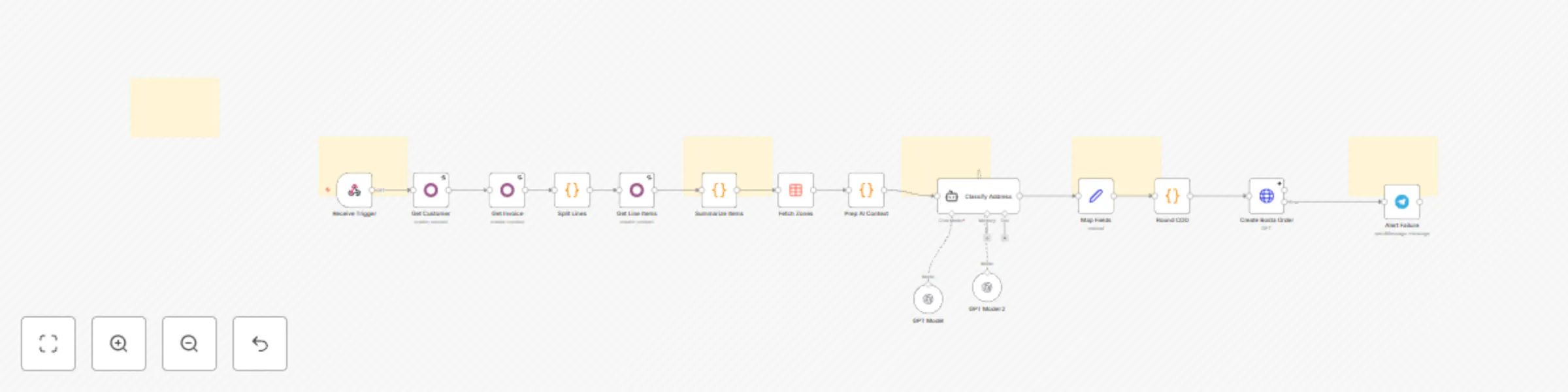
Create Bosta shipping orders from Odoo invoices using OpenAI GPT models
## What Problem Does It Solve? - **Manual Data Entry Bottlenecks:** Moving shipping data from Odoo to Bosta manually is slow and prone to errors, especially during high-volume periods. - **Address Mismatches:** Odoo stores addresses as unstructured text, while Bosta requires strict Zone/District IDs. Mismatches lead to failed deliveries and returns. - **Messy Labels:** Long ERP product names look unprofessional on shipping labels. - **This workflow solves these by:** - Instantly creating the shipping order in Bosta when an Odoo invoice is confirmed. - Using an **AI Agent** to intelligently parse raw addresses and map them to the exact Bosta ID. - Ensuring the high operational standards required by automating data cleaning and COD rounding. ## How to Configure It ### 1. Odoo Setup - Create an Automation Rule in Odoo that sends a POST request to this workflow's Webhook URL when an invoice state changes to "Confirmed". ### 2. Credentials - Connect your **Odoo**, **OpenAI**, and **Telegram** accounts in the respective n8n nodes. - Add your **Bosta API Key** in the Header parameters of the `Create Bosta Order` node. ### 3. Product Mapping - Open the `Summarize Items` code node and update the `NAME_MAP` object to link your Odoo product names to short shipping labels. ### 4. Data Table - Ensure the `Fetch Zones` node is connected to your Bosta Zones/Districts data table in n8n. ## How It Works - **Trigger:** The workflow starts automatically when an invoice is confirmed in Odoo. - **Fetch & Process:** It pulls customer details and invoice items, then aggregates quantities (e.g., turning 3 lines of "Shampoo" into "Shampoo (3)"). - **AI Analysis:** The AI Agent cross-references the raw address with the official Bosta zones list to strictly select the correct IDs. - **Execution:** The order is created in Bosta. If successful, the process is complete. - **Error Handling:** If any step fails, a Telegram message is sent immediately with the invoice number to alert the **operations team**. ## Customization Ideas - **Write Back:** Add a node to update the Odoo invoice with the generated Bosta tracking number. - **Multi-Courier:** Add a switch node to route orders to different couriers (e.g., Aramex, Mylerz) based on the city. - **Campaign Logging:** Log successful shipments to a spreadsheet to track fulfillment metrics. - **Notification Channels:** Change the error alert from Telegram to Slack or Email. If you need any help [Get in Touch](https://www.linkedin.com/in/abdallaelshikh0/)

Identify buying-intent leads on Twitter and Instagram with Slack and Notion CRM
## 📘 Description This workflow enables on-demand social lead discovery using a chat-based interface. When a user submits a lead discovery query, the workflow searches Twitter and Instagram for posts where people are actively asking for tools, recommendations, or help solving real problems. An AI agent filters out spam and promotions, extracts only genuine buying-intent posts, and classifies each lead as Low, Medium, or High intent. Qualified leads are converted into two outputs: a human-readable Slack summary for quick review and a structured, CRM-ready Notion record for tracking and follow-ups. Short-term conversation memory is maintained to improve relevance across follow-up queries. Built-in error handling ensures failures are reported immediately. ⚠️ Deployment Disclaimer This template can only be used on self-hosted n8n installations. It relies on external MCP tools and custom AI orchestration not supported on n8n Cloud. ## ⚙️ What This Workflow Does (Step-by-Step) 💬 Receive User Lead Discovery Query (Chat Trigger) Accepts a natural-language lead discovery request from a user. 🧠 Maintain Short-Term Conversation Context Keeps recent query context to improve follow-up accuracy. 🔎 Discover Buying-Intent Leads from Social Platforms (AI) Searches Twitter and Instagram for posts indicating real buying or problem-solving intent and extracts structured lead data. 🌐 External Social Search & Enrichment (MCP Tool) Fetches relevant social posts from external platforms. 🧠 AI Lead Qualification Classifies intent (Low / Medium / High), summarizes the problem, and filters noise. 🧩 Generate Slack & Notion Lead Insight Summary (AI) Creates a concise Slack summary and a clean, structured Notion record. 📣 Send Lead Discovery Summary to Slack Delivers a skimmable summary for immediate team visibility. 🗂 Store Lead Discovery Insight in Notion CRM Logs search query, themes, and overall intent for tracking. 🚨 Error Handler → Email Alert Sends an alert if the workflow fails at any step. ## 🧩 Prerequisites • Self-hosted n8n instance • Azure OpenAI API credentials • MCP bearer authentication for social search • Slack API credentials • Notion API credentials 🛠 Setup Instructions Deploy the workflow on a self-hosted n8n instance Connect Azure OpenAI, MCP, Slack, and Notion credentials Enable the chat trigger Test with a sample lead discovery query 🛠 Customization Tips • Adjust intent classification rules in the AI prompt • Modify output fields to match your CRM schema • Extend discovery to additional platforms via MCP tools ## 💡 Key Benefits ✔ On-demand social lead discovery via chat ✔ Filters only real buying-intent signals ✔ Produces Slack-ready summaries and CRM-ready records ✔ Maintains context across follow-up queries ✔ Eliminates manual social media scanning ## 👥 Perfect For - Sales teams - Growth teams - Founders - Agencies sourcing leads from social platforms

Analyze market demand using GPT-4o, XPOZ MCP, Notion and email reports
## 📘 Description This workflow performs automated market demand research for a defined niche on a scheduled basis and converts raw public discussions into actionable business insights. It continuously scans search engines and social platforms to identify real customer pain points, unmet needs, buying or switching intent, and dissatisfaction with existing tools or solutions. An AI market research agent analyzes public conversations to filter out noise and extract only high-signal demand indicators. These insights are then transformed into two outputs: a concise Notion-ready research summary for internal knowledge tracking and a professional, customer-ready email that communicates key findings in clear, business-friendly language. Built-in validation and error handling ensure reliability and traceability. This workflow replaces repetitive manual market research with a consistent, insight-driven intelligence pipeline that supports founders, marketers, and growth teams. ⚠️ Deployment Disclaimer This template is intended for self-hosted n8n instances only. It relies on external MCP-based social intelligence tools and advanced AI agents not supported on n8n Cloud. ## ⚙️ What This Workflow Does (Step-by-Step) ⏰ Scheduled Market Research Trigger Runs automatically on a defined schedule. 🧾 Inject Niche, Query, and Research Context Sets the niche, keywords, and analyst notes to guide research focus. 🔎 Analyze Public Discussions for Market Demand (AI) Scans public search and social platforms to identify real demand signals, pain points, and buying intent. 📡 Public Search & Social Intelligence (MCP Tool) Fetches relevant public discussions for analysis. 🧠 Convert Market Signals into Structured Insights (AI) Transforms raw findings into a Notion-ready summary and a customer-friendly email. 🧹 Parse & Validate AI Output Ensures structured JSON output for safe downstream use. 📘 Save Market Research Insight to Notion Stores summarized insights for long-term research and tracking. 📧 Send Market Insight Email to Stakeholder Delivers a concise, value-focused email highlighting key findings. 🚨 Workflow Error Handler → Email Alert Sends detailed error notifications if any step fails. ## 🧩 Prerequisites • Self-hosted n8n instance • OpenAI API credentials • MCP (Xpoz) public search & social intelligence credentials • Notion API access • Gmail OAuth credentials ## 💡 Key Benefits ✔ Automates recurring market research ✔ Identifies real demand and buying intent signals ✔ Produces clean Notion documentation automatically ✔ Generates customer-ready insight emails ✔ Eliminates manual scanning of forums and social media ✔ Built-in error alerts for reliability ## 👥 Perfect For - Startup founders validating ideas - Growth and marketing teams - Product strategy teams - Market research and competitive intelligence teams
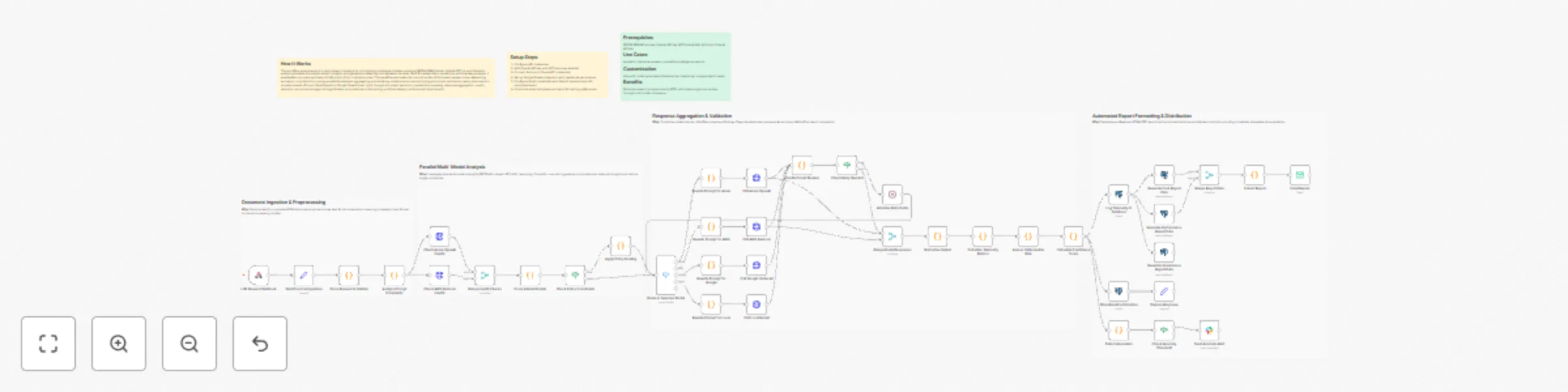
Run multi-model research analysis and email reports with GPT-4, Claude and NVIDIA NIM
## How It Works This workflow automates end-to-end research analysis by coordinating multiple AI models—including NVIDIA NIM (Llama), OpenAI GPT-4, and Claude to analyze uploaded documents, extract insights, and generate polished reports delivered via email. Built for researchers, academics, and business analysts, it enables fast, accurate synthesis of information from multiple sources. The workflow eliminates the manual burden of document review, cross-referencing, and report compilation by running parallel AI analyses, aggregating and validating model outputs, and producing structured, publication-ready documents in minutes instead of hours. Data flows from Google Sheets (user input) through document extraction, parallel AI processing, response aggregation, quality validation, structured storage in Google Sheets, automated report formatting, and final delivery via Gmail with attachments. ## Setup Steps 1. Configure API credentials 2. Add OpenAI API key with GPT-4 access enabled 3. Connect Anthropic Claude API credentials 4. Set up Google Sheets integration with read/write permissions 5. Configure Gmail credentials with OAuth2 authentication for automated email 6. Customize email templates and report formatting preferences ## Prerequisites NVIDIA NIM API access, OpenAI API key (GPT-4 enabled), Anthropic Claude API key ## Use Cases Academic literature reviews, competitive intelligence reports ## Customization Adjust AI model parameters (temperature, tokens) per analysis depth needs ## Benefits Reduces research analysis time by 80%, eliminates single-source bias through multi-model consensus

Build a RAG chat system using Aryn DocParse, AWS S3, Pinecone and GPT-4o
### How it works 1. Provide your S3 bucket containing documents such as PDFs and MS Word in the "Get Files from S3" node. You will need to provide AWS credentials that will allow the node to access the bucket and download the files in the specified location. 2. Choose document processing options in the Aryn node. The main options are for text and table extraction. You can also provide a JSON schema for property extraction. You can refer to https://docs.aryn.ai/docparse/processing_options for details on these options. You will also need an Aryn API key which you can obtain by going to https://aryn.ai/signup. Please note that use of vision models for OCR and table extraction is restricted to paid tiers. 3. The resulting content of parsing and extraction is then chunked and ingested into Pinecone. 4. Once at least one document has been ingested into a Pinecone index, you can start asking questions about anything that may be found in ingested documents in the chat box. ### Setup steps 1. For data retrieval, you will need a "folder" in a bucket on AWS S3 as well as valid AWS credentials with permission to fetch those files. 2. For document parsing, you will need to obtain an Aryn API key. You can sign up for free at https://aryn.ai/signup. 3. For the Pinecone vector database, head over to https://pinecone.io and create an account and create a sample index for free. You will also need to generate an API key. 4. For the AI agent and RAG, you will also need an OpenAI API key. Please go to https://openai.com and get a free API key.

Create a founder digest and leads from Hacker News with GPT-4o and Gmail
 ## 📊 Description Automate daily founder intelligence from Hacker News without manual monitoring. This workflow scans Hacker News discussions (Show HN, launches, AI, startups, SaaS), filters out noise and non-discussion pages, and extracts only high-signal threads. AI then converts these discussions into a concise, founder-ready daily digest highlighting key trends, why they matter, and practical actions. The digest is delivered via email, while structured insights are logged to Google Sheets for long-term tracking and analysis. ## ⚠️ Deployment Disclaimer This template is designed for self-hosted n8n installations only. It relies on external MCP tools and custom AI orchestration that are not supported on n8n Cloud. ## 🔄 What This Template Does 1️⃣ Runs automatically on a daily schedule ⏰ 2️⃣ Searches Hacker News discussions via Google using SerpAPI 🔍 3️⃣ Extracts titles, summaries, links, and metadata from results 📄 4️⃣ Filters out guidelines, index pages, and non-discussion links 🚫 5️⃣ Aggregates valid discussion threads into a single dataset 📦 6️⃣ Uses AI to identify key trends, problems, and founder-relevant signals 🧠 7️⃣ Generates a concise daily founder digest (trend, why it matters, actions) ✍️ 8️⃣ Sends the digest automatically via email 📧 9️⃣ Cleans and normalizes insights for storage 🧹 🔟 Appends structured founder intelligence to Google Sheets for tracking 📊 ## ✅ Key Benefits ✅ Eliminates manual Hacker News scanning ✅ Surfaces only high-signal, founder-relevant discussions ✅ Converts raw discussions into clear, actionable insights ✅ Delivers a daily, skimmable founder digest automatically ✅ Builds a historical intelligence log in Google Sheets ✅ Creates a repeatable founder research workflow ## ⚙️ Features - Daily scheduled execution - Hacker News discovery via Google Search (SerpAPI) - Noise filtering with custom JavaScript logic - AI-powered trend and insight extraction - Founder-focused digest generation - Email delivery via Gmail - Insight archiving in Google Sheets ## 🔑 Requirements - SerpAPI account - Azure OpenAI credentials - Gmail account connected to n8n - Google Sheets account - Self-hosted n8n instance ## 🎯 Target Audience - Startup founders tracking early signals - Product and growth leaders monitoring trends - VCs and analysts scouting emerging tools - Teams needing automated market and founder intelligence

Analyze stock sentiment with GPT-4o and create Asana tasks with Slack alerts
 ## 📘 Description This workflow analyzes real-time stock market sentiment and intent from public social media discussions and converts those signals into operations-ready actions. It exposes a webhook endpoint where a stock-market–related query can be submitted (for example, a stock, sector, index, or market event). The workflow then scans Twitter/X and Instagram for recent public discussions that indicate buying interest, selling pressure, fear, uncertainty, or emerging opportunities. An AI agent classifies each signal by intent type, sentiment, urgency, and strength. These insights are transformed into a prioritized Asana task for market or research teams and a concise Slack alert for leadership visibility. Built-in validation and error handling ensure reliable execution and fast debugging. This automation removes the need for manual social monitoring while keeping teams informed of emerging market risks and opportunities. ## ⚠️ Deployment Disclaimer This template is designed for self-hosted n8n installations only. It relies on external MCP tools and custom AI orchestration that are not supported on n8n Cloud. ## ⚙️ What This Workflow Does (Step-by-Step) - 🌐 Receive Stock Market Query (Webhook Trigger) Accepts an external POST request containing a stock market query. - 🧾 Extract Stock Market Query from Payload Normalizes and prepares the query for analysis. - 🔎 Analyze Social Media for Stock Market Intent (AI) Scans public Twitter/X and Instagram posts to detect actionable market intent signals. - 📡 Social Intelligence Data Fetch (MCP Tool) Retrieves relevant social data from external intelligence sources. - 🧠 Transform Market Intent Signals into Ops-Ready Actions (AI) Structures insights into priorities, summaries, and recommended actions. - 🧹 Parse Structured Ops Payload Validates and safely parses AI-generated JSON for downstream use. - 📋 Create Asana Task for Market Signal Review Creates a prioritized task with key signals, context, and recommendations. - 📣 Send Market Risk & Sentiment Alert to Slack Delivers an executive-friendly alert summarizing risks or opportunities. - 🚨 Error Handler → Slack Alert Posts detailed error information if any workflow step fails. ## 🧩 Prerequisites • Self-hosted n8n instance • OpenAI and Azure OpenAI API credentials • MCP (Xpoz) social intelligence credentials • Asana OAuth credentials • Slack API credentials ## 🛠 Setup Instructions - Deploy the workflow on a self-hosted n8n instance - Configure the webhook endpoint and test with a sample query - Connect OpenAI, Azure OpenAI, MCP, Asana, and Slack credentials - Set the correct Asana workspace and project ID - Select the Slack channel for alerts ## 🛠 Customization Tips • Adjust intent and sentiment classification rules in AI prompts • Modify task priority logic or due-date rules • Extend outputs to email reports or dashboards if required ## 💡 Key Benefits ✔ Real-time market sentiment detection from social media ✔ Converts unstructured signals into actionable tasks ✔ Provides leadership-ready Slack alerts ✔ Eliminates manual market monitoring ✔ Built-in validation and error visibility ## 👥 Perfect For - Market research teams - Investment and strategy teams - Operations and risk teams - Founders and analysts tracking market sentiment

Reconcile Stripe, bank, and e-commerce data with GPT-4.1 and Google Sheets
## How It Works This workflow automates financial reconciliation by orchestrating multiple AI agents to detect mismatches, analyze root causes, and apply corrections across bank statements, invoices, and e-commerce platforms. Designed for finance teams, accountants, and business owners managing high transaction volumes, it eliminates manual reconciliation tedious work that typically consumes hours weekly. The system retrieves financial data from Stripe, banking APIs, and e-commerce platforms, then feeds it to specialized AI agents: one detects discrepancies using pattern recognition, another performs root cause analysis, and a third generates ledger corrections. An orchestrator agent coordinates these specialists, ensuring systematic processing. Results are logged to Google Sheets and trigger email notifications for critical issues, creating an audit trail while reducing reconciliation time from hours to minutes with 95%+ accuracy. ## Setup Steps 1. Configure Stripe API credentials in "Get Stripe Transactions" node 2. Add banking API authentication for "Get Bank Feed Data" node 3. Connect e-commerce platform (Shopify/WooCommerce) credentials 4. Input NVIDIA API key for all OpenAI Model nodes 5. Set OpenAI API key in Orchestrator Agent 6. Configure Gmail credentials for notification node ## Prerequisites NVIDIA API access, OpenAI API key, Stripe account ## Use Cases Monthly financial close automation, daily transaction reconciliation ## Customization Modify detection thresholds, add custom financial data sources ## Benefits Reduces reconciliation time by 90%, eliminates manual data entry errors

Write personalized cold emails from LinkedIn leads with Wiza, Perplexity and GPT-5
## What it does Submit a LinkedIn profile URL through a form. The workflow finds their email and company info using Wiza, then researches the prospect and their company with Perplexity AI to uncover recent news, growth signals, and pain points. Your choice of AI model uses that research to write a personalized icebreaker email with a relevant hook. The finished draft shows up in your Gmail inbox, ready to review and send. ## Who's it for Sales teams, recruiters, and marketers scaling personalized outreach without manual research. ## Requirements - n8n (self-hosted or cloud) - Wiza API Key - OpenAI API Key - Perplexity API Key - Gmail OAuth2 credentials ## How to set up 1. Import workflow JSON into n8n 2. Configure Wiza, OpenAI, Perplexity, and Gmail credentials 3. Create Leads and Case Studies data tables in n8n 4. Update business context in the "Your Offer" node 5. Activate workflow and use the form URL ## How to customize - Modify email templates in the "Ice Breaker Email Generator" prompt - Update business profile and case studies for relevance - Adjust AI model settings for tone and creativity

Monitor hotel competitor rates and answer WhatsApp Q&A using OpenAI GPT-4.1
## How It Works ***Top Branch Workflow A*** **1. The Market Intelligence:** - **Patrols the Market:** Runs hourly to scrape competitor rates for future days. - **Gathers Intel:** If prices spike, it instantly checks event announcements to see if a major event is driving demand. - **Crunches Numbers:** Calculates the exact price gap and filters out noise. **2. The Revenue Manager:** - **Sets Strategy:** The AI Agent reviews the price gaps, competitor moves, and event signals. - **Reports:** Writes a strategic Executive Summary and sends it to your WhatsApp. ***Bottom Branch Workflow B*** **3. The Consultant:** - **Recall:** When you ask a question via WhatsApp, the bot retrieves the saved analysis, historical rates, and event schedule. - **Answer:** It acts as an on-demand analyst, conducting further analysis to give an informed answer to questions ## Setup Steps **1. Config:** Add your hotel + competitor hotels (IDs/names) in the Config node. **2. Monitor Window:** Set how far ahead you want to monitor (e.g., daysAhead = 30) in the Config node. **3. Sensitivity:** Set how sensitive alerts should be (e.g., alert only if competitor moves > 10%) in the Significant Competitor Change node. **4. Connect Credentials:** - Amadeus (to fetch hotel prices) - WhatsApp (to send alerts) - Postgres/SQL (to store price snapshots, history, summary) - OpenAI (for the AI Agents) **5. Event Source:** Update the Fetch VCC nodes to scrape your local convention center or event site. **6. Run a test:** Trigger Workflow A manually and confirm you receive a WhatsApp alert. Reply to that WhatsApp message to test Workflow B (Q&A). ## Use Cases & Benefits **For Revenue Managers:** Automate the "rate shop" routine and catch competitor moves without opening a spreadsheet. **For Sales & Marketing Teams:** Go beyond raw data. Pairing "what changed" with "why changed" instantly. **For Hotel Leadership:** Perfect for GMs and division leaders who need instant, decision-ready alerts via WhatsApp. ⚡ ***Zero-Touch Efficiency:*** Eliminates hours of manual searching by automating rate checks 3x daily. 🧠 ***Contextual Intelligence:*** Tracks price AND explains why it moved by cross-referencing local events. 🤖 ***Actionable Strategy:*** AI doesn't just report numbers; it recommends specific pricing tactics. 📉 ***Long-Term Vision:*** Builds a permanent database of rate history, enabling the AI to answer complex trend questions over time. ## 📬 Want to Customize This? [[email protected]]([email protected])

Create an AI Telegram bot using Google Drive, Qdrant, and OpenAI GPT-4.1
### How it works This workflow creates an intelligent Telegram bot with a knowledge base powered by Qdrant vector database. The bot automatically processes documents uploaded to Google Drive, stores them as embeddings, and uses this knowledge to answer questions in Telegram. It consists of two independent flows: **document processing** (Google Drive → Qdrant) and **chat interaction** (Telegram → AI Agent → Telegram). ### Step-by-step **Document Processing Flow:** * **New File Trigger:** The workflow starts when the **New File Trigger** node detects a new file created in the specified Google Drive folder (polling every 15 minutes). * **Download File:** The **Download File** (Google Drive) node downloads the detected file from Google Drive. * **Text Splitting:** The **Split Text into Chunks** node splits the document text into chunks of 3000 characters with 300 character overlap for optimal embedding. * **Load Document Data:** The **Load Document Data** node processes the binary file data and prepares it for vectorization. * **OpenAI Embeddings:** The **OpenAI Embeddings** node generates vector embeddings for each text chunk. * **Insert into Qdrant:** The **Insert into Qdrant** node stores the embeddings in the Qdrant vector database collection. * **Move to Processed Folder:** After successful processing, the **Move to Processed Folder** (Google Drive) node moves the file to a "Qdrant Ready" folder to keep files organized. **Telegram Chat Flow:** * **Telegram Message Trigger:** The **Telegram Message Trigger** node receives new messages from the Telegram bot. * **Filter Authorized User:** The **Filter Authorized User** node checks if the message is from an authorized chat ID (26899549) to restrict bot access. * **AI Agent Processing:** The **AI Agent** receives the user's message text and processes it using the fine-tuned GPT-4.1 model with access to the Qdrant knowledge base tool. * **Qdrant Knowledge Base:** The **Qdrant Knowledge Base** node retrieves relevant information from the vector database to provide context for the AI agent's responses. * **Conversation Memory:** The **Conversation Memory** node maintains conversation history per chat ID, allowing the bot to remember context. * **Send Response to Telegram:** The **Send Response to Telegram** node sends the AI-generated response back to the user in Telegram. ### Set up steps Estimated set up time: 15 minutes 1. **Google Drive Setup:** * Add your Google Drive OAuth2 credentials to the **New File Trigger**, **Download File**, and **Move to Processed Folder** nodes. * Create two folders in your Google Drive: one for incoming files and one for processed files. * Copy the folder IDs from the URLs and update them in the **New File Trigger** (folderToWatch) and **Move to Processed Folder** (folderId) nodes. 2. **Qdrant Setup:** * Add your Qdrant API credentials to the **Insert into Qdrant** and **Qdrant Knowledge Base** nodes. * Create a collection in your Qdrant instance (e.g., "Test-youtube-adept-ecom"). * Update the collection name in both Qdrant nodes. 3. **OpenAI Setup:** * Add your OpenAI API credentials to the **OpenAI Chat Model** and **OpenAI Embeddings** nodes. * (Optional) Replace the fine-tuned model ID in **OpenAI Chat Model** with your own model or use a standard model like `gpt-4-turbo`. 4. **Telegram Setup:** * Create a Telegram bot via [@BotFather](https://t.me/botfather) and obtain the bot token. * Add your Telegram bot credentials to the **Telegram Message Trigger** and **Send Response to Telegram** nodes. * Update the authorized chat ID in the **Filter Authorized User** node (replace `26899549` with your Telegram user ID). 5. **Customize System Prompt (Optional):** * Modify the system message in the **AI Agent** node to customize your bot's personality and behavior. * The current prompt is configured for an n8n automation expert creating social media content. 6. **Activate the Workflow:** * Toggle "Active" in the top-right to enable both the Google Drive trigger and Telegram trigger. * Upload a document to your Google Drive folder to test the document processing flow. * Send a message to your Telegram bot to test the chat interaction flow.

Generate SEO landing page content with GPT-4, Reddit, YouTube and Google Sheets
## How It Works This workflow automates SEO content creation by aggregating multi-source research and generating optimized articles. Designed for content marketers, SEO specialists, and digital agencies, it solves the time-consuming challenge of researching trending topics and crafting search-optimized content at scale. The system pulls discussions from Reddit, videos from YouTube, and industry news via APIs, then combines this data into comprehensive insights. An AI agent analyzes aggregated research, performs Google Search SEO analysis, consults Wikipedia for accuracy, and generates structured, SEO-optimized HTML content. The final output saves automatically to Google Sheets for easy management and publishing workflows. ## Setup Steps 1. Configure Reddit, YouTube, and industry news API credentials in fetch nodes 2. Add OpenAI API key for GPT-4 agent and Google API key for search analysis 3. Connect Google Sheets with write permissions for content storage ## Prerequisites Reddit API access, YouTube Data API key, industry news API ## Use Cases Blog content automation, competitive content analysis, trending topic research ## Customization Modify research sources, adjust AI prompts for brand voice, customize SEO parameters ## Benefits 10x faster content production, multi-platform research coverage
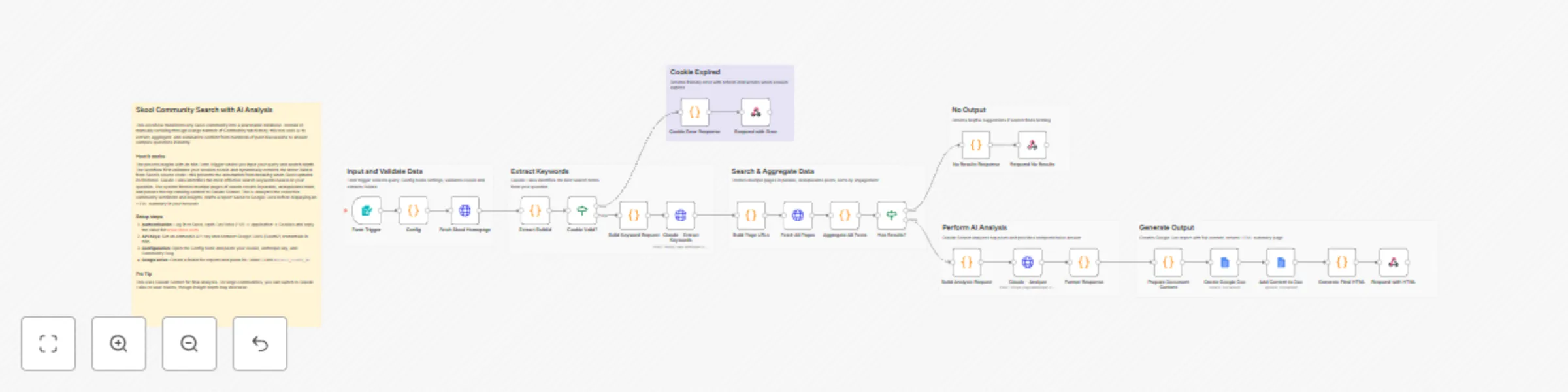
Search Skool community posts with Claude and Google Docs analysis
## How it works 1. **Form Trigger** accepts a question and optional settings (folder ID, search depth) 2. **Cookie Validation** checks if Skool session is still active 3. **BuildId Extraction** dynamically extracts Skool's build ID from homepage 4. **Keyword Extraction** uses Claude Haiku to extract 1-2 search keywords 5. **Multi-Page Search** fetches 1-10 pages of Skool search results 6. **Post Aggregation** collects all posts with content and comments 7. **AI Analysis** uses Claude Sonnet to analyze posts and answer your question 8. **Google Doc Report** creates a detailed research document in your Drive 9. **HTML Response** returns a beautiful summary page ## Key Features - Auto BuildId Detection - No manual updates when Skool changes - Cookie Expiration Handling - Clear error messages when session expires - Configurable Search Depth - Search 1-10 pages (default: 5) - Token Protection - Limits content to control API costs - Dual AI Models - Haiku for keywords (cheap), Sonnet for analysis (powerful) ## Set up steps **Time required:** 10-15 minutes 1. Get your Skool session cookie from browser DevTools 2. Get an Anthropic API key from console.anthropic.com 3. Set up Google Docs OAuth2 credential in n8n 4. Create a Google Drive folder for research docs 5. Update the Config node with your values: - `COOKIE` - Your Skool session cookie - `ANTHROPIC_API_KEY` - Your Claude API key - `DEFAULT_FOLDER_ID` - Your Google Drive folder ID - `COMMUNITY` - Your Skool community slug ## Who is this for? - Members of Skool communities searching past discussions - Community managers researching common questions - Anyone building knowledge bases from Skool content ## Estimated costs - **Per search:** $0.02-0.10 (Claude Haiku + Sonnet) - Skool cookies expire every 7-14 days (requires refresh) ``` --- ## 🏷️ Suggested Tags ``` skool, community, search, ai, claude, anthropic, google-docs, research, knowledge-base, form

Build a website-powered customer support chatbot with Decodo, Pinecone and Gemini
**Categories:** Business Automation, Customer Support, AI, Knowledge Management This comprehensive workflow enables businesses to build and deploy a custom-trained AI Chatbot in minutes. By combining a sophisticated data scraping engine with a RAG-based (Retrieval-Augmented Generation) chat interface, it allows you to transform website content into a high-performance support agent. Powered by **Google Gemini** and **Pinecone**, this system ensures your chatbot provides accurate, real-time answers based exclusively on your business data. ### **Benefits** * **Instant Knowledge Sync** - Automatically crawls sitemaps and URLs to keep your AI up-to-date with your latest website content. * **Embeddable Anywhere** - Features a ready-to-use chat trigger that can be integrated into the bottom-right of any website via a simple script. * **High-Fidelity Retrieval** - Uses vector embeddings to ensure the AI "searches" your documentation before answering, reducing hallucinations. * **Smart Conversational Memory** - Equipped with a 10-message window buffer, allowing the bot to handle complex follow-up questions naturally. * **Cost-Efficient Scaling** - Leverages Gemini’s efficient API and Pinecone’s high-speed indexing to manage thousands of customer queries at a low cost. ### **How It Works** 1. **Dual-Path Ingestion:** The process begins with an n8n Form where you provide a sitemap or individual URLs. The workflow automatically handles XML parsing and URL cleaning to prepare a list of pages for processing. 2. **Clean Content Extraction:** Using **Decodo**, the workflow fetches the HTML of each page and uses a specialized extraction node to strip away code, ads, and navigation, leaving only the high-value text content. **SignUp using:** [dashboard.decodo.com/register?referral_code=55543bbdb96ffd8cf45c2605147641ee017e7900](dashboard.decodo.com/register?referral_code=55543bbdb96ffd8cf45c2605147641ee017e7900). 3. **Vectorization & Storage:** The cleaned text is passed to the **Gemini Embedding** model, which converts the information into 3076-dimensional vectors. These are stored in a **Pinecone** "supportbot" index for instant retrieval. 4. **RAG-Powered Chat Agent:** When a user sends a message through the chat widget, an **AI Agent** takes over. It uses the user's query to search the Pinecone database for relevant business facts. 5. **Intelligent Response Generation:** The AI Agent passes the retrieved facts and the current chat history to **Google Gemini**, which generates a polite, accurate, and contextually relevant response for the user. ### **Requirements** * **n8n Instance:** A self-hosted or cloud instance of n8n. * **Google Gemini API Key:** For text embeddings and chat generation. * **Pinecone Account:** An API key and a "supportbot" index to store your knowledge base. * **Decodo Access:** For high-quality website content extraction. ### **How to Use** 1. **Initialize the Knowledge Base:** Use the Form Trigger to input your website URL or Sitemap. Run the ingestion flow to populate your Pinecone index. 2. **Configure Credentials:** Authenticate your Google Gemini and Pinecone accounts within n8n. 3. **Deploy the Chatbot:** Enable the Chat Trigger node. Use the provided webhook URL to connect the backend to your website's frontend chat widget. 4. **Test & Refine:** Interact with the bot to ensure it retrieves the correct data, and update your knowledge base by re-running the ingestion flow whenever your website content changes. ### **Business Use Cases** * **Customer Support Teams** - Automate answers to 80% of common FAQs using your existing documentation. * **E-commerce Sites** - Help customers find product details, shipping policies, and return information instantly. * **SaaS Providers** - Build an interactive technical documentation assistant to help users navigate your software. * **Marketing Agencies** - Offer "AI-powered site search" as an add-on service for client websites. ### **Efficiency Gains** * **Reduce Ticket Volume** by providing instant self-service options. * **Eliminate Manual Data Entry** by scraping content directly from the live website. * **Improve UX** with 24/7 availability and zero wait times for customers. **Difficulty Level:** Intermediate **Estimated Setup Time:** 30 min **Monthly Operating Cost:** Low (variable based on AI usage and Pinecone tier)

Discover buying-intent leads on Twitter and Instagram with GPT-4o-mini and send summaries to Slack and Notion
## 📊 Description Automate B2B lead discovery by identifying high-intent prospects directly from Reddit discussions using AI-powered intent analysis. 🎯🤖 This workflow scans Reddit for conversations related to CRM and marketing automation tools, analyzes snippets to detect buying intent, identifies relevant decision-makers on LinkedIn, enriches contact details via RocketReach, and logs qualified leads into Google Sheets. Running every three hours, it ensures your sales team never misses fresh outbound opportunities without manual research. 🚀📊 ## 🔁 What This Template Does 1️⃣ Runs automatically every 3 hours to search Reddit for tool-related discussions. ⏰ 2️⃣ Extracts Reddit snippets, links, and highlighted keywords from search results. 🔍 3️⃣ Uses AI to classify buying intent as High, Medium, or Low. 🤖 4️⃣ Identifies the core problem and suggests a safe, non-salesy outreach angle. 💬 5️⃣ Filters only High and Medium intent opportunities. 🚦 6️⃣ Searches LinkedIn for matching decision-makers based on role and seniority. 👥 7️⃣ Enriches lead profiles with emails and company data using RocketReach. 📇 8️⃣ Saves qualified leads into Google Sheets with deduplication logic. 📊 9️⃣ Sends Slack alerts when enrichment fails or API limits are hit. 🚨 🔟 Sends Gmail alerts if any workflow error occurs. ✉️ ## ⭐ Key Benefits ✅ Discovers real buying intent directly from public Reddit discussions ✅ Eliminates manual lead research and qualification ✅ Uses AI for consistent, conservative intent classification ✅ Enriches leads with verified contact data automatically ✅ Builds a clean, ready-to-use outbound lead list in Google Sheets ✅ Runs continuously to capture fresh opportunities ## 🧩 Features Scheduled Reddit monitoring via SerpAPI AI-based intent detection using GPT-4o-mini Conservative intent scoring to avoid false positives LinkedIn decision-maker discovery RocketReach contact enrichment Google Sheets lead storage with update logic Slack alerts for API and enrichment issues Gmail-based error notifications Scalable batch processing ## 🔐 Requirements OpenAI API key (GPT-4o-mini) SerpAPI API key RocketReach API key Google Sheets OAuth2 credentials Slack API credentials Gmail OAuth2 credentials ## 🎯 Target Audience B2B sales and outbound teams Growth and demand-generation teams Lead generation agencies SaaS founders targeting niche audiences RevOps teams automating prospect research

AI-powered RAG configuration assistant: From form to email recommendations
## Description An intelligent RAG Configuration Assistant that analyzes your retrieval-augmented generation requirements and delivers AI-powered recommendations via email. Get expert guidance on embedding models, chunk sizes, vector stores, and cost estimates—all automated through a simple form submission. ## Key Features • AI-powered analysis using LLM • 14 predefined use cases (Document Q&A, Chatbot, Legal, Medical, etc.) • Optional document upload for enhanced analysis • Beautiful HTML email reports with modern dashboard design • Customized n8n workflow JSON attachment • Cost estimation based on budget and usage • Deterministic AI (temperature=0) for consistent results • Dual-branch architecture (file upload or manual input) ## How it works 1. **Form Submission**: User provides use case, document type, pages, budget, query volume 2. **AI Analysis**: Claude evaluates requirements and complexity 3. **Recommendation Engine**: Generates optimal configuration (embedding model, chunk size, vector store) 4. **Report Generation**: Creates professional HTML email with all recommendations 5. **Workflow Creation**: Builds customized n8n workflow JSON 6. **Email Delivery**: Sends report + workflow attachment via Gmail ## How to use 1. **Setup credentials**: Add OpenRouter API key and Gmail OAuth 2. **Activate workflow**: Enable the Form Trigger 3. **Share form URL**: Distribute to your team or clients 4. **Receive requests**: Users fill out the form 5. **Get results**: Recipients receive email with recommendations + workflow file 6. **Import workflow**: Download attached JSON and import to n8n ## Requirements **Essential:** - n8n instance (v1.0+) - OpenRouter account + API key - Gmail account with OAuth2 setup
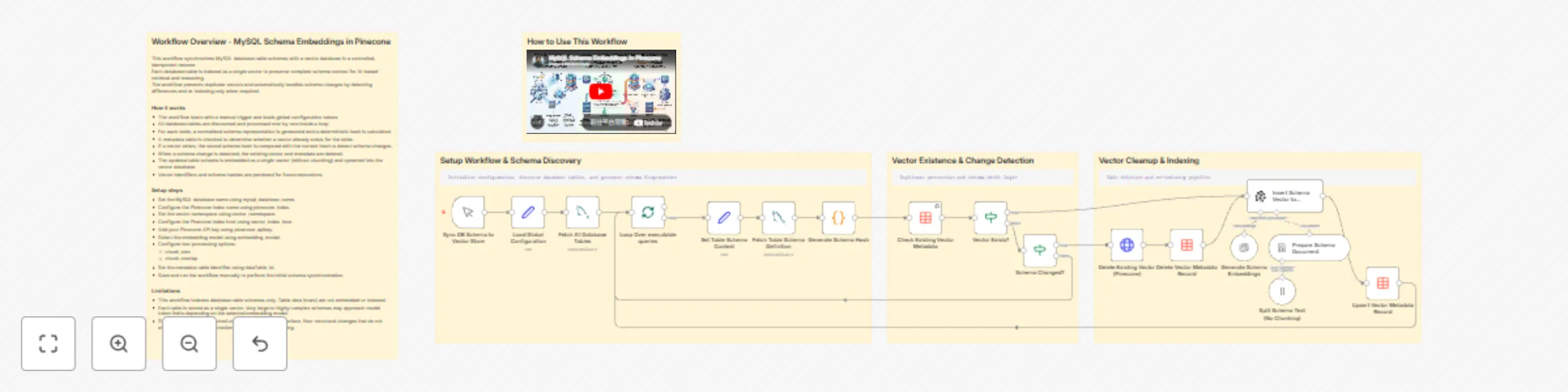
Synchronize MySQL database schemas to Pinecone with OpenAI embeddings
This workflow synchronizes MySQL database table schemas with a vector database in a controlled, idempotent manner. Each database table is indexed as a single vector to preserve complete schema context for AI-based retrieval and reasoning. The workflow prevents duplicate vectors and automatically handles schema changes by detecting differences and re-indexing only when required. ### How it works - The workflow starts with a manual trigger and loads global configuration values. - All database tables are discovered and processed one by one inside a loop. - For each table, a normalized schema representation is generated, and a deterministic hash is calculated. - A metadata table is checked to determine whether a vector already exists for the table. - If a vector exists, the stored schema hash is compared with the current hash to detect schema changes. - When a schema change is detected, the existing vector and metadata are deleted. - The updated table schema is embedded as a single vector (without chunking) and upserted into the vector database. - Vector identifiers and schema hashes are persisted for future executions. ### Setup steps - Set the MySQL database name using mysql_database_name. - Configure the Pinecone index name using pinecone_index. - Set the vector namespace using vector_namespace. - Configure the Pinecone index host using vector_index_host. - Add your Pinecone API key using pinecone_apikey. - Select the embedding model using embedding_model. - Configure text processing options: - chunk_size - chunk_overlap - Set the metadata table identifier using dataTable_Id. - Save and run the workflow manually to perform the initial schema synchronization. ### Limitations - This workflow indexes database table schemas only. Table data (rows) are not embedded or indexed. - Each table is stored as a single vector. Very large or highly complex schemas may approach model token limits depending on the selected embedding model. - Schema changes are detected using a hash-based comparison. Non-structural changes that do not affect the schema representation will not trigger re-indexing.

Send AI-curated weekly news digests with RSS, Vector DB & GPT-4o
## What this workflow does This workflow implements a two-stage news automation system designed for reusable and topic-driven email delivery. News articles are continuously collected from multiple platforms using RSS feeds and stored in a vector database with semantic embeddings and category metadata. Instead of fetching news on demand, the workflow separates daily ingestion from weekly delivery. This allows the same news data to be reused across different topics, audiences, or delivery schedules. On a weekly basis, relevant articles are retrieved from the vector store based on defined areas of interest and item limits. The selected news is then processed by an AI agent, which converts the raw articles into a structured, email-ready format before sending the final content to users. ## How it works 1. News articles are collected daily from multiple RSS feeds 2. Articles are categorized and stored in a vector database 3. On a weekly trigger, topic preferences are evaluated 4. Relevant articles are retrieved using vector-based search 5. An AI agent formats the content for email delivery 6. The email is sent to the user ## Setup To use this workflow, complete the following steps: 1. Add and configure your RSS feed sources 2. Connect a vector database and embedding model 3. Configure AI model credentials for content generation 4. Set up email service credentials 5. Define weekly scheduling and topic inputs 6. Test retrieval and email output ## Customization You can customize this workflow by: - Adding or removing RSS feed sources - Adjusting news categories or topic filters - Changing the number of articles retrieved per topic - Modifying the AI agent’s writing tone or structure - Reusing the vector store for other content workflows - Updating email frequency or delivery format ## Requirements - RSS feed URLs - Vector database credentials - AI model credentials - Email service credentials

Audio transcription & chat bot with AssemblyAI, Gemini, and Pinecone RAG
## Who’s it for This template is designed for podcasters, researchers, educators, product teams, and support teams who work with audio content and want to turn it into searchable knowledge. It is especially useful for users who need automated transcription, structured summaries, and conversational access to audio data. ## What it does / How it works This workflow starts with a public form where users upload an audio file. The audio is sent to AssemblyAI for speech-to-text processing, including speaker labels and bullet-point summarization. Once transcription is complete, the full text is converted into a document, split into chunks, and embedded using Google Gemini. The embeddings are stored in a Pinecone vector database along with metadata, making the content retrievable for future use. In parallel, the workflow logs uploaded file information into Google Sheets for tracking. A separate chat trigger allows users to ask questions about the uploaded audio files. An AI agent retrieves relevant context from Pinecone and responds using Gemini, enabling conversational search over audio transcripts. ## Requirements - AssemblyAI API credentials - Google Gemini (PaLM) API credentials - Pinecone API credentials - Google Sheets OAuth2 credentials - A Pinecone index for storing audio embeddings ## How to set up 1. Connect AssemblyAI, Gemini, Pinecone, and Google Sheets credentials in n8n. 2. Configure the Pinecone index for storing transcripts. 3. Verify the Google Sheet has columns for file name and status. 4. Test by uploading an audio file through the form. 5. Enable the workflow for continuous use. ## How to customize the workflow - Change summary style or transcript options in AssemblyAI - Adjust chunk size and overlap for better retrieval - Add email or Slack notifications after processing - Extend the chatbot to support multiple knowledge bases

Generate comprehensive client brief reports with Llama 3 AI & Google Workspace
**How It Works** - Trigger: The workflow starts automatically when a new file (PDF, DOCX, or TXT) is uploaded to a specific Google Drive folder for client briefs. - Configuration: The workflow sets up key variables, such as the folder for storing reports, the account manager’s email, the tracking Google Sheet, and the error notification email. - File Type Check & Text Extraction: It checks the file type and extracts the text using the appropriate method for PDF, DOCX, or TXT files. - Extraction Validation: If text extraction fails or the file is empty, an error notification is sent to the designated email. - AI Analysis: The extracted text is analyzed using Groq AI (Llama 3 model) to summarize the brief, extract client needs, goals, challenges, and more. - Industry Research: The workflow performs additional AI-powered research on the client’s industry and project type, using Wikipedia and Google Search tools. - Report Generation: The analysis and research are combined into a comprehensive, formatted report. - Google Doc Creation: The report is saved as a new Google Doc in a specified folder. - Logging: Key details are logged in a Google Sheet for tracking and record-keeping. - Notification: The account manager receives an email with highlights and a link to the full report. - Error Handling: If any step fails (e.g., text extraction), an error email is sent with troubleshooting advice. **Setup Steps** 1. Google Drive Folders: Create a folder for incoming client briefs. Create a folder for storing generated client summary reports. 2. Google Sheet: Create a Google Sheet with a sheet/tab named “Brief Analysis Log” for tracking analysis results. 3. Google Cloud Project: Set up a Google Cloud project and enable APIs for Google Drive, Google Docs, Google Sheets, and Gmail. Create OAuth2 credentials for n8n and connect them in your n8n instance. 4. Groq AI Credentials: Obtain API credentials for Groq AI and add them to n8n. 5. SerpAPI (Optional, for Google Search): If using Google Search in research, get a SerpAPI key and add it to n8n. **n8n Workflow Configuration:** In the “Workflow Configuration” node, set the following variables: - clientSummariesFolderId: Google Drive folder ID for reports. - accountManagerEmail: Email address to notify. - trackingSheetId: Google Sheet ID for logging. - errorNotificationEmail: Email for error alerts. **Connect All Required Credentials:** Make sure all Google and AI nodes have the correct credentials selected in n8n. Test the Workflow: Upload a sample client brief to the monitored Google Drive folder. Check that the workflow runs, generates a report, logs the result, and sends the notification email.
Create a Lookio RAG assistant from a CSV text corpus
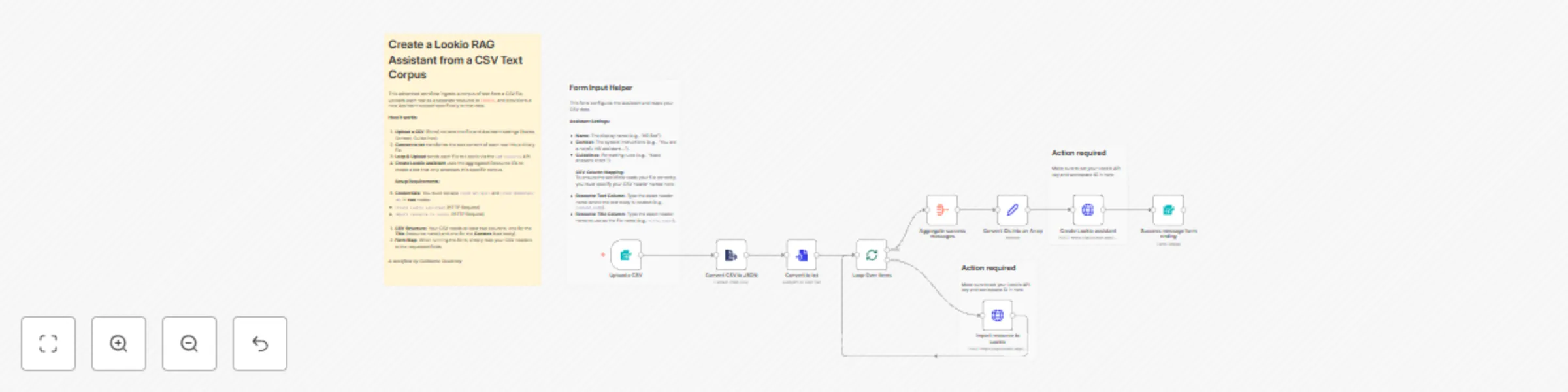
This advanced template automates the creation of a **[Lookio](https://www.lookio.app)** Assistant populated with a specific corpus of text. Instead of uploading files one by one, you can simply upload a CSV containing multiple text resources. The workflow iterates through the rows, converts them to text files, uploads them to Lookio, and finally creates a new Assistant with strict access limited to these specific resources. ## Who is this for? * **Knowledge Managers** who want to spin up specific "Topic Bots" (e.g., an "RFP Bot" or "HR Policy Bot") based on a spreadsheet of Q&As or articles. * **Product Teams** looking to bulk-import release notes or documentation to test RAG (Retrieval-Augmented Generation) responses. * **Automation Builders** who need a reference implementation for looping through CSV rows, converting text strings to binary files, and aggregating IDs for a final API call. ## What is the RAG platform Lookio for knowledge retrieval? **Lookio** is an API-first platform that solves the complexity of building **RAG (Retrieval-Augmented Generation)** systems. While tools like NotebookLM are great for individuals, Lookio is built for business automation. It handles the difficult backend work—file parsing, chunking, vector storage, and semantic retrieval—so you can focus on the workflow. * **API-First:** Unlike consumer AI tools, Lookio allows you to integrate your knowledge base directly into n8n, Slack, or internal apps. * **No "DIY" Headache:** You don't need to manage a vector database or write chunking algorithms. * **Free to Start:** You can sign up without a credit card and get 100 free credits to test this workflow immediately. ## What problem does this workflow solve? * **Bulk Ingestion:** Converts a CSV export (with columns for Title and Content) into individual text resources in Lookio. * **Automated Provisioning:** Eliminates the manual work of creating an Assistant and selecting resources one by one. * **Dynamic Configuration:** Allows the user to define the Assistant's specific name, context (system prompt), and output guidelines directly via the upload form. ## How it works 1. **Form Trigger:** The user uploads a CSV and specifies the Assistant details (Name, Context, Guidelines) and maps the CSV column names. 2. **Parsing:** The workflow converts the CSV to JSON and uses the **Convert to File** node to transform the raw text content of each row into a binary `.txt` file. 3. **Loop & Upload:** It loops through the items, uploading them via the Lookio **Add Resource** API (`/webhook/add-resource`), and collects the returned `Resource ID`s. 4. **Creation:** Once all files are processed, it aggregates the IDs and calls the **Create Assistant** API (`/webhook/create-assistant`), setting the `resources_access_type` to "Limited selection" so the bot relies only on the uploaded data. 5. **Completion:** Returns the new Assistant ID and a success message to the user. ## CSV File Requirements Your CSV file should look like this (headers can be named anything, as you will map them in the form): | Title | Content | | --- | --- | | How to reset password | Go to settings, click security, and press reset... | | Vacation Policy | Employees are entitled to 20 days of PTO... | ## How to set up 1. **Lookio Credentials:** Get your **API Key** and **Workspace ID** from your [Lookio API Settings](https://www.lookio.app) (Free to sign up). 2. **Configure HTTP Nodes:** * Open the **Import resource to Lookio** node: Update headers (`api_key`) and body (`workspace_id`). * Open the **Create Lookio assistant** node: Update headers (`api_key`) and body (`workspace_id`). 3. **Form Configuration (Optional):** The form is pre-configured to ask for column mapping, but you can hardcode these in the "Convert to txt" node if you always use the same CSV structure. 4. **Activate & Share:** Activate the workflow and use the **Production URL** from the Form Trigger to let your team bulk-create assistants.
Create autonomous payment agents using AgentGatePay and multi-chain tokens
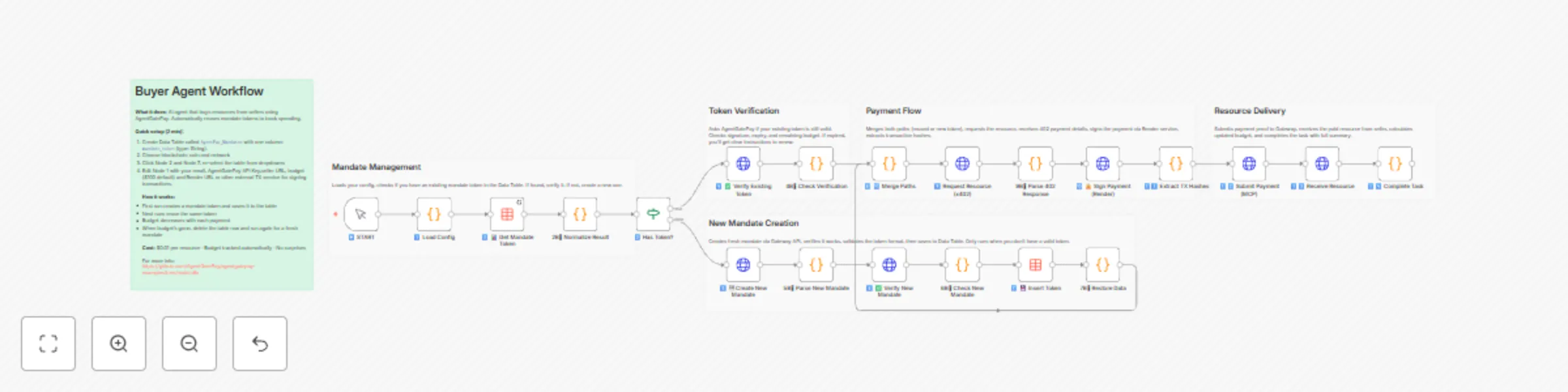
# AgentGatePay N8N Quick Start Guide **Get your AI agents paying for resources autonomously in under 10 minutes.** > **⚠️ BETA VERSION**: These templates are currently in beta. We're actively adding features and improvements based on user feedback. Expect updates for enhanced functionality, additional blockchain networks, and new payment options. --- ## What You'll Build - **Buyer Agent**: Automatically pays for API resources using **USDC, USDT, or DAI** on **Ethereum, Base, Polygon, or Arbitrum** blockchains - **Seller API**: Accepts multi-token payments and delivers resources - **Monitoring**: Track spending and revenue in real-time across all chains and tokens **Supported Tokens:** - USDC (6 decimals) - Recommended - USDT (6 decimals) - DAI (18 decimals) **Supported Blockchains:** - Ethereum (mainnet) - Base (recommended for low gas fees ~$0.001) - Polygon - Arbitrum --- ## Prerequisites (5 minutes) ### 1. Create AgentGatePay Accounts **Buyer Account** (agent that pays): ```bash curl -X POST https://api.agentgatepay.com/v1/users/signup \ -H "Content-Type: application/json" \ -d '{ "email": "[email protected]", "password": "SecurePass123!", "user_type": "agent" }' ``` **Seller Account** (receives payments): ```bash curl -X POST https://api.agentgatepay.com/v1/users/signup \ -H "Content-Type: application/json" \ -d '{ "email": "[email protected]", "password": "SecurePass123!", "user_type": "merchant" }' ``` **Save both API keys** - shown only once! ### 2. Deploy Transaction Signing Service (2 minutes) **One-Click Render Deploy:** 1. Click: [](https://render.com/deploy?repo=https://github.com/AgentGatePay/TX) 2. Enter: - `AGENTGATEPAY_API_KEY`: Your buyer API key - `WALLET_PRIVATE_KEY`: Your wallet private key (0x...) 3. Deploy → Copy service URL: `https://your-app.onrender.com` ### 3. Fund Wallet - Send **USDC, USDT, or DAI** to your buyer wallet - Default: **Base network** (lowest gas fees) - Need ~$1 in tokens for testing + ~$0.01 ETH for gas (on Ethereum) or ~$0.001 on Base --- ## Installation (3 minutes) ### Step 1: Import Templates **In N8N:** 1. Go to **Workflows** → **Add Workflow** 2. Click **⋮** (three dots) → **Import from File** 3. Import all 4 workflows: - `🤖 Create a Cryptocurrency-Powered API for Selling Digital Resources with AgentGatePay` - `💲Create a Cryptocurrency-Powered API for Selling Digital Resources with AgentGatePay` - `📊 Buyer Agent [Monitoring] - AgentGatePay Autonomous Payment Workflow` - `💲 Seller Agent [Monitoring] - AgentGatePay Autonomous Payment Workflow` ### Step 2: Create Data Table **In N8N Settings:** 1. Go to **Settings** → **Data** → **Data Tables** 2. Create table: `AgentPay_Mandates` 3. Add column: `mandate_token` (type: String) 4. Save --- ## Configuration (2 minutes) ### Configure Seller API First **Open:** `💲Seller Resource API - CLIENT TEMPLATE` **Edit Node 1** (Parse Request): ```javascript const SELLER_CONFIG = { merchant: { wallet_address: "0xYourSellerWallet...", // ← Your seller wallet api_key: "pk_live_xyz789..." // ← Your seller API key }, catalog: { "demo-resource": { id: "demo-resource", price_usd: 0.01, // $0.01 per resource description: "Demo API Resource" } } }; ``` **Activate workflow** → Copy webhook URL ### Configure Buyer Agent **Open:** `🤖 Buyer Agent - CLIENT TEMPLATE` **Edit Node 1** (Load Config): ```javascript const CONFIG = { buyer: { email: "[email protected]", // ← Your buyer email api_key: "pk_live_abc123...", // ← Your buyer API key budget_usd: 100, // $100 mandate budget mandate_ttl_days: 7 // 7-day validity }, seller: { api_url: "https://YOUR-N8N.app.n8n.cloud/webhook/YOUR-WEBHOOK-ID" // ← Seller webhook base URL ONLY (see README.md for extraction instructions) }, render: { service_url: "https://your-app.onrender.com" // ← Your Render URL } }; ``` --- ## Run Your First Payment (1 minute) ### Execute Buyer Agent 1. Open **Buyer Agent** workflow 2. Click **Execute Workflow** 3. Watch the magic happen: - Mandate created ($100 budget) - Resource requested (402 Payment Required) - Payment signed (2 transactions: merchant + commission) - Payment verified on blockchain - Resource delivered **Total time:** ~5-8 seconds ### Verify on Blockchain Check transactions on BaseScan: ``` https://basescan.org/address/YOUR_BUYER_WALLET ``` You'll see: - **TX 1:** Commission to AgentGatePay (0.5% = $0.00005) - **TX 2:** Payment to seller (99.5% = $0.00995) --- ## Monitor Activity ### Buyer Monitoring **Open:** `📊 Buyer Monitoring - AUDIT LOGS` **Edit Node 1:** Set your buyer wallet address and API key **Execute** → See: - Mandate budget remaining - Payment history - Total spent - Average transaction size ### Seller Monitoring **Open:** `💲 Seller Monitoring - AUDIT LOGS` **Edit Node 1:** Set your seller wallet address and API key **Execute** → See: - Total revenue - Commission breakdown - Top payers - Payment count --- ## How It Works ### Payment Flow ``` 1. Buyer Agent requests resource ↓ 2. Seller returns 402 Payment Required (includes: wallet address, price, token, chain) ↓ 3. Buyer signs TWO blockchain transactions via Render: - Merchant payment (99.5%) - Gateway commission (0.5%) ↓ 4. Buyer resubmits request with transaction hashes ↓ 5. Seller verifies payment with AgentGatePay API ↓ 6. Seller delivers resource ``` ### Key Concepts **AP2 Mandate:** - Pre-authorized spending authority - Budget limit ($100 in example) - Time limit (7 days in example) - Stored in N8N Data Table for reuse **x402 Protocol:** - HTTP 402 "Payment Required" status code - Seller specifies payment details - Buyer pays and retries with proof **Two-Transaction Model:** - Transaction 1: Merchant receives 99.5% - Transaction 2: Gateway receives 0.5% - Both verified on blockchain --- ## Customization ### Change Resource Price Edit seller Node 1: ```javascript catalog: { "expensive-api": { id: "expensive-api", price_usd: 1.00, // ← Change price description: "Premium API access" } } ``` ### Add More Resources ```javascript catalog: { "basic": { id: "basic", price_usd: 0.01, description: "Basic API" }, "pro": { id: "pro", price_usd: 0.10, description: "Pro API" }, "enterprise": { id: "enterprise", price_usd: 1.00, description: "Enterprise API" } } ``` Buyer requests by ID: `?resource_id=pro` ### Change Blockchain and Token By default, templates use **Base + USDC**. To change: **Edit buyer Node 1** (Load Config): ```javascript const CONFIG = { buyer: { /* ... */ }, seller: { /* ... */ }, render: { /* ... */ }, payment: { chain: "polygon", // Options: ethereum, base, polygon, arbitrum token: "DAI" // Options: USDC, USDT, DAI } }; ``` **Important:** 1. Ensure your wallet has the selected token on the selected chain 2. Update Render service to support the chain (add RPC URL) 3. Gas fees vary by chain. **Token Decimals:** - USDC/USDT: 6 decimals (automatic conversion) - DAI: 18 decimals (automatic conversion) ### Schedule Monitoring Replace "Execute Workflow" trigger with **Schedule Trigger**: - Buyer monitoring: Every 1 hour - Seller monitoring: Every 6 hours Add **Slack/Email** node to send alerts. --- ## Troubleshooting ### "Mandate expired" **Fix:** Delete mandate from Data Table → Re-execute workflow ### "Transaction not found" **Fix:** Wait 10-15 seconds for blockchain confirmation → Retry ### "Render service unavailable" **Fix:** Render free tier spins down after 15 min → First request takes ~5 sec (cold start) ### "Insufficient funds" **Fix:** Send more tokens (USDC/USDT/DAI) to buyer wallet - Check balance on blockchain explorer (BaseScan for Base, Etherscan for Ethereum, etc.) ### "Webhook not responding" **Fix:** Ensure seller workflow is **Active** (toggle in top-right) --- ## Production Checklist Before going live: - [ ] Use separate wallet for agent (not your main wallet) - [ ] Set conservative mandate budgets ($10-100) - [ ] Monitor spending daily (use monitoring workflows) - [ ] Upgrade Render to paid tier ($7/mo) for no cold starts - [ ] Set up Slack/email alerts for low balance - [ ] Test with small amounts first ($0.01-0.10) - [ ] Keep API keys secure (use N8N credentials manager) - [ ] Review transactions on blockchain explorer weekly --- ## Summary You just built: - Autonomous payment agent (buys resources automatically) - Monetized API (sells resources for **USDC, USDT, or DAI**) - **Multi-chain support** (Ethereum, Base, Polygon, Arbitrum) - Real blockchain transactions (verified on-chain) - Budget management (AP2 mandates) - Monitoring dashboard (track spending/revenue) **Total setup time:** ~10 minutes **Total cost:** $0 (Render free tier + AgentGatePay free) --- **Ready to scale?** Connect multiple agents, add more resources, integrate with your existing systems! **Questions?** Check `README.md` or contact [email protected] Website: https://www.agentgatepay.com