W

WhySoSerious

2
Workflows

Workflows by WhySoSerious

Workflow preview: Automated ticket triage for HaloPSA with Gemini AI summary generation
Free advanced

Automated ticket triage for HaloPSA with Gemini AI summary generation

What it is This workflow listens for new tickets in HaloPSA via webhook, generates a professional AI-powered summary of the issue using Gemini (or another LLM), and posts it back into the ticket as a private note. It’s designed for MSPs using HaloPSA who want to reduce triage time and give engineers a clear head start on each support case. ⸻ ✨ Features • 🔔 Webhook trigger from HaloPSA on new ticket creation • 🚧 Optional team filter (skip Sales or other queues) • 📦 Extracts ticket subject, details, and ID • 🧠 Builds a structured AI prompt with MSP context (NinjaOne, M365, CIPP) • 🤖 Processes via Gemini or other LLM • 📑 Cleans & parses JSON output (summary, next step, troubleshooting) • 🧱 Generates a branded HTML private note (logo + styled sections) • 🌐 Posts the note back into HaloPSA via API ⸻ 🔧 Setup 1. Webhook • Replace WEBHOOK_PATH and paste the generated Production URL into your HaloPSA webhook. 2. Guard filter (optional) • Change teamName or teamId to skip tickets from specific queues. 3. Branding • Replace YOUR_LOGO_URL and Your MSP Brand in the HTML note builder. 4. HaloPSA API • In the HTTP node, replace YOUR_HALO_DOMAIN and add your Halo API token (Bearer auth). 5. LLM credentials • Set your API key in the Gemini / OpenAI node credentials section. 6. (Optional) Adjust the AI prompt with your own tools or processes. ⸻ ✅ Requirements • HaloPSA account with API enabled • Gemini / OpenAI (or other LLM) API key • SMTP (optional) if you want to extend with notifications ⸻ ⚡ Workflow overview ``🔔 Webhook → 🚧 Guard → 📦 Extract Ticket → 🧠 Build AI Prompt → 🤖 AI Agent (Gemini) → 📑 Parse JSON → 🧱 Build HTML Note → 🌐 Post to HaloPSA``

W
WhySoSerious
AI Summarization
19 Aug 2025
306
0
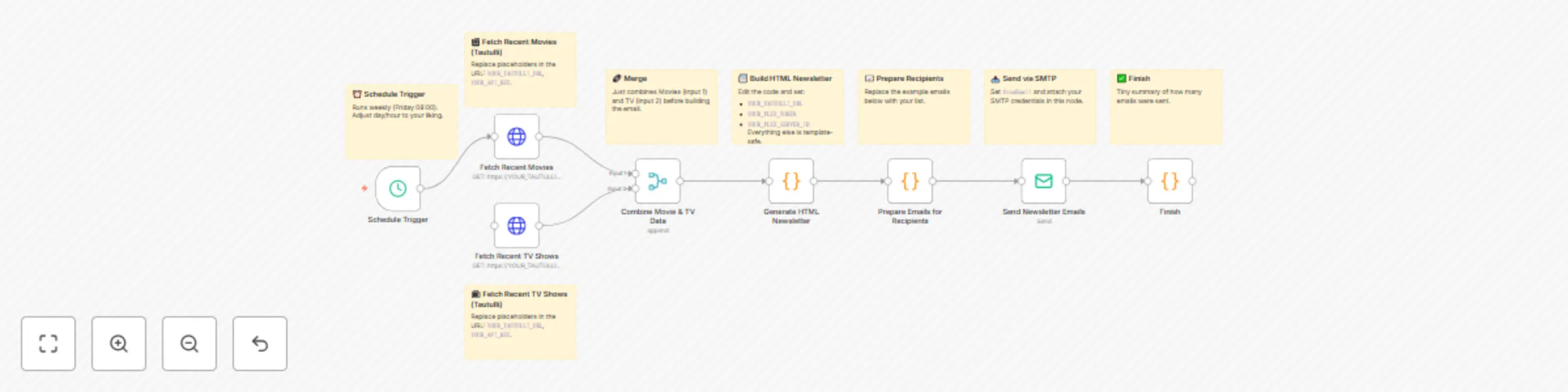
Workflow preview: Create a weekly responsive Plex Media newsletter via email (Tautulli alternative)
Free advanced

Create a weekly responsive Plex Media newsletter via email (Tautulli alternative)

📬 Plex Recently Added → Responsive Email Newsletter (Tautulli Alternative) What it is This workflow automatically creates a weekly Plex newsletter that highlights recently added Movies & TV Shows. It’s designed to be mobile-friendly and Gmail/iOS Mail compatible, making it easy to share Plex updates with friends, family, or your community. How it works • ⏰ Runs on a weekly schedule (customizable). • 🎬 Fetches recently added Movies & TV Shows from Tautulli API. • 📰 Builds a responsive HTML newsletter that works in Gmail, iOS Mail, and most clients. • 📧 Sends one personalized email per recipient via SMTP. • 🗒️ Every node has a Sticky Note explaining setup and purpose. How to set up 1. Replace the placeholders in the nodes with your own details: • YOUR_TAUTULLI_URL • YOUR_API_KEY • YOUR_PLEX_TOKEN • YOUR_PLEX_SERVER_ID 2. Update the recipient list in Prepare Emails for Recipients. 3. Add your SMTP credentials in Send Newsletter Emails. 4. (Optional) Customize the HTML/CSS in Generate HTML Newsletter. Requirements • Plex Media Server with Tautulli installed. • SMTP account (Gmail, custom domain, etc.). Customization • Change the schedule to daily/weekly as needed. • Edit the HTML template for your own branding. • Extend with additional nodes (Discord, Slack, etc.). ⸻ ⚡ Workflow Overview: ``⏰ Schedule Trigger → 🎬 Fetch Movies → 📺 Fetch TV → 🔗 Merge → 📰 Build HTML → 📧 Prepare Recipients → 📤 Send → ✅ Finish ``

W
WhySoSerious
Social Media
19 Aug 2025
596
0