Vishal Kumar
Workflows by Vishal Kumar
GitLab merge request review & risk analysis with Claude/GPT AI
## Trigger The workflow runs when a GitLab Merge Request (MR) is created or updated. ## Extract & Analyze It retrieves the code diff and sends it to Claude AI or GPT-4o for risk assessment and issue detection. ## Generate Report AI produces a structured summary with: - Risk levels - Identified issues - Recommendations - Test cases ## Notify Developers The report is: - Emailed to developers and QA teams - Posted as a comment on the GitLab MR ## Setup Guide ### Connect GitLab - Add GitLab API credentials - Select repositories to track ### Configure AI Analysis - Enter Anthropic (Claude) or OpenAI (GPT-4o) API key ### Set Up Notifications - Add Gmail credentials - Update the email distribution list ### Test & Automate - Create a test MR to verify analysis and email delivery ## Key Benefits - **Automated Code Review** – AI-driven risk assessment and recommendations - **Security & Compliance** – Identifies vulnerabilities before code is merged - **Integration with GitLab CI/CD** – Works within existing DevOps workflows - **Improved Collaboration** – Keeps developers and QA teams informed --- **Developed by Quantana**, an AI-powered automation and software development company.
Email summary agent
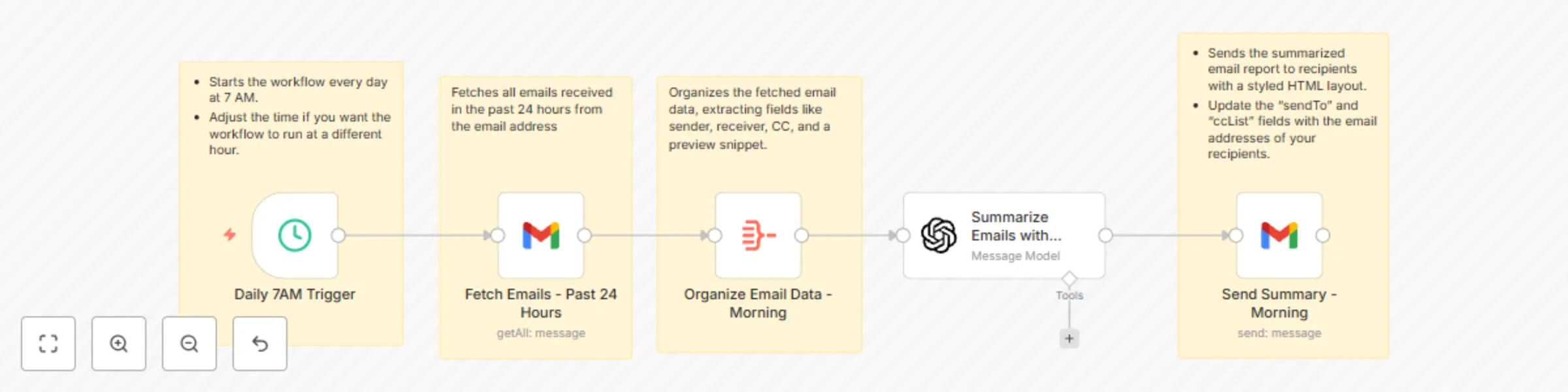
## Problem Teams often struggle with email overload, leading to missed actions and inefficient meeting preparation. ## Solution This workflow automates email management using n8n and AI. It fetches emails, summarizes key points and actions, and sends two concise updates—one in the morning and one at night. ## How It Works - Triggers at 7 AM and 9 PM: Automates the process to summarize emails received during specific time blocks. - Fetches Emails: Retrieves emails from the last 24 hours or after a specific time. - Summarizes with AI: Uses OpenAI to process the email content into actionable summaries. Sends Team Updates: Compiles the summaries into a concise, formatted email and sends it to the team. ## Expected Results Significant reduction in missed actions and follow-ups. ## Customizations Adjust timings, filters, and recipients to suit your team’s needs.
Ssl expiry alert with SSL-Checker.io
## Use Case Managing SSL certificates manually can be time-consuming and error-prone, often leading to unexpected downtime or security risks due to expired certificates. ## What This Workflow Does This workflow automatically monitors SSL certificates for a list of websites, checks their expiry status using SSL-Checker.io, and sends timely notifications if a certificate is about to expire. ## Setup Add your credentials for Google Sheets, Gmail, and SSL-Checker.io. Create a Google Sheet with a list of URLs for the websites you want to monitor. Configure the workflow to check the SSL status weekly. Set up email notifications to alert you when a certificate is close to expiry. Activate the workflow to automate monitoring and notification. ## How to Adjust It to Your Needs - Customize the URL Source: Replace Google Sheets with another data source like Airtable or CSV files. - Modify Notification Thresholds: Change the expiry threshold (e.g., notify for 14 days instead of 7). - Add Additional Actions: Integrate with tools like Slack or Teams for team-wide notifications. - Automate Renewal Requests: Add a step to send renewal requests directly to your SSL provider if a certificate is nearing expiry.