A

Aleksandr

1
Workflow

Workflows by Aleksandr

Workflow preview: Convert URL-encoded webhook data from amoCRM to structured array
Free beginner

Convert URL-encoded webhook data from amoCRM to structured array

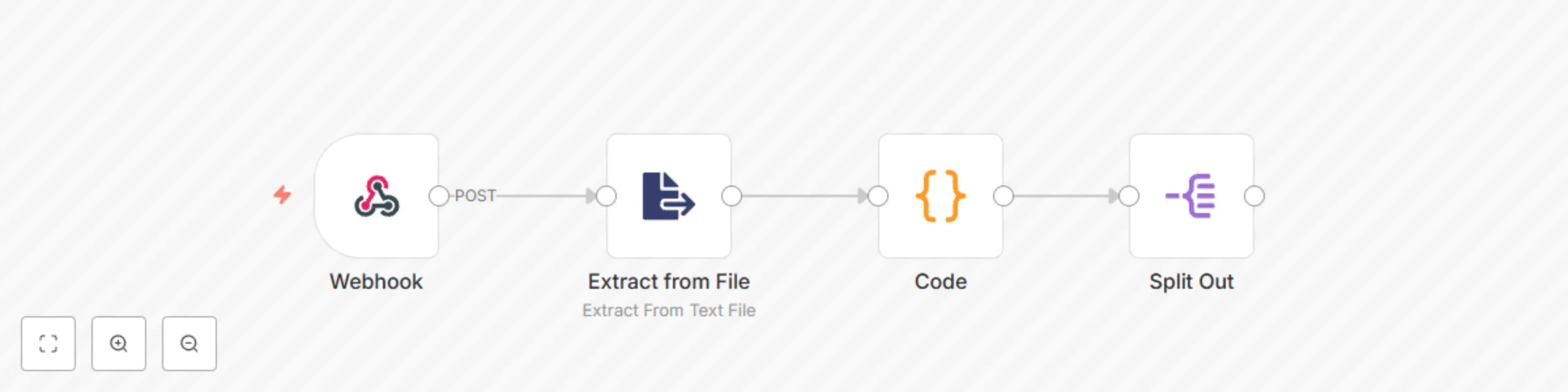
This template processes webhooks received from amoCRM in a URL-encoded format and transforms the data into a structured array that n8n can easily interpret. By default, n8n does not automatically parse URL-encoded webhook payloads into usable JSON. This template bridges that gap, enabling seamless data manipulation and integration with subsequent processing nodes. **Key Features:** - Input Handling: Processes URL-encoded data received from amoCRM webhooks. - Data Transformation: Converts complex, nested keys into a structured JSON array. - Ease of Use: Simplifies access to specific fields for further workflow automation. **Setup Guide:** - Webhook Trigger Node: Configure the Webhook Trigger node to receive data from amoCRM. - URL-Encoding Parsing: Use the provided nodes to transform the input URL-encoded data into a structured array. - Access Transformed Data: Use the resulting JSON structure for subsequent nodes in your workflow, such as filtering, updating records, or triggering external systems. **Example Data Transformation:** - Sample Input (URL-Encoded): The following input format is typically received from amoCRM: $json.body['leads[update][0][custom_fields][0][id]'] - Output (Structured JSON): After processing, the data is transformed into an easily accessible JSON array format: {{ $json.leads.update[‘0’].id }} This output allows you to work with clean, structured JSON, simplifying field extraction and workflow continuation. **Code Explanation:** This workflow parses URL-encoded key-value pairs using n8n nodes to restructure the data into a nested JSON object. By doing so, the template improves transparency, ensures data integrity, and makes further automation tasks straightforward.

A
Aleksandr
Personal Productivity
15 Nov 2024
334
0