Elie Kattar
Workflows by Elie Kattar
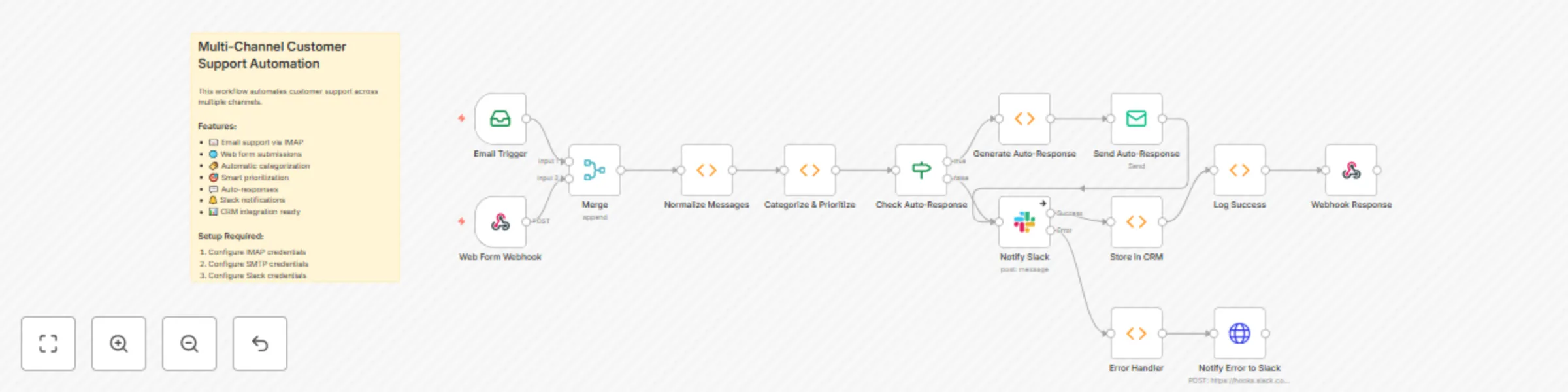
Multi-channel customer support automation suite
## Multi-Channel Customer Support Automation Suite **Transform your customer support operations with this enterprise-grade automation workflow that unifies, categorizes, and intelligently routes support tickets from multiple channels.** ### 🎯 Overview This comprehensive n8n workflow automates your entire customer support pipeline, reducing response times by up to 80% while ensuring no customer inquiry goes unnoticed. It seamlessly integrates email, web forms, and webhooks into a single, intelligent support system that works 24/7. ### 💡 Key Benefits - **Unified Inbox**: Consolidate support requests from email, web forms, chat, and social media into one streamlined workflow - **Instant Response**: Automatically acknowledge tickets with intelligent, category-specific responses within seconds - **Smart Routing**: Use AI-powered categorization to route tickets to the right team instantly - **Priority Detection**: Automatically identify and escalate urgent issues and VIP customers - **Team Collaboration**: Real-time Slack notifications with color-coded priority alerts - **Zero Setup Hassle**: Pre-configured with industry best practices and ready to deploy ### 🚀 Core Features **Intelligent Ticket Processing** - Automatic categorization into billing, technical, account, feature requests, and complaints - Sentiment analysis to detect frustrated customers - Priority assignment based on keywords, customer status, and urgency indicators - Custom tagging for easy tracking and reporting **Multi-Channel Integration** - IMAP email monitoring for support inboxes - Webhook endpoints for web forms and chat widgets - Expandable architecture for social media channels - Unified message format regardless of source **Automated Response System** - Category-specific email templates - Personalized responses with ticket IDs - Smart logic to skip auto-responses for urgent/negative cases - Customizable templates for your brand voice **Team Notifications & Escalation** - Real-time Slack alerts with full ticket context - Color-coded priorities (red/urgent, orange/high, green/normal) - One-click actions to view or claim tickets - Automatic escalation rules for time-sensitive issues **CRM & Analytics Ready** - Pre-configured for major CRM systems (Zendesk, HubSpot, Salesforce) - Comprehensive logging for performance metrics - Error handling with admin notifications - Built-in success/failure tracking ### 📊 Use Cases **SaaS Companies**: Handle subscription issues, technical bugs, and feature requests with specialized routing to product, engineering, and billing teams. **E-commerce**: Manage order inquiries, shipping issues, and returns while maintaining high customer satisfaction scores. **Agencies**: Provide white-label support services with customizable branding and client-specific routing rules. **Startups**: Scale support operations without hiring additional staff by automating 70% of routine inquiries. ### 🛠️ Technical Specifications - **Channels Supported**: Email (IMAP), Web Forms, Webhooks, expandable to social media - **Response Time**: < 2 seconds for auto-responses - **Categorization Accuracy**: 85%+ with keyword matching, 95%+ with AI enhancement - **Scalability**: Handles 1,000+ tickets/day on standard n8n infrastructure - **Integration Ready**: Slack, all major CRMs, SMTP, custom APIs ### 💰 ROI & Impact Typical results from implementing this workflow: - **80% reduction** in first response time - **60% decrease** in ticket handling time - **40% of tickets** resolved automatically - **95% customer satisfaction** for auto-responded tickets - **Save 20+ hours/week** of manual ticket sorting ### 🎁 What's Included - Complete n8n workflow JSON (ready to import) - 5 pre-configured auto-response templates - Intelligent categorization rules for common support scenarios - Priority detection algorithms - Slack notification formatting - Error handling and recovery logic - Setup documentation and customization guide ### 🔧 Requirements - n8n instance (self-hosted or cloud) - Email account with IMAP/SMTP access - Slack workspace (for notifications) - CRM system (optional but recommended) ### 🚦 Quick Setup 1. Import the workflow JSON 2. Configure email and Slack credentials 3. Customize auto-response templates 4. Connect your CRM 5. Go live in under 30 minutes **Perfect for businesses handling 50-5,000 support tickets monthly who want to deliver exceptional customer service while reducing operational costs.**
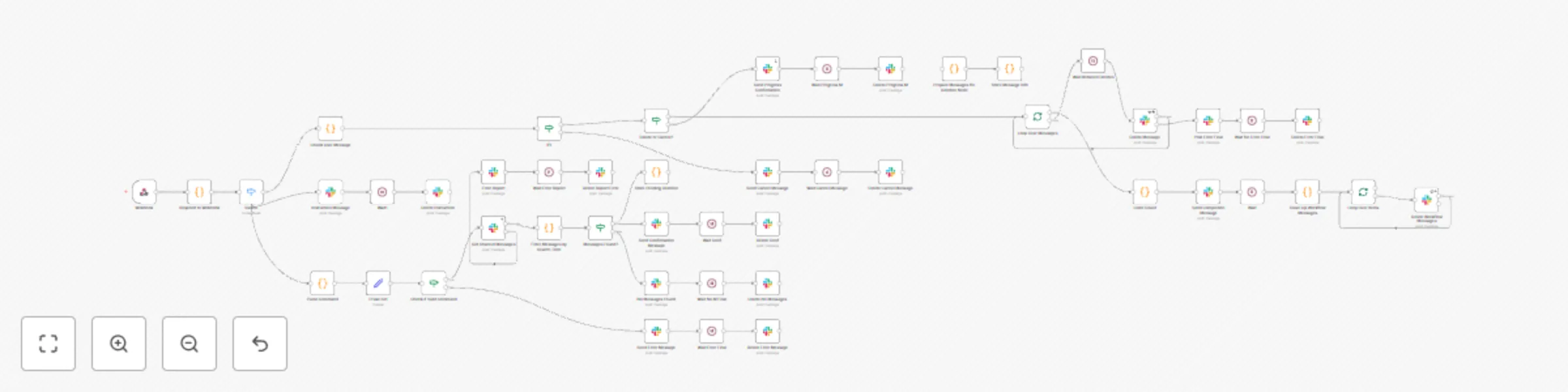
Bulk delete Slack messages with smart filtering and confirmations
# 🧹 Jedi Cleaner for Slack ## ❌ Slack's Limitation Slack lacks a native bulk delete feature. Users must delete messages manually, which is time-consuming and inefficient for large volumes. ## ✅ Our Solution **Jedi Cleaner** automates Slack message deletion using smart filters, safety confirmations, and enterprise-grade reliability. --- ## 🚀 Key Features & Capabilities ### ⚡ Lightning-Fast Bulk Operations * Delete hundreds of messages in minutes * Intelligent rate limiting prevents API throttling * Auto-retry on failure ensures reliable operation ### 🎯 Smart Message Filtering * **Keyword match** – Find messages with specific terms * **User mentions** – Target messages that mention specific users * **Exact phrases** – Use quotes for precision * **Bot/User content** – Handle mixed sources seamlessly --- ## 🛡️ Enterprise-Grade Safety * **Confirmation workflow** – No accidental deletions * **Timeout** – Requests expire after 5 minutes * **Preview-first** – Review messages before deletion * **Granular control** – Choose exactly what to delete --- ## 🔍 Intelligent Search & Preview * Flexible filters (words, phrases, patterns) * Preview + count before deletion * Multi-channel support with context isolation ## 📊 Complete Workflow Management * Auto-cleanup of bot messages after execution * Real-time progress tracking * Debug logs and audit trail * Static data persistence and cleanup --- ## 🧪 How It Works ### Phase 1: Search Request ```plaintext User: /cleanup "error messages" Bot Response: 🔍 Found 15 messages containing "error messages" 📊 Breakdown: • Will be permanently deleted • Cannot be undone • Respond within 5 minutes ✅ Type: @cleaner_jedi yes ❌ Type: @cleaner_jedi cancel ``` ### Phase 2: User Confirmation ```plaintext User: @cleaner_jedi yes Bot: 🗑️ Deleting 15 messages containing "error messages" ``` ### Phase 3: Completion ```plaintext ✅ Cleanup Complete • 15 messages deleted • Channel cleaned • Auto-deletes this message in 5 seconds ``` --- ## 🛠️ Technical Architecture ### Core Components * **Unified Webhook Handler** Handles slash commands & mentions, deduplicates events * **Search Engine** Integrates Slack API, parses & filters search terms * **Safety & Confirmation System** Temporary storage, expiration logic, user auth * **Bulk Operations Engine** Message deletion, progress tracking, error handling * **Cleanup & Memory Management** Deletes bot messages, static data cleanup --- ## 📱 User Commands | Command | Description | Example | | ---------------------- | ----------------------------------- | -------------------------- | | `/cleanup [term]` | Search messages containing `[term]` | `/cleanup "webhook error"` | | `@cleaner_jedi yes` | Confirm deletion | After preview | | `@cleaner_jedi cancel` | Cancel pending deletion | Cancels active request | ### 🧩 Edge Cases | Scenario | Bot Response | | -------------------- | ---------------------------------------------- | | No messages found | "No messages found containing '\[term]'" | | Expired confirmation | "Request expired. Please run /cleanup again" | | No pending request | "No pending cleanup found. Run /cleanup first" | | Invalid search term | "Please provide a valid search term" | --- ## ⚙️ Setup Requirements ### Slack App Configuration **OAuth Scopes:** ```plaintext ✅ chat:write ✅ chat:write.public ✅ channels:history ✅ groups:history ✅ app_mentions:read ✅ commands ``` **Event Subscriptions:** ```plaintext ✅ app_mention ✅ message.channels ``` **Slash Command:** ```plaintext Command: /cleanup URL: https://your-n8n.app.cloud/webhook/cleanerjedi Hint: [search term] ``` ### n8n Workflow Setup Required Nodes: * **Webhook Trigger** – Captures Slack events * **Respond to Webhook** – Handles routing * **Switch Node** – Event type routing * **Slack API Nodes** – Search, delete, notify * **JavaScript Nodes** – Logic & validation --- ## ⚡ Advanced Features ### 🧠 Intelligent Deduplication ```javascript eventId = `cmd_${body.command}_${body.user_id}_${body.trigger_id}`; if (staticData.recentEvents.includes(eventId)) { return []; // Skip duplicate } ``` ### 🔍 Flexible Search Terms * **Single words:** `test` * **Phrases:** `"error message"` * **Special characters:** `webhook-failed` * Case-insensitive by default ### ♻️ Auto-Cleanup ```javascript setTimeout(() => { deleteMessage(completionMessage.ts); deleteMessage(progressMessage.ts); }, 5000); ``` ### 🧠 Storage Management * Temp storage for requests * Auto-expiry cleanup * Memory-safe event trimming --- ## 📊 Error Handling & Logging ### Error Scenarios ```plaintext ❌ Invalid term ⏰ Expired request 🚫 Access denied ⚠️ Rate limit hit ``` ### Debugging & Monitoring * Event IDs, timestamps * Key-value storage info * API response codes --- ## ✅ Usage Examples ### Example 1: Delete Error Messages ```plaintext /cleanup "error" → Bot: Found 23 messages → @cleaner_jedi yes → ✅ Deleted 23 messages ``` ### Example 2: Cancel Midway ```plaintext /cleanup "from:@john" → Bot: Found 8 messages → @cleaner_jedi cancel → ❌ Operation cancelled ``` ### Example 3: Search by Date ```plaintext /cleanup "2024-01-15" → Bot: Found 12 messages → @cleaner_jedi yes → ✅ 12 messages deleted ``` --- ## 🔒 Security & Safety * ✅ **User confirmation required** * ✅ **5-minute time limits** * ✅ **Permission-aware deletions** * ✅ **Audit trail logging** --- ## 🚀 Performance Optimizations * Minimal webhook/API usage * Batch deletion * Cached recent events **Memory Handling:** * Temp data cleanup * Key expiration * Cache trimming --- ## 📈 Monitoring & Analytics ### Metrics Tracked * Messages per operation * User response times * Failure & error rates * Storage performance ### Logging ```javascript console.log('✅ SUCCESS:', operationDetails); console.warn('⚠️ WARNING:', warningDetails); console.error('❌ ERROR:', errorDetails); console.info('ℹ️ INFO:', informationDetails); ``` --- ## 🎉 Summary ### For Users * ✅ Simple commands * ✅ Preview + safety * ✅ Fast processing * ✅ Clear status feedback ### For Admins * ✅ Lower API load * ✅ Full logging * ✅ Resilient to errors * ✅ Lightweight memory footprint ### For Developers * ✅ Modular, clean code * ✅ Well-documented * ✅ Scalable & robust * ✅ Easy to extend --- PDF how to do Document Included