J

Jason Krol

3
Workflows

Workflows by Jason Krol
Workflow preview: Create Notion tasks from Telegram messages with GPT-3.5
Free intermediate

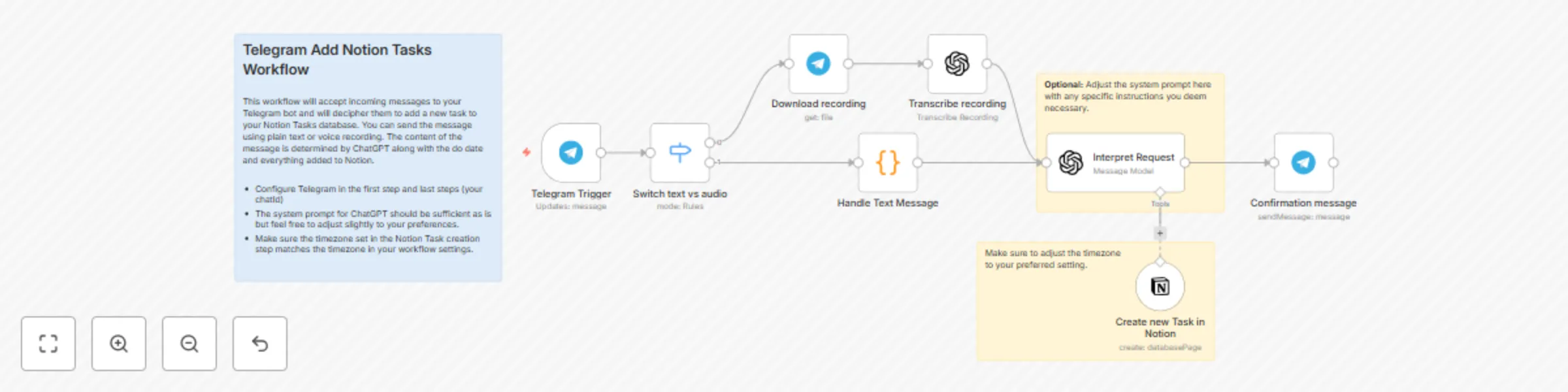
Create Notion tasks from Telegram messages with GPT-3.5

Using the power and ease of Telegram, send a simple text or audio message to a bot with a request to add a new Task to your Notion Tasks database. ## How it works ChatGPT is used to transacribe the audio or text message, parse it, and determine the title to add as a new Notion Task. You can optionally include a "do date" as well and ChatGPT will include that when creating the task. Once complete you will receive a simple confirmation message back. ### Minimal Setup Required Just follow n8n's instructions on how to connect to Telegram and create your own chatBot, provide the chatID in the 2 Telegram nodes, and you're finished! A few optional settings include tweaking the ChatGPT system prompt (unnecessary) and the timezone for your Notion Task(s).

J
Jason Krol
Personal Productivity
7 Aug 2025
604
0
Workflow preview: Weekly Notion journal & task summarization with GPT-4.1 to Discord
Free advanced

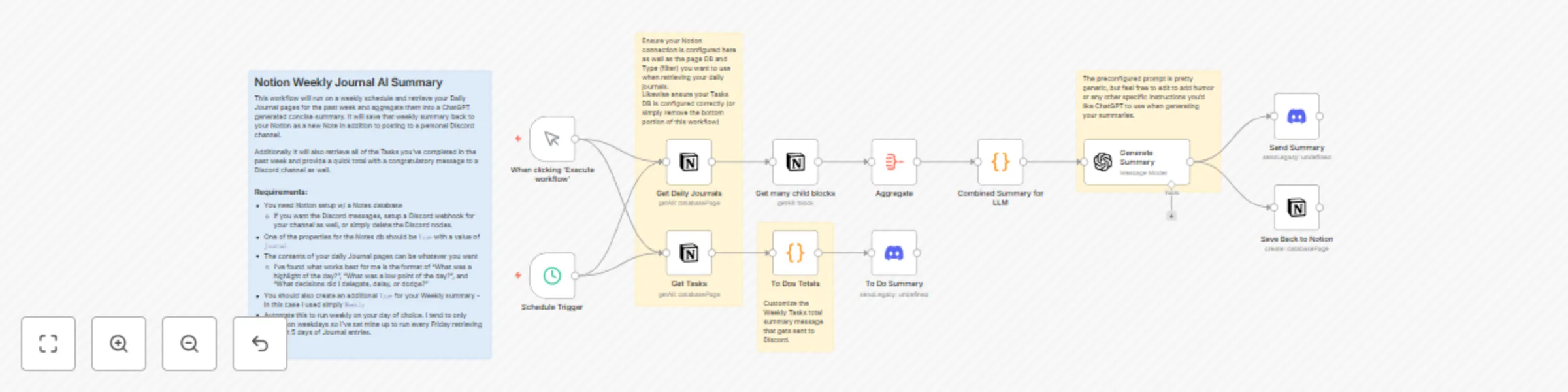
Weekly Notion journal & task summarization with GPT-4.1 to Discord

## Notion Weekly Journal AI Summary This workflow will run on a weekly schedule and retrieve your Notion Daily Journal pages for the past week and aggregate them into a ChatGPT generated concise summary. It will save that weekly summary back to your Notion as a new Note in addition to posting to a personal Discord channel. Additionally it will also retrieve all of the Tasks you've completed in the past week and provide a quick total with a congratulatory message to a Discord channel as well. ### Requirements/Setup: - You need Notion setup w/ a Notes database - If you want the Discord messages, setup a Discord webhook for your channel as well, or simply delete the Discord nodes. - One of the properties for the Notes db should be `Type` with a value of `Journal` - The contents of your daily Journal pages can be whatever you want - I've found what works best for me is the format of "What was a highlight of the day?", "What was a low point of the day?", and "What decisions did I delegate, delay, or dodge?" - You should also create an additional `Type` for your Weekly summary page that gets created - in this case I used simply `Weekly` - Automate this to run weekly on your day of choice. I tend to only journal on weekdays so I've set mine up to run every Friday retrieving the past week's Journal entries. ### Options: - You don't have to use Discord, feel free to swap out with Slack or remove altogether. - You also don't need to use the Tasks summary bottom half, simply remove that if you don't want it or need it. - You can easily reuse this workflow to aggregate your Weekly Summary notes (that this workflow auto generates/saves) to generate a Quarterly or even Yearly summary!

J
Jason Krol
Personal Productivity
6 Aug 2025
299
0
Workflow preview: Send daily 4K Bluray preorder updates from Blu-ray.com to Discord
Free intermediate

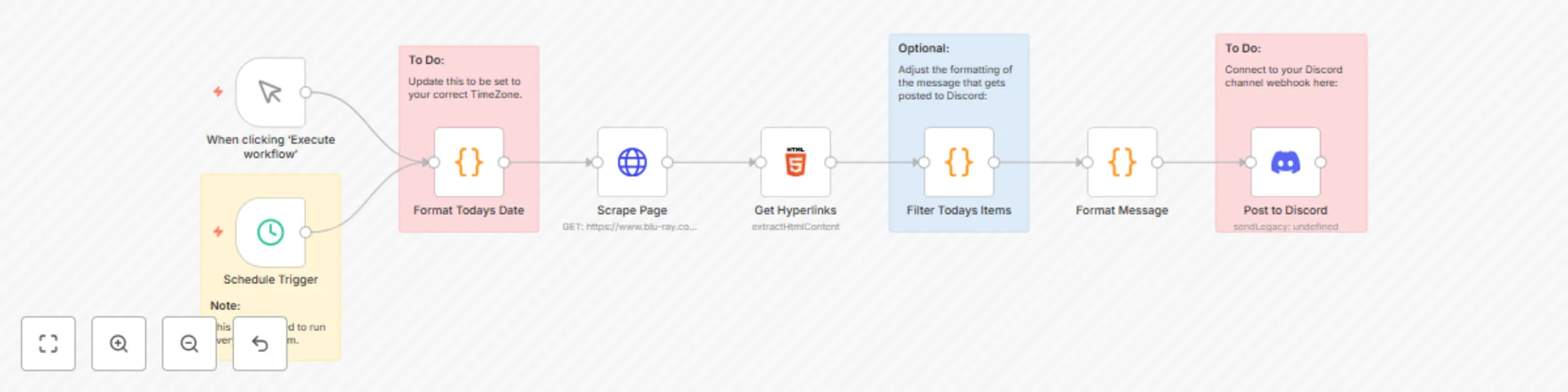
Send daily 4K Bluray preorder updates from Blu-ray.com to Discord

This is a simple webpage scraper that specifically grabs today's newest 4K Bluray Preorders as listed on the Blu-ray.com website. This is a scheduled workflow that can run every day and will post a formatted summary message of links to a Discord channel of your choice. ## Minimal setup required: - Just create a webhook for the channel you want posted to in Discord and provide that in the final step. - The timezone format step is set to East Coast (NYC) by default, feel free to change. - No API keys or any special configuration needed (beyond your Discord webhook) - Feel free to customize the formatting of the message that gets posted 👍 ## How it works: - First format todays date to match the formatting used on the website - Grab the HTML for the preorders page at www.blu-ray.com - Filter only the hyperlinks for each Bluray on the page - Then further filter only those with an html header matching today's date - Format how you want the message to be sent to your Discord channel (in this case a simple list of Hyperlinks for each Title) - Send to Discord! ## Disclaimer: - **This should be only for personal use.** - The links go back to the blu-ray.com website, which is a good thing! - Don't abuse this by slamming their site with some crazy level of automation frequency. - Support the blu-ray.com website by using their affiliate links whenever you do want to preorder a title ;) - This is one of my first shared templates, so it may not be super optimal or perfect but it works for my needs and hopefully you'll find some use out of it! - Discord currently has a 2000 character limit on webhook messages. Some of the messages may get truncated as a result.

J
Jason Krol
Market Research
2 Aug 2025
161
0