S

Shahzaib Anwar

1
Workflow

Workflows by Shahzaib Anwar

Workflow preview: Process Shopify lead emails from Gmail to HubSpot contacts and deals
Free advanced

Process Shopify lead emails from Gmail to HubSpot contacts and deals

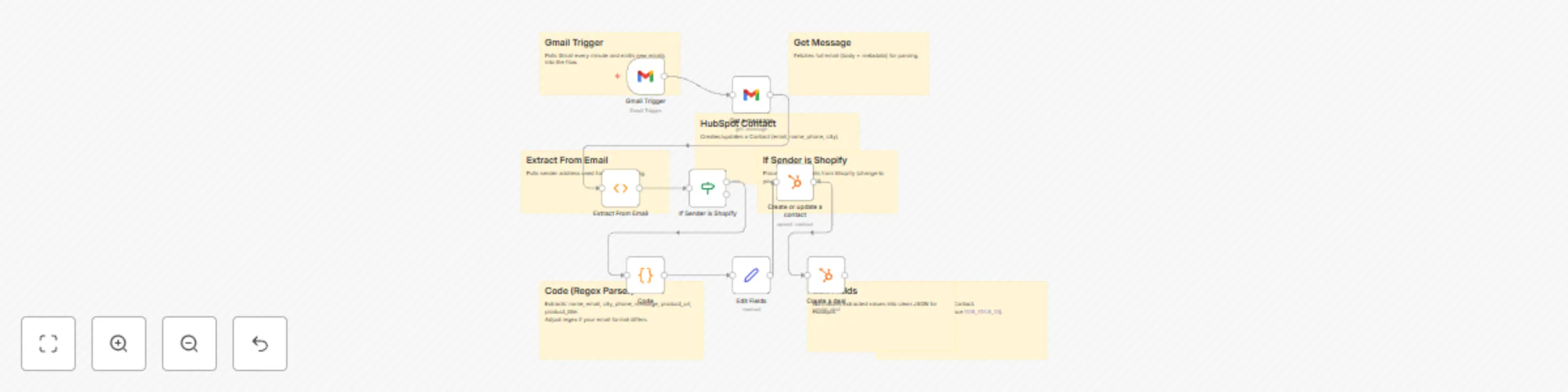
## 📌 Overview This workflow automatically processes incoming **Shopify/Gmail leads** and pushes them into **HubSpot** as both **Contacts** and **Deals**. It helps sales and marketing teams **capture leads instantly**, enrich CRM data, and avoid missed opportunities. --- ## ⚡ How it works 1. **Trigger**: Watches for new emails in Gmail. 2. **Extract Data**: Parses email body (Name, Email, City, Phone, Message, Product URL/Title). 3. **Condition**: Checks if sender is Shopify before processing. 4. **HubSpot**: - Creates/updates a **Contact** with customer details. - Creates a **Deal** associated with that contact. --- ## 🎯 Benefits - 📥 Automates lead capture → CRM - 🚫 Eliminates manual copy-paste from Gmail - 🔄 Real-time sync between Gmail and HubSpot - 📈 Improves sales follow-up speed and accuracy --- ## 🛠 Setup Steps 1. Import this workflow into your **n8n instance**. 2. Connect your **Gmail** and **HubSpot** credentials. 3. Replace the HubSpot **Deal Stage ID** with your own pipeline stage. 4. (Optional) Adjust the **Code Node regex** if your email format differs. 5. Activate the workflow and test with a sample lead email. --- ## 📝 Example Email Format Name: John Doe Email: [email protected] City: London Phone: +44 7000 000000 Body: Interested in product Product Url: https://example.com/product Product Title: Sample Product sticky_notes: - name: Gmail Trigger note: > 📧 Watches for new emails in Gmail. Polls every minute and passes email data into the flow. - name: Get a Message note: > 📩 Fetches the full Gmail message content (body + metadata) for parsing. - name: Extract From Email note: > 🔍 Extracts the sender’s email address from Gmail to identify the source. - name: If Sender is Shopify note: > ✅ Condition node that ensures only Shopify-originated emails/leads are processed. - name: Code Node (Regex Parser) note: > 🧾 Parses the email body using regex to extract Name, Email, City, Phone, Message, Product URL, and Title. - name: Edit Fields (Set Node) note: > 📝 Cleans and structures the extracted fields into proper JSON format before sending to HubSpot. - name: HubSpot → Create/Update Contact note: > 👤 Creates or updates a HubSpot Contact with the extracted lead details. - name: HubSpot → Create Deal note: > 💼 Creates a HubSpot Deal linked to the Contact, including campaign/product information.

S
Shahzaib Anwar
Lead Generation
16 Sep 2025
73
0