R

Roshan Ramani

26
Workflows

Workflows by Roshan Ramani

Workflow preview: Monitor viral Reddit posts and send GPT-4o-mini summaries to Telegram
Free advanced

Monitor viral Reddit posts and send GPT-4o-mini summaries to Telegram

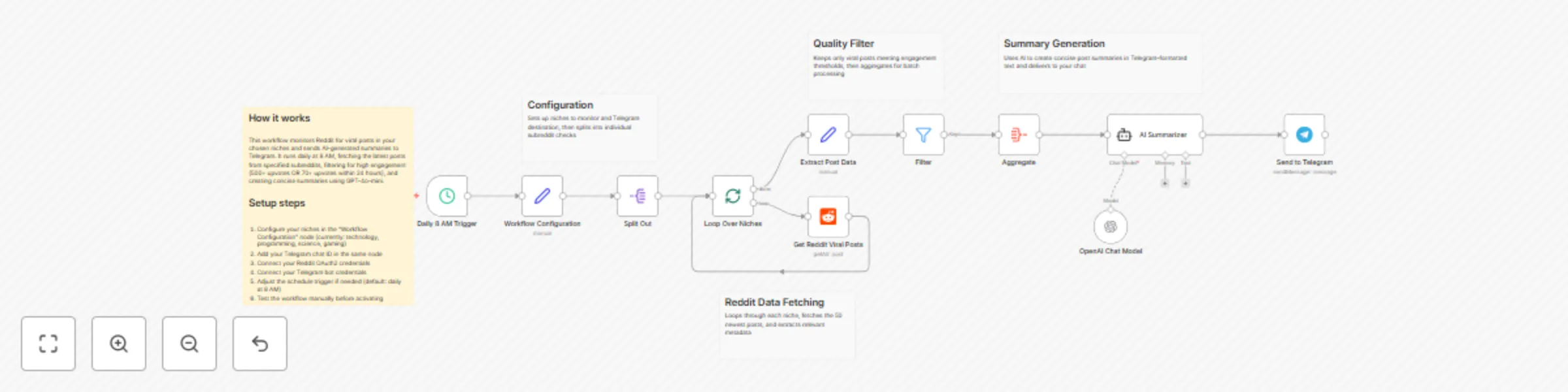
## Who's it for This workflow is perfect for: - Content creators who need to stay on top of trending topics - Marketers tracking industry discussions and competitor mentions - Community managers monitoring relevant subreddits - Researchers gathering trending content in specific niches - Anyone who wants curated Reddit updates without manual browsing ## What it does This automated workflow: - Monitors multiple subreddits for viral posts daily - Filters posts based on engagement metrics (upvotes and recency) - Generates concise AI summaries of trending content - Delivers formatted updates directly to your Telegram chat - Runs completely hands-free once configured ## How it works **Step 1: Configuration & Scheduling** - Triggers daily at 8 AM (customizable) - Loads your configured subreddit niches and Telegram settings **Step 2: Data Collection** - Loops through each subreddit in your niche list - Fetches the 50 newest posts from each subreddit - Extracts key data: title, URL, upvotes, timestamp, subreddit name **Step 3: Smart Filtering** - Applies viral post criteria: - Posts with 500+ upvotes, OR - Posts with 70+ upvotes created within the last 24 hours - Ensures only high-engagement content passes through **Step 4: AI Summarization** - Aggregates all filtered posts into a single batch - Sends to GPT-4o-mini for analysis - Generates concise 100-200 word summaries - Formats output for Telegram markdown **Step 5: Delivery** - Sends all summaries to your Telegram chat - Includes post links and engagement metrics - Delivers in a clean, readable format ## Setup steps **1. Configure Reddit credentials** - Connect your Reddit OAuth2 API credentials in the "Get Reddit Viral Posts" node - Ensure you have API access enabled on your Reddit account **2. Configure Telegram credentials** - Add your Telegram bot token in the "Send to Telegram" node - Get your chat ID by messaging your bot and checking updates **3. Customize your niches** - Open the "Workflow Configuration" node - Edit the niches array with your target subreddits - Default niches: technology, programming, science, gaming **4. Set your Telegram chat ID** - Replace the default chat ID (7917193308) in "Workflow Configuration" - Use your personal chat ID or group chat ID **5. Adjust the schedule (optional)** - Modify the "Daily 8 AM Trigger" to your preferred time - Change frequency if you want multiple updates per day **6. Test before activating** - Run the workflow manually using the "Test workflow" button - Verify summaries arrive in Telegram correctly - Check that filtering logic works as expected ## Requirements **Required credentials:** - Reddit OAuth2 API access (free) - Telegram bot token (free via @BotFather) - OpenAI API key for GPT-4o-mini (paid) **Platform requirements:** - n8n instance (self-hosted or n8n Cloud) - Active internet connection - Sufficient API rate limits for your usage **Technical knowledge:** - Basic understanding of n8n workflows - Ability to generate API credentials - Familiarity with Telegram bots (helpful but not required) ## How to customize **Adjust subreddit monitoring:** - Add or remove subreddits in the niches array - Format: `["subreddit1", "subreddit2", "subreddit3"]` - Example: `["machinelearning", "datascience", "artificial"]` **Modify viral post criteria:** - Edit the "Filter" node conditions - Change upvote thresholds (default: 500+ or 70+ within 24h) - Adjust time window for recency checks **Customize AI summaries:** - Update the system prompt in "AI Summarizer" node - Change summary length (default: 100-200 words) - Modify tone, style, or focus areas - Switch to different OpenAI models if needed **Change scheduling:** - Modify trigger time in "Daily 8 AM Trigger" - Options: hourly, twice daily, weekly, custom cron - Consider API rate limits when increasing frequency **Adjust data collection:** - Change the limit parameter in "Get Reddit Viral Posts" - Default: 50 posts per subreddit - Higher limits = more comprehensive but slower execution **Enhance filtering logic:** - Add additional criteria (comments count, awards, etc.) - Create category-specific thresholds - Filter by post type (text, link, image) **Format Telegram output:** - Modify parse_mode in "Send to Telegram" node - Options: Markdown, HTML, or plain text - Customize message structure and styling

R
Roshan Ramani
Market Research
3 Jan 2026
103
0
Workflow preview: Generate professional product advertisements with Nano Banana Pro via Telegram
Free advanced

Generate professional product advertisements with Nano Banana Pro via Telegram

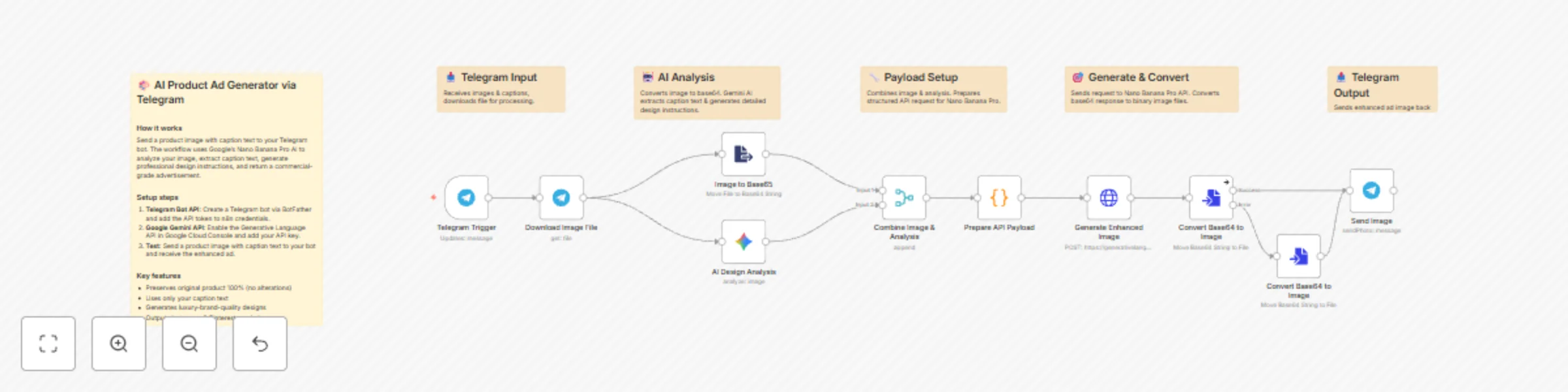
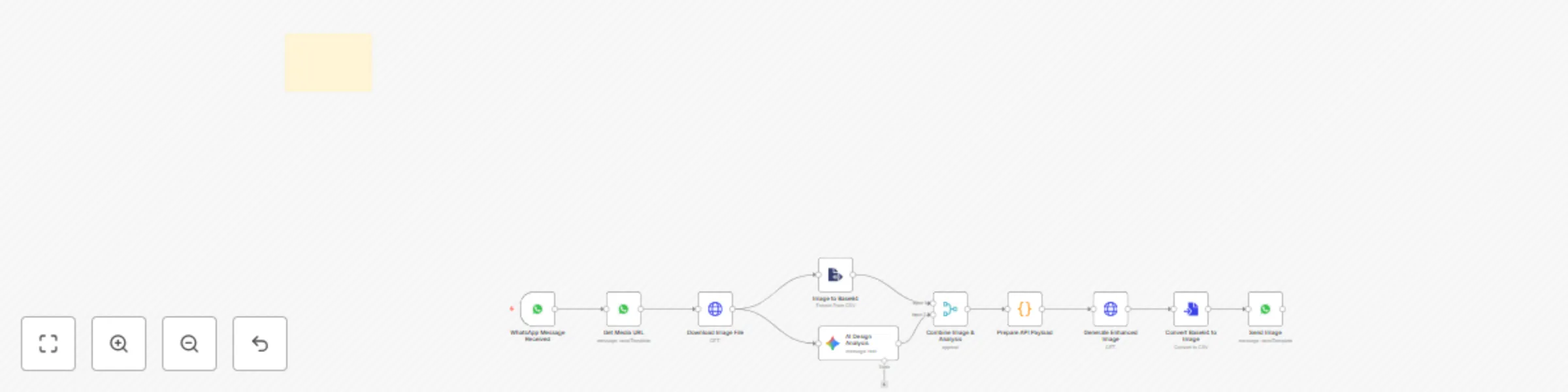
# Nano Banana Pro AI Product Advertisement Generator via Telegram ## Who's It For - E-commerce businesses needing quick product ads - Social media marketers without design resources - Small business owners creating promotional content - Product photographers seeking automated enhancements ## What It Does Transforms basic product photos into professional advertisements using AI. Users send a product image with caption text via Telegram, and receive commercial-grade ads with studio lighting, premium backgrounds, and typography overlays. ## How It Works - User sends product photo with caption to Telegram bot - Image converted to base64 for AI processing - Google Gemini analyzes image and extracts marketing text from caption - AI generates detailed design enhancement instructions (400+ words) - Nano Banana Pro creates 1-2 professional advertisement versions - Enhanced images automatically sent back to user ## Requirements - Telegram Bot API credentials (via BotFather) - Google Gemini API key with nano-banana-pro-preview access - n8n instance (self-hosted or cloud) ## Setup Instructions ### Create Telegram Bot - Message BotFather on Telegram - Send `/newbot` command and follow prompts - Copy the API token ### Configure n8n Credentials - Add Telegram Bot API token - Add Google Gemini API key - Import workflow JSON - Update credential references - Activate workflow ### Test the Workflow Send image with caption format: `"Product Name | Tagline | Call to Action"` Example: `"Premium Sneakers | Mountain Edition | Shop Now"` ## Key Features - Original product remains 100% unchanged - Text extracted only from user's caption (no AI-generated taglines) - Professional design enhancements applied - Studio-quality lighting and color grading - Luxury background selection based on product category - Typography overlays using caption text - 30-60 second processing time - Returns 1-2 advertisement variants ## Node Breakdown **Telegram Trigger** - Listens for messages with images **Download Image File** - Retrieves image from Telegram servers **Image to Base64** - Converts image for AI processing **AI Design Analysis** - Gemini extracts caption text and generates design blueprint covering composition, lighting, backgrounds, color grading, effects, and typography **Combine Image & Analysis** - Merges image data with design instructions **Prepare API Payload** - Structures data for Nano Banana Pro API **Generate Enhanced Image** - Creates professional ad using AI **Convert Base64 to Image** - Converts first generated ad to file **Convert Base64 to Image1** - Converts second ad variant (if available) **Send Image** - Returns enhanced ads to user via Telegram ## Customization Options ### Adjust Design Style Modify AI Design Analysis prompt to change lighting intensity, background preferences, color grading, or typography styles ### Change Caption Parsing Update extraction rules for different text elements or multi-language support ### Add Output Formats Request different aspect ratios (16:9 social media, 4:5 Instagram, 9:16 Stories) ### Error Handling Add fallback nodes to handle image generation failures ### Usage Analytics Insert database node to track requests and caption data ## Caption Examples `"NIKE AIR MAX | Run Beyond Limits | Shop Now"` `"Himalayan Coffee Beans - Fresh from the Mountains - Order Today"` `"Luxury Smartwatch | Track Your Success | Available Now"` ## Important Notes - Product never altered, only enhanced visually - Empty captions result in ads without text overlays - Best with clear photos on simple backgrounds - Monitor API quotas to avoid rate limits - Processing time varies by API response speed

R
Roshan Ramani
Content Creation
3 Dec 2025
450
0
Workflow preview: AI-powered company documents Q&A assistant with Google Drive and GPT-4 mini
Free advanced

AI-powered company documents Q&A assistant with Google Drive and GPT-4 mini

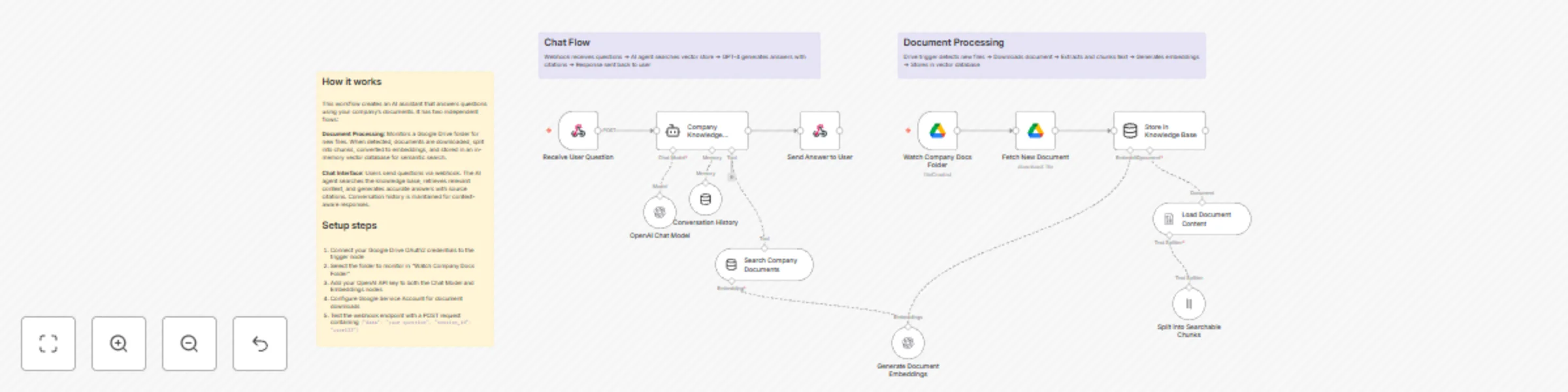
# Company Knowledge Base Assistant ## Who's it for This workflow is designed for companies looking to onboard new employees and interns efficiently. It's perfect for HR teams, team leaders, and organizations that want to provide instant access to company knowledge without manual intervention. Whether you're a startup or an established company, this assistant helps your team find answers quickly from your existing documentation. ## What it does This AI-powered chatbot automatically learns from your company documents stored in Google Drive and provides accurate, contextual answers to employee questions. The system continuously monitors a designated Drive folder, processes new documents, and makes them instantly searchable through a conversational interface. Key features: - Automatic document ingestion from Google Drive - Intelligent search across all company documents - Conversational interface with memory - Source citation for answers - Real-time updates when new documents are added ## How it works The workflow has two main components: **Document Processing Pipeline**: Monitors your Google Drive folder every minute for new files. When a document is added, it's automatically downloaded, split into searchable chunks, converted into vector embeddings, and stored in an in-memory knowledge base. **Chat Interface**: Users send questions via webhook, the AI agent searches the knowledge base for relevant information, maintains conversation history for context, and returns accurate answers with source citations. ## Requirements - Google Drive account with OAuth2 credentials - Google Service Account for document downloads - OpenAI API key for embeddings and chat model - Designated Google Drive folder for company documents ## Setup Instructions 1. **Configure Google Drive**: - Set up Google Drive OAuth2 credentials in the "Watch Company Docs Folder" node - Set up Google Service Account credentials in the "Fetch New Document" node - Select your company documents folder in the trigger node 2. **Configure OpenAI**: - Add your OpenAI API key to both embedding nodes - The workflow uses GPT-4 Mini for cost-effective responses 3. **Upload Your Documents**: - Add company handbooks, policies, procedures, and FAQs to the designated Drive folder - Documents will be automatically processed within minutes 4. **Test the Chat Interface**: - The webhook endpoint accepts POST requests with this format: ```json { "data": "Your question here", "session_id": "unique-user-id" } ``` 5. **Integrate with Your Tools**: - Connect the webhook to Slack, Teams, or your internal chat platform - Each user gets their own conversation history via session_id ## How to customize - **Change check frequency**: Adjust polling interval in "Watch Company Docs Folder" from every minute to hourly or daily - **Adjust chunk size**: Modify the "Split into Searchable Chunks" node to change how documents are segmented - **Increase context**: Change `topK` parameter in "Search Company Documents" to retrieve more relevant sections - **Extend memory**: Adjust `contextWindowLength` in "Conversation History" to remember more previous messages - **Switch AI model**: Replace GPT-4 Mini with GPT-4 or other models based on your accuracy needs - **Add filters**: Modify the system prompt to focus on specific departments or document types - **Custom responses**: Update the system message in "Company Knowledge Assistant" to match your company's tone ## Tips for best results - Use clear, descriptive file names for documents in Drive - Organize documents by department or topic in subfolders - Include FAQ documents with common questions and answers - Regularly update outdated documents to maintain accuracy - Monitor the assistant's responses and refine the system prompt as needed ---

R
Roshan Ramani
Internal Wiki
18 Nov 2025
127
0
Workflow preview: Reddit post finder with Google Gemini summarization via Telegram
Free advanced

Reddit post finder with Google Gemini summarization via Telegram

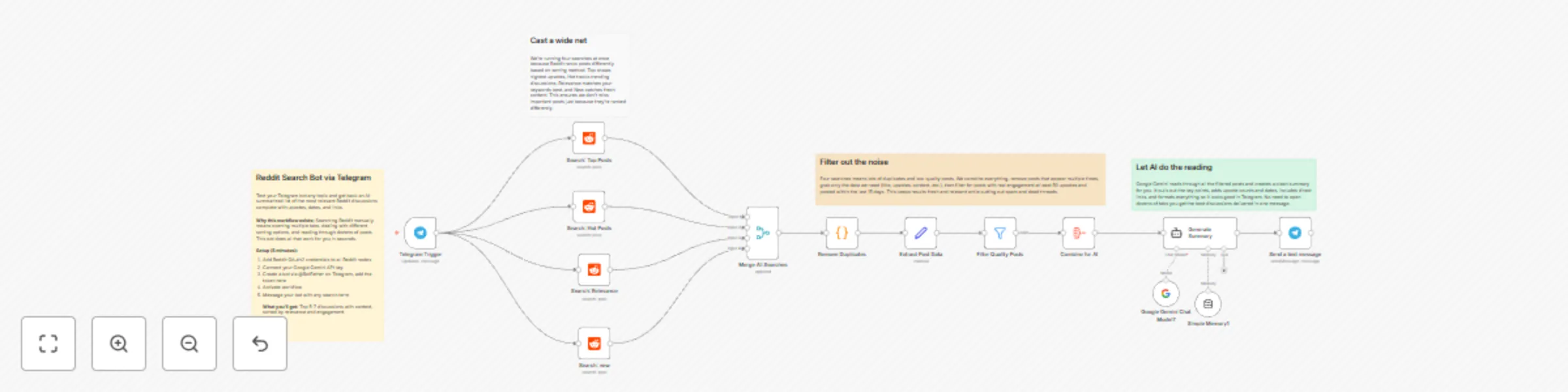
## Who's it for This template is perfect for content creators, researchers, marketers, and Reddit enthusiasts who want to stay updated on specific topics without manually browsing Reddit. If you need curated, AI-summarized Reddit insights delivered directly to your Telegram, this workflow automates the entire process. ## What it does This workflow transforms your Telegram into a powerful Reddit search engine with AI-powered curation. Simply send any keyword to your Telegram bot, and it will: - Search Reddit across 4 different sorting methods (top, hot, relevance) to capture diverse perspectives - Automatically remove duplicate posts from multiple search results - Filter posts based on quality metrics (minimum 50 upvotes, recent content within 15 days, non-empty text) - Extract key information: title, upvotes, subreddit, publication date, URL, and content - Generate a clean, Telegram-formatted summary using Google Gemini AI - Deliver structured results with direct links back to you instantly The AI summary includes post titles, upvote counts, timestamps, brief insights, and direct Reddit links—all formatted for easy mobile reading. ## How it works **Step 1: Telegram Trigger** User sends a search keyword via Telegram (e.g., "voice AI agents") **Step 2: Parallel Reddit Searches** Four simultaneous Reddit API calls search with different sorting algorithms: - Top posts (all-time popularity) - Hot posts (trending now) - Relevance (best keyword matches) - Top posts (duplicate for broader coverage) **Step 3: Merge & Deduplicate** All search results combine into one stream, then a JavaScript code node removes duplicate posts by comparing post IDs **Step 4: Field Extraction** The Edit Fields node extracts and formats: - Post title - Upvote count - Subreddit name and subscriber count - Publication date (converted from Unix timestamp) - Reddit URL - Post content (selftext) **Step 5: Quality Filtering** The Filter node applies three conditions: - Minimum 50 upvotes (ensures quality) - Non-empty content (excludes link-only posts) - Posted within last 15 days (ensures freshness) **Step 6: Data Aggregation** All filtered posts aggregate into a single dataset for AI processing **Step 7: AI Summarization** Google Gemini AI analyzes the aggregated posts and generates a concise, Telegram-formatted summary with: - Emoji indicators for better readability - Point-wise breakdown of top 5-7 posts - Upvote counts and relative timestamps - Brief 1-2 sentence summaries - Direct Reddit links **Step 8: Delivery** The formatted summary sends back to the user's Telegram chat ## Requirements **Credentials needed:** - **Reddit OAuth2 API** - For searching Reddit posts ([Get Reddit API credentials](https://www.reddit.com/prefs/apps)) - **Google Gemini API** - For AI-powered summarization ([Get Gemini API key](https://ai.google.dev/)) - **Telegram Bot Token** - For receiving queries and sending results ([Create Telegram Bot](https://core.telegram.org/bots/tutorial)) **n8n Version:** Self-hosted or Cloud (latest version recommended) ## Setup Instructions **1. Create Telegram Bot** - Message @BotFather on Telegram - Send `/newbot` and follow prompts - Copy the bot token for n8n credentials - Start a chat with your new bot **2. Configure Reddit API** - Go to https://www.reddit.com/prefs/apps - Click "Create App" → Select "script" - Note your Client ID and Secret - Add credentials to n8n's Reddit OAuth2 **3. Get Gemini API Key** - Visit https://ai.google.dev/ - Create a new API key - Add to n8n's Google Gemini credentials **4. Import & Configure Workflow** - Import this template into n8n - Add your three credentials to respective nodes - Remove pinData from "Telegram Trigger" node (test data) - Activate the workflow **5. Test It** - Send any keyword to your Telegram bot (e.g., "machine learning") - Wait 10-20 seconds for results - Receive AI-summarized Reddit insights ## How to customize **Adjust Quality Filters:** Edit the Filter node conditions: - Change minimum upvotes (currently 50) - Modify time range (currently 15 days) - Add subreddit subscriber minimum **Limit Results:** Add a Limit node after Filter to cap results at 10-15 posts for faster processing **Change Search Strategies:** Modify the Reddit nodes' "sort" parameter: - `new` - Latest posts first - `comments` - Most commented - `controversial` - Controversial content **Customize AI Output:** Edit the AI Agent's system message to: - Change summary style (more/less detail) - Adjust formatting (bullets, numbered lists) - Modify language/tone - Add emoji preferences **Add User Feedback:** Insert a Telegram Send Message node after the trigger: ``` "🔍 Searching Reddit for '{{ $json.message.text }}'... Please wait." ``` **Enable Error Handling:** Create an Error Workflow: - Add Error Trigger node - Send fallback message: "❌ Search failed. Please try again." **Sort by Popularity:** Add a Sort node after Filter: - Field: `upvotes` - Order: Descending

R
Roshan Ramani
Market Research
6 Nov 2025
107
0
Workflow preview: Automate employee birthdays & work anniversaries with Google Gemini and Slack
Free intermediate

Automate employee birthdays & work anniversaries with Google Gemini and Slack

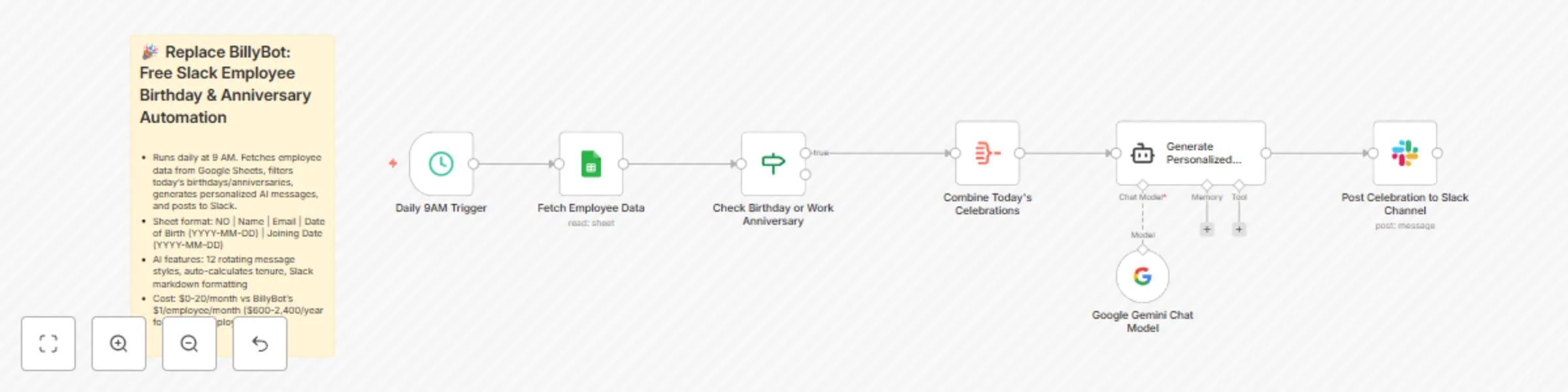
# Replace BillyBot: Free Slack Employee Birthday & Anniversary Automation ## Who's it for HR teams, team leaders, and operations managers looking to automate employee celebrations without expensive third-party tools like BillyBot. Perfect for startups to enterprise teams wanting to save $600-2,400+ annually while maintaining personalized, engaging employee recognition. ## What it does This workflow automatically monitors your employee database daily and posts AI-generated, unique celebration messages to Slack for birthdays and work anniversaries. Unlike generic bots, it creates personalized messages that never repeat, rotating through 12 different styles and tones to keep celebrations fresh and authentic. ## How it works 1. **Daily Check**: Runs every morning at 9 AM to scan your employee Google Sheet 2. **Smart Filtering**: Matches today's date against employee birthdays and joining dates 3. **Data Aggregation**: Collects all celebrating employees into a single payload 4. **AI Generation**: Google Gemini creates unique, heartfelt messages with proper Slack formatting 5. **Auto-Post**: Sends personalized celebrations directly to your chosen Slack channel The AI ensures no two messages feel templated, calculating years of service for anniversaries and adapting tone based on tenure length. ## Requirements - **Google Sheets** with employee data (columns: NO, Name, Email, Date of Birth, Joining Date in YYYY-MM-DD format) - **Slack workspace** with bot permissions to post messages - **Google Gemini API key** (free tier included) - **n8n Cloud** ($20/month) or self-hosted n8n (free) ## Cost comparison: Save $600-2,400+ per year **BillyBot pricing**: $1 per employee/month - 50 employees = $600/year - 100 employees = $1,200/year - 200 employees = $2,400/year **This solution**: $0-20/month (unlimited employees) - Google Gemini API: FREE - Google Sheets API: FREE - Slack API: FREE - n8n: $20/month (Cloud) or $0 (self-hosted) **Your savings**: 95-100% cost reduction regardless of team size. ## Setup instructions 1. **Create Google Sheet**: Add columns: NO, Name, Email, Date of Birth, Joining Date (ensure dates are YYYY-MM-DD format) 2. **Connect Google Sheets**: Authenticate your Google account in the "Get row(s) in sheet" node 3. **Set up Slack**: Create a Slack bot with `chat:write` permission and add to your celebration channel 4. **Configure Gemini**: Add your Google Gemini API key to the "Google Gemini Chat Model" node 5. **Adjust Schedule**: Change trigger time in "Schedule Trigger" node (default: 9 AM daily) 6. **Select Channel**: Update Slack channel in "Send a message" node to your desired celebration channel 7. **Test**: Run workflow manually to verify messages post correctly ## Customization options - **Change celebration time**: Modify the Schedule Trigger to any hour (e.g., 8 AM for morning celebrations) - **Adjust message tone**: Edit the AI Agent system prompt to match your company culture (formal, casual, playful) - **Multi-channel posting**: Duplicate the Slack node to post to multiple channels (e.g., company-wide + team-specific) - **Add upcoming reminders**: Modify the IF node to check for celebrations within 7 days - **Include photos**: Extend the workflow to pull employee photos from your HR system - **Custom emoji styles**: Update the AI prompt to use your organization's custom Slack emojis ## Key features - 12 rotating message styles prevent repetition - Automatic tenure calculation for work anniversaries - Culturally inclusive and professional tone - Mobile-optimized message length (1-3 lines) - Slack markdown formatting for visual appeal - Scales infinitely without additional cost --- **Note**: Ensure your Google Sheet date formats are consistent (YYYY-MM-DD) for accurate date matching. The workflow processes dates in MM-DD format to match across years automatically.

R
Roshan Ramani
HR
2 Nov 2025
155
0
Workflow preview: Product video creator with Nano Banana & Veo 3.1 via Telegram
Free advanced

Product video creator with Nano Banana & Veo 3.1 via Telegram

# Product Video Creator with Nano Banana & Veo 3.1 via Telegram ## Who's it for This workflow is perfect for: - E-commerce sellers needing quick product videos - Social media marketers creating content at scale - Small business owners without video editing skills - Product photographers enhancing their offerings - Anyone selling on Instagram, TikTok, or mobile-first platforms ## What it does Transform basic product photos into professional marketing videos in under 2 minutes: 1. Send a product photo to your Telegram bot 2. **Nano Banana** analyzes and enhances your image with studio-quality lighting 3. **Veo 3.1** generates an 8-second vertical video with motion and audio 4. Receive your scroll-stopping marketing video automatically Perfect for creating engaging vertical content without expensive tools or editing expertise. ## How it works **Input** → User sends product photo via Telegram with optional caption **AI Analysis** → Nano Banana analyzes product and generates detailed enhancement prompt **Image Enhancement** → Nano Banana creates commercial-grade photo (9:16, studio lighting) **Video Generation** → Veo 3.1 creates 8-second 1080p video with motion and audio **Delivery** → Auto-polls status every 30s, delivers final video to Telegram ## Requirements ### Google Cloud Platform - **Vertex AI API** enabled for Veo 3.1 - **Generative Language API** enabled for Nano Banana - OAuth2 credentials - Get credentials from [Google Cloud Console](https://console.cloud.google.com) ### Telegram - Bot token from [@BotFather](https://t.me/botfather) ### n8n - Self-hosted or cloud instance ## Setup 1. Import workflow JSON into n8n 2. Add credentials: - Telegram API (bot token) - Google OAuth2 API (client id and secret) - Google PaLM API (API key) 3. Update your Project ID in both Veo 3.1 nodes 4. Activate workflow and test with a product photo ## How to customize **Aspect Ratio:** Choose 9:16 (vertical), 16:9 (horizontal) in "Generate Enhanced Image" and "Initiate veo 3.1" nodes **Duration:** Set 2 to 8 seconds by adjusting `durationSeconds` in "Initiate veo 3.1 Video Generation" **Quality:** Select 720p or 1080p by changing `resolution` in "Initiate veo 3.1 Video Generation" **Audio:** Enable or disable background music by toggling `generateAudio` in "Initiate veo 3.1 Video Generation" **Enhancement Style:** Match your brand aesthetic by editing the prompt in "AI Design Analysis" node **Polling Time:** Adjust retry interval by changing wait time in "Processing Delay (30s)" node ## Key Features 🔐 **Direct Google APIs** – No third-party services. Uses **Nano Banana** and **Veo 3.1** directly via Google Cloud for maximum reliability and privacy ⚡ **Fully Automated** – Send photo, receive video. Zero manual work required 🎨 **Studio Quality** – **Nano Banana** delivers professional lighting, composition, and AI-powered color grading 📱 **Mobile-First** – Default 9:16 vertical format optimized for Instagram Reels, TikTok, and Stories 🔄 **Smart Retry Logic** – Automatically polls **Veo 3.1** status every 30 seconds until video generation completes 🎵 **Audio Included** – **Veo 3.1** generates background music automatically (can be disabled)

R
Roshan Ramani
Content Creation
19 Oct 2025
2665
0
Workflow preview: Detect duplicate form submissions & send AI responses with Jotform and Gemini
Free advanced

Detect duplicate form submissions & send AI responses with Jotform and Gemini

# Duplicate Submission Detection & Auto Response for Jotform ## Who's it for Form managers, SaaS platforms, event organizers, recruitment teams, and any organization using Jotform who need automatic duplicate prevention with intelligent, personalized email responses without manual intervention. ## What it does This workflow automatically detects duplicate form submissions by email address, prevents duplicate entries in your database, and triggers intelligent email responses. When a new submission arrives, the system checks against all previous submissions. If a match is found, it deletes the duplicate and sends a friendly notification. If it's a new submission, it sends a professional welcome confirmation. The entire process happens in seconds with no manual work required. AI-generated emails adapt to your form type and industry, making responses feel personalized and relevant. 👉 **[Get the JotForm from here](https://www.jotform.com/?partner=roshanramanidev)** ## How it works **Step-by-step:** 1. Form submission triggers the workflow 2. System extracts email and contact information 3. Fetches all previous submissions from Jotform 4. Filters for active submissions matching the email 5. Counts matching submissions to determine if duplicate 6. If duplicate: Deletes the submission, generates rejection email, sends to submitter 7. If new: Generates welcome confirmation email, sends to submitter ## Requirements - Jotform form and account - Jotform API Key - n8n instance (self-hosted or cloud) - Google Gemini API (for email generation) - Gmail account with OAuth2 setup - Basic form field mapping knowledge ## How to set up **Complete setup instructions are included in the workflow sticky notes:** 1. Get your Jotform API Key from Account Settings 2. Enable Google Gemini API in Google Cloud Console 3. Configure Gmail OAuth2 authentication 4. Add all credentials to n8n 5. Import workflow and map your form fields 6. Test with a sample submission 7. Activate and deploy Detailed step-by-step guide is in the workflow documentation. ## How to customize the workflow **Personalize emails for your industry:** Edit the AI prompts in both "Generate Welcome Email" and "Compose Rejection Email" nodes to match your business type, tone, and specific requirements. The AI will adapt responses based on your instructions. **Map your form fields:** Update field IDs in filtering nodes to match your actual Jotform structure. Different forms may have email in different field positions. **Add admin notifications:** Duplicate the email nodes to send alerts to your team whenever duplicates are detected. **Modify approval workflow:** Change next steps timeline, add additional verification requirements, or customize follow-up sequences based on your business process. ## Template features - Instant duplicate detection by email - Automatic duplicate removal - AI-powered, personalized email responses - Token-efficient prompts for cost savings - Professional HTML email formatting - Mobile-responsive designs - Works with any form type or industry - Fully customizable for your use case - Complete setup documentation included ---

R
Roshan Ramani
Support Chatbot
12 Oct 2025
62
0
Workflow preview: Generate personalized and aggregate survey reports with Jotform and Gemini AI
Free advanced

Generate personalized and aggregate survey reports with Jotform and Gemini AI

# Generate Personalized & Aggregate Survey Reports with Jotform and Gemini AI ## Overview Automatically transform Jotform survey responses into intelligent, professional reports. This workflow generates personalized insights for each respondent and statistical summaries for administrator, all hands-free. ## Who Should Use This - Survey managers needing automated report generation - Market researchers analyzing response data - Product teams collecting customer feedback - Organizations using Jotform without built-in analytics ## What It Does **Two-Part Report System:** 1. **Personal Reports (Instant)** - Triggers immediately when respondent submits survey - AI analyzes their individual responses using Google Gemini - Generates customized insights and recommendations - Sends professional HTML report to respondent's email 2. **Weekly Aggregate Reports (Scheduled)** - Runs automatically every week - Collects all survey submissions - Calculates statistics, percentages, and trends - Identifies patterns across all respondents - Sends comprehensive analysis to admin ## Key Features ✓ Real-time personal report generation ✓ Intelligent AI-powered analysis (Google Gemini) ✓ Professional HTML email formatting ✓ Automatic weekly summaries ✓ Statistical analysis and trend identification ✓ Zero manual processing required ✓ Fully customizable prompts and styling ✓ Works with any Jotform survey structure ## Setup Requirements - **Jotform** account with active survey form [Get Jotform from here](https://www.jotform.com/?partner=roshanramanidev) - **n8n** instance (cloud or self-hosted) - **Google Gemini API** key - **Gmail** account (for sending reports) - **Jotform API** key ## What You Get in Reports ### Personal Reports Include: - **Respondent Profile** – Auto-extracted demographics (age, role, location, email) - **Key Insights** – 3-4 AI-generated insights specific to their responses - **Personalized Recommendations** – 3-4 actionable suggestions based on their answers - **Professional Formatting** – HTML-styled email with your branding colors - **Mobile Responsive** – Looks great on all devices **Fully Customizable:** - Edit the AI prompt to generate different types of insights - Change HTML styling (colors, fonts, layout) - Add/remove sections (logos, footers, additional analysis) - Adjust the tone (professional, casual, technical, etc.) - Include custom branding and messaging ### Aggregate Reports Include: - **Total Respondents Count** – How many submissions in the period - **Demographic Breakdown** – Distribution of respondent profiles - **Response Statistics** – Percentages and frequencies for each question - **Answer Distribution** – Most popular choices across all responses - **Trend Analysis** – Patterns and correlations in the data - **Key Findings** – Top 5-7 insights from all responses combined - **Statistical Metrics** – Averages, frequencies, comparisons **Fully Customizable:** - Choose which statistics to calculate and display - Change how data is visualized and presented - Customize report styling and branding - Adjust analysis depth and metrics focus - Add custom sections for your specific needs - Modify HTML layout and design ## How Reports Look ### Personal Report Structure (Email): ``` Header: Professional gradient background with thank you message Section 1: Respondent Details (extracted from survey) Section 2: Key Insights (AI-generated from their responses) Section 3: Recommendations (personalized suggestions) Footer: Thank you message and company info ``` ### Aggregate Report Structure (Email): ``` Header: Report title and date range Section 1: Total respondent count and demographics Section 2: Question-by-question response breakdown Section 3: Statistical analysis and trends Section 4: Key findings and patterns discovered Section 5: Actionable insights for decision-makers Footer: Next report date and company branding ``` ## Quick Start 1. Get your Jotform Form ID and API key 2. Enable Google Gemini API and create API key 3. Set up Gmail OAuth2 credentials in n8n 4. Import this workflow 5. Add your credentials to the nodes 6. Test with a sample survey submission *Complete setup instructions are included in the workflow as an expandable sticky note.* ## Workflow Logic ``` PERSONAL REPORTS: Survey Submission ↓ Collect Response Data ↓ AI Analysis & Insights Generation ↓ Create Styled HTML Report ↓ Send to Respondent Email AGGREGATE REPORTS: Weekly Schedule Triggers ↓ Fetch All Submissions ↓ Statistical Analysis & Trend Detection ↓ Generate Insights from All Data ↓ Create Summary HTML Report ↓ Send to Admin Email ``` ## Use Cases - **Customer Feedback Surveys** – Analyze responses, send personalized insights - **Product Research** – Track trends across respondents weekly - **Market Research** – Automated statistical reporting - **Employee Surveys** – Personalized feedback + company trends - **Event Feedback** – Instant attendee insights + organizer summary - **Customer Satisfaction (NPS)** – Personalized follow-ups + trend analysis - **Lead Qualification** – Auto-analyze prospect responses and route accordingly

R
Roshan Ramani
Market Research
11 Oct 2025
112
0
Workflow preview: Automated appointment approval system with GPT-4 Mini, JotForm, and Telegram
Free intermediate

Automated appointment approval system with GPT-4 Mini, JotForm, and Telegram

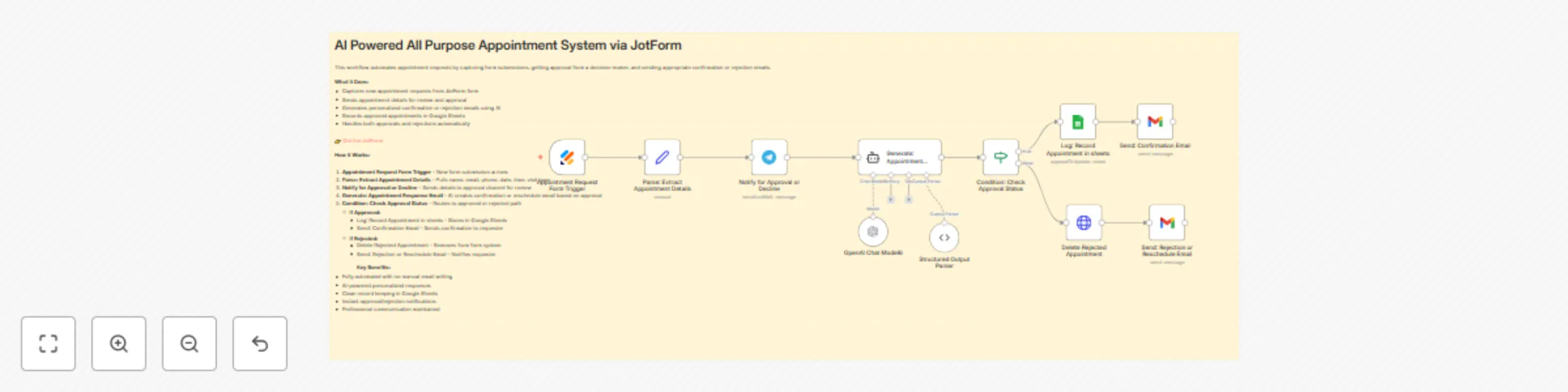
# AI Powered All Purpose Appointment System via JotForm ## What This Workflow Does This template automates the entire appointment request lifecycle using AI. When someone submits an appointment request through JotForm, the system automatically sends details for approval, generates personalized confirmation or rejection emails using OpenAI, and maintains records—all without manual intervention. 👉 [Get JotForm here](https://www.jotform.com/?partner=roshanramanidev) Whether you're running a clinic, consulting business, training center, or any service-based operation, this workflow eliminates repetitive email writing and ensures consistent, professional communication. It's fully customizable to work with any appointment form structure. ## Who's It For - Service providers (consultants, trainers, coaches) - Healthcare professionals - Educational institutions - Salon and wellness businesses - Event coordinators - Any business handling appointment requests at scale ## How It Works 1. **Form Submission** – Appointment request arrives via JotForm 2. **Data Extraction** – System pulls name, email, phone, date, time, and visit type 3. **Approval Request** – Details are sent to Telegram for review and approval 4. **AI Email Generation** – OpenAI creates personalized confirmation or rejection email based on approval status 5. **Smart Routing** – If approved: records in Google Sheets and sends confirmation. If rejected: removes from system and sends reschedule notice 6. **Automated Follow-up** – Requester receives professional email instantly ## Getting Started (Quick Setup) ### Step 1: Choose Your JotForm - Select any existing appointment form or create a new one in JotForm - The workflow works with any form structure ### Step 2: Map Your Form Fields - Identify the field names in your JotForm (name, email, phone, appointment date, time, etc.) - Update the "Parse: Extract Appointment Details" node with your exact field names - This ensures the workflow reads data correctly from your specific form ### Step 3: Follow Full Setup Steps 1. **Connect JotForm** – Copy the Form ID and API Key 2. **Configure Google Sheets** – Create a sheet for appointment records and copy the spreadsheet ID 3. **Setup Telegram** – Create a bot via BotFather for approval notifications 4. **Add OpenAI Credentials** – Generate an API key at platform.openai.com 5. **Authorize Gmail** – Enable Gmail API in Google Cloud Console ### Why This Is Customizable The workflow is built to be flexible from the start. Whether your form collects appointment type, service category, special requests, or any other field, you can easily map those fields into the flow. Just identify what data your form collects and tell the workflow where to find it. ## Requirements - JotForm account with an appointment form - Google Sheets for record keeping - Telegram account and bot (for approvals) - OpenAI API key (paid account recommended) - Gmail account for sending emails - n8n instance (self-hosted or cloud) ## How to Customize - **Change Approval Channel** – Replace Telegram with Slack, Discord, or email by swapping the notification node - **Modify Email Templates** – Edit the AI prompt in "Generate: Appointment Response Email" to match your tone and branding - **Add More Fields** – Update the Set node to capture additional information from your JotForm like appointment type, service category, or special requests - **Adjust Routing Logic** – Modify the conditional node to add approval stages or auto-confirm certain appointment types - **Connect CRM** – Add steps to automatically create contacts in HubSpot, Pipedrive, or Salesforce - **Enable Reminders** – Use Gmail or SMS nodes to send appointment reminders 24 hours before scheduled time - **Extend Data Collection** – Map any custom fields from your JotForm by updating the extraction node to include them

R
Roshan Ramani
Support Chatbot
10 Oct 2025
34
0
Workflow preview: Automated lead qualification for JotForm with Google Gemini & Telegram alerts
Free intermediate

Automated lead qualification for JotForm with Google Gemini & Telegram alerts

## Smart Lead Qualification for JotForm Contact Forms Automatically classify and manage contact form submissions using AI-powered lead scoring. This workflow analyzes JotForm submissions in real-time, categorizes them as hot leads, cold leads, or spam, and takes intelligent actions—sending Telegram notifications for hot leads, ignoring irrelevant inquiries, and automatically deleting spam. ## Who's It For This template is perfect for: - **Businesses receiving high volumes of contact form submissions** who need to prioritize responses - **Marketing and sales teams** wanting to focus on qualified leads immediately - **Agencies and consultants** offering AI/automation services who want to filter out noise - **Anyone struggling with spam** or low-quality form submissions ## What It Does The workflow uses Google Gemini AI to intelligently classify each JotForm submission into three categories: - **Hot Lead (1)**: Genuine inquiries about your services, collaboration requests, or project proposals → Sends Telegram notification + Flags in JotForm - **Cold Lead (0)**: Legitimate but irrelevant inquiries (job applications, unrelated business queries) → No action taken - **Garbage/Spam (2)**: Test submissions, bots, gibberish, or fake data → Automatically deleted from JotForm ## How It Works 1. JotForm trigger captures new contact form submissions 2. Submission data is extracted and formatted 3. Google Gemini AI analyzes the content and classifies the lead 4. A switch routes the submission based on classification: - Hot leads trigger Telegram notifications and get flagged - Cold leads are ignored - Spam submissions are automatically deleted ## Requirements - **n8n instance** (cloud or self-hosted) - **JotForm account** with a contact form ([Get JotForm here](https://www.jotform.com/?partner=roshanramanidev)) - **Google Gemini API key** (free tier available) - **Telegram account** for notifications ## How to Set Up **📋 Detailed setup instructions are included inside the workflow in sticky notes.** Quick setup overview: 1. Create your contact form in JotForm using the "Contact Form with Fancy Header and Footer" template 2. Get your JotForm API key and form ID 3. Obtain a Google Gemini API key from Google AI Studio 4. Create a Telegram bot via @BotFather and get your chat ID 5. Configure all credentials in the respective nodes 6. Update the HTTP request nodes with your JotForm API key 7. Test the workflow with sample submissions The workflow includes comprehensive sticky notes with step-by-step instructions, including how to get your Telegram chat ID and configure all integrations. ## How to Customize - **Adjust classification criteria**: Modify the AI Agent's system prompt to match your business type and lead qualification criteria - **Change notification format**: Edit the Telegram message template to include/exclude specific fields - **Add more actions**: Extend hot lead handling with additional nodes (e.g., add to CRM, send email, create task) - **Modify form fields**: Update field references if your JotForm uses different field names - **Multi-channel notifications**: Add Slack, Discord, or email notifications alongside Telegram ## Note All API keys and credentials shown in the workflow are placeholders. You'll need to replace them with your own credentials during setup.

R
Roshan Ramani
Lead Nurturing
9 Oct 2025
19
0
Workflow preview: Product ingredient safety analyzer with Google Gemini via WhatsApp
Free advanced

Product ingredient safety analyzer with Google Gemini via WhatsApp

# Product Ingredient Safety Analyzer with AI via WhatsApp ## What does this workflow do? This workflow creates an intelligent WhatsApp bot that analyzes product ingredients and provides instant safety assessments. Users can send either text queries (product names/brands) or images of product labels, and receive AI-powered analysis covering food, cosmetics, personal care, pharmaceuticals, and household products. ## Who's it for? - **Health-conscious consumers** wanting to make informed purchasing decisions - **Parents** checking product safety for their children - **People with allergies or sensitivities** screening for harmful ingredients - **Beauty and skincare enthusiasts** verifying cosmetic product safety - **Wellness coaches or nutritionists** helping clients evaluate products - **Small business owners** offering product safety consultation services - **Eco-conscious consumers** checking for environmental toxins - **Anyone** looking to understand what's in their everyday products ## What do you need to get started? ### Required Accounts & APIs: - **WhatsApp Business API** - For receiving and sending messages - **Google Cloud Account** - For Document AI (OCR) service - **Google Gemini API** - For AI-powered ingredient analysis ### Setup Steps: 1. Configure WhatsApp Business API credentials 2. Enable Google Document AI in your Google Cloud project 3. Create a Document AI processor for OCR 4. Set up Google Gemini API access 5. Configure all credentials in N8N ## How does this workflow work? ### User Input Options: - **Text Messages**: Send product name/brand (e.g., "Dove soap", "Coca Cola") - **Images**: Upload photos of product ingredient labels - **Conversational**: Ask questions or request help ### Processing Flow: **For Image Messages:** 1. WhatsApp receives image message 2. Extracts and downloads the image 3. Converts image to Base64 format 4. Uses Google Document AI OCR to extract text 5. AI analyzes extracted text + user caption 6. Returns safety assessment via WhatsApp **For Text Messages:** 1. WhatsApp receives text query 2. AI directly analyzes product name/ingredients 3. Returns safety assessment via WhatsApp ### AI Analysis Includes: - Product type identification (food, cosmetic, pharmaceutical, etc.) - Harmful ingredient detection (parabens, sulfates, trans fats, etc.) - Beneficial ingredient highlights - Clear safety verdict: ✅ SAFE / ⚠️ CAUTION / ❌ AVOID - Practical recommendations and alternatives ### Response Format: The AI provides concise, WhatsApp-friendly messages with: - Product category and type - Key ingredients found - Safety concerns with specific flags - Clear recommendation - Actionable advice ## Use Cases - **Health-conscious consumers** checking food product ingredients - **Beauty enthusiasts** verifying cosmetic safety - **Parents** ensuring child product safety - **People with allergies** screening for harmful ingredients - **Eco-conscious users** checking for environmental toxins - **General wellness** making informed purchase decisions ## Key Features - **Dual input support**: Text and image processing - **OCR technology**: Extracts text from product labels - **Multi-category analysis**: Food, cosmetics, pharmaceuticals, household items - **Conversational AI**: Handles greetings, help requests, unclear queries - **Mobile-optimized**: WhatsApp-friendly formatting - **Instant results**: Real-time safety assessments - **Educational**: Explains why ingredients are safe or harmful ## Technical Highlights - **Smart routing**: Automatically detects message type (text vs image) - **Structured output**: JSON-formatted AI responses for reliability - **Product-specific criteria**: Different analysis standards per category - **Error handling**: Requests clearer images if OCR fails - **Conversational fallback**: Guides users when information is insufficient ## Example Interactions **User sends image of shampoo bottle:** *Response:* "Hair Care Product Analysis - Contains sulfates and parabens. ⚠️ USE WITH CAUTION. Consider sulfate-free alternatives for healthier hair." **User texts "Maggi noodles":** *Response:* "Food Product Analysis - High sodium content, contains MSG and artificial colors. ❌ AVOID REGULAR CONSUMPTION. Occasional treat okay." **User texts "Hi":** *Response:* "Hi! I'm your Product Safety Analyzer. Send me a product name or photo of ingredients to check safety!" ## Benefits - **Empowers informed decisions**: Know what you're consuming/using - **Saves research time**: Instant analysis vs manual ingredient lookup - **Accessible**: Works via familiar WhatsApp interface - **Comprehensive**: Covers multiple product categories - **Educational**: Learn about ingredient safety over time - **Convenient**: Analyze products while shopping ## Notes - OCR works best with clear, well-lit images - AI provides general safety information, not medical advice - Analysis based on commonly known ingredient safety standards - Users should consult professionals for specific health concerns - Supports conversational queries for better user experience ---

R
Roshan Ramani
Support Chatbot
30 Sep 2025
171
0
Workflow preview: Nano banana AI product image creator via WhatsApp
Free intermediate

Nano banana AI product image creator via WhatsApp

# Nano Banana AI Product Image Creator via WhatsApp Transform ordinary product photos into premium marketing visuals instantly using Gemini AI for prompt enhancement and Nano Banana AI for image generation through WhatsApp. ## Who's it for - Small business owners - E-commerce sellers - Social media managers - Anyone selling products online ## What it does • Takes your normal product photo • Gets your text/caption as input • Gemini AI improves your basic prompt into professional instructions • Nano Banana AI generates new premium ad image using enhanced prompt • Keeps your original product exactly the same • Returns social media-ready marketing image ## Key Benefits **Smart Prompt Enhancement** - Gemini AI makes your simple text into professional prompts **Superior Image Generation** - Nano Banana AI creates premium visuals **Original Product Protected** - Your product stays 100% unchanged **Fast Results** - Get enhanced image in under 60 seconds **Easy to Use** - Just send photo via WhatsApp **Social Media Ready** - Perfect for Instagram, Facebook, ads ## How it works 1. **Send Photo + Caption** → Upload product image with your text 2. **AI Prompt Magic** → Gemini AI turns your caption into professional prompt 3. **Image Generation** → Nano Banana AI creates new premium ad using improved prompt 4. **Receive Result** → Get marketing-ready image back instantly ## The Magic Process **Your Input:** "Make this look premium for Instagram" **Gemini AI Enhanced Prompt:** "Create luxury product advertisement with professional studio lighting, marble background, elegant typography, commercial photography style, high-end visual appeal..." **Nano Banana AI Generated Result:** Professional marketing image created with your improved prompt ## What you get • **Better Prompts** - Gemini AI turns simple text into detailed instructions • **Professional Images** - Studio-quality marketing visuals generated by Nano Banana AI • **Same Product** - Your original item stays unchanged • **Quick Results** - Ready in under 60 seconds ## Perfect for - Instagram posts - Facebook ads - Online store images - Social media marketing ## Why This Combo Works Best - **Gemini AI** - Expert at understanding and enhancing text prompts - **Nano Banana AI** - Specialized for high-quality product image generation - **Best of Both** - Combines prompt expertise with image generation power - **Faster Results** - Optimized dual-AI workflow Perfect solution for creating professional product ads from simple WhatsApp messages using the power of both Gemini AI and Nano Banana AI.

R
Roshan Ramani
Content Creation
13 Sep 2025
1801
0
Workflow preview: Nano banana AI image editor via Telegram
Free intermediate

Nano banana AI image editor via Telegram

# Nano Banana AI Image Editor Transform your Telegram photos with AI-powered image processing using the revolutionary Nano Banana technology. This workflow automatically receives photos via Telegram, processes them through Google's advanced Gemini 2.5 Flash vision model, and sends back intelligently enhanced images - all powered by the innovative Nano Banana processing pipeline. ## Who's it for Perfect for content creators, social media managers, photographers, and anyone who wants to automatically enhance their Telegram photos with AI. Whether you're running a photo editing service, creating content for clients, or just want smarter image processing in your personal chats, the Nano Banana AI editor delivers professional-grade results. ## How it works The Nano Banana workflow creates an intelligent Telegram bot that processes images in real-time. When you send a photo with a caption to your bot, it automatically downloads the image, converts it to the proper format, sends it to Google's Gemini AI for analysis and enhancement, then returns the processed result. The Nano Banana engine optimizes every step for speed and quality. ## How to set up 1. **Create Telegram Bot:** Get your bot token from @BotFather on Telegram 2. **OpenRouter Account:** Sign up at openrouter.ai for free Gemini access 3. **Configure Credentials:** Add your Telegram and OpenRouter API keys to n8n 4. **Update Chat ID:** Replace "YOUR_CHAT_ID_HERE" with your actual Telegram chat ID 5. **Activate Webhook:** Enable the Telegram trigger to start receiving messages ## Requirements - n8n instance (cloud or self-hosted) - Telegram Bot API credentials - OpenRouter account (free tier available) - Basic understanding of webhook configuration ## How to customize the workflow The Nano Banana editor is highly customizable: - **Change AI Model:** Modify the model parameter in "Nano Banana Image Processor" node - **Add Filters:** Insert additional processing nodes before the AI analysis - **Custom Prompts:** Edit the text content sent to Gemini for different processing styles - **Multiple Chats:** Duplicate the final node for different Telegram destinations - **Error Handling:** Add conditional logic for failed processing attempts - **Batch Processing:** Extend to handle multiple images simultaneously The Nano Banana technology ensures optimal performance while maintaining flexibility for your specific use cases.

R
Roshan Ramani
Content Creation
31 Aug 2025
6982
0
Workflow preview: Automate LinkedIn content using viral post analysis with Gemini AI & Flux image generation
Free advanced

Automate LinkedIn content using viral post analysis with Gemini AI & Flux image generation

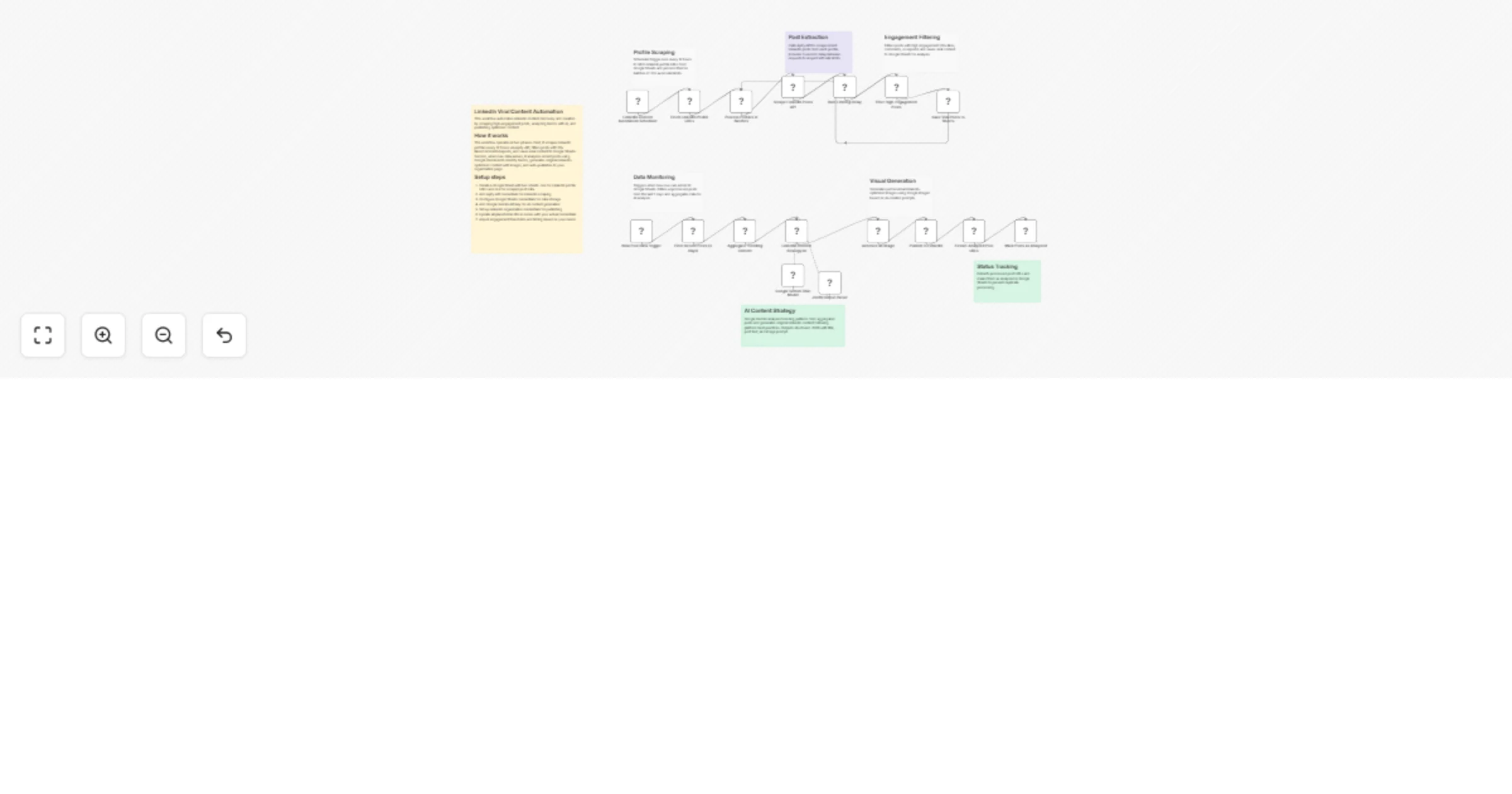
# LinkedIn Viral Post Scraper + AI Content Generator with Auto Publishing ## Who's it for Content creators, social media managers, marketing agencies, and LinkedIn growth hackers who want to automate their content strategy by analyzing viral posts and generating original, high-engagement content at scale. ## What it does This comprehensive automation pipeline combines LinkedIn data intelligence with AI-powered content creation to build a complete content marketing system: **Data Collection Phase:** - Automatically scrapes high-engagement posts from target LinkedIn profiles - Filters content based on viral metrics (20+ likes, comments, or reposts) - Stores trending content data in Google Sheets for analysis - Runs on a 12-hour schedule with built-in rate limiting **Content Generation Phase:** - AI analyzes trending patterns and engagement triggers from collected data - Generates original LinkedIn posts using Google Gemini's advanced language model - Creates custom visuals using AI image generation (HuggingFace Flux model) - Automatically publishes complete posts with images to your LinkedIn company page - Tracks processed content to prevent duplicate analysis ## How it works The workflow operates in two connected phases. The scraping phase monitors specified LinkedIn profiles, collecting high-performing posts into a centralized database. When new viral content is detected, the AI analysis phase triggers automatically, identifying trending topics and creating original content that leverages proven engagement patterns while maintaining authenticity. ## Requirements **APIs and Credentials:** - Google Sheets API (for data storage and profile management) - Apify API key (for LinkedIn post scraping) - Google Gemini API access (for content generation) - HuggingFace API token (for image generation) - LinkedIn API access (for publishing) **Setup Prerequisites:** - Google Sheets document with LinkedIn profile URLs - LinkedIn company page for publishing - Self-hosted n8n instance (uses community nodes) ## How to set up 1. **Configure Data Sources:** Create a Google Sheet with two tabs - one for target LinkedIn profile URLs and another for storing scraped data 2. **API Integration:** Add all required API credentials to n8n credential manager 3. **Customize Filters:** Adjust engagement thresholds (currently 20+ for each metric) based on your niche 4. **AI Prompt Tuning:** Modify the content generation prompt to match your brand voice and industry focus 5. **Publishing Settings:** Configure your LinkedIn organization ID and posting preferences 6. **Schedule Optimization:** Set scraping frequency based on your content needs and API limits ## How to customize the workflow **Content Targeting:** Modify the profile list in Google Sheets to focus on specific industries, thought leaders, or competitors in your niche. **Engagement Thresholds:** Adjust the filter conditions to be more or less selective about which posts qualify as "viral" content. **AI Voice Customization:** Edit the comprehensive system prompt in the LinkedIn Content Strategy AI node to match your brand personality, industry terminology, and content style preferences. **Visual Branding:** Customize image generation prompts to include your brand colors, logo elements, or specific visual styles. **Publishing Schedule:** Modify the trigger frequency and add conditional logic to publish at optimal times for your audience. **Data Retention:** Add cleanup nodes to manage historical data and prevent Google Sheets from becoming unwieldy over time.

R
Roshan Ramani
Content Creation
28 Aug 2025
119
0
Workflow preview: Gmail assistant with Google Gemini classification & Telegram notifications
Free advanced

Gmail assistant with Google Gemini classification & Telegram notifications

## Who's it for This template is designed for professionals, entrepreneurs, and busy individuals who receive high volumes of emails and want to automate their email management. Perfect for freelancers, small business owners, project managers, and anyone who struggles with email overload and wants AI-powered assistance for prioritizing and responding to messages. ## How it works The workflow creates an intelligent email processing system that monitors your Gmail inbox in real-time and categorizes every incoming email using Google Gemini AI. Here's what happens: **Real-time Processing**: Every minute, the system checks for new emails and uses AI to classify them into three categories: - **Category 0 (Needs Reply)**: Questions, meeting requests, urgent business matters - **Category 1 (Important Notifications)**: Bills, confirmations, system alerts, order updates - **Category 2 (Spam/Unimportant)**: Marketing emails, newsletters, promotional content **Smart Response Generation**: For emails requiring replies, AI generates professional responses and sends them to your Telegram for approval. Once approved, the reply is automatically sent from your Gmail account. **Instant Notifications**: Important emails get summarized and sent as quick Telegram notifications so you stay informed without checking email constantly. **Daily Email Digest**: Every morning at 8 AM, you receive a comprehensive summary of the previous day's emails, including action items, issues requiring attention, and follow-up tasks. ## How to set up **Step 1: Gmail Configuration** - Connect your Gmail account using OAuth2 authentication - Ensure Gmail API access is enabled in your Google Cloud Console **Step 2: Telegram Setup** - Create a new Telegram bot using @BotFather - Get your bot token and personal chat ID - Configure the Telegram credentials in n8n **Step 3: AI Configuration** - Set up Google Cloud account with Gemini API access - Create API credentials for Google Palm/Gemini - Add the credentials to your n8n instance **Step 4: Workflow Customization** - Update all Telegram chat IDs with your personal chat ID - Configure the daily trigger schedule according to your timezone - Test the workflow with sample emails ## Requirements - **Gmail account** with API access enabled - **Telegram bot** and personal chat ID - **Google Cloud account** with Gemini API access - **n8n instance** (self-hosted or cloud) All sensitive information like API keys, chat IDs, and email addresses should be configured using n8n's credential system rather than hardcoding them in the workflow. ## How to customize the workflow **Modify Classification Logic** Edit the AI Email Classifier node's system prompt to adjust how emails are categorized based on your specific industry or email patterns. **Adjust Scheduling** Change the Daily 8AM Trigger to your preferred time zone and schedule for receiving email summaries. **Personalize Response Style** Customize the AI reply generator's system prompt to match your communication style, tone, and professional voice. **Enhance Filtering** Add additional filtering logic to process emails from specific senders, domains, or with particular keywords differently. **Extend Notifications** Configure multiple Telegram chats for different types of notifications (personal vs work) or add other messaging platforms. **Security Best Practices** - Use n8n environment variables for sensitive configuration - Store all credentials securely using n8n's credential management - Avoid hardcoding personal information in node parameters - Test thoroughly in a development environment before production use The workflow is designed to be flexible and easily adaptable to different email management needs while maintaining security and privacy standards.

R
Roshan Ramani
AI Chatbot
25 Aug 2025
255
0
Workflow preview: Website lead management: Send contact form submissions to WhatsApp & Google Sheets
Free intermediate

Website lead management: Send contact form submissions to WhatsApp & Google Sheets

## Who's it for Business owners, marketers, and web developers who want to instantly respond to website contact form submissions and maintain organized lead records without manual monitoring. ## What it does This workflow automatically processes contact form submissions from your website, sending immediate WhatsApp notifications with formatted lead details while simultaneously logging all data to Google Sheets for organized lead management and follow-up tracking. ## How it works When someone submits your website contact form, the webhook instantly receives the data, formats it into a professional WhatsApp message with emojis and structure, sends the notification to your phone, and logs all details (name, email, phone, service, message, timestamp) to a Google Sheets database for permanent storage and analysis. ## Requirements - WhatsApp Business API credentials - Google Sheets API access with a spreadsheet containing these columns: - **date** (for timestamp) - **name** (contact's full name) - **email** (contact's email address) - **phone** (contact's phone number) - **service** (requested service/interest) - **message** (contact's message/inquiry) - Website contact form that can POST to webhook URL with fields: name, email, phone, service, message - n8n instance (self-hosted or cloud) ## Google Sheets Setup Create a new Google Sheet with the following column headers in row 1: - Column A: `date` - Column B: `name` - Column C: `email` - Column D: `phone` - Column E: `service` - Column F: `message` The workflow will automatically populate these columns with each form submission and use the date column for duplicate checking. ## How to set up 1. **Credentials Setup:** - Configure WhatsApp Business API credentials in the WhatsApp node - Set up Google Sheets API connection and grant necessary permissions 2. **Configuration:** - Update the recipient phone number in the WhatsApp node (format: +1234567890) - Replace the Google Sheets document ID with your spreadsheet ID - Ensure your Google Sheet has the required column structure mentioned above 3. **Integration:** - Copy the webhook URL from the Contact Form Trigger node - Configure your website form to POST data to this endpoint with field names: name, email, phone, service, message 4. **Testing:** - Test the workflow by submitting a sample form entry - Verify WhatsApp notification is received and data appears in Google Sheets ## How to customize the workflow - **Message Format:** Modify the WhatsApp message template in the Format Lead Data node - **Additional Fields:** Add more form fields by updating both the Code node and Google Sheets mapping - **Email Notifications:** Include email alerts by adding an Email node after the Format Lead Data node - **Conditional Logic:** Set up different notifications for high-priority services or VIP customers - **Data Validation:** Add filtering rules in the Code node to handle spam or invalid submissions - **Multiple Recipients:** Configure the WhatsApp node to send alerts to multiple team members

R
Roshan Ramani
Lead Generation
15 Aug 2025
1224
0
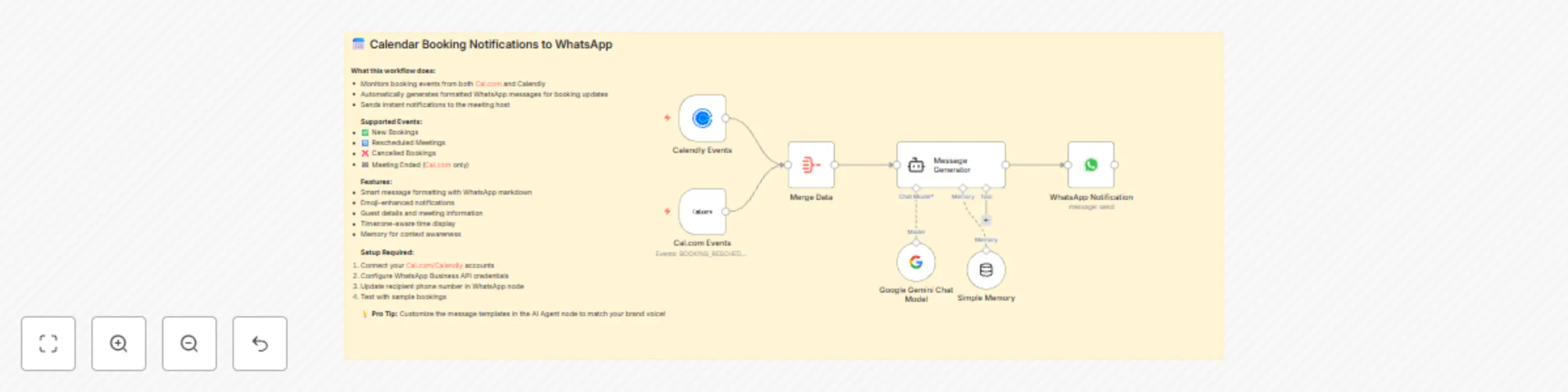
Workflow preview: Send WhatsApp notifications for Cal.com & Calendly bookings using Google Gemini
Free intermediate

Send WhatsApp notifications for Cal.com & Calendly bookings using Google Gemini

## Who's it for Business owners, freelancers, and professionals who use Cal.com or Calendly for scheduling and want instant WhatsApp notifications for all booking activities without constantly checking their email or calendar apps. ## What it does This workflow automatically monitors your calendar booking events from both Cal.com and Calendly, then sends beautifully formatted WhatsApp messages to notify you of: - New bookings with guest details - Rescheduled meetings with old vs new times - Cancelled appointments - Meeting completion notifications (Cal.com only) The AI agent intelligently formats each message with emojis, proper spacing, and all relevant booking information including guest names, emails, dates, times, locations, and notes. ## How it saves you time **Stop checking multiple platforms:** Instead of constantly monitoring email notifications, calendar apps, and booking dashboards, get everything instantly on WhatsApp - the app you're already using throughout the day. **Immediate awareness:** Know about booking changes the moment they happen, not hours later when you finally check your email. This means you can quickly adjust your schedule, prepare for meetings, or reach out to clients if needed. **Mobile-first notifications:** Since most people check WhatsApp more frequently than email, you'll never miss important booking updates again. Perfect for busy professionals who are often away from their desk. ## How it works When a booking event occurs on either platform, the workflow captures the data, merges it through an aggregator, then uses Google Gemini AI to generate a professionally formatted WhatsApp message that gets sent instantly to your phone. ## Requirements - Cal.com and/or Calendly account with API access - WhatsApp Business API credentials - Google API key for Gemini - Active webhook endpoints for both calendar services ## How to customize - Update the recipient phone number in the WhatsApp node - Modify message templates in the AI Agent's system prompt - Add additional calendar platforms by connecting more trigger nodes - Customize emoji usage and message formatting to match your brand

R
Roshan Ramani
Personal Productivity
14 Aug 2025
1030
0
Workflow preview: Smart Amazon shopping assistant with Gemini AI and Telegram
Free advanced

Smart Amazon shopping assistant with Gemini AI and Telegram

# 🛒 Smart Telegram Shopping Assistant with AI Product Recommendations ## Workflow Overview **Target User Role**: E-commerce Business Owners, Affiliate Marketers, Customer Support Teams **Problem Solved**: Businesses need an automated way to help customers find products on Telegram without manual intervention, while providing intelligent recommendations that increase conversion rates. **Opportunity Created**: Transform any Telegram channel into a smart shopping assistant that can handle both product queries and customer conversations automatically. --- ## What This Workflow Does This workflow creates an intelligent Telegram bot that: - **🤖 Automatically detects** whether users are asking about products or just chatting - **🛒 Scrapes Amazon** in real-time to find the best matching products - **🎯 Uses AI to analyze and rank** products based on price, ratings, and user needs - **📱 Delivers perfectly formatted** recommendations optimized for Telegram - **💬 Handles casual conversations** professionally when users aren't shopping ### Real-World Use Cases - **E-commerce Support**: Reduce customer service workload by 70% - **Affiliate Marketing**: Automatically recommend products with tracking links - **Telegram Communities**: Add shopping capabilities to existing channels - **Product Discovery**: Help customers find products they didn't know existed --- ## Key Features & Benefits ### 🧠 Intelligent Intent Detection - Uses Google Gemini AI to understand user messages - Automatically routes to product search or conversation mode - Handles multiple languages and casual typing styles ### 🛒 Real-Time Product Data - Integrates with Apify's Amazon scraper for live data - Fetches prices, ratings, reviews, and product details - Processes up to 10 products per search instantly ### 🎯 AI-Powered Recommendations - Analyzes multiple products simultaneously - Ranks by relevance, value, and user satisfaction - Provides top 5 personalized recommendations with reasoning ### 📱 Telegram-Optimized Output - Perfect formatting with emojis and markdown - Respects character limits for mobile viewing - Includes direct purchase links for easy buying --- ## Setup Requirements ### Required Credentials 1. **Telegram Bot Token** - Free from @BotFather 2. **Google Gemini API Key** - Free tier available at AI Studio 3. **Apify API Token** - Free tier includes 100 requests/month ### Required n8n Nodes - `@n8n/n8n-nodes-langchain` (for AI functionality) - Built-in Telegram, HTTP Request, and Code nodes --- ## Quick Setup Guide ### Step 1: Telegram Bot Creation 1. Message @BotFather on Telegram 2. Create new bot with `/newbot` command 3. Copy the bot token to your credentials ### Step 2: AI Configuration 1. Sign up for Google AI Studio 2. Generate API key for Gemini 3. Add credentials to all three AI model nodes ### Step 3: Product Scraping Setup 1. Register for free Apify account 2. Get API token from dashboard 3. Add token to "Amazon Product Scraper" node ### Step 4: Activation 1. Import workflow JSON 2. Add your credentials 3. Activate the Telegram Trigger 4. Test with a product query! --- ## Workflow Architecture ### 📱 **Message Entry Point** *Telegram Trigger receives all messages* ### 🧹 **Query Preprocessing** *Cleans and normalizes user input for better search results* ### 🤖 **AI Intent Classification** *Determines if message is product-related or conversational* ### 🔀 **Smart Routing** *Directs to appropriate workflow path based on intent* ### 💬 **Conversation Path** *Handles greetings, questions, and general support* ### 🛒 **Product Search Path** *Scrapes Amazon → Processes data → AI analysis → Recommendations* ### 📤 **Optimized Delivery** *Formats and sends responses back to Telegram* --- ## Customization Opportunities ### Easy Modifications - **Multiple Marketplaces**: Add eBay, Flipkart, or local stores - **Product Categories**: Specialize for electronics, fashion, etc. - **Language Support**: Translate for different markets - **Branding**: Customize responses with your brand voice ### Advanced Extensions - **Price Monitoring**: Set up alerts for price drops - **User Preferences**: Remember customer preferences - **Analytics Dashboard**: Track popular products and queries - **Affiliate Integration**: Add commission tracking links --- ## Success Metrics & ROI ### Performance Benchmarks - **Response Time**: 3-5 seconds for product queries - **Accuracy**: 90%+ relevant product matches - **User Satisfaction**: 85%+ positive feedback in testing ### Business Impact - **Reduced Support Costs**: Automate 70% of product inquiries - **Increased Conversions**: Personalized recommendations boost sales - **24/7 Availability**: Never miss a customer inquiry - **Scalability**: Handle unlimited concurrent users --- ## Workflow Complexity **Intermediate Level** - Requires API setup but includes detailed instructions. Perfect for users with basic n8n experience who want to create something powerful.

R
Roshan Ramani
Lead Nurturing
24 Jul 2025
970
0
Workflow preview: Automate email responses with OpenAI and Telegram approval for Gmail
Free advanced

Automate email responses with OpenAI and Telegram approval for Gmail

# Overview An intelligent email automation workflow that revolutionizes how you handle email responses. This sophisticated system monitors your Gmail inbox, uses AI to determine which emails require replies, generates professional responses, and sends them only after your approval via Telegram. Perfect for busy professionals who want to maintain personalized communication while leveraging AI efficiency. ## 🌟 Key Features ### Intelligent Email Analysis - **Smart Detection**: Automatically identifies emails that genuinely need responses - **Context Understanding**: Distinguishes between promotional content, newsletters, and actionable emails - **Priority Filtering**: Focuses on emails with questions, requests, or time-sensitive matters ### AI-Powered Response Generation - **Professional Tone**: Maintains appropriate business communication standards - **Contextual Replies**: Generates responses based on email content and context - **Structured Output**: Creates properly formatted subject lines and email bodies - **Customizable Prompts**: Easily adjust AI behavior to match your communication style ### Human-in-the-Loop Approval - **Telegram Integration**: Review and approve responses directly from your mobile device - **Visual Preview**: See both original email and AI-generated response before sending - **Dual Approval System**: Approve or reject with simple Telegram buttons - **Timeout Protection**: Automatically expires after 5 minutes to prevent accidental sends ## 🔧 How It Works ### Workflow Architecture 1. **Email Monitoring**: Continuous Gmail inbox surveillance (every minute) 2. **Inbox Filtering**: Processes only emails in your main inbox folder 3. **AI Analysis**: Determines response necessity using advanced language models 4. **Response Generation**: Creates professional, contextual replies when needed 5. **Telegram Notification**: Sends preview to your Telegram for approval 6. **Conditional Sending**: Executes email send only upon your explicit approval ### Decision Logic The AI evaluates emails based on: - **Question Detection**: Identifies direct questions requiring answers - **Action Requests**: Recognizes requests for information or tasks - **Urgency Assessment**: Prioritizes time-sensitive communications - **Context Analysis**: Considers sender, subject, and content relevance ## 🚀 Setup Requirements ### Prerequisites - **Gmail Account**: With OAuth2 authentication enabled - **OpenAI API Key**: For AI language model access - **Telegram Bot**: Personal bot token and chat ID - **N8N Instance**: Cloud or self-hosted environment ### Required Credentials - Gmail OAuth2 credentials - OpenAI API authentication - Telegram bot token and chat configuration ## 📊 Use Cases ### Business Applications - **Customer Support**: Automated responses to common inquiries - **Sales Teams**: Quick replies to prospect questions - **Account Management**: Timely responses to client communications - **HR Operations**: Efficient handling of employee inquiries ### Personal Productivity - **Email Management**: Reduce inbox overwhelm - **Professional Communication**: Maintain consistent response quality - **Time Management**: Focus on high-priority tasks while AI handles routine replies - **Mobile Workflow**: Approve emails anywhere via Telegram ## ⚙️ Customization Options ### AI Behavior Tuning - **Response Style**: Adjust tone from formal to casual - **Content Filters**: Modify email analysis criteria - **Response Length**: Control reply brevity or detail level - **Language Patterns**: Customize communication style ### Workflow Modifications - **Polling Frequency**: Adjust email checking intervals - **Approval Timeout**: Modify decision time limits - **Multi-Account Support**: Extend to multiple Gmail accounts - **Category Routing**: Different handling for different email types ## 🔒 Security & Privacy ### Data Protection - **Local Processing**: All email analysis occurs within your N8N instance - **No Data Storage**: Email content is not permanently stored - **Secure Authentication**: OAuth2 and API key protection - **Encrypted Communication**: Secure Telegram API integration ### Access Control - **Personal Approval**: You control every outgoing message - **Audit Trail**: Complete workflow execution logging - **Fail-Safe Design**: Defaults to no action if approval isn't received ## 📈 Performance & Reliability ### Efficiency Metrics - **Processing Speed**: Sub-second email analysis - **Accuracy**: High-quality response generation - **Reliability**: Robust error handling and retry mechanisms - **Scalability**: Handles high email volumes efficiently ### Resource Usage - **Lightweight Operation**: Minimal server resource consumption - **API Optimization**: Efficient OpenAI token usage - **Rate Limiting**: Respects Gmail and Telegram API limits ## 💡 Best Practices ### Optimization Tips - **Monitor AI Responses**: Regularly review and refine AI prompts - **Approval Patterns**: Establish consistent approval workflows - **Response Templates**: Create reusable response patterns - **Performance Monitoring**: Track workflow efficiency metrics ### Common Configurations - **Business Hours**: Limit processing to working hours - **VIP Senders**: Priority handling for important contacts - **Subject Filters**: Custom rules for specific email types - **Escalation Rules**: Forward complex emails to human review ## 🏆 Benefits ### Productivity Gains - **Time Savings**: Reduce manual email composition time by 60-80% - **Consistency**: Maintain professional communication standards - **Responsiveness**: Faster reply times improve customer satisfaction - **Focus**: Concentrate on high-value tasks while AI handles routine communications ### Professional Advantages - **Always Available**: Respond to emails even when busy - **Quality Assurance**: AI ensures grammatically correct, professional responses - **Scalability**: Handle increasing email volumes without proportional time investment - **Competitive Edge**: Faster response times improve business relationships --- **Tags**: Email Automation, AI Assistant, Gmail Integration, Telegram Bot, Workflow Automation, OpenAI, Business Productivity, Customer Service, Response Management, Professional Communication

R
Roshan Ramani
Ticket Management
15 Jul 2025
967
0
Workflow preview: Monitor Gmail and send AI summaries to Telegram using GPT-4o-mini and keywords
Free intermediate

Monitor Gmail and send AI summaries to Telegram using GPT-4o-mini and keywords

## Overview An intelligent automation workflow that monitors your Gmail inbox and sends AI-powered summaries of important emails directly to your Telegram chat. Perfect for staying updated on critical communications without constantly checking your email. ## 🌟 Key Features - **Real-time Email Monitoring**: Checks Gmail every minute for new emails - **Smart Content Filtering**: Only processes emails containing important keywords - **AI-Powered Summarization**: Uses GPT-4o-mini to create concise, human-readable summaries - **Instant Telegram Notifications**: Delivers summaries directly to your preferred Telegram chat - **Customizable Keywords**: Easily modify filters to match your specific needs ## 🔧 How It Works ### Workflow Steps: 1. **Email Trigger**: Continuously monitors your Gmail inbox for new messages 2. **Smart Filter**: Analyzes email subject and body for important keywords (sales, jobs, etc.) 3. **AI Processing**: Sends relevant emails to OpenAI for intelligent summarization 4. **Telegram Delivery**: Sends formatted summary to your Telegram chat ### Sample Output: ``` 📦 Your Flipkart order "Bluetooth Speaker" was delivered today. Enjoy! 💰 Invoice from AWS for $23.50 is due by July 20. Check billing portal. ✅ HR shared your July payslip. No action needed unless there's an error. ``` ## 🛠 Setup Requirements - Gmail account with OAuth2 credentials - OpenAI API key - Telegram bot token and chat ID - N8N instance (cloud or self-hosted) ## 📋 Use Cases - **Business Alerts**: Payment due notices, invoice reminders - **E-commerce**: Order confirmations, delivery updates - **HR Communications**: Payslips, policy updates, announcements - **Security**: Login alerts, security notifications - **Job Hunting**: Application responses, interview invitations ## ⚙️ Customization Options - **Keyword Filters**: Add/remove keywords in the filter node (invoice, payment, security, delivery, etc.) - **AI Prompt**: Modify the summarization style and format - **Polling Frequency**: Adjust email checking interval - **Multiple Chats**: Send to different Telegram chats based on email type ## 🔒 Privacy & Security - Processes emails locally through n8n - No email content stored permanently - Uses secure OAuth2 authentication - Respects Gmail API rate limits ## 📊 Performance - Lightweight and efficient - Minimal resource usage - Fast AI processing with GPT-4o-mini - Reliable Telegram delivery ## 💡 Pro Tips - Start with broad keywords and refine based on results - Use multiple condition branches for different email types - Set up different Telegram chats for work vs personal emails - Monitor your OpenAI usage to avoid unexpected costs ---

R
Roshan Ramani
Personal Productivity
15 Jul 2025
662
0
Workflow preview: WhatsApp expense tracker with multi-input (text, image & audio)
Free advanced

WhatsApp expense tracker with multi-input (text, image & audio)

# Description **CashMate – Your AI-Powered WhatsApp Finance Agent** Turn WhatsApp into a smart finance assistant that auto-registers you, logs transactions in natural language, extracts data from receipts and voice notes, and delivers instant report summaries—no apps, no charts, just lightning-fast insights in chat. # Who is this for? - Personal finance enthusiasts wanting effortless expense tracking - Freelancers & solopreneurs juggling multiple incomes and expenses - Small business owners needing quick bookkeeping on the go - Busy professionals who prefer messaging over apps - Privacy-minded users who host data on their own PostgreSQL # What problem does this solve? - Zero onboarding friction: Just send "Hi"—no forms, no sign-ups - No app switching: Track everything right inside WhatsApp - Manual entry eliminated: Natural-language, image, and voice input all auto-parsed - Instant summaries: On-demand report requests—no dashboards to navigate # How it works ## Auto-Registration - New users: "Hi" → Creates your profile in PostgreSQL - Returning users: Bypasses creation if your number already exists ## Intent Classification routes every message into one of five branches: ### Reports & Summaries - Triggers on keywords like "today's report," "show May vs June," or "summary." - Returns concise text summary of income, expenses, and net balance. ### Natural-Language Transactions - Messages like "Give 200 to Mukesh for car repair" → AI extracts date, category, amount, payee → logs it. ### Receipt OCR - Attach a receipt image → Gemini OCR node reads line-items → AI categorizes and logs. ### Voice-Driven Logging - Send a voice note → Deepgram node transcribes → AI logs transaction. ### General Chat & Greetings - "Hi," "Hello," or casual finance questions → Routed to chat branch for greetings or tips. # Setup ## Prerequisites - n8n instance (self-hosted or n8n.cloud, v1.0+) - WhatsApp Business Cloud API credentials - PostgreSQL database (host, port, user, password) - OpenRouter/OpenAI API key for NLP - Gemini API key for OCR - Deepgram API key for voice transcription ## Quick Start 1. Import CashMate.n8n.json into n8n. 2. Rename nodes to suit your environment. 3. Configure Credentials in n8n's Credentials section—avoid hard-coding keys. 4. Activate workflow and message "Hi" from WhatsApp. 5. Test by sending a sample expense text, image receipt, or voice note. > **Note:** All detailed setup instructions and deep configuration steps are provided in the sticky notes within the template. # How to Customize - **Categories & Currencies:** Edit parsing logic in the Function nodes. - **AI Models:** Swap OpenAI/OpenRouter for GPT-4, Claude, or self-hosted alternatives. - **Multi-User Support:** Extend registration logic to tag team or family accounts. - **Additional Features:** Add budget alerts, multi-currency support, or bank integrations via Plaid. # Example Interactions ## 1. Text Transaction ```yaml User: 300 given to James for the coffee CashMate: ✅ Transaction Added: • Date: 2025-06-24 • Category: Coffee & Beverages • Type: Expense • Amount: ₹300.00 • Counterparty: James ``` ## 2. Receipt Image (OCR) ```yaml User: [sends image of café bill totaling ₹450] CashMate: ✅ Transaction Added: • Date: 2025-06-24 • Category: Coffee & Beverages • Type: Expense • Amount: ₹450.00 • Counterparty: Café Aroma ``` ## 3. Voice Transaction ```yaml User: [voice note: "Paid 650 rupees for office stationery"] CashMate: ✅ Transaction Added: • Date: 2025-06-24 • Category: Office Supplies • Type: Expense • Amount: ₹650.00 • Counterparty: (none) ```

R
Roshan Ramani
Personal Productivity
24 Jun 2025
1130
0
Workflow preview: TalentFlow AI – Instantly evaluate applicant's GitHub, LinkedIn, using  AI
Free advanced

TalentFlow AI – Instantly evaluate applicant's GitHub, LinkedIn, using AI

# AI-Powered Job Application Screening Workflow ## Who Is This For? This template is ideal for: - **HR teams** - **Recruiters** - **Hiring managers** Who want to automate the screening of job applicants. If you collect candidate data via JotForm and want an AI‑powered, multi‑source evaluation—without manual copy‑paste—this workflow is for you. ## What Problem Does This Solve? Manually reviewing: - LinkedIn profiles - GitHub repos - LeetCode stats - Resume PDFs Is **time‑consuming** and **error‑prone**. This workflow: 1. Centralizes all candidate data 2. Scores each dimension against specific job requirements 3. Appends results to Google Sheets 4. Helps make data‑driven hiring decisions faster ## What This Workflow Does ### 1. Trigger on New JotForm Submission Captures candidate name, email, social URLs, resume link, and **job description** *(Pro Tip: Add hidden field in JotForm to pass job requirements)* ### 2. Extract & Normalize Usernames Parses LinkedIn, GitHub, and LeetCode handles ### 3. Scrape & Format Data - **LinkedIn** → profile & latest posts via ScrapingDog & Apify - **GitHub** → profile, repos, and contribution metrics via GitHub GraphQL - **LeetCode** → submission stats & rankings via LeetCode GraphQL - **Resume** → converts PDF to text with PDF.co ### 4. AI‑Powered Evaluation Uses LangChain agents on OpenRouter to: - Generate fit scores (1–10) **based on job description** - Provide justifications for each source - Analyze candidate suitability against specific role requirements ### 5. Merge & Append Consolidates scores and feedback → writes new row to Google Sheets with hyperlinks and totals ## Setup ### JotForm Configuration 1. Create your job application form 2. **Add Hidden Field**: - Name: `job_description` - Value: [Paste full job description here] *(This enables AI to evaluate candidates against specific role requirements)* 3. Create fields matching the workflow requirements ![image.png](fileId:1592) ### Required Credentials/Variables - JotForm API key - SCRAPINGDOG_API_KEY & Apify token - GitHub personal access token (read‑only) - PDF.co API key - OpenRouter API key ### Configuration Steps 1. **Google Sheets** - Create or select spreadsheet - Grant n8n access 2. **Node Organization** - All nodes renamed for clarity - Sticky notes explain prerequisites ## How to Customize ### 1. Job-Specific Evaluation - Include hidden `job_description` field in JotForm - AI will automatically analyze candidates against these requirements ### 2. Add/Edit Fields Use `Edit Fields` node to map your form questions ### 3. Adjust Scoring Tweak agent prompts: - `linkedin evaluation` - `github evaluation` - etc. ### 4. Extend Sources Insert new branches (e.g., Stack Overflow) by following existing patterns ## Result Transforms raw candidate submissions into actionable insights—evaluating applicants against specific job requirements and reducing screening time from hours to minutes with consistent, unbiased evaluations.

R
Roshan Ramani
HR
21 Jun 2025
235
0
Workflow preview: Twitter Keyword & Public-Figure Monitor with Automated Airtable Archiving
Free intermediate

Twitter Keyword & Public-Figure Monitor with Automated Airtable Archiving

# Monitor & Archive Keyword Tweets to Airtable ## 📌 Overview Automatically searches Twitter for any keyword/topic (person, brand, hashtag), filters duplicates, and stores new tweets in Airtable with rich metadata - all on a daily schedule. ## 🛠️ Workflow Steps 1. **⏰ Schedule Trigger** Runs daily at 8 AM (customizable) 2. **🐦 Twitter Search** Fetches 100 latest tweets matching your keyword 3. **📦 Reformat Data** Structures: - Text | Likes | ID | URL - Author | Timestamp 4. **🗂️ Fetch Airtable Records** Retrieves existing tweet IDs 5. **🔍 Deduplicate** Compares IDs to exclude duplicates 6. **➕ Append New Tweets** Saves only fresh entries to Airtable ## 💡 Key Benefits - **🤖 Automated Monitoring**: Near real-time tracking - **🧹 Clean Data**: Zero duplicate entries - **📁 Structured Archive**: Organized metadata for analysis - **⚙️ Fully Customizable**: Adapt keywords/schedule/output ## 🧩 Perfect For - Social media analysts tracking brand mentions - Journalists monitoring public figures - Researchers archiving topic conversations - Marketing teams measuring campaign reach ## 🚀 Getting Started 1. **Import** into n8n 2. **Connect Credentials**: - Twitter API keys - Airtable base + table ID 3. **Configure**: - Search keyword (e.g., `"Narendra Modi"`) - Schedule timing 4. **Run & Forget**: - Initial run to backfill - Daily auto-archiving ## ✅ Enhancement Ideas + Add Filters: - Exclude retweets - Filter by language - Geolocation targeting + Notifications: - Slack alerts for new tweets - Email digests + AI Extensions: - Sentiment analysis - Auto-categorization - Trend reporting

R
Roshan Ramani
Market Research
17 Jun 2025
817
0
Workflow preview: Automate GitHub Issue Assignments via Comment Commands
Free intermediate

Automate GitHub Issue Assignments via Comment Commands

# 🤖 GitHub Auto-Assign Bot **Streamline your open source project** with intelligent issue assignment automation. ## ✨ What It Does Automatically assigns GitHub issues to contributors who comment "assign me" - eliminating manual triage work and creating a fair, first-come-first-served system. ## 🔑 Key Features - **Smart Detection**: Monitors both new issues and comments for assignment requests - **Conflict Prevention**: Checks existing assignments before making new ones - **Auto-Labeling**: Adds "assigned" labels for better tracking - **Self-Service Assignment**: Contributors claim issues with simple "assign me" command - **Polite Responses**: Automatically notifies when issues are already assigned ## 🎯 Perfect For - Open source maintainers - Development teams managing GitHub repos - Projects with active contributor communities - Anyone reducing manual issue management ## ⚙️ Setup Requirements 1. GitHub repository with issues enabled 2. n8n instance with GitHub OAuth credentials 3. 5 minutes configuration time ## 🚀 How Contributors Use It 1. Find an unassigned issue 2. Comment `assign me` 3. Get automatically assigned 4. Start coding immediately → no maintainer approval needed! ## ✅ Benefits - **Reduces maintainer workload** - No manual assignments - **Faster contributor onboarding** - Instant self-service - **Prevents conflicts** - Built-in assignment checking - **Scales automatically** - Works across unlimited issues - **Improves contributor experience** - Simple, clear process ## ⚡ Workflow Triggers - New GitHub issues containing "assign me" - New comments with "assign me" on existing issues - Automatic label management - Conflict resolution responses --- > **Transform your GitHub workflow** - Perfect for growing open source projects and development teams!

R
Roshan Ramani
Project Management
17 Jun 2025
248
0