Oneclick AI Squad
Workflows by Oneclick AI Squad

Product concept to 3D showcase with Claude AI & DALL-E packaging design
This is an advanced n8n workflow for transforming product concepts into 3D showcase videos with AI packaging design and auto-rotation rendering. ## **Workflow Features:** ### **🎯 Core Capabilities:** 1. **AI Product Concept Generation** - Uses Claude Sonnet 4 to analyze product prompts and generate comprehensive 3D specifications 2. **Automated Packaging Design** - DALL-E 3 generates professional packaging visuals 3. **Texture Map Generation** - Creates PBR-ready texture maps for realistic materials 4. **3D Scene Script Generation** - Produces complete Blender Python scripts with: - Product geometry based on shape - Professional 3-point lighting (key, fill, rim) - 360° rotation animation (8 seconds) - Camera setup and render settings 5. **Preview Rendering** - Generates photorealistic 3D preview images 6. **Video Processing** - Handles encoding and upload to video hosting services 7. **Database Storage** - Saves all showcase data for tracking 8. **Status Monitoring** - Checks render progress with automatic retry logic ### **📋 Required Setup:** **API Credentials needed:** - Anthropic API (for Claude AI) - OpenAI API (for DALL-E image generation) - Replicate API (optional for additional rendering) - Video hosting service (Cloudflare Stream or similar) - PostgreSQL database ### **🔧 How to Use:** 1. **Import the JSON** - Copy the artifact content and import directly into n8n 2. **Configure Credentials** - Add your API keys in n8n credentials manager 3. **Activate Workflow** - Enable the webhook trigger 4. **Send Request** to webhook endpoint: ```json POST /product-showcase { "productPrompt": "A premium organic energy drink in a sleek aluminum can with nature-inspired graphics" } ``` ### **📤 Output Includes:** - Product specifications (dimensions, materials, colors) - Packaging design image URL - Texture map URLs - Downloadable Blender script - 3D preview render - Video showcase URL - Rendering metadata
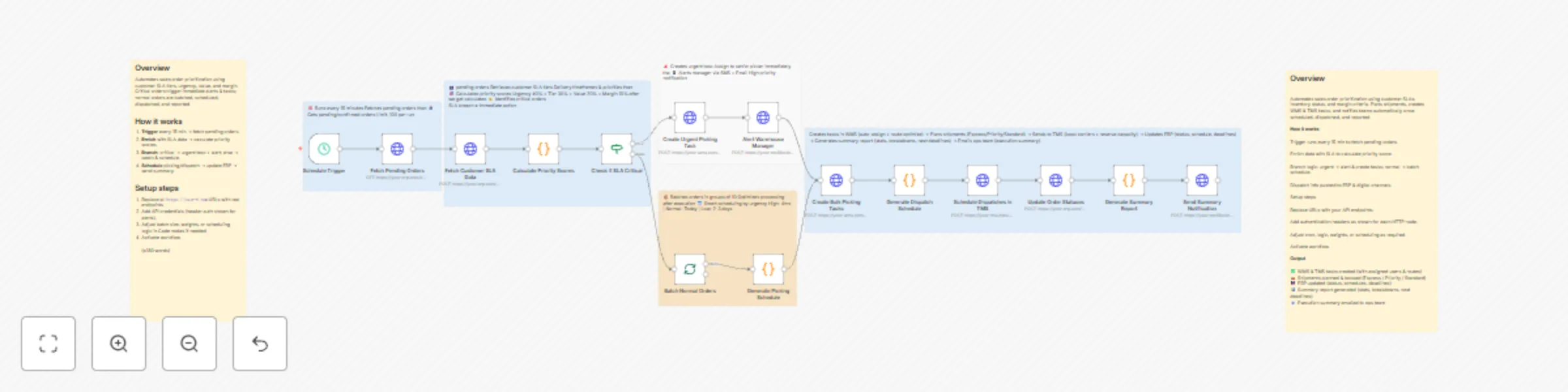
Automate sales order prioritization with ERP-WMS-TMS integration based on SLA tiers
This n8n workflow automates the prioritization and scheduling of sales orders based on customer SLAs, urgency, and profitability. It ensures that high-priority and SLA-critical orders are picked, packed, and dispatched first—improving fulfillment speed, customer satisfaction, and operational efficiency across warehouses and logistics. --- ### Key Features * **Automated Order Fetching:** Periodically retrieves all pending or confirmed sales orders from ERP systems. * **Dynamic SLA-Based Prioritization:** Calculates order priority scores using urgency, customer tier, order value, and profit margin. * **Intelligent SLA Monitoring:** Identifies SLA breaches and automatically flags them for immediate handling. * **Automated Task Creation:** Generates urgent picking tasks and alerts warehouse managers in real-time. * **Smart Scheduling:** Optimizes picking and dispatch timelines based on urgency and capacity. * **Seamless ERP & TMS Integration:** Updates order statuses and schedules dispatches automatically. * **Operational Transparency:** Sends end-of-cycle summary reports via email to operations teams. --- ### Workflow Process 1. **Schedule Trigger** * Runs every 15 minutes to ensure orders are frequently evaluated. * Maintains real-time responsiveness without overloading systems. 2. **Fetch Pending Orders** * Retrieves all orders in pending or confirmed state from ERP API. * Configurable limit (e.g., 100 orders per run) for controlled processing. 3. **Fetch Customer SLA Data** * Collects SLA tiers, delivery timeframes, and customer-specific priorities from ERP or CRM API. * Supports dynamic customer segmentation (Gold, Silver, Bronze tiers). 4. **Calculate Priority Scores** * Assigns weighted priority scores based on multiple criteria: * Urgency: **40%** * Tier: **30%** * Order Value: **20%** * Profit Margin: **10%** * Produces a composite score used for sorting and scheduling. 5. **Check if SLA Critical** * Detects if any order is close to or past SLA deadlines. * Routes SLA-breached orders for immediate escalation. 6. **Create Urgent Picking Task** * Generates warehouse picking tasks for critical orders. * Assigns to senior pickers or rapid response teams. 7. **Alert Warehouse Manager** * Sends instant SMS and email alerts for SLA-critical or high-priority orders. * Ensures immediate managerial attention. 8. **Batch Normal Orders** * Groups non-critical orders into batches of 10 for optimized processing. * Reduces load on WMS while maintaining steady throughput. 9. **Generate Picking Schedule** * Creates smart picking schedules based on urgency: * **High Priority:** Same-day * **Normal:** Within 1 day * **Low:** Within 2–3 days 10. **Create Bulk Picking Tasks** * Pushes picking tasks into WMS (Warehouse Management System). * Uses auto-assignment and route optimization logic. 11. **Generate Dispatch Schedule** * Builds dispatch timelines according to delivery method: Express, Priority, or Standard. * Syncs with transport capacity data. 12. **Schedule Dispatches in TMS** * Sends dispatch requests to TMS (Transport Management System). * Books carriers and reserves capacity for each batch. 13. **Update Order Statuses** * Updates ERP with new order statuses, schedules, and expected delivery dates. * Maintains a unified view across systems. 14. **Generate Summary Report** * Creates a summary JSON report including: * Total orders processed * SLA-critical cases * Dispatch breakdowns * Next deadlines 15. **Send Summary Notification** * Emails the operations team with execution summary and performance metrics. * Ensures team alignment and SLA visibility. --- ### Industries That Benefit This automation is especially valuable for: * **E-commerce & Retail:** To prioritize same-day or express deliveries for VIP customers. * **Logistics & 3PL Providers:** For meeting tight SLAs across multiple clients and delivery tiers. * **Manufacturing & B2B Distribution:** Ensures high-value or contractual orders are prioritized. * **Pharma & Healthcare:** Critical for time-sensitive and compliance-driven deliveries. * **Consumer Goods & FMCG:** Helps manage high-volume dispatch with smart scheduling. --- ### Prerequisites * ERP system with API access (e.g., SAP, Odoo, NetSuite). * WMS and TMS integrations with order/task APIs. * SMTP and SMS gateway credentials for notifications. * n8n instance with HTTP, Function, Email, and Scheduler nodes installed. --- ### Modification Options * Customize priority scoring weights per business type. * Integrate AI for predictive SLA breach forecasting. * Add Slack/Teams channels for real-time operational alerts. * Implement escalation routing for unassigned urgent tasks. * Extend reports to include OTIF (On-Time-In-Full) metrics. --- **Explore More AI-Powered Workflows:** [Contact us](https://www.oneclickitsolution.com/contact-us/) for customized supply chain and order management automation.
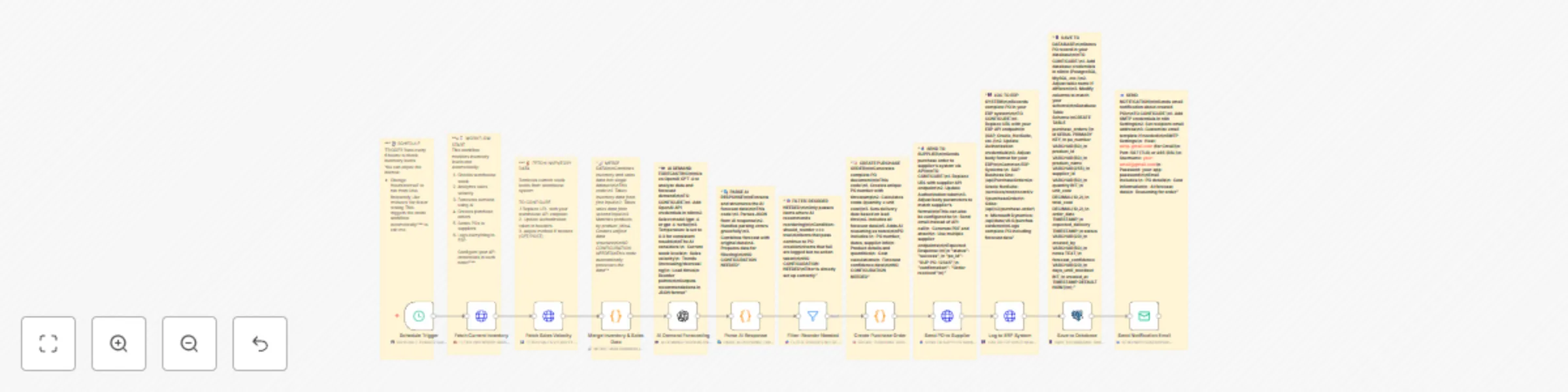
AI-driven inventory management with OpenAI forecasting & ERP integration
This n8n workflow automates the monitoring of warehouse inventory and sales velocity to predict demand, generate purchase orders automatically, send them to suppliers, and record all transactions in ERP and database systems. It uses AI-driven forecasting to ensure timely restocking while maintaining operational efficiency and minimizing stockouts or overstocking. --- ### Key Features * **Automated Scheduling:** Periodically checks inventory and sales data at defined intervals. * **Real-Time Data Fetching:** Retrieves live warehouse stock levels and sales trends. * **AI Demand Forecasting:** Uses OpenAI GPT to predict future demand based on sales velocity and stock trends. * **Auto-Purchase Orders:** Automatically generates and sends purchase orders to suppliers. * **ERP Integration:** Logs completed purchase orders into ERP systems like SAP, Oracle, or Netsuite. * **Database Logging:** Saves purchase order details and forecast confidence data into SQL databases (PostgreSQL/MySQL). * **Email Notifications:** Notifies relevant teams upon successful order creation and logging. * **Modular Configuration:** Each node includes configuration notes and credentials setup instructions. --- ### Workflow Process 1. **Schedule Trigger** * Runs every 6 hours to monitor stock and sales data. * Interval can be adjusted for higher or lower frequency checks. 2. **Fetch Current Inventory Data** * Retrieves live inventory levels from the warehouse API endpoint. * Requires API credentials and optional GET/POST method setup. 3. **Fetch Sales Velocity** * Pulls recent sales data for forecasting analysis. * Used later for AI-based trend prediction. 4. **Merge Inventory & Sales Data** * Combines inventory and sales datasets into a unified JSON structure. * Prepares data for AI model input. 5. **AI Demand Forecasting** * Sends merged data to OpenAI GPT for demand prediction. * Returns demand score, reorder need, and confidence levels. 6. **Parse AI Response** * Extracts and structures forecast results. * Combines AI data with original inventory dataset. 7. **Filter: Reorder Needed** * Identifies items flagged for reorder based on AI output. * Passes only reorder-required products to next steps. 8. **Create Purchase Order** * Automatically creates a PO document with item details, quantity, and supplier information. * Calculates total cost and applies forecast-based reorder logic. 9. **Send PO to Supplier** * Sends the generated purchase order to supplier API endpoints. * Includes response validation for order success/failure. 10. **Log to ERP System** * Records confirmed purchase orders into ERP platforms (SAP, Oracle, Netsuite). * Includes timestamps and forecast metrics. 11. **Save to Database** * Stores all PO data, supplier responses, and AI forecast metrics into PostgreSQL/MySQL tables. * Useful for long-term audit and analytics. 12. **Send Notification Email** * Sends summary emails upon PO creation and logging. * Includes PO ID, supplier, cost, and demand reasoning. --- ### Setup Instructions * **Schedule Trigger:** Adjust to your preferred interval (e.g., every 6 hours or once daily). * **API Configuration:** * Provide credentials in Inventory, Sales, and Supplier nodes. * Use Authorization headers or API keys as per your system. * **AI Node (OpenAI):** * Add your OpenAI API key in the credentials section. * Modify the prompt if you wish to include additional forecasting parameters. * **ERP Integration:** * Replace placeholder URLs with your ERP system endpoints. * Match fields like purchase order number, date, and cost. * **Database Connection:** * Configure credentials for PostgreSQL/MySQL in the Save to Database node. * Ensure tables (`purchase_orders`) are created as per schema provided in sticky notes. * **Email Notifications:** * Set up SMTP credentials (e.g., Gmail, Outlook, or custom mail server). * Add recipients under workflow notification settings. --- ### Industries That Benefit This automation is highly beneficial for: * **Retail & E-commerce:** Predicts product demand and auto-orders from suppliers. * **Manufacturing:** Ensures raw materials are restocked based on production cycles. * **Pharmaceuticals:** Maintains optimum inventory for high-demand medicines. * **FMCG & Supply Chain:** Balances fast-moving goods availability with minimal overstocking. * **Automotive & Electronics:** Prevents delays due to missing components. --- ### Prerequisites * API access to inventory, sales, supplier, and ERP systems. * Valid OpenAI API key for demand forecasting. * SQL database (PostgreSQL/MySQL) for record storage. * SMTP or mail server credentials for email notifications. * n8n environment with required nodes installed (HTTP, AI, Filter, Email, Database). --- ### Modification Options * Change forecast logic or thresholds for different industries. * Integrate Slack/Teams for live notifications. * Add approval workflow before sending POs. * Extend AI prompt for seasonality or promotional trends. * Add dashboard visualization using Grafana or Google Sheets. --- **Explore More AI Workflows:** [Get in touch with us](https://www.oneclickitsolution.com/contact-us/) to build industry-grade n8n automations with predictive intelligence.
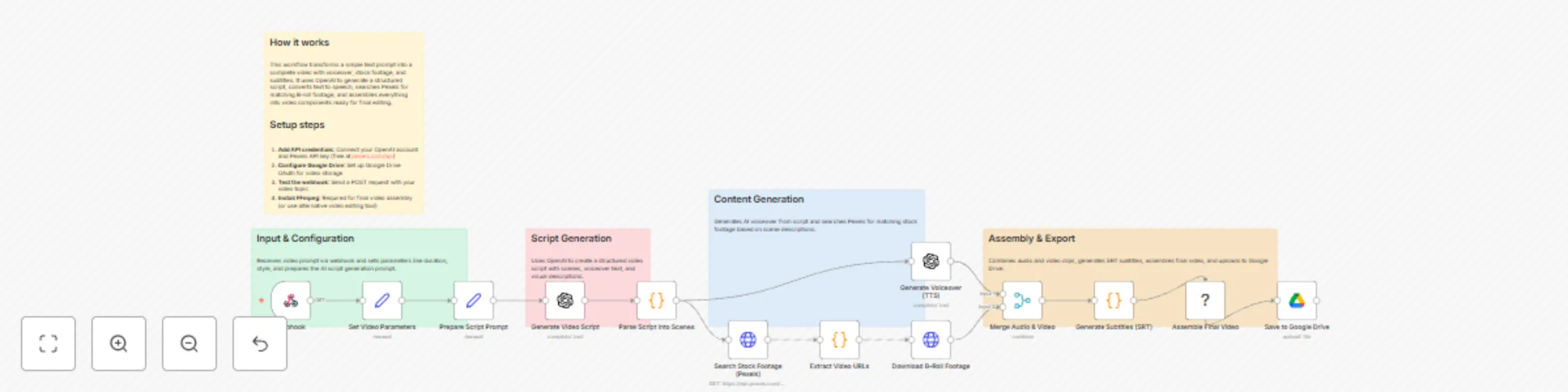
Create AI videos from prompts with OpenAI script, TTS & Pexels B-roll assembly
Automatically creates complete videos from a text prompt—script, voiceover, stock footage, and subtitles all assembled and ready. ## How it works Send a video topic via webhook (e.g., "Create a 60-second video about morning exercise"). The workflow uses OpenAI to generate a structured script with scenes, converts text to natural-sounding speech, searches Pexels for matching B-roll footage, and downloads everything. Finally, it merges audio with video, generates SRT subtitles, and prepares all components for final assembly. The workflow handles parallel processing—while generating voiceover, it simultaneously searches and downloads stock footage to save time. ## Setup steps 1. **Add OpenAI credentials** for script generation and text-to-speech 2. **Get a free Pexels API key** from pexels.com/api for stock footage access 3. **Connect Google Drive** for storing the final video output 4. **Install FFmpeg** (optional) for automated video assembly, or manually combine the components 5. **Test the webhook** by sending a POST request with your video topic **Input format:** ```json { "prompt": "Your video topic here", "duration": 60, "style": "motivational" } ``` ## What you get - ✅ AI-generated script broken into scenes - ✅ Professional voiceover audio (MP3) - ✅ Downloaded stock footage clips (MP4) - ✅ Timed subtitles file (SRT) - ✅ All components ready for final editing **Note:** The final video assembly requires FFmpeg or a video editor. All components are prepared and organized by scene number for easy manual editing if needed.

Automated proof-of-delivery with GPT-4 Vision & ERP/Invoice integration
This n8n workflow automates the end-to-end proof-of-delivery process for logistics operations. It ingests POD data via webhook—including driver signatures, delivery photos, and GPS coordinates—performs AI-driven verification for package integrity and authenticity, updates ERP systems with delivery status, triggers automated invoicing for verified cases, and handles disputes by creating evidence-backed tickets and alerting teams. Designed for seamless integration, it minimizes errors in billing and reconciliation while accelerating resolution for mismatches. ## **Benefits** * **Reduced Manual Effort:** Automates verification and status updates, cutting processing time from hours to minutes. * **Enhanced Accuracy:** AI analysis detects damages, location discrepancies, and signature fraud with high confidence scores, preventing billing disputes. * **Faster Revenue Cycle:** Instant invoicing for verified deliveries improves cash flow and reduces DSO (Days Sales Outstanding). * **Proactive Dispute Management:** Generates high-priority tickets with linked evidence, enabling quicker resolutions and lower escalation costs. * **Audit-Ready Traceability:** Logs all decisions, AI outputs, and actions for compliance with logistics standards like ISO 9001. * **Scalability:** Handles high-volume deliveries without proportional staff increases, supporting growth in e-commerce fulfillment. ## **Useful for Which Industry** * **Logistics & Supply Chain:** Ideal for 3PL providers, freight forwarders, and courier services managing last-mile deliveries. * **E-Commerce & Retail:** Supports platforms like Amazon or Shopify sellers verifying customer receipts and automating returns. * **Manufacturing & Distribution:** Streamlines B2B shipments with ERP integrations for just-in-time inventory. * **Pharmaceuticals & Healthcare:** Ensures tamper-evident deliveries with photo verification for cold-chain compliance. * **Food & Beverage:** Tracks perishable goods with damage detection to maintain quality assurance. ## **Workflow Process** * **Webhook Intake:** Receives POD submission (driver ID, signature image, delivery photo, recipient, GPS) via POST/GET. * **Input Validation:** Checks for required fields; branches to error if incomplete. * **Parallel AI Verification:** - AI Vision (OpenAI GPT-4): Analyzes photo for package condition, location match, and damage. - Signature Validation: AI checks legitimacy, handwritten authenticity, and completeness. * **Merge & Decide:** Consolidates results with confidence scoring; routes to verified (true) or dispute (false). * **Verified Path:** - Update ERP: POSTs status, timestamps, and coordinates to delivery system. - Trigger Invoicing: Generates billable invoice with POD reference via billing API. - Success Response: Returns confirmation to caller. * **Dispute Path:** - Create Ticket: POSTs high-priority support ticket with evidence (images, scores). - Alert Team: Notifies dispute team via email/Slack with issue summary and ticket link. - Dispute Response: Returns status and next steps to caller. * **Error Handling:** Returns detailed feedback for invalid inputs. ## **Setup Instructions** 1. **Import Workflow:** Paste JSON into n8n Workflows → Import from Clipboard. 2. **Configure Webhook:** Set URL for POD submissions (e.g., from mobile apps); test with sample POST data. 3. **AI Setup:** Add OpenAI API key to vision/signature nodes; specify GPT-4 model. 4. **Integrate Systems:** Update ERP/billing URLs and auth in update/trigger nodes (e.g., `https://your-erp.com/api`). 5. **Dispute Config:** Link support API (e.g., Zendesk) and notification service (e.g., Slack webhook). 6. **Threshold Tuning:** Adjust confidence scores in decision node (e.g., >85% for auto-approve). 7. **Test Run:** Execute manually with valid/invalid POD samples; verify ERP updates and ticket creation. ## **Prerequisites** * n8n instance (v1.50+) with webhook and HTTP request nodes enabled. * OpenAI API access for GPT-4 vision (image analysis credits required). * ERP/billing APIs with POST endpoints and authentication (e.g., OAuth tokens). * Support ticketing system (e.g., Zendesk, Jira) for dispute creation. * Secure image storage (e.g., AWS S3) for POD uploads. * Basic API testing tools (e.g., Postman) for endpoint validation. ## **Modification Options** * Add OCR for recipient name extraction from photos in validation step. * Integrate geofencing APIs for automated location alerts in AI vision. * Support multi-signature PODs for group deliveries by expanding parallel branches. * Add partial invoicing logic for mixed verified/disputed items. * Incorporate blockchain for immutable POD records in high-value shipments. * Extend alerts to SMS via Twilio for on-the-road driver notifications. * Build analytics export to Google Sheets for delivery success rates.

Automate pharmaceutical COA verification & vendor scoring with AI document analysis
This enterprise-grade **n8n workflow** automates the **Pharmaceutical Raw Material COA Verification & Vendor Quality Scoring System** — from upload to final reporting — using **AI-powered document extraction**, specification matching, and dynamic vendor scoring. It processes Certificates of Analysis (COAs) to validate compliance, assign quality scores, generate approvals or CAPA requests, and notify stakeholders, ensuring regulatory adherence and vendor accountability with full audit trails and zero manual data entry. ## **Key Features** * **Webhook-triggered COA Upload** for seamless integration with file-sharing systems * **AI Document Extraction** to parse test results and data from uploaded COAs * **Automated Specification Analysis** matching against predefined quality standards * **Weighted Vendor Scoring** based on compliance metrics and historical performance * **Compliance Decision Engine** with approve/reject branching and CAPA flagging * **Dynamic Certificate Generation** for approved materials, including digital signatures * **Vendor Database Synchronization** to update scores and records in real-time * **Targeted Email Notifications** for QA, production, and executive teams * **Executive Reporting Dashboard** with summaries, scores, and verification logs * **Audit-Ready Logging** for all steps, deviations, and decisions ## **Workflow Process** | Step | Node | Description | | ---- | ----------------------------------- | -------------------------------------------------------- | | 1 | **START: Upload COA** | Webhook trigger receives uploaded COA file for verification process | | 2 | **EXTRACT: Parse COA** | Extracts test results and data from the COA document using AI parsing | | 3 | **ANALYZE: Vendor Compliance** | Compares extracted data against specifications and flags deviations | | 4 | **SCORE: Vendor Quality Rating** | Calculates weighted compliance score based on test results and history | | 5 | **DECISION: Compliance Route** | Evaluates score/status: Branches to approve (green) or reject (red) path | | 6 | **APPROVED: Generate Approval Cert** (Approved Path) | Creates digital approval certificate for compliant materials | | 7 | **Update Vendor Database** | Saves verification record, score, and status to vendor database | | 8 | **NOTIFY: Email Alert** | Sends detailed notifications to QA/production teams | | 9 | **REPORT: Final Report** | Generates executive summary with COA scores and verifications | | 10 | **REJECT: Generate Rejection Report** (Reject Path) | Produces rejection report with deviation details | | 11 | **Request CAPA** | Initiates Corrective and Preventive Action (CAPA) process | | 12 | **PATH REJECTED** | Terminates rejected branch with audit log entry | ## **Setup Instructions** ### 1. Import Workflow * Open **n8n → Workflows → Import from Clipboard** * Paste the JSON workflow ### 2. Configure Credentials | Integration | Details | | ----------------- | -------------------------------------------------- | | **File Storage (e.g., Google Drive/AWS S3)** | API key or OAuth for COA upload handling | | **AI Extraction (e.g., Claude or OCR Tool)** | API key for document parsing (e.g., `claude-3-5-sonnet-20241022`) | | **Database (e.g., PostgreSQL/Airtable)** | Connection string for vendor records and specs | | **Email (SMTP/Gmail)** | SMTP credentials or OAuth for notifications | ### 3. Update Database/Sheet IDs Ensure your database or Google Sheets include: * `VendorDatabase` for scores and history * `Specifications` for quality standards ### 4. Set Triggers * **Webhook:** `/coa-verification` (for real-time file uploads) * **Manual/Scheduled:** For batch processing if needed ### 5. Run a Test Use **manual execution** to confirm: * COA extraction and analysis * Score calculation and branching * Email notifications and report generation (use sample COA file) ## **Database/Sheets Structure** ### **VendorDatabase** | vendorId | coaId | score | complianceStatus | lastVerified | deviations | capaRequested | |--------------|-------------|----------|--------------------|--------------------|--------|--------------------|---------------| | VEND-123456 | COA-789012 | 92.5 | Approved | 2025-11-04T14:30:00Z | None | No | ### **Specifications** | materialType | testParam | specMin | specMax | weight | |--------------|-------------|----------|--------------------|--------------------|--------|--------------------|---------------|----------| | API Excipient | Purity (%) | 98.0 | 102.0 | 0.4 | ## **System Requirements** | Requirement | Version/Access | | --------------------- | ---------------------------------------------- | | **n8n** | v1.50+ (AI and database integrations supported) | | **AI Parsing API** | `claude-3-5-sonnet-20241022` or equivalent OCR | | **Database API** | SQL connection or Google Sheets API | | **Email API** | `https://www.googleapis.com/auth/gmail` or SMTP | | **File Storage** | AWS S3 or Google Drive API access | ## **Optional Enhancements** * Integrate **ERP Systems** (e.g., SAP) for direct material release * Add **Regulatory Export** to PDF/CSV for FDA audits * Implement **Historical Trend Analysis** for vendor performance dashboards * Use **Multi-Language Support** for global COA extraction * Connect **Slack/Teams** for real-time alerts beyond email * Enable **Batch Processing** for high-volume uploads * Add **AI Anomaly Detection** for predictive non-compliance flagging * Build **Custom Scoring Models** via integrated ML tools **Result:** A fully automated quality assurance pipeline that verifies COAs, scores vendors, and drives compliance decisions — **ensuring pharmaceutical safety and efficiency with AI precision and complete traceability.** **Explore More AI Workflows:** [Get in touch with us](https://www.oneclickitsolution.com/contact-us/) for custom n8n automation!

Automated hotel price drop alerts with email notifications and database tracking
This n8n workflow automatically tracks hotel room prices, detects price drops, and sends real-time email alerts with savings calculations. It continuously monitors multiple hotels and room types to help travelers, businesses, and agents secure the best rates. ### **Key Features** * Automatically checks hotel prices every **6 hours** * Monitors **multiple hotels and room categories** * Detects and alerts when prices **drop** * Compares **old vs new** pricing and highlights savings * Sends **beautiful HTML email alerts** * Logs price history for long-term insights * Shows **availability changes** and urgency indicators ### **Price Drop Triggers** Alerts are sent when: * Price decreases by any amount * Price drops by a certain percentage (configurable) * Room becomes available again after being sold out ### **Email Alert Includes** | Field | Details | | --------------------- | ------------------------------- | | Hotel Name & Location | ✅ | | Room Type & Plan | ✅ | | Old Price | Shown with **strikethrough** | | New Price | Highlighted for visibility | | Savings Amount | ₹ / $ value difference | | Savings % | Percentage change | | Booking Link | Direct hotel booking / OTA link | | Urgency Badge | Shows limited-time availability | ### **Workflow Logic** 1. **Schedule Trigger** Runs every **6 hours** (configurable) 2. **Fetch Hotel Price API** Calls hotel booking / OTA / aggregator API 3. **Compare With Stored Price** Retrieves previous price from database/storage 4. **Detect Price Drop & Availability Change** 5. **Save Latest Price** Updates price history record 6. **Send Email Alert** Sends formatted HTML email with price drop details 7. **Log Notification** Maintains complete log of events ### **Setup Requirements** | Step | Action | | ---- | ------------------------------------------- | | 1 | Schedule Trigger (cron: every 6 hours) | | 2 | Add Hotel API / scraping source credentials | | 3 | Set up database or Google Sheet for storage | | 4 | Configure SMTP for emails | | 5 | Enter agent / user email address | | 6 | Populate hotel & room watchlist | | 7 | Test and verify price comparison logic | ### **Best Use Cases** * Travel agencies * Corporate travel teams * Personal trip planning * Hotel revenue analysts * Price intelligence dashboards ### **Extension Ideas** * WhatsApp and Telegram alerts * Push notifications to mobile apps * Google Sheets dashboard * Slack alerts for teams * Price trend charts (Grafana / Google Charts) * Integration with GPT for smart recommendations
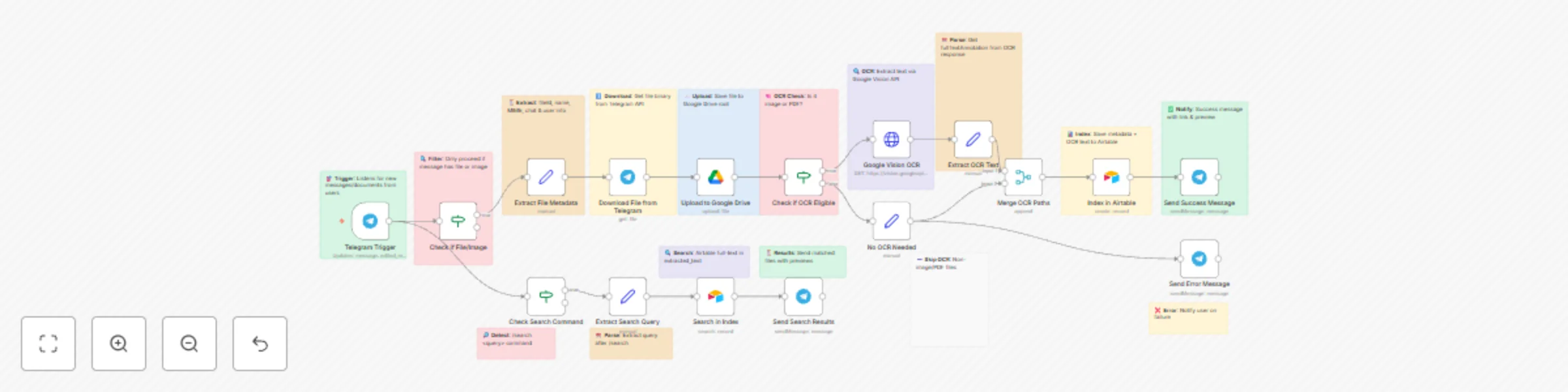
Create a searchable document archive with Telegram, Drive, OCR and Airtable
This n8n workflow receives files sent in a Telegram chat, uploads them to Google Drive, extracts text using OCR (for images and PDFs), and stores the extracted content in Airtable for quick search and retrieval. Users can later search through documents using a Telegram `/search` command. ### **Key Features** * Accepts images and documents from Telegram * Uploads files to Google Drive automatically * Detects file type and runs OCR if eligible * Extracts text from images & PDFs via Google Vision * Stores file metadata + text in Airtable * Search documents using `/search` command in Telegram * Sends result previews and file links * Error handling & user notifications included ### **Use Cases** * Personal document vault with search * Team knowledge filing system * Receipt & invoice OCR archive * Legal documents store & retrieval * Research papers & notes indexing * Company file inbox for AI knowledge base ### **Workflow Steps** | Step | Action | Description | | ---- | --------------------- | ---------------------------------------------------------- | | 1 | Telegram Trigger | Detects incoming docs/images or `/search` command | | 2 | Filter File or Search | Routes based on whether message has file or search command | | 3 | Extract Metadata | Reads file info such as name, MIME type, user | | 4 | Download File | Downloads file via Telegram API | | 5 | Upload to Drive | Saves file in Google Drive | | 6 | OCR Check | Determines if file supports OCR | | 7 | Google OCR | Runs OCR for images/PDFs | | 8 | Extract Text | Pulls text output from OCR | | 9 | Merge OCR Text | Combines file data + text | | 10 | Save to Airtable | Indexes with metadata + text | | 11 | Success Reply | Sends link + success message | | 12 | `/search` Flow | Parse search query | | 13 | Airtable Search | Full-text search for records | | 14 | Send Results | Sends matches to Telegram | | 15 | Error Handler | Notifies user on failure | ### **Input Formats** #### **File Messages Supported** * Images * PDFs * Documents #### **Search Command** ``` /search keyword ``` Example: ``` /search invoice ``` ### **Output** #### After Upload: ``` ✅ File saved & indexed successfully! 🔗 Drive Link: <link> ``` #### After Search: Returns structured result: * File name * Preview text snippet * Google Drive link ### **Data Stored in Airtable** | Field | Description | | ------------- | ------------------------- | | File Name | Original name | | File Link | Google Drive link | | MIME Type | File type | | Telegram User | Sender info | | OCR Text | Extracted searchable text | | Uploaded Date | Timestamp | ### **Technical Requirements** * Telegram Bot Token * Google Drive API connection * Google Vision API key * Airtable API key & table ### **Benefits** * Automatically organizes Telegram files * Makes PDFs & images searchable * Saves manual sorting and indexing time * AI-ready data storage (future LLM integration) * Fast search experience right in Telegram ### **Enhancement Ideas** * Add Whisper for voice message transcription * Add chat GPT summarization for large docs * Build dashboard for uploaded files * Auto-tag documents (invoice, ID, receipt etc.) * Multi-language OCR support ### Status ✅ Ready for production ✅ Handles images, PDFs, and files ✅ End-to-end automation 🛠 Optional: add more AI enrichment later
Telegram multi-language translation bot with GPT-3.5
SmartPoll Automator is an n8n-powered workflow that automatically creates and publishes polls in Telegram. It helps teams, communities, and businesses run polls without manual work. You simply send a command or submit a form — the workflow creates the poll and posts it in your selected Telegram group/channel. ### **Key Features** * Create polls automatically from a webhook or form input * Support for single-choice and multi-vote polls * Option to schedule polls * Logs all poll requests and results * Sends confirmation and status updates * Works across multiple Telegram groups/channels ### **Use Cases** * Daily team check-in polls * Customer feedback polls * Community/Q&A voting * Training/quiz polls * Opinion surveys for Telegram groups * Marketing campaign polls ### **Workflow Steps** | Step | Action | Description | | ---- | ---------------------- | ----------------------------------------------- | | 1 | Webhook Trigger | Receives poll request data (question + options) | | 2 | Data Validation | Checks if poll question & options are valid | | 3 | Poll Formatting | Structures poll text and options | | 4 | Telegram API Poll Send | Sends poll to selected Telegram group/channel | | 5 | Optional Scheduler | Delay or schedule poll time | | 6 | Logging | Stores poll details for logs | | 7 | Confirmation | Sends success message to user or admin | ### **Input Format** Example JSON input via webhook: ```json { "poll_question": "Which feature should we build next?", "options": [ "AI Email Assistant", "Scraper Automation", "DevOps Bot" ], "multiple_answers": false, "target_chat_id": "123456789", "schedule_time": "" } ``` ### **Output** * Poll posted in Telegram group * Confirmation message returned * Log entry stored Example confirmation response: ``` Poll successfully created and posted to Telegram! ``` ### **Requirements** * Telegram Bot Token * Telegram Chat ID * n8n instance * Webhook URL or Google Form/CRM connection ### **Benefits** * Saves time * Ensures consistent poll format * Improves engagement in Telegram communities * Enables automated market research & internal feedback * No coding required after setup ### **Enhancement Ideas** * Add AI to generate poll questions * Add Google Sheets poll request form * Add analytics dashboard * Trigger polls from Slack/CRM ### **Status** ✅ Fully Automated ✅ Multi-group support ✅ Real-time logging 🕒 Optional scheduling

Automate airlines customer support with GPT-4 and question classification
This n8n workflow automates airline customer support by classifying travel-related questions, fetching relevant information, generating AI answers, and delivering structured responses to users. It ensures accurate travel information delivery, tracks user satisfaction, and logs interactions for future insights — reducing manual support load and improving customer experience. ### Key Features * Allows users to ask airline/travel questions directly through chat via webhook integration. * Automatically classifies questions into categories like baggage, refunds, visas, bookings, and travel info. * Fetches verified travel knowledge and generates responses using AI. * Performs satisfaction check and offers human support if needed. * Logs all conversations and system responses for analytics and support auditing. ### Workflow Process * The **Webhook Entry Point** node receives passenger questions from chat/website (e.g., WhatsApp, web chat widget, or API). * The **Data Extraction & Cleaning** node formats the user query by removing noise and structuring text. * The **Question Categorization** node uses AI to classify the inquiry (e.g., baggage policy, cancellation rules, destination info). * The **Category Parsing** node routes the query to the appropriate context source or knowledge logic. * The **Knowledge Retrieval** node fetches verified travel or airline-specific information. * The **AI Response Generator** node produces a natural, accurate customer-facing reply using the retrieved context. * The **Response Formatting** node adds clarity, structured bullet points, links, and travel guidance tips. * The **Satisfaction Check** node asks if the user is happy with the answer and branches: * If satisfied → continue to logging * If not satisfied → send request to human support channel * The **Human Escalation Path** node hands unresolved queries to human support teams. * The **Interaction Logger** node stores conversation data (question, category, AI response, feedback status) in a database. * The **Final Delivery** node sends the formatted response back to the user chat channel. ### Setup Instructions * Import the workflow into n8n and configure the **Webhook Entry Point** with your chat platform or airline support portal. * Add OpenAI API credentials in the **AI Response Generator** and **Categorization** nodes. * Set up your **Knowledge Retrieval** source (e.g., internal travel database, API, or curated knowledge file). * Connect a database (e.g., PostgreSQL, MySQL, Supabase, MongoDB) to store conversation logs and user behavior. * Configure optional human support integration (Slack, email, CRM, or support desk tool). * Test the workflow by sending sample airline queries (e.g., “Baggage limit to Dubai?” or “How to reschedule my flight?”). ### Prerequisites * n8n instance with webhook, AI, and database nodes enabled. * OpenAI API key for AI classification and response generation. * Airline or travel knowledge source (API or internal knowledge base). * Database connection for logging queries and satisfaction responses. * Customer chat channel setup (WhatsApp, website widget, CRM integration, or Telegram bot). ### Modification Options * Enhance the **Knowledge Retrieval** step to pull real-time data from flight APIs, visa APIs, or airline portals. * Add language translation to support global passengers. * Extend **Satisfaction Logic** to auto-escalate urgent cases (e.g., flight delays, lost baggage complaints). * Build **self-service functions** like: * Flight status lookup * Refund eligibility checker * Visa requirement assistant * Customize the **Response Formatting** to include buttons/links (e.g., check baggage rules, contact support). **Explore More AI Travel Workflows: [Get in touch with us](https://www.oneclickitsolution.com/contact-us/) for custom airline automation!**
Monitor & auto-heal AWS EC2 instances with multi-channel alerts
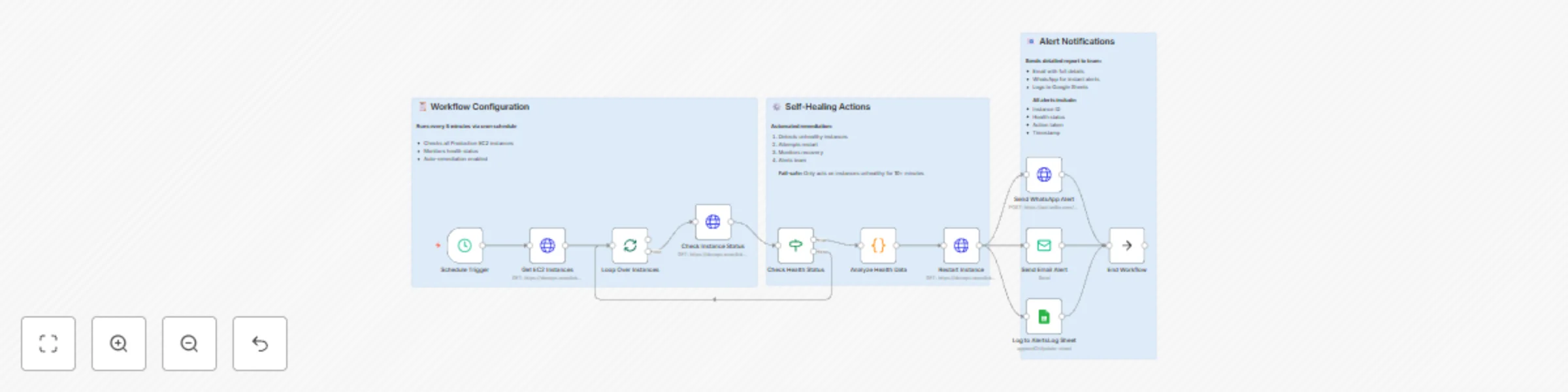
This n8n workflow automates the monitoring, health assessment, and self-healing of AWS EC2 instances in production environments. It runs periodic checks, identifies unhealthy instances based on status and metrics, restarts them automatically, and notifies teams via multi-channel alerts while logging data for auditing and reporting. ### Key Features - Triggers health checks every 5 minutes to proactively monitor EC2 fleet status. - Fetches and loops through all production EC2 instances for individualized analysis. - Evaluates instance health using AWS metrics and custom thresholds to detect issues like high CPU or stopped states. - Performs automatic restarts on unhealthy instances to minimize downtime. - Sends instant WhatsApp notifications for urgent alerts, detailed email reports for team review, and logs metrics to Google Sheets for long-term tracking. - Includes sticky notes for quick reference on configuration, self-healing logic, and alert setup. ### Workflow Process - The **Schedule Trigger** node runs the workflow every 5 minutes, ensuring frequent health monitoring without overwhelming AWS APIs. - The **Get EC2 Instances** node fetches all production-tagged EC2 instances from AWS, filtering by environment (e.g., tag: Environment=Production). - The **Loop Over Instances** node iterates through each fetched instance individually, allowing parallel processing for scalability. - The **Check Instance Status** node retrieves detailed health metrics for the current instance via AWS API (e.g., status checks, CPU utilization, and state). - The **Health Status Check** node evaluates the instance's status against predefined thresholds (e.g., failed system checks or high load); if healthy, it skips to logging. - The **Analyze Health Data** node assesses metrics in depth to determine action (e.g., restart if CPU > 90% for 5+ minutes) and prepares alert payloads. - The **Restart Instance** node automatically initiates a reboot on unhealthy instances using AWS EC2 API, with optional dry-run mode for testing. - The **WhatsApp Notification** node (part of Multi-Channel Alerts) sends instant alerts via Twilio WhatsApp API, including instance ID, issue summary, and restart status. - The **Email Report** node generates and sends a detailed HTML report to the team via SMTP, summarizing checked instances, actions taken, and metrics trends. - The **Google Sheets Logging** node appends health data, timestamps, and outcomes to a specified spreadsheet for historical analysis and dashboards. - The **Sticky Notes** nodes provide inline documentation: one for AWS credential setup, one explaining self-healing thresholds, and one for alert channel configurations. ### Setup Instructions - Import the workflow into n8n and activate the **Schedule Trigger** with a 5-minute cron expression (e.g., `*/5 * * * *`). - Configure AWS credentials in the **Get EC2 Instances**, **Check Instance Status**, and **Restart Instance** nodes using IAM roles with EC2 read/restart permissions. - Set up Twilio credentials in the **WhatsApp Notification** node, including your Twilio SID, auth token, and WhatsApp-enabled phone numbers for sender/receiver. - Add SMTP credentials (e.g., Gmail or AWS SES) in the **Email Report** node, and update sender/receiver email addresses in the node parameters. - Link Google Sheets in the **Google Sheets Logging** node by providing the spreadsheet ID, sheet name, and OAuth credentials for write access. - Customize health thresholds in **Health Status Check** and **Analyze Health Data** (e.g., via expressions for CPU/memory limits). - Test the workflow by manually executing it on a small set of instances and verifying alerts/logging before enabling production scheduling. - Review sticky notes within n8n for quick tips, and monitor executions in the dashboard to fine-tune intervals or error handling. ### Prerequisites - AWS account with EC2 access and IAM user/role for DescribeInstances, DescribeInstanceStatus, and RebootInstances actions. - Twilio account with WhatsApp sandbox or approved number for notifications. - SMTP email service (e.g., Gmail, Outlook) with app-specific passwords enabled. - Google Workspace or personal Google account for Sheets integration. - n8n instance with AWS, Twilio, SMTP, and Google Sheets nodes installed (cloud or self-hosted). - Production EC2 instances tagged consistently (e.g., Environment=Production) for filtering. ### Modification Options - Adjust the **Schedule Trigger** interval to hourly for less frequent checks or integrate with AWS CloudWatch Events for dynamic triggering. - Expand **Analyze Health Data** to include advanced metrics (e.g., disk I/O via CloudWatch) or ML-based anomaly detection. - Add more alert channels in **Multi-Channel Alerts**, such as Slack webhooks or PagerDuty integrations, by duplicating the WhatsApp/Email branches. - Enhance **Google Sheets Logging** with charts or conditional formatting via Google Apps Script for visual dashboards. - Implement approval gates in **Restart Instance** (e.g., via email confirmation) to prevent auto-restarts in sensitive environments. **Explore More AI Workflows: [Get in touch with us](https://www.oneclickitsolution.com/contact-us/) for custom n8n automation!**
Multi-channel event countdown manager with Telegram, Slack and Email
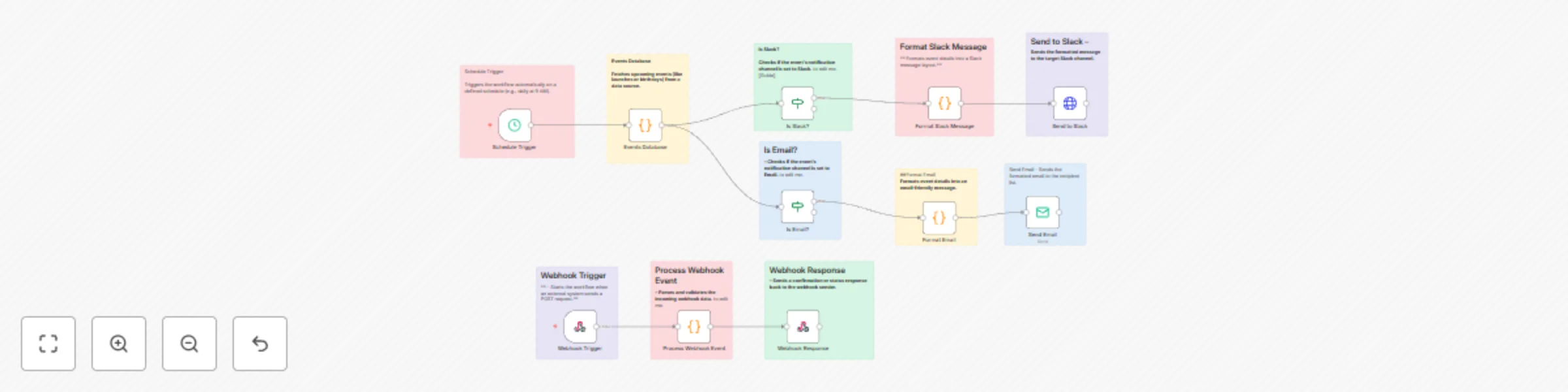
This n8n workflow automates the creation and countdown notifications for events like product launches or birthdays via a Telegram bot, ensuring timely group alerts through multi-channel routing (e.g., Slack or email). It processes incoming event data from webhooks, stores it persistently, and triggers scheduled reminders to keep teams or groups informed. ### Key Features - Handles event creation or updates via webhook from Telegram chats or external sources. - Fetches and processes upcoming events on a customizable schedule for countdown notifications. - Routes alerts dynamically to channels like Slack or email based on event settings. - Validates incoming data, formats messages for optimal delivery, and confirms responses to initiators. ### Workflow Process - The **Webhook Trigger** node starts the workflow when an external system (e.g., Telegram bot) sends a POST request with event details like date, description, and notification preferences. - The **Process Webhook Event** node parses and validates incoming webhook data, ensuring required fields (e.g., event date, channel) are present before proceeding. - The **Events Database** node fetches upcoming events (e.g., launches or birthdays) from a data source, either triggered by the webhook for updates or scheduled for notifications. - The **Webhook Response** node sends a confirmation or status response back to the webhook sender (e.g., Telegram bot) in JSON format. - The **Schedule Trigger** node runs the workflow automatically on a defined schedule (e.g., daily at 9AM) to check for countdown-eligible events. - The **Is Slack?** node checks if the event's notification channel is set to Slack; if true, it routes to Slack-specific formatting. - The **Format Slack Message** node formats the event countdown message in a Slack-friendly layout (e.g., with mentions or embeds). - The **Send to Slack** node sends the formatted message to the target Slack channel for group notifications. - The **Is Email?** node checks if the event's notification channel is set to email (fallback from Slack check); if true, it routes to email-specific formatting. - The **Format Email** node formats the event countdown message in an email-friendly detail (e.g., with HTML for readability). - The **Send Email** node sends the formatted email to the recipient list (e.g., group organizers or participants). ### Setup Instructions - Import the workflow into n8n and configure the **Webhook Trigger** with your Telegram bot's webhook URL for event creation requests. - Set up database credentials in the **Events Database** node (e.g., connect to PostgreSQL or Airtable for event storage). - Configure channel integrations: Slack app token for **Send to Slack**, SMTP credentials for **Send Email**, and ensure **Schedule Trigger** aligns with your countdown frequency (e.g., hourly for real-time alerts). - Test by sending a sample POST request to the webhook with event data and manually triggering the schedule to verify notifications. - Monitor executions in the n8n dashboard and refine validation logic in **Process Webhook Event** for custom event fields. ### Prerequisites - Telegram bot with webhook setup for incoming event creation messages. - Database service (e.g., PostgreSQL or Google Sheets) for storing and querying events. - Slack workspace and email provider (e.g., Gmail SMTP) for notifications. - n8n instance with webhook and cron scheduling enabled. - Basic API setup for Telegram bot token and channel routing. ### Modification Options - Add a Telegram-specific check node (e.g., "Is Telegram?") branching from **Events Database** to integrate direct bot messaging. - Customize the **Schedule Trigger** for dynamic timing, like event-specific intervals for countdowns (e.g., daily leading up to the date). - Extend **Format Slack Message** or **Format Email** with dynamic templates, such as embedding countdown timers or images. - Integrate additional channels (e.g., Discord) by duplicating the **Is Slack?** / **Is Email?** logic. - Enhance **Process Webhook Event** to support recurring events or auto-populate recipient lists from Telegram group data. **Explore More AI Workflows:** [Get in touch with us](https://www.oneclickitsolution.com/contact-us/) for custom n8n automation!

Multi-channel task reminder system with Telegram, Email and Slack
This n8n workflow automates task creation and scheduled reminders for users via a Telegram bot, ensuring timely notifications across multiple channels like email and Slack. It streamlines task management by validating inputs, storing tasks securely, and delivering reminders while updating statuses for seamless follow-up. ### Key Features - Enables users to create tasks directly in chat via webhook integration. - Triggers periodic checks for due tasks and processes them individually for accurate reminders. - Routes reminders to preferred channels (Telegram, email, or Slack) based on user settings. - Validates inputs, handles errors gracefully, and logs task data for persistence and auditing. ### Workflow Process - The **Webhook Entry Point** node receives task creation requests from users via chat (e.g., Telegram bot), including details like user ID, task description, and channel preferences. - The **Input Validation** node checks for required fields (e.g., user ID, task description); if validation fails, it routes to the **Error Response** node. - The **Save to Database** node stores validated task data securely in a database (e.g., PostgreSQL, MongoDB, or MySQL) for persistence. - The **Success Response** node (part of Response Handlers) returns a confirmation message to the user in JSON format. - The **Schedule Trigger** node runs every 3 minutes to check for pending reminders (with a 5-minute buffer for every hour to avoid duplicates). - The **Fetch Due Tasks** node queries the database for tasks due within the check window (e.g., reminders set for within 3 minutes). - The **Tasks Check** node verifies if fetched tasks exist and are eligible for processing. - The **Split Items** node processes each due task individually to handle them in parallel without conflicts. - The **Channel Router** node directs reminders to the appropriate channel based on task settings (e.g., email, Slack, or Telegram). - The **Email Sender** node sends HTML-formatted reminder emails with task details and setup instructions. - The **Slack Sender** node delivers Slack messages using webhooks, including task formatting and user mentions. - The **Telegram Sender** node sends Telegram messages via bot API, including task ID, bot setup, and conversation starters. - The **Update Task Status** node marks the task as reminded in the database (e.g., updating status to "sent" with timestamp). - The **Workflow Complete!** node finalizes the process, logging completion and preparing for the next cycle. ### Setup Instructions - Import the workflow into n8n and configure the **Webhook Entry Point** with your Telegram bot's webhook URL and authentication. - Set up database credentials in the **Save to Database** and **Fetch Due Tasks** nodes (e.g., connect to PostgreSQL or MongoDB). - Configure channel-specific credentials: Telegram bot token for **Telegram Sender**, email SMTP for **Email Sender**, and Slack webhook for **Slack Sender**. - Adjust the **Schedule Trigger** interval (e.g., every 3 minutes) and add any custom due-time logic in **Fetch Due Tasks**. - Test the workflow by sending a sample task creation request via the webhook and simulating due tasks to verify reminders and status updates. - Monitor executions in n8n dashboard and tweak validation rules or response formats as needed for your use case. ### Prerequisites - Telegram bot setup with webhook integration for task creation and messaging. - Database service (e.g., PostgreSQL, MongoDB, or MySQL) for task storage and querying. - Email service (e.g., SMTP provider) and Slack workspace for multi-channel reminders. - n8n instance with webhook and scheduling enabled. - Basic API knowledge for bot configuration and channel routing. ### Modification Options - Customize the **Input Validation** node to add fields like priority levels or recurring task flags. - Extend the **Channel Router** to include additional channels (e.g., Microsoft Teams or SMS via Twilio). - Modify the **Schedule Trigger** to use dynamic intervals based on task urgency or user preferences. - Enhance the **Update Task Status** node to trigger follow-up actions, like archiving completed tasks. - Adjust the **Telegram Sender** node for richer interactions, such as inline keyboards for task rescheduling. **Explore More AI Workflows: [Get in touch with us](https://www.oneclickitsolution.com/contact-us/) for custom n8n automation!**
Monitor Instagram competitor trends with Claude 3.5 & multi-channel alerts
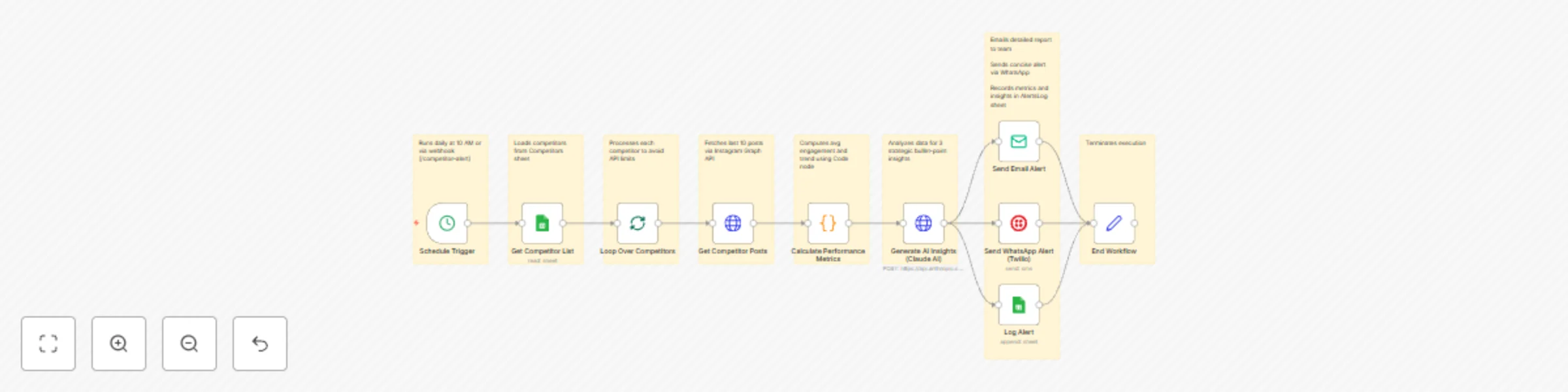
This enterprise-grade **n8n workflow** automates **competitor monitoring** on Instagram — from post fetching to AI-driven strategy alerts — using **Claude AI**, Instagram API, and multi-channel notifications. It tracks trends, analyzes performance, and delivers actionable insights via WhatsApp and email, keeping your team ahead with zero manual effort. ## **Key Features** * **Daily competitor scanning** from Google Sheets * **Post performance metrics** (engagement rate, trends) calculated automatically * **AI-powered insights** using **Claude 3.5 Sonnet** for content and engagement strategies * **Dual-channel alerts:** WhatsApp (Twilio) and email for instant delivery * **Audit logs** in Google Sheets for historical trends * **Scalable triggers:** Daily schedule or webhook for ad-hoc checks ## **Workflow Process** | Step | Node | Description | | ---- | ----------------------------------- | -------------------------------------------------------- | | 1 | **Schedule Trigger** | Runs daily at 10 AM or via webhook (`/competitor-alert`) | | 2 | **Get Competitor List** | Loads competitors from `Competitors` sheet | | 3 | **Loop Over Competitors** | Processes each competitor to avoid API limits | | 4 | **Get Competitor Posts** | Fetches last 10 posts via Instagram Graph API | | 5 | **Calculate Performance Metrics** | Computes avg engagement and trend using Code node | | 6 | **Generate AI Insights (Claude AI)**| Analyzes data for 3 strategic bullet-point insights | | 7 | **Send Email Alert** | Emails detailed report to team | | 8 | **Send WhatsApp Alert (Twilio)** | Sends concise alert via WhatsApp | | 9 | **Log Alert** | Records metrics and insights in `AlertsLog` sheet | | 10 | **End Workflow** | Terminates execution | ## **Setup Instructions** ### 1. Import Workflow * Open **n8n → Workflows → Import from Clipboard** * Paste the JSON workflow ### 2. Configure Credentials | Integration | Details | | ----------------- | -------------------------------------------------- | | **Google Sheets** | Service account with spreadsheet access | | **Instagram API** | Business access token for media fetching | | **Claude AI** | Anthropic API key for `claude-3-5-sonnet-20241022` | | **Twilio** | Credentials for WhatsApp messaging | | **SMTP/Email** | SMTP or Gmail for email alerts | ### 3. Update Spreadsheet IDs Ensure your Google Sheets include: * `Competitors` * `AlertsLog` ### 4. Set Triggers * **Webhook:** `/webhook/competitor-alert` (for on-demand runs) * **Schedule:** Daily at 10:00 AM ### 5. Run a Test Use **manual execution** to confirm: * Post fetching and metrics calculation * AI insights generation * WhatsApp/email delivery and sheet logging ## **Google Sheets Structure** ### **Competitors** | competitorName | competitorUserId | industryFocus | |----------------|------------------|---------------| | BrandX | 1234567890 | Fashion | ### **AlertsLog** | competitor | avgEngagement | trend | insights | timestamp | |---------------|----------------|--------|-----------------------------------|--------------------| | BrandX | 75.5 | Rising | - Bullet 1... | 2023-10-01T12:00:00Z | ## **System Requirements** | Requirement | Version/Access | | --------------------- | ---------------------------------------------- | | **n8n** | v1.50+ (AI and messaging integrations supported)| | **Claude AI API** | `claude-3-5-sonnet-20241022` | | **Instagram Graph API**| Business account access token | | **Twilio API** | WhatsApp-enabled phone number | | **Google Sheets API** | `https://www.googleapis.com/auth/spreadsheets` | | **SMTP** | For email (e.g., Gmail OAuth) | ## **Optional Enhancements** * Add **visual charts** (e.g., engagement trends via Google Charts) * Integrate **Slack** for team-wide alerts * Use **advanced metrics** like reach/impressions via Instagram Insights API * Connect **CRM (HubSpot)** to tag competitors * Enable **multi-platform monitoring** (e.g., TikTok) * Add **threshold-based alerts** (e.g., only if engagement >20% increase) * Export insights to **Notion** or **Airtable** for strategy docs **Result:** A single automated system that monitors competitors, uncovers trends, and arms your team with AI strategies — **delivered via WhatsApp and email with zero manual work.** **[Get in touch with us](https://www.oneclickitsolution.com/contact-us/) for custom n8n automation!**
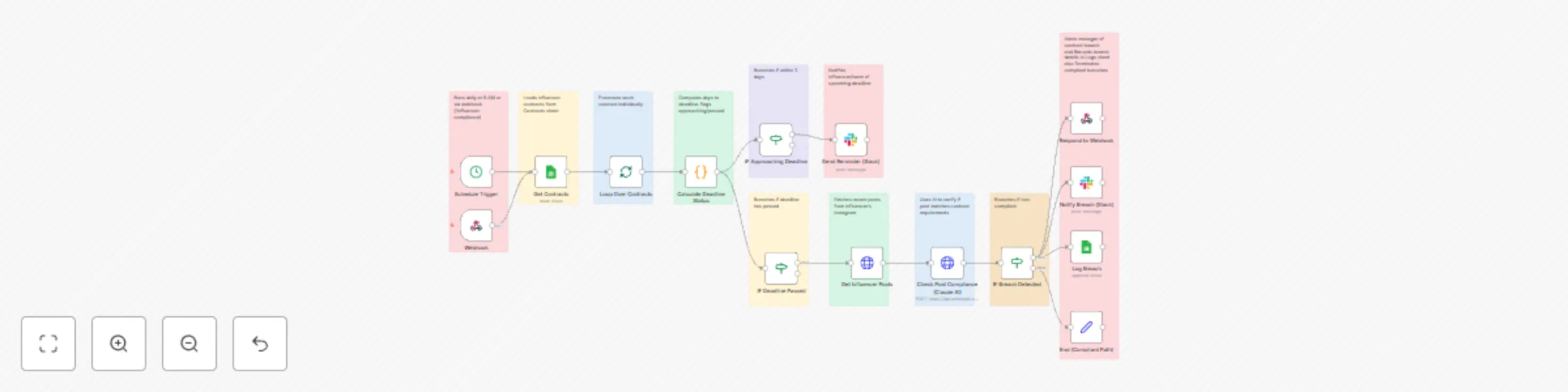
Automate Instagram influencer contract compliance with Claude AI & Slack alerts
This enterprise-grade **n8n workflow** automates **influencer contract compliance** for Instagram campaigns — from deadline tracking to breach detection — using **Claude AI**, Instagram API, and smart reminders. It ensures timely deliverables by monitoring posts, sending proactive alerts, and escalating breaches, all with zero manual oversight. ## **Key Features** * **Daily contract scanning** from Google Sheets * **Deadline calculations** for approaching or passed dates * **Automated reminders** via Slack for nearing deadlines * **Post verification** using Instagram API and **Claude 3.5 Sonnet** for hashtag/description matching * **Breach detection engine** identifies non-compliant influencers * **Escalation notifications** to managers on breaches * **Audit logs** stored in Google Sheets for compliance records * **Scalable triggers:** Daily schedule or webhook for new contracts ## **Workflow Process** | Step | Node | Description | | ---- | ----------------------------------- | -------------------------------------------------------- | | 1 | **Schedule Trigger** | Runs daily at 9 AM or via webhook (`/influencer-compliance`) | | 2 | **Get Contracts** | Loads influencer contracts from `Contracts` sheet | | 3 | **Loop Over Contracts** | Processes each contract individually | | 4 | **Calculate Deadline Status** | Computes days to deadline, flags approaching/passed | | 5 | **IF Approaching Deadline** | Branches if within 3 days | | 6 | **Send Reminder (Slack)** | Notifies influencer/team of upcoming deadline | | 7 | **IF Deadline Passed** | Branches if deadline has passed | | 8 | **Get Influencer Posts** | Fetches recent posts from influencer's Instagram | | 9 | **Check Post Compliance (Claude AI)** | Uses AI to verify if post matches contract requirements | | 10 | **IF Breach Detected** | Branches if non-compliant | | 11 | **Notify Breach (Slack)** | Alerts manager of contract breach | | 12 | **Log Breach** | Records breach details in `Logs` sheet | | 13 | **End (Compliant Path)** | Terminates compliant branches | ## **Setup Instructions** ### 1. Import Workflow * Open **n8n → Workflows → Import from Clipboard** * Paste the JSON workflow ### 2. Configure Credentials | Integration | Details | | ----------------- | -------------------------------------------------- | | **Google Sheets** | Service account with spreadsheet access | | **Instagram API** | Business access token for fetching media | | **Claude AI** | Anthropic API key for `claude-3-5-sonnet-20241022` | | **Slack** | Webhook or OAuth app | ### 3. Update Spreadsheet IDs Ensure your Google Sheets include: * `Contracts` * `Logs` ### 4. Set Triggers * **Webhook:** `/webhook/influencer-compliance` (for real-time updates) * **Schedule:** Daily at 9:00 AM ### 5. Run a Test Use **manual execution** to confirm: * Reminder and breach notifications * Post compliance checks * Log entries in sheet ## **Google Sheets Structure** ### **Contracts** | campaignId | influencerName | influencerUserId | deadline | requiredHashtag | campaignDescription | |------------|----------------|------------------|------------|-----------------|---------------------| | CAMP-001 | InfluencerX | 1234567890 | 2023-12-31 | #BrandPromo | Promote new product | ### **Logs** | campaignId | influencerName | action | timestamp | details | |------------|----------------|-----------------|--------------------|----------------------| | CAMP-001 | InfluencerX | Breach Detected | 2023-10-01T12:00:00Z | Failed to post by deadline | ## **System Requirements** | Requirement | Version/Access | | --------------------- | ---------------------------------------------- | | **n8n** | v1.50+ (AI and API integrations supported) | | **Claude AI API** | `claude-3-5-sonnet-20241022` | | **Instagram Graph API**| Business account access token | | **Google Sheets API** | `https://www.googleapis.com/auth/spreadsheets` | | **Slack Webhook** | Required for notifications | ## **Optional Enhancements** * Add **email reminders** to influencers directly * Integrate **Asana/Trello** for task creation on breaches * Use **advanced AI prompts** for deeper post analysis (e.g., sentiment) * Connect **Payment APIs (Stripe)** to withhold payments on breaches * Enable **multi-platform checks** (e.g., TikTok/YouTube) * Add **reporting dashboard** via Google Data Studio * Implement **auto-contract updates** from CRM systems **Result:** A single automated system that tracks, reminds, and enforces influencer deliverables — **with full AI verification and zero manual work.** **[Get in touch with us](https://www.oneclickitsolution.com/contact-us/) for custom n8n automation!**
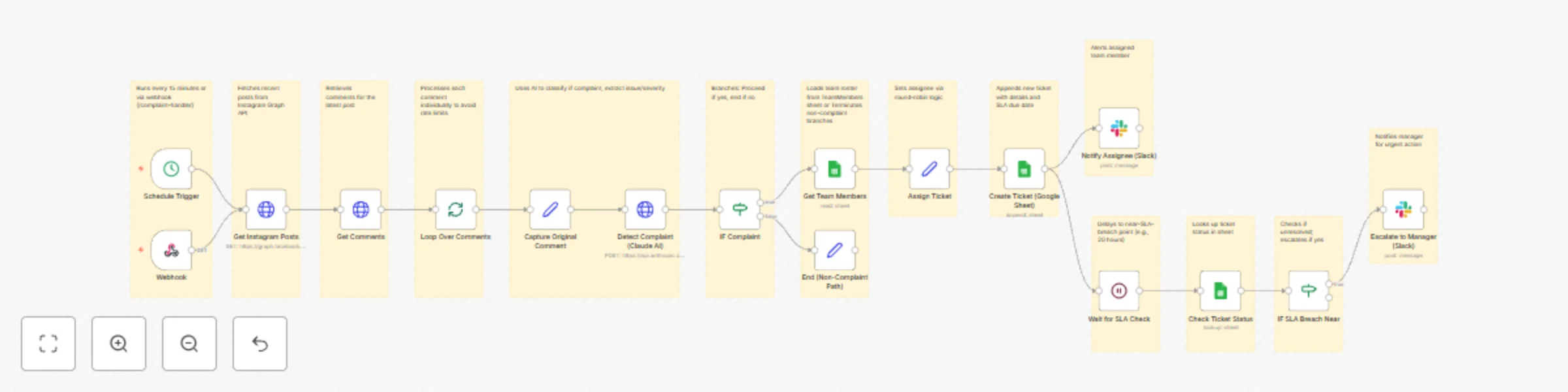
Automate Instagram complaint handling with Claude AI, tickets & SLA management
This enterprise-grade **n8n workflow** automates the **Instagram complaint handling process** — from detection to resolution — using **Claude AI**, dynamic ticket assignment, and SLA enforcement. It converts customer complaints in comments into **actionable support tickets** with **auto-assignment**, **escalation alerts**, and **full audit trails**, ensuring timely responses and improved customer satisfaction with zero manual intervention. ## **Key Features** * **Real-time Instagram polling** for new comments * **AI-powered complaint detection** using **Claude 3.5 Sonnet** for sentiment and issue classification * **Automatic ticket creation** in Google Sheets (or integrable with Zendesk/Jira) * **Round-robin assignment** to team members from a dynamic roster * **SLA timer and monitoring** (e.g., 24-hour response window with escalation at 80% elapsed) * **Escalation engine** notifies managers via Slack if near breach * **Multi-channel notifications:** Slack for assignees and escalations * **Audit-ready:** Logs ticket details, assignments, and actions * **Scalable triggers:** Webhook or scheduled polling ## **Workflow Process** | Step | Node | Description | | ---- | ----------------------------------- | -------------------------------------------------------- | | 1 | **Schedule Trigger** | Runs every 15 minutes or via webhook (`/complaint-handler`) | | 2 | **Get Instagram Posts** | Fetches recent posts from Instagram Graph API | | 3 | **Get Comments** | Retrieves comments for the latest post | | 4 | **Loop Over Comments** | Processes each comment individually to avoid rate limits | | 5 | **Detect Complaint (Claude AI)** | Uses AI to classify if complaint, extract issue/severity | | 6 | **IF Complaint** | Branches: Proceed if yes, end if no | | 7 | **Get Team Members** | Loads team roster from `TeamMembers` sheet | | 8 | **Assign Ticket** | Sets assignee via round-robin logic | | 9 | **Create Ticket (Google Sheet)** | Appends new ticket with details and SLA due date | | 10 | **Notify Assignee (Slack)** | Alerts assigned team member | | 11 | **Wait for SLA Check** | Delays to near-SLA-breach point (e.g., 20 hours) | | 12 | **Check Ticket Status** | Looks up ticket status in sheet | | 13 | **IF SLA Breach Near** | Checks if unresolved; escalates if yes | | 14 | **Escalate to Manager (Slack)** | Notifies manager for urgent action | | 15 | **End (Non-Complaint Path)** | Terminates non-complaint branches | ## **Setup Instructions** ### 1. Import Workflow * Open **n8n → Workflows → Import from Clipboard** * Paste the JSON workflow ### 2. Configure Credentials | Integration | Details | | ----------------- | -------------------------------------------------- | | **Instagram API** | Access token from Facebook Developer Portal | | **Claude AI** | Anthropic API key for `claude-3-5-sonnet-20241022` | | **Google Sheets** | Service account with spreadsheet access | | **Slack** | Webhook or OAuth app | ### 3. Update Spreadsheet IDs Ensure your Google Sheets include: * `SupportTickets` * `TeamMembers` ### 4. Set Triggers * **Webhook:** `/webhook/complaint-handler` (for real-time Instagram notifications if set up) * **Schedule:** Every 15 minutes ### 5. Run a Test Use **manual execution** to confirm: * Ticket creation in sheet * Slack notifications * SLA wait and escalation logic (simulate by shortening wait time) ## **Google Sheets Structure** ### **SupportTickets** | ticketId | commentText | user | createdAt | assignedTo | status | slaDue | issueType | severity | |--------------|-------------|----------|--------------------|--------------------|--------|--------------------|---------------|----------| | TKT-12345678 | Sample complaint text | user123 | 2023-10-01T12:00:00Z | [email protected] | Open | 2023-10-02T12:00:00Z | Product Issue | Medium | ### **TeamMembers** | name | email | |-----------|-------------------| | John Doe | [email protected] | | Jane Smith| [email protected] | ## **System Requirements** | Requirement | Version/Access | | --------------------- | ---------------------------------------------- | | **n8n** | v1.50+ (AI integrations supported) | | **Claude AI API** | `claude-3-5-sonnet-20241022` | | **Instagram Graph API**| Business account access token | | **Google Sheets API** | `https://www.googleapis.com/auth/spreadsheets` | | **Slack Webhook** | Required for notifications | ## **Optional Enhancements** * Integrate **Zendesk/Jira** for professional ticketing instead of Google Sheets * Add **email notifications** to customers acknowledging complaints * Use **sentiment thresholds** for prioritizing high-severity tickets * Connect **Twilio** for SMS escalations * Enable **multi-platform support** (e.g., Twitter/Facebook comments) * Add **reporting dashboard** via Google Data Studio * Implement **auto-resolution** for simple complaints using AI responses **Result:** A single automated system that detects, tickets, assigns, and enforces SLAs on Instagram complaints — **with full AI intelligence and zero manual work.** **Explore More AI Workflows:** [Get in touch with us](https://www.oneclickitsolution.com/contact-us/) for custom n8n automation!

Auto-moderate Instagram comments with Perspective API & Slack alerts
Automatically detects and hides hate speech/toxic comments, alerts your team, and logs flagged content for review. ### Workflow Overview - **Trigger**: A Schedule node runs every 15 minutes to poll for new comments (Instagram doesn't natively push notifications easily, so polling is used). You could replace this with a Webhook if you set up Instagram webhooks via Graph API. - **Scan Comments**: Uses Instagram Graph API (via HTTP Request) to fetch recent posts and their comments. Assumes you have an Instagram Business Account and a valid access token (from Facebook Developer Portal). - **Detect Toxicity**: For each comment, it sends the text to Google's Perspective API (a free toxicity detection API; sign up at https://perspectiveapi.com/ for an API key). Threshold for "toxic" is set to >0.7 toxicity score (configurable). - **Auto-Hide Offensive Ones**: If toxic, uses Instagram API to hide the comment. - **Alert Team**: Sends a Slack notification (or email; configurable) with details. - **Store Evidence**: Appends the toxic comment details (text, user, score, timestamp) to a Google Sheet for auditing. - **Error Handling**: Basic error node to notify if API calls fail. - **Business Value Alignment**: This automates protection, reducing manual moderation and building trust. ### Prerequisites: - n8n installed (self-hosted or cloud). - Instagram Graph API access token (set in n8n credentials or as environment variable). - Perspective API key (free tier available). - Slack webhook or email credentials. - Google Sheets API credentials (for storage). ### How to Import 1. In n8n, go to the workflows list. 2. Click "Import from JSON" (or paste into a new workflow). 3. Update placeholders: - Replace `YOUR_INSTAGRAM_ACCESS_TOKEN` with your token. - Replace `YOUR_PERSPECTIVE_API_KEY` with your key. - Set up credentials for HTTP Request (Instagram), Slack, and Google Sheets. - Adjust `YOUR_INSTAGRAM_BUSINESS_ACCOUNT_ID` and `YOUR_MEDIA_ID` (or make it dynamic). 4. Test and activate. If you encounter issues (e.g., API rate limits), adjust the schedule or add waits. ### Notes on Customization - **Looping**: The "Loop Over Comments" uses SplitInBatches to process comments one by one, avoiding API rate limits. - **Toxicity API**: I used Perspective API as it's reliable and free for low volume. If you prefer another (e.g., Hugging Face), swap the HTTP Request body. - **Instagram API**: This fetches comments for the first recent post (simplified). To handle multiple posts, add another loop. - **Alerts**: Slack is used; change to Email node if preferred. - **Storage**: Google Sheets for simplicity; could be swapped for MongoDB or Airtable. - **Sticky Notes**: Three notes explain phases – they won't affect execution but help in the UI. - **Testing**: Start with test data. Instagram API requires app review for production.
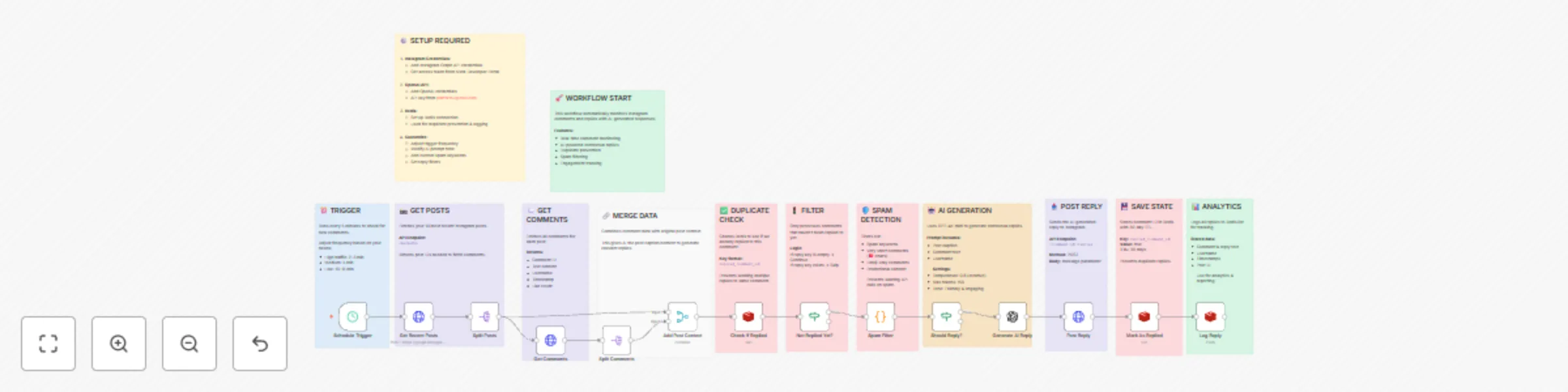
Automate Instagram comment replies with OpenAI and Redis tracking
This workflow automatically replies to new comments on your Instagram posts using smart AI. It checks your recent posts, finds unread comments, and skips spam or duplicates. The AI reads the post and comments to create a friendly, natural reply with emojis. It posts the reply instantly and logs everything so you can track engagement. Perfect for busy creators — stays active 24/7 without you lifting a finger! ## What It Monitors - **Recent Instagram Posts**: Fetches the latest posts based on your account activity. - **New Comments**: Detects unreplied comments in real time. - **Reply Eligibility**: Filters spam, duplicates, and already replied comments. - **AI-Generated Responses**: Creates personalized, engaging replies using post context. ## Features - Runs on a **schedule trigger** (High traffic: 2–3 min | Medium: 5 min | Low: 10+ min). - Fetches **recent posts** and their **comments** via Instagram Graph API. - **Context-aware AI replies** using post caption + comment content. - **Spam & duplicate filtering** to avoid unwanted or repeated replies. - **Tone-friendly & emoji-rich** responses for higher engagement. - **Logs every reply** with metadata (post ID, comment ID, timestamp). ## Workflow Steps | Node Name | Description | |---------|-----------| | **Schedule Trigger** | Triggers workflow based on traffic level (2–10 min intervals). | | **Get Recent Posts** | Fetches recent posts using Instagram Graph API. Returns post IDs needed to fetch comments. | | **Split Posts** | Splits batch of posts into individual items for parallel processing. | | **Get Comments** | For each post, retrieves comments with content, username, timestamp, like count. | | **Split Comments** | Splits comments into individual items for granular processing. | | **Add Post Context** | Combines comment + original post caption to generate relevant replies. | | **Check if Replied** | Checks if AI has already replied to this comment (prevents duplicate replies). | | **Not Replied Yet?** | Routes only unreplied comments forward. | | **Spam Filter** | Filters out spam using: <br>• Spam keywords <br>• Empty/one-word comments <br>• Excessive emojis <br>• Known spam patterns | | **Should Reply?** | Final logic gate: <br>• If reply key exists → Skip <br>• If spam → Skip <br>• Else → Proceed | | **Generate AI Reply** | Uses OpenAI (or compatible LLM): <br>• Input: Post caption + comment <br>• Tone: Friendly & engaging <br>• Max tokens: 150 <br>• Temperature: 0.8 (creative) | | **Post Reply** | Posts AI-generated reply via Instagram API: <br>• Method: POST <br>• Body: message parameter <br>• TTL: 30 days | | **Mark As Replied** | Updates internal tracking to prevent duplicate replies. | | **Log Reply** | Logs full reply details: <br>• Post ID <br>• Comment ID <br>• Username <br>• Reply text <br>• Timestamp <br>• Used for analytics & reporting | --- ## How to Use 1. Copy the JSON configuration of the workflow. 2. Import it into your **n8n** workspace. 3. Configure **Instagram Graph API credentials** (Business/Creator Account required). 4. Set up **OpenAI API key** in the **Generate AI Reply** node. 5. Activate the workflow. 6. Monitor replies in Instagram and execution logs in n8n. > The bot will **only reply once per comment**, skip spam, and use full post context for natural responses. --- ## Requirements - **n8n** account and self-hosted or cloud instance. - **Instagram Business or Creator Account** with Graph API access. - **Facebook App** with `pages_read_engagement`, `pages_manage_comments` permissions. - **OpenAI API key** (or compatible LLM endpoint). - Valid **access token** with long-lived permissions. --- ## Customizing this Workflow - Change **Schedule Trigger** interval based on post frequency (e.g., every 1 min for viral accounts). - Update **Spam Filter** keywords list for brand-specific spam patterns. - Modify **Generate AI Reply** prompt to match your brand voice (e.g., formal, humorous, Gen-Z). - Adjust **Temperature** (0.5 = consistent, 1.0 = creative) and **Max Tokens**. - Replace **OpenAI** with **Claude, Gemini, or local LLM** via HTTP request. - Add **approval step** (manual review) before posting replies. - Export logs to **Google Sheets, Airtable, or database** for analytics. **Explore More AI Workflows:** [https://www.oneclickitsolution.com/contact-us/](https://www.oneclickitsolution.com/contact-us/)
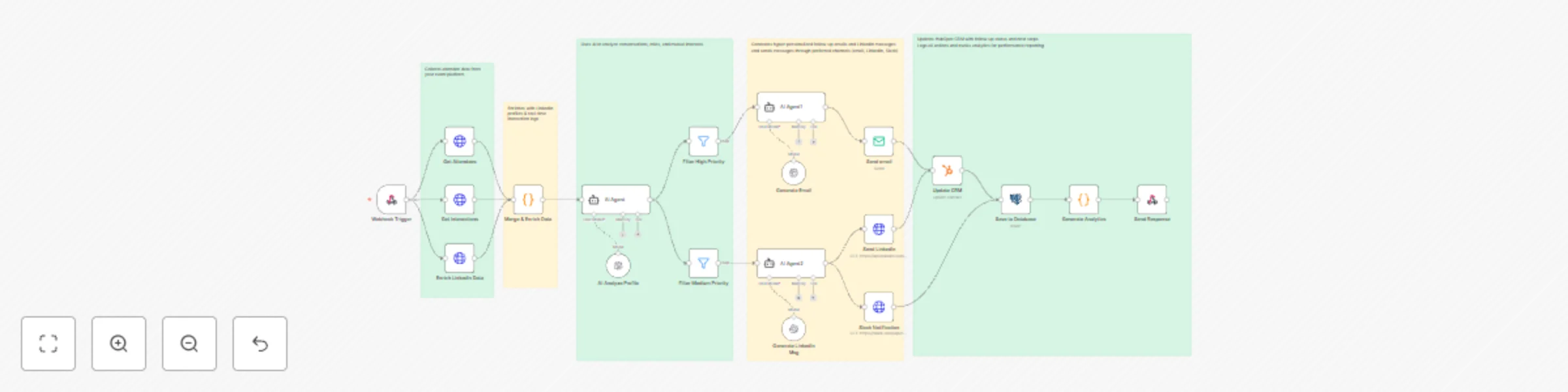
Automate event follow-ups with GPT-4, LinkedIn & HubSpot multi-channel outreach
Automate your post-event networking with this intelligent n8n workflow. Triggered instantly after an event, it collects attendee and interaction data, enriches profiles with LinkedIn insights, and uses GPT-4 to analyze engagement and generate tailored follow-up messages. High-value leads are prioritized, messages are sent via email, LinkedIn, or Slack, and all activity is logged in your CRM and database. Save hours of manual follow-up while boosting relationship-building and ROI. 🤝✨ --- ### Advanced Features - **Webhook automation** – Starts instantly on event completion - **Multi-Source Enrichment** – Combines event data, interactions, and LinkedIn profiles - **AI-Powered Insights** – GPT-4 analyzes behavior and suggests personalized talking points - **Smart Priority Filtering** – Routes leads into High, Medium, and Low priority paths - **Personalized Content Generation** – AI crafts custom emails and LinkedIn messages - **Multi-Channel Outreach** – Sends via Email, LinkedIn DM, and Slack - **CRM Integration** – Automatically updates HubSpot with contact notes and engagement - **PostgreSQL Logging** – Stores full interaction history and analytics - **ROI Dashboard** – Tracks response rates, meetings booked, and pipeline impact --- ### What It Does - Collects attendee data from your event platform - Enriches with LinkedIn profiles & real-time interaction logs - Scores networking potential using engagement algorithms - Uses AI to analyze conversations, roles, and mutual interests - Generates hyper-personalized follow-up emails and LinkedIn messages - Sends messages through preferred channels (email, LinkedIn, Slack) - Updates HubSpot CRM with follow-up status and next steps - Logs all actions and tracks analytics for performance reporting --- ### Workflow Process - The **Webhook Trigger** initiates the workflow via POST request with event and attendee data. - **Get Attendees** fetches participant list from the event platform. - **Get Interactions** pulls Q&A, chat, poll, and networking activity logs. - **Enrich LinkedIn Data** retrieves professional profiles, job titles, and company details via LinkedIn API. - **Merge & Enrich Data** combines all sources into a unified lead profile. - **AI Analyze Profile** uses GPT-4 to evaluate interaction depth, role relevance, and conversation context. - **Filter High Priority** routes top-tier leads (e.g., decision-makers with strong engagement). - **Filter Medium Priority** handles warm prospects for lighter follow-up. - **AI Agent1** generates personalized email content using chat model and memory. - **Generate Email** creates a professional, context-aware follow-up email. - **Send Email** delivers the message to the lead’s inbox. - **AI Agent2** crafts a concise, friendly LinkedIn connection message. - **Generate LinkedIn Msg** produces a tailored outreach note. - **Send LinkedIn** posts the message via LinkedIn API. - **Slack Notification** alerts your team in real-time about high-priority outreach. - **Update CRM (HubSpot)** adds contact, tags, and follow-up tasks automatically. - **Save to Database (Insert)** logs full lead journey and message content in PostgreSQL. - **Generate Analytics** compiles engagement metrics and success rates. - **Send Response** confirms completion back to the event system. --- ### Setup Instructions - Import the workflow JSON into n8n - Configure credentials: - Event Platform API (for attendees & interactions) - LinkedIn API (OAuth2) - OpenAI (GPT-4) - SMTP (for email) or Email Service (SendGrid, etc.) - HubSpot API Key - PostgreSQL Database - Slack Webhook URL - Trigger with a webhook POST containing event ID and settings - Watch personalized outreach happen automatically! --- ### Prerequisites - Event platform with webhook + attendee/interaction API - LinkedIn Developer App with API access - OpenAI API key with GPT-4 access - HubSpot account with API enabled - PostgreSQL database (table for leads & logs) - Slack workspace (optional, for team alerts) --- ### Example Webhook Payload ```json { "eventId": "evt_spring2025", "eventName": "Annual Growth Summit", "triggerFollowUp": true, "priorityThreshold": { "high": 75, "medium": 50 } } ``` --- ### Modification Options - Adjust scoring logic in **AI Analyze Profile** (e.g., weight Q&A participation higher) - Add custom email templates in **Generate Email** with your brand voice - Include meeting booking links (Calendly) in high-priority messages - Route VIP leads to **Send SMS** via Twilio - Export analytics to Google Sheets or BI tools (Looker, Tableau) - Add approval step before sending LinkedIn messages --- **Ready to 10x your event ROI?** [Get in touch with us](https://www.oneclickitsolution.com/contact-us/) for custom n8n automation!
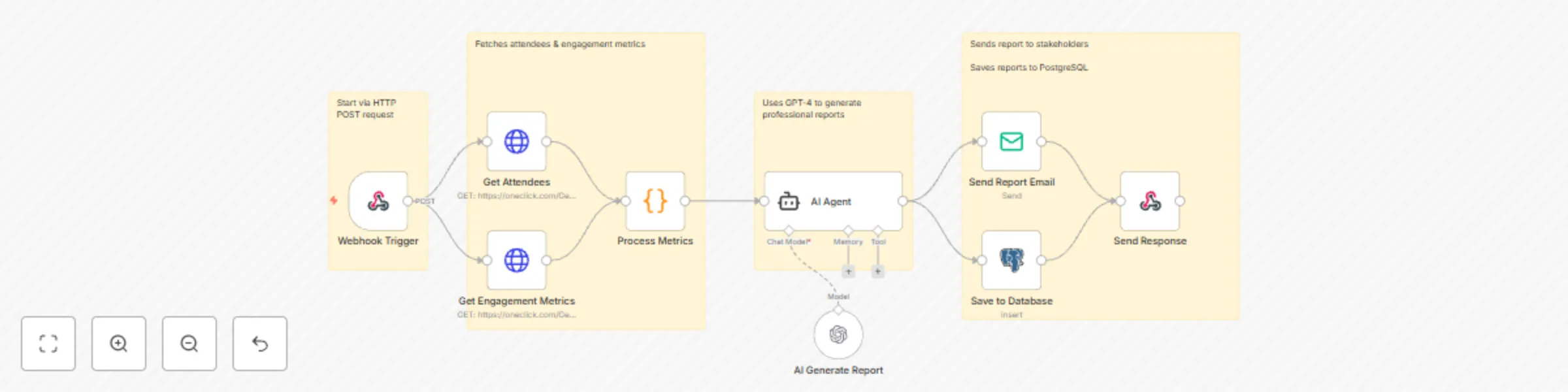
Generate post-event reports with GPT-4, email delivery & database storage
Streamline your post-event analysis with this smart n8n workflow. Triggered by a simple webhook, it instantly gathers attendee and engagement data from your event platform, calculates key metrics, and uses AI to generate a polished, professional report. The final summary is emailed to stakeholders and saved securely in a database — all without manual effort. Perfect for conferences, webinars, and corporate events. 📧📈 ### Key Features - **Webhook triggered** – Starts instantly via HTTP POST request - **Multi-source data collection** – Fetches attendees & engagement metrics - **Advanced analytics** – Calculates attendance rates, engagement scores, top sessions - **AI-powered insights** – Uses GPT-4 to generate professional reports - **Auto-email delivery** – Sends report to stakeholders - **Database archiving** – Saves reports to PostgreSQL ### What it Analyzes - Attendance rates & check-ins - Average session time - Engagement scores (polls, Q&A, networking) - Top performing sessions - Attendee breakdown (by role & company) - AI-generated insights & recommendations ### Workflow Process - The **Webhook Trigger** node starts the workflow when an HTTP POST request is received with event details. - **Get Attendees (GET)** pulls the list of registered and checked-in participants from your event system. - **Get Engagement Metrics (GET)** retrieves interaction data like poll responses, Q&A activity, and session views. - **Process Metrics** calculates key stats: attendance rate, average session duration, engagement score, and ranks top sessions. - **AI Generate Report** uses GPT-4 to create a clear, professional summary with insights and recommendations based on the data. - **AI Agent** coordinates data flow and prepares the final report structure using chat model and memory tools. - **Save to Database (Insert)** stores the full report and raw metrics in PostgreSQL for future reference. - **Send Report Email** automatically emails the AI-generated report to the specified recipient. - **Send Response** returns a confirmation back to the triggering system via webhook. ### Setup Instructions - Import this JSON into n8n - Configure credentials: - Event API (for GET requests) - OpenAI (GPT-4) - SMTP (for email delivery) - PostgreSQL (for data storage) - Trigger via webhook with event data - Receive comprehensive report via email within minutes! ### Prerequisites - Event platform with REST API (for attendee & engagement data) - OpenAI API key (GPT-4 access) - SMTP server credentials (Gmail, SendGrid, etc.) - PostgreSQL database with write access ### Example Webhook Payload ```json { "eventId": "evt_123", "eventName": "Tech Summit 2025", "eventDate": "2025-10-29", "email": "[email protected]" } ``` ### Modification Options - Add custom metrics in the **Process Metrics** node (e.g., NPS score, feedback sentiment) - Change AI tone in **AI Generate Report** (formal, executive summary, or creative) - Modify email template in **Send Report Email** with your branding - Connect to different data sources by updating GET nodes - Add Slack or Teams notification after **Send Report Email** **Ready to automate your event reporting?** [Get in touch with us](https://www.oneclickitsolution.com/contact-us/) for custom n8n workflows!
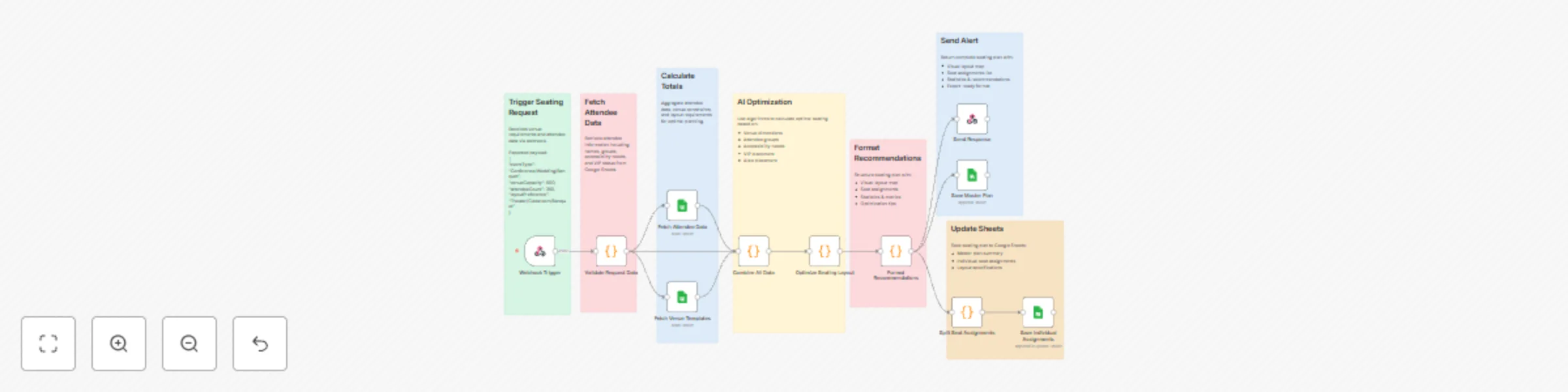
Create Dynamic Seating & Venue Layout Plans with Google Sheets
Enhance event logistics with this automated n8n workflow. Triggered by seating requests, it fetches attendee data and venue templates from Google Sheets, calculates totals, and optimizes seating layouts. The workflow generates detailed recommendations, splits individual assignments, and sends alerts, ensuring efficient venue planning and real-time updates. 🎪📋 ### Key Features - Optimizes seating arrangements based on attendee data and event type. - Generates venue layouts with visual and statistical insights. - Provides real-time alerts with comprehensive seating plans. - Logs detailed assignments and layouts in Google Sheets. ### Workflow Process - The **Webhook Trigger** node initiates the workflow upon receiving venue requirements and attendee data via webhook. - **Validate Request Data** ensures the incoming data is complete and accurate. - **Fetch Attendee Data** retrieves attendee information, including groups, accessibility needs, and VIP preferences from Google Sheets. - **Fetch Venue Templates** reads venue layout templates from Google Sheets. - **Calculate Totals** aggregates attendee data and venue constraints for optimal planning. - **Combine All Data** merges attendee and venue data for analysis. - **AI Optimization** uses algorithms to calculate optimal seating based on venue dimensions, attendee groups, accessibility needs, VIP placement, and aisle placement. - **Optimize Seating Layout** refines the seating plan for efficiency. - **Format Recommendations** structures the seating plan with visual layout map, seat assignments, statistics & metrics, and optimization tips. - **Split Seat Assignments** divides the plan into individual seat assignments. - **Send Response** returns the complete seating plan with visual layout map, seat assignment list, statistics & recommendations, and export-ready format. - **Send Alert** notifies organizers with the finalized plan details. - **Update Sheets** saves the master plan summary, individual seat assignments, and layout specifications to Google Sheets. - **Save Individual Assignments** appends or updates individual seat assignments to Google Sheets. ### Setup Instructions - Import the workflow into n8n and configure Google Sheets OAuth2 for data access. - Set up the Webhook Trigger with your event management system's API credentials. - Configure the AI Optimization node with a suitable algorithm or model. - Test the workflow by sending sample seating requests and verifying layouts. - Adjust optimization parameters as needed for specific venue or event requirements. ### Prerequisites - Google Sheets OAuth2 credentials - Webhook integration with the event management system - Structured attendee and venue data in a Google Sheet **Google Sheet Structure:** 1. Attendee Data Sheet with columns: - Name - Group - Accessibility Needs - VIP Status - Preferences - Updated At 2. Venue Templates Sheet with columns: - Venue Name - Capacity - Dimensions - Layout Template - Updated At ### Modification Options - Customize the **Validate Request Data** node to include additional validation rules. - Adjust the **AI Optimization** node to prioritize specific criteria (e.g., proximity, accessibility). - Modify the **Format Recommendations** node to include custom visual formats. - Integrate with venue management tools for live layout updates. - Set custom alert triggers in the **Send Alert** node. **Discover more workflows – [Get in touch with us](https://www.oneclickitsolution.com/contact-us/)**
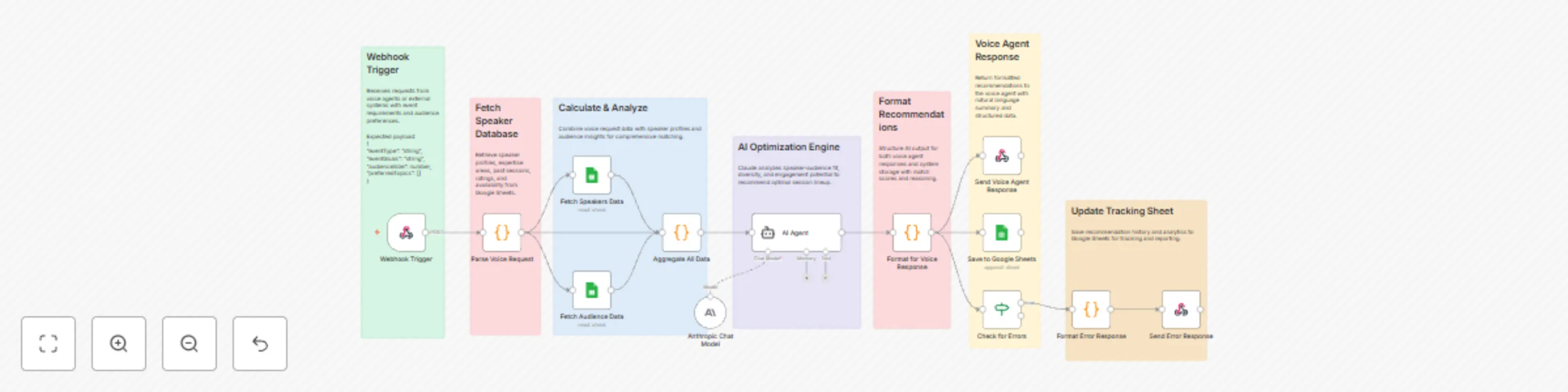
Generate event speaker recommendations with Claude AI and Google Sheets
Simplify event planning with this automated n8n workflow. Triggered by incoming requests, it fetches speaker and audience data from Google Sheets, analyzes profiles and preferences, and generates optimized session recommendations. The workflow delivers formatted voice responses and updates tracking data, ensuring organizers receive real-time, tailored suggestions. 🎙️📊 ### Key Features - Real-time analysis of speaker and audience data for personalized recommendations. - Generates optimized session lineups based on profiles and preferences. - Delivers responses via voice agent for a seamless experience. - Logs maintain a detailed recommendation history in Google Sheets. ### Workflow Process - The **Webhook Trigger** node initiates the workflow upon receiving voice agent or external system requests. - **Parse Voice Request** processes incoming voice data into actionable parameters. - **Fetch Database** retrieves speaker ratings, past sessions, and audience ratings from Google Sheets. - **Calculate & Analyze** combines voice request data with speaker profiles and audience insights for comprehensive matching. - **AI Optimization Engine** analyzes speaker-audience fit and recommends optimal session lineups. - **Format Recommendations** structures the recommendations for voice agent response. - **Voice Agent Response** returns formatted recommendations to the user with natural language summary and structured data. - **Update Tracking Sheet** saves recommendation history and analytics to Google Sheets. - If errors occur, the **Check for Errors** node branches to: - **Format Error Response** prepares an error message. - **Send Error Response** delivers the error notification. ### Setup Instructions - Import the workflow into n8n and configure Google Sheets OAuth2 for data access. - Set up the Webhook Trigger with your voice agent or external system's API credentials. - Configure the AI Optimization Engine node with a suitable language model (e.g., Anthropic Chat Model). - Test the workflow by sending sample voice requests and verifying recommendations. - Adjust analysis parameters as needed for specific event requirements. ### Prerequisites - Google Sheets OAuth2 credentials - Voice agent API or integration service - AI/LLM service for optimization (e.g., Anthropic) - Structured speaker and audience data in a Google Sheet **Google Sheet Structure:** 1. Create a sheet with columns: - Speaker Name - Rating - Past Sessions - Audience Rating - Preferences - Updated At ### Modification Options - Customize the **Calculate & Analyze** node to include additional matching criteria (e.g., topic expertise). - Adjust the **AI Optimization Engine** to prioritize specific session formats or durations. - Modify voice response templates in the **Voice Agent Response** node with branded phrasing. - Integrate with event management tools (e.g., Eventbrite) for live data feeds. - Set custom error handling rules in the **Check for Errors** node. **Discover more workflows – [Get in touch with us](https://www.oneclickitsolution.com/contact-us/)**
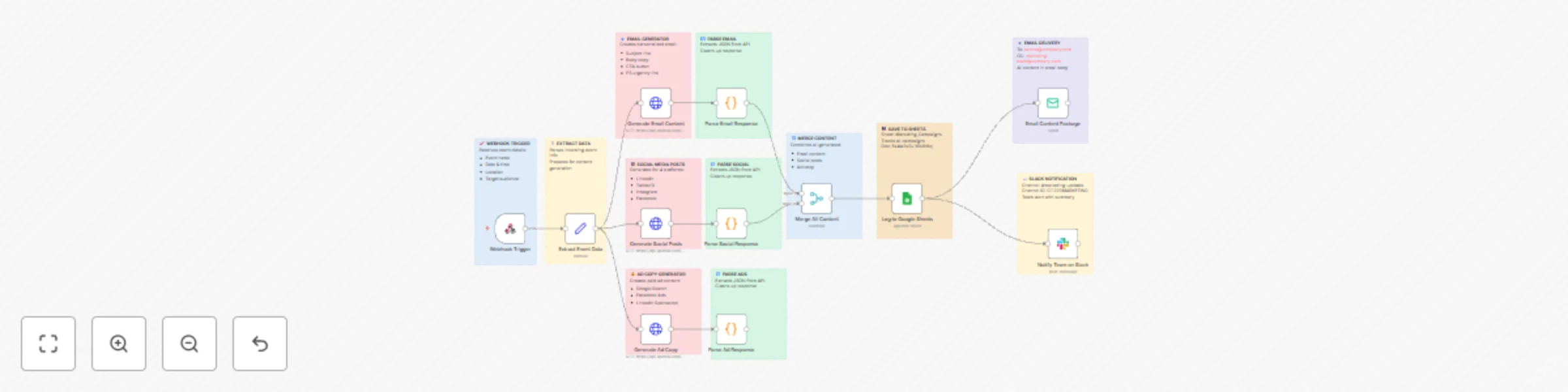
Generate event marketing content with GPT-4, Google Sheets & Slack
This n8n workflow automates the generation of personalized marketing content for events, including emails, social media posts, and advertisements. Leveraging AI, it tailors content based on event details and target audience preferences, enhancing promotional efforts and engagement for organizers. ### Key Features - Generates customized email, social media, and ad content for event promotion. - Personalizes content based on event specifics and audience insights. - Streamlines content creation with AI-driven suggestions and formatting. - Delivers content ready for distribution across multiple channels. - Supports real-time updates and adjustments for campaign optimization. ### Workflow Process - The **Webhook for Event Planning** node receives event details and marketing preferences to initiate the workflow. - The **Read Event Details** node extracts and organizes event data from Google Sheets for content creation. - The **Set Variables** node defines key parameters and audience targeting criteria. - The **AI Agent for Event Plan** node uses AI to generate optimized marketing content, including emails, social media posts, and ads. - The **Format Plan** node structures the generated content into a polished, actionable format. - The **Save to Google Sheets** node stores the generated content for tracking and future use. - The **Email Report** node compiles a comprehensive event marketing plan and sends it to organizers via email. - The **Send Email Report** node delivers the finalized report to the organizer. ### Setup Instructions - Import the workflow into n8n and configure the Webhook for Event Planning with your event management system's API credentials. - Set up Google Sheets integration for the Read Event Details and Save to Google Sheets nodes. - Configure the AI Agent for Event Plan node with a suitable language model for content generation. - Set up email credentials for the Email Report and Send Email Report nodes. - Test the workflow by inputting sample event data to verify content generation and delivery. - Monitor the output and adjust AI parameters or node settings as needed for optimal results. ### Prerequisites - Webhook integration with the event management or input system. - Google Sheets account for data storage and retrieval. - AI/LLM service for content generation and personalization. - Email service for report delivery. - Access to event details and audience data for customization. ### Modification Options - Modify the **Read Event Details** node to include additional data fields or sources. - Adjust the **Set Variables** node to incorporate specific audience segments or branding guidelines. - Customize the **AI Agent for Event Plan** node to focus on particular content types (e.g., video scripts, banners). - Add social media posting nodes to directly publish content from the **Format Plan** node. - Configure the **Email Report** node to include additional metrics or campaign analytics.
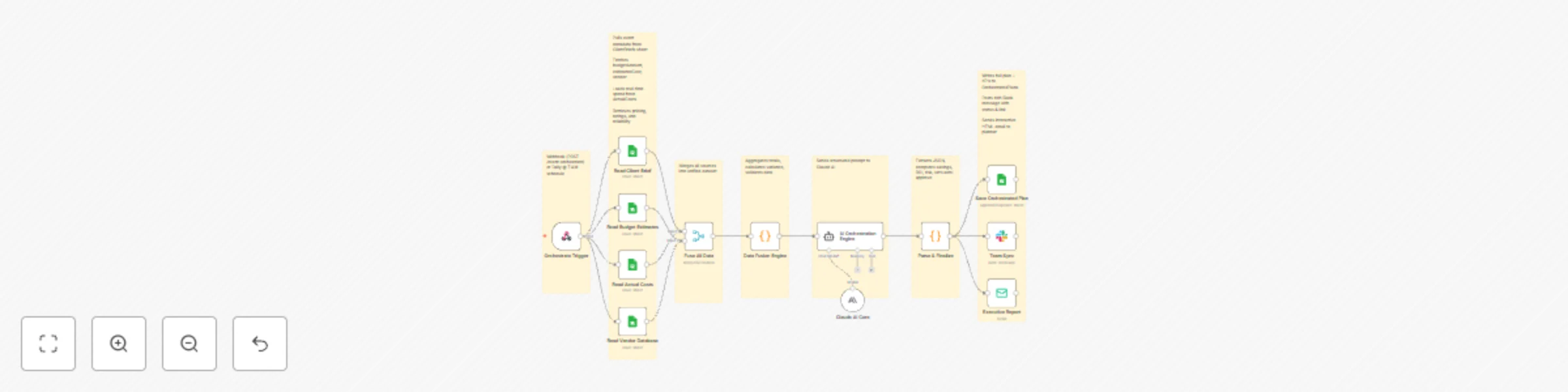
Automate event planning & budget optimization with Claude AI and Google Sheets
This enterprise-grade **n8n workflow** automates the **entire event planning lifecycle** — from client briefs to final reports — using **Claude AI**, real-time financial data, and smart integrations. It converts raw client data into **optimized, insight-driven event plans** with **cost savings**, **risk management**, and **automatic reporting**, all with zero manual work. ## **Key Features** * **Multi-source data fusion** from Google Sheets (`ClientBriefs`, `BudgetEstimates`, `ActualCosts`, `VendorDatabase`) * **AI-powered orchestration** using **Claude 3.5 Sonnet** for event plan optimization * **Automatic ROI and variance analysis** with cost-saving insights * **Vendor intelligence** — ranks suppliers by cost, rating, and reliability * **Risk engine** computes event risk (probability × impact) * **Auto-approval logic** for safe, high-ROI events * **Multi-channel delivery:** Slack + Email + Google Sheets * **Audit-ready:** Full JSON plan + execution logs * **Scalable triggers:** Webhook or daily schedule ## **Workflow Process** | Step | Node | Description | | ---- | --------------------------- | -------------------------------------------------------- | | 1 | **Orchestrate Trigger** | Runs daily at 7 AM or via webhook (`/event-orchestrate`) | | 2 | **Read Client Brief** | Loads event metadata from the `ClientBriefs` sheet | | 3 | **Read Budget Estimates** | Fetches estimated budgets and vendor data | | 4 | **Read Actual Costs** | Loads live cost data for comparison | | 5 | **Read Vendor Database** | Pulls vendor pricing, reliability, and rating | | 6 | **Fuse All Data** | Merges data into a unified dataset | | 7 | **Data Fusion Engine** | Calculates totals, variances, and validates inputs | | 8 | **AI Orchestration Engine** | Sends structured prompt to **Claude AI** for analysis | | 9 | **Parse & Finalize** | Extracts JSON, computes ROI, risks, and savings | | 10 | **Save Orchestrated Plan** | Updates `OrchestratedPlans` sheet with results | | 11 | **Team Sync** | Sends status & summary to Slack | | 12 | **Executive Report** | Emails final interactive plan to event planner | ## **Setup Instructions** ### 1. Import Workflow * Open **n8n → Workflows → Import from Clipboard** * Paste the JSON workflow ### 2. Configure Credentials | Integration | Details | | ----------------- | -------------------------------------------------- | | **Google Sheets** | Service account with spreadsheet access | | **Claude AI** | Anthropic API key for `claude-3-5-sonnet-20241022` | | **Slack** | Webhook or OAuth app | | **Email** | SMTP or Gmail OAuth credentials | ### 3. Update Spreadsheet IDs Ensure your Google Sheets include: * `ClientBriefs` * `BudgetEstimates` * `ActualCosts` * `VendorDatabase` * `OrchestratedPlans` ### 4. Set Triggers * **Webhook:** `/webhook/event-orchestrate` * **Schedule:** Daily at 7:00 AM ### 5. Run a Test Use **manual execution** to confirm: * Sheet updates * Slack notifications * Email delivery ## **Google Sheets Structure** ### **ClientBriefs** | eventId | clientName | eventType | attendees | budget | eventDate | plannerEmail | spreadsheetId | teamChannel | priority | |----------|-------------|------------|-----------|----------|------------|---------------|---------------|-------------| | EVT-2025-001 | Acme Corp | Conference | 200 | 75000 | 2025-06-15 | [[email protected]](mailto:[email protected]) | 1A... | #event-orchestration | High | ### **BudgetEstimates** | category | item | budgetAmount | estimatedCost | vendor | | -------- | -------------- | ------------ | ------------- | ----------- | | Venue | Grand Ballroom | 20000 | 22500 | Luxe Events | ### **ActualCosts** | category | actualCost | | -------- | ---------- | | Venue | 23000 | ### **VendorDatabase** | vendorName | category | avgCost | rating | reliability | | ----------- | -------- | ------- | ------ | ----------- | | Luxe Events | Venue | 21000 | 4.8 | High | ### **OrchestratedPlans** Automatically filled with: `eventId`, `savings`, `roi`, `riskLevel`, `status`, `summary`, `fullPlan (JSON)` ## **System Requirements** | Requirement | Version/Access | | --------------------- | ---------------------------------------------- | | **n8n** | v1.50+ (LangChain supported) | | **Claude AI API** | `claude-3-5-sonnet-20241022` | | **Google Sheets API** | `https://www.googleapis.com/auth/spreadsheets` | | **Slack Webhook** | Required for notifications | | **Email Service** | SMTP, Gmail, or SendGrid | ## **Optional Enhancements** * Add **PDF export** for management reports * Connect **Google Calendar** for event scheduling * Integrate **CRM (HubSpot / Salesforce)** for client updates * Add **interactive Slack buttons** for approvals * Export results to **Notion** or **Airtable** * Enable **multi-event batch orchestration** * Add **forecasting** from past data trends **Result:** A single automated system that plans, analyzes, and reports events — **with full AI intelligence and zero manual work.** **Explore More AI Workflows:** [https://www.oneclickitsolution.com/contact-us/](https://www.oneclickitsolution.com/contact-us/)