M Shehroz Sajjad
Workflows by M Shehroz Sajjad
AI-powered HR interview system with BeyondPresence
## What problem does it solve? Manual candidate screening is time-consuming and inconsistent. This workflow automates initial interviews, providing 24/7 availability, consistent questioning, and objective assessments for every candidate. ## Who is it for? - HR teams handling high-volume recruiting - Small businesses without dedicated recruiters - Companies scaling their hiring process - Remote-first organizations needing asynchronous screening ## What this workflow does Creates AI interviewers from job descriptions that conduct natural conversations with candidates via BeyondPresence Agents. Automatically analyzes interviews and saves structured assessments to Google Sheets. ## Setup 1. **Install Beyond Presence Community Node**: Beyond Presence has [verified community node](https://n8n.io/integrations/beyond-presence/) which you can install from node search panel easily. You must install beyondpresence node (available in node search) before copying workflow. **WALKTHROUGH [VIDEO](https://www.loom.com/share/9d116f62c51f411290aac373622773d7)** 2. **Copy template sheet**: [BeyondPresence HR Interview System Template](https://docs.google.com/spreadsheets/d/1dXLpP5bRRirBsln4YIQtFgb1MiP-0yR8IDRzse5k7X0/copy) 2. **Add credentials**: - BeyondPresence API Key - OpenAI API - Google Sheets 3. **Configure webhook** in BeyondPresence dashboard: `https://[your-n8n-production-webhook]` 4. **Paste job description** in "Your Job Description" node and run setup flow 5. **Share generated interview link** with candidates 6. **Get interview analysis in Google Sheet** As soon as candidates complete interview with you AI Agent you will start getting results in Google Sheet. ## How it works 1. **Agent Creation**: Converts job description into conversational AI interviewer 2. **Interview Conduct**: Candidates chat naturally with AI via shared link 3. **Webhook Trigger**: Completed interviews sent to n8n 4. **AI Analysis**: OpenAI evaluates responses against job requirements 5. **Results Storage**: Assessments saved to Google Sheets with scores and recommendations ## Resources - [Google Sheets Template](https://docs.google.com/spreadsheets/d/1dXLpP5bRRirBsln4YIQtFgb1MiP-0yR8IDRzse5k7X0/copy) - [BeyondPresence Documentation](https://docs.bey.dev/introduction) - [Webhook Setup Guide](https://docs.n8n.io/integrations/builtin/core-nodes/n8n-nodes-base.webhook/) ## Example Use Case Tech startup screens 200 applicants for engineering role. Creates AI interviewer in 2 minutes, sends link to all candidates. Receives structured assessments within 24 hours, identifying top 20 candidates for human interviews. Reduces initial screening time from 2 weeks to 2 days.
BeyondPresence sales intelligence → real-time lead scoring
Monitor BeyondPresence video agent conversations in real-time to automatically score leads (0-100+) based on buying signals and send instant Slack alerts when hot opportunities or competitors are mentioned. This template helps sales teams prioritize leads immediately, never miss competitor mentions, and respond to high-intent prospects while they're still engaged. ## How it works - **Real-time webhook** processes each user message as it happens during calls - **Scoring engine** analyzes for buying signals (+points) and objections (-points) - **Competitor detection** instantly identifies when alternatives are mentioned - **Smart routing** sends alerts to different Slack channels based on urgency - **Hot leads** (70+ score) trigger immediate notifications with recommendations - **Call summary (Optional)** provides final qualification score when conversation ends ## Set up steps 1. **Connect Slack OAuth2** - Use n8n's built-in Slack integration (no webhooks needed!) 2. **Create Slack channels** - Set up #sales-hot-leads, #sales-competitors, #sales-qualified 3. **Add webhook to BeyondPresence** - Copy URL from n8n to [BeyondPresence Settings](https://app.bey.chat/settings) → Webhooks 4. **Customize competitors** - Edit the scoring node to add your specific competitor names 5. **Adjust scoring weights** (optional) - Tune point values for your sales process **Setup time**: 10-15 minutes **Requirements**: BeyondPresence account, Slack workspace admin access
Analyze BeyondPresence video calls with GPT-4o-mini and Google Sheets
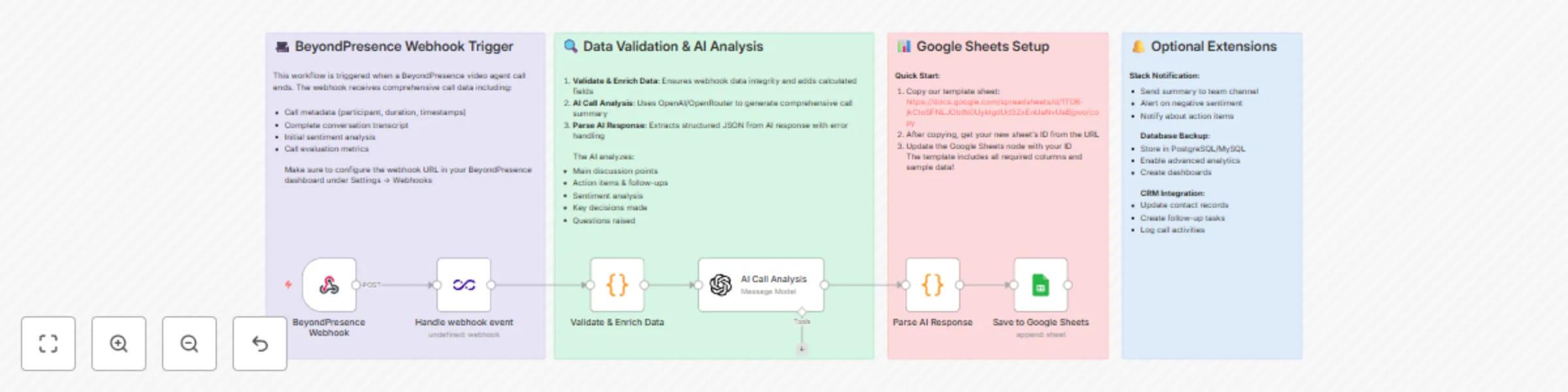
Transform your [BeyondPresence](https://app.bey.chat/settings) video agent conversations into comprehensive insights by automatically analyzing each call with AI and organizing 35+ data points in Google Sheets. This template helps customer success, support, and training teams save 30+ minutes per call on documentation while ensuring no critical action items or insights are missed. ## How it works - **Webhook receives** completed call data from BeyondPresence including full transcript - **Data validation** ensures quality and adds enriched metadata (duration, time calculations) - **AI analysis** (GPT-4) extracts action items, sentiment, decisions, and recommendations - **Parse response** handles the AI output and structures it for sheets - **Auto-append** to Google Sheets with 35+ insights per call organized beautifully ## Set up steps 1. **Copy our Google Sheets template** - One click! Get pre-formatted sheet: [BeyondPresence Call Analytics Template](https://docs.google.com/spreadsheets/d/1TO6-jkCtoSFNLJObtN0UyklgdUd3ZxEnUaNvUaBjpvo/copy) 2. **Connect accounts** - Add OpenAI API key and Google Sheets OAuth2 3. **Configure webhook** - Copy URL from n8n to [BeyondPresence Settings](https://app.bey.chat/settings) → Webhooks 4. **Customize AI prompt** (optional) - Adjust analysis focus for your use case 5. **Test with a call** - Make a test call and watch insights appear! **Setup time**: 5-10 minutes **Requirements**: BeyondPresence account, OpenAI API key, Google account