Marcelo Abreu
Workflows by Marcelo Abreu
Track demo bookings with Google Calendar to Meta Conversions API integration
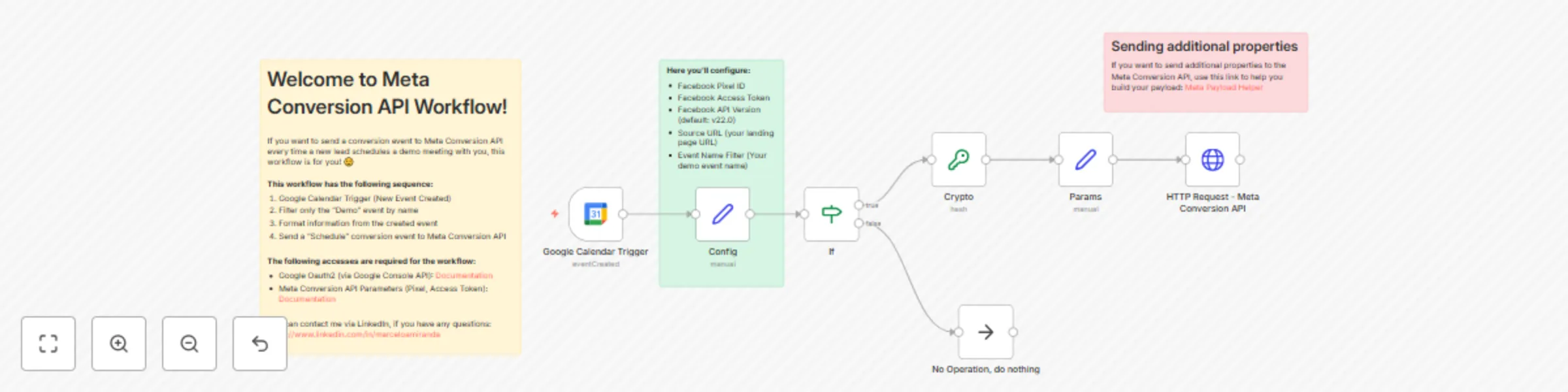
## Who is this workflow for? **If you're using Meta Ads to generate new leads** to your sales pipeline, this workflow is for you! 🙌🏻 ## What this workflow does - Triggers every time you have a new calendar event on a chosen Google Acount - Filter only events with the same name of your "Schedule a demo" event - Formats and send event to Meta Conversion API ## What events can I send? Any event you'd like! It's preconfigured with the "Schedule" event, but you can change to "Purchase", "InitiateCheckout", "Lead" and custom events. ## Setup Guide - Connect Google OAuth2 to n8n - Get your PIXEL ID and Access Token from Meta - Set your configuration node with Pixel ID, Access Token, source_url and event_name ## Requirements - Meta Access Token + Pixel ID (via Meta Conversion API): [Documentation](https://developers.facebook.com/docs/marketing-api/conversions-api/get-started) - Google Access (via OAuth2): [Documentation](https://docs.n8n.io/integrations/builtin/credentials/google/oauth-single-service/) **This free template was created by [pdf noodle](https://pdfnoodle.com).** Feel free to [contact us via the founder Linkedin](https://www.linkedin.com/in/marceloamiranda/), if you have any questions! 👋🏻
Automate weekly SEO report with GPT-4 insights and Slack delivery
## What this workflow does - Runs automatically every Monday morning at 8 AM - Collects your Google Search Console from the last month and the month before that for a given url (date range is configurable) - Formats the data, aggregating it by date, query, page, device and country - Generates AI-driven analysis and insights on your results, providing actionable recommendations - Renders the report as a visually appealing PDF with charts and tables - Sends the report via Slack (you can also add email or WhatsApp) **A sample for the first page of the report:**  ## Setup Guide - [Create an account of pdf noodle](https://app.pdfnoodle.com/auth/sign-up) and use the pre-made Meta Ads template. - Connect Google OAuth2 (guide on the template), OpenAI and Slack to n8n - Set your site url and date range - *(opcional)* Customize the scheduling date and time 👉🏻 **You can use our** [**detailed guide on how to setup this workflow**](https://pdfnoodle.com/blog/automate-seo-reports-using-n8n-and-pdforge). ## Requirements - Google OAuth2 (via Google Search Console): [Documentation](https://docs.n8n.io/integrations/builtin/credentials/google/oauth-generic) - pdf noodle access: [Create an account](https://app.pdfnoodle.com/auth/sign-up) - AI API access (e.g. via OpenAI, Anthropic, Google or Ollama) - Slack acces (via OAuth2): [Documentation](https://docs.n8n.io/integrations/builtin/credentials/slack) Feel free to [contact me via Linkedin](https://www.linkedin.com/in/marceloamiranda/), if you have any questions! 👋🏻
Generate weekly Meta Ads report with GPT-4 insights and Slack delivery
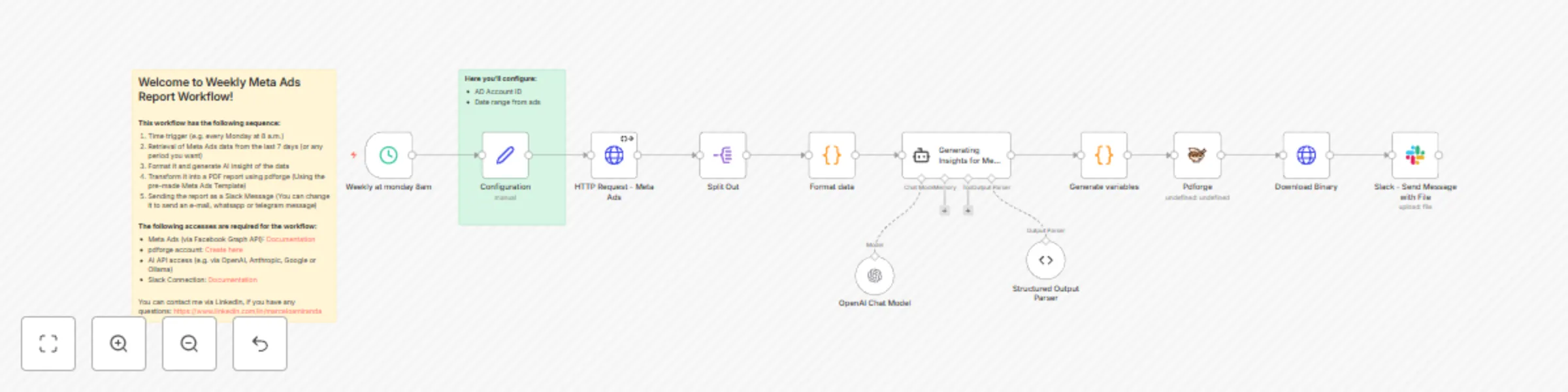
## What this workflow does - Runs automatically every Monday morning at 8 AM - Collects your Meta Ads data from the last 7 days for a given account (date range is configurable) - Formats the data, aggregating it at the campaign, ad set, and ad levels - Generates AI-driven analysis and insights on your results, providing actionable recommendations - Renders the report as a visually appealing PDF with charts and tables - Sends the report via Slack (you can also add email or WhatsApp) **A sample for the first page of the report:**  ## Setup Guide - [Create an account of pdf noodle](https://app.pdfnoodle.com/auth/sign-up) and use the pre-made Meta Ads template. - Connect Meta Ads, OpenAI and Slack to n8n - Set your Ad Account Id and date range (choose from 'last_7d', 'last_14d', 'last30d') - *(opcional)* Customize the scheduling date and time ## Requirements - Meta Ads (via Facebook Graph API): [Documentation](https://docs.n8n.io/integrations/builtin/credentials/facebookgraph/) - pdf noodle access: [Integration guide](https://pdfnoodle.com/blog/how-to-automate-pdf-generation-with-n8n-and-pdforge) - AI API access (e.g. via OpenAI, Anthropic, Google or Ollama) - Slack acces (via OAuth2): [Documentation](https://docs.n8n.io/integrations/builtin/credentials/slack) Feel free to [contact me via Linkedin](https://www.linkedin.com/in/marceloamiranda/), if you have any questions! 👋🏻