B

Bao Duy Nguyen

3
Workflows

Workflows by Bao Duy Nguyen
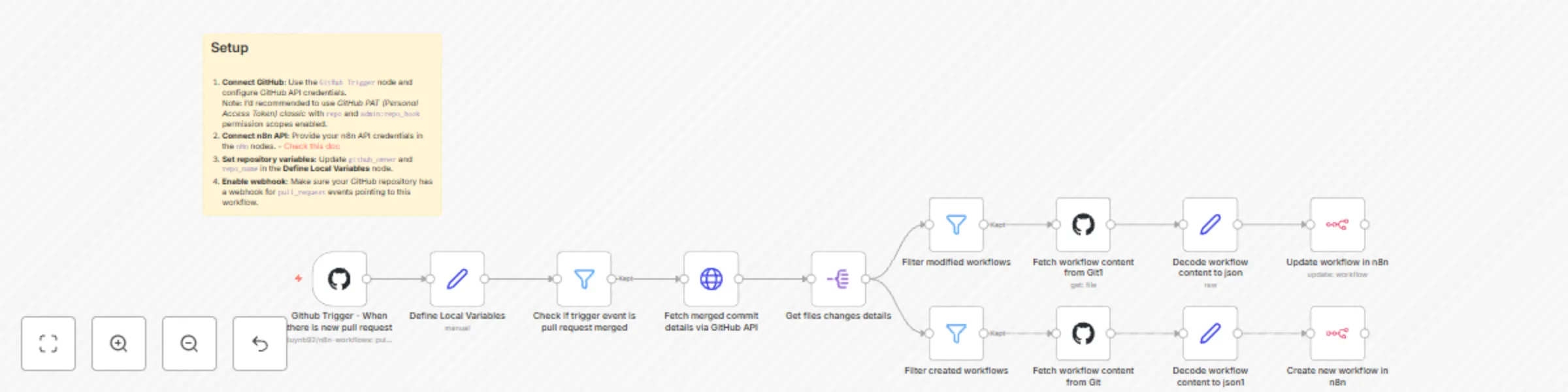
Workflow preview: Sync GitHub workflows to n8n after pull request merges
Free intermediate

Sync GitHub workflows to n8n after pull request merges

## Who is this for? This template is ideal for **developers, DevOps engineers, and automation managers** who manage their n8n workflows using GitHub. It helps teams streamline their CI/CD automation by syncing changes from GitHub directly into n8n after a pull request (PR) is merged. ## What problem is this workflow solving? Manually restoring workflows after reviewing and merging code in GitHub can be tedious and error-prone. This workflow solves that by **automating the restore process**, ensuring that any new or updated workflow committed to your GitHub repo is automatically imported into your n8n environment. ## What this workflow does - Triggers when a GitHub pull request is **closed and merged**. - Fetches the details of the merge commit. - Retrieves the list of **added and modified workflow files**. - Downloads and decodes each workflow file. - **Creates or updates** the corresponding workflow in your n8n instance automatically. ## Setup 1. **Connect GitHub**: Use the `GitHub Trigger` node and configure GitHub API credentials. Note: I'd recommended to use *GitHub PAT (Personal Access Token) classic* with `repo` and `admin:repo_hook` permission scopes enabled. 2. **Connect n8n API**: Provide your n8n API credentials in the `n8n` nodes. - [Check this doc](https://docs.n8n.io/api/authentication/) 3. **Set repository variables**: Update `github_owner` and `repo_name` in the **Define Local Variables** node. 4. **Enable webhook**: Make sure your GitHub repository has a webhook for `pull_request` events pointing to this workflow. ## How to customize this workflow to your needs - Modify filters to handle only certain branches or file paths. - Add Slack or email notifications to confirm successful imports. - Insert logging or version tagging for better traceability. - Extend with conditional logic for workflow testing before applying changes. This automated flow provides a seamless CI/CD loop between GitHub and n8n, empowering teams to manage workflow versioning efficiently and securely.

B
Bao Duy Nguyen
DevOps
30 May 2025
1580
0

Workflow preview: Automated workflow backups to GitHub with PR creation & Slack notifications
Free advanced

Automated workflow backups to GitHub with PR creation & Slack notifications

## Who is this for? This template is ideal for DevOps engineers, automation specialists, and n8n users who manage multiple workflows and want a reliable version control system for backups. It’s especially useful for teams collaborating via GitHub. ## What problem is this workflow solving? Manually backing up n8n workflows to GitHub can be time-consuming and error-prone. This workflow solves that by automating the backup of new and updated n8n workflows, ensuring your GitHub repository always reflects the latest changes. ## What this workflow does - Retrieves all workflows from your local n8n instance. - Decodes their content and compares it with existing GitHub files. - Detects newly created or updated workflows. - Creates a new Git branch and commits changes. - Opens a pull request (PR) to the main branch. - Sends a Slack notification when the PR is created. The system uses GitHub API, n8n, Merge, Set, and Slack nodes for full automation. ## Setup 1. GitHub credentials: Add your GitHub API credentials in n8n. 2. Slack integration: Connect your Slack Bot token if you want PR notifications. 3. Repository details: Update github_owner, repo_name, and workflow directory path in the “Define Local Variables” node. 4. n8n API key - [Check this doc](https://docs.n8n.io/api/authentication/) ## How to customize this workflow to your needs - Change the workflow directory from workflows/ to a custom path. - Modify the Slack message or add email notification support. - Add filters to back up only specific workflows based on naming or tags. - Adjust branch naming conventions or use different GitHub base branches. This workflow provides a seamless backup and versioning pipeline, minimizing manual Git interactions and supporting collaborative automation development.

B
Bao Duy Nguyen
DevOps
28 May 2025
623
0
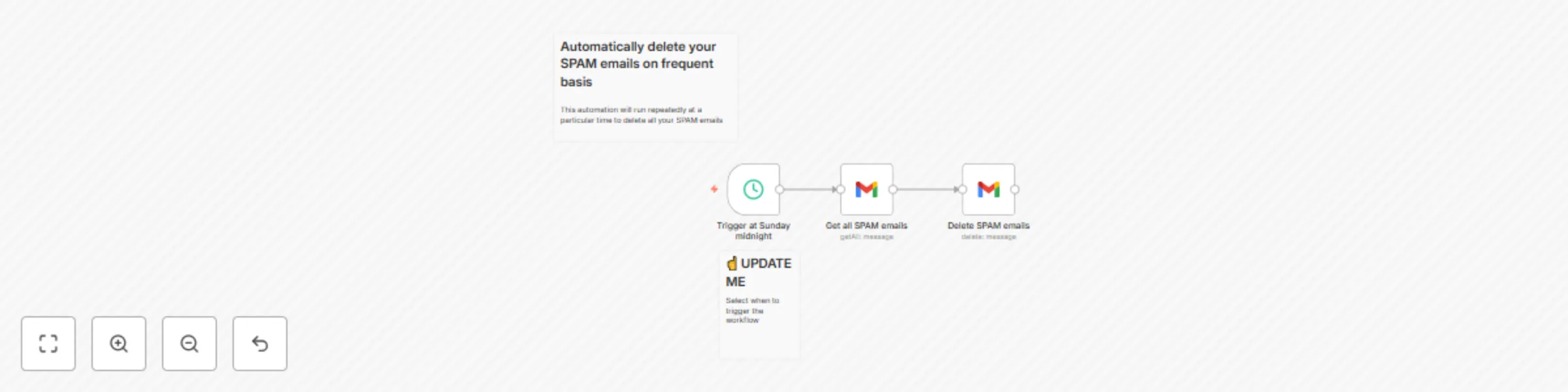
Workflow preview: Automatically delete spam emails in Gmail on schedule
Free intermediate

Automatically delete spam emails in Gmail on schedule

## Who is this for? If you hate SPAM emails or don't want to clean them up frequently. ## What problem is this workflow solving? It automatically deletes SPAM emails for you, so you don't have to. Save a bit of your time. ## What this workflow does - You can specify when to execute the workflow: daily, weekly, or monthly. ## Setup - Select the preferred execution time - Configure credentials for Gmail OAuth2 ## How to customize this workflow to your needs - There's no need. It just works!

B
Bao Duy Nguyen
Personal Productivity
21 May 2025
4530
0