Obsidi8n
Workflows by Obsidi8n
Workflow results to markdown notes in your Obsidian vault, via Google Drive
This workflow converts any n8n workflow outputs into Markdown notes that are accessible in your Obsidian Vault through Google Drive synchronization. **Setup Requirements** 1. Create a designated folder in Google Drive (Desktop). 2. Create a symbolic link between this folder and a new target folder in your Obsidian Vault. 3. Configure Google Drive n8n node settings. 4. Send the output of any workflow to the trigger, and the notes will appear in your Vault folder. **Optional Features** You can use AI agents to: - Write notes in your preferred format (e.g., Zettelkasten). - Compose YAML front matter. - Suggest tags. **Use Cases** - Convert RSS feed items to notes. - Create notes from YouTube video transcripts. - Transform tasks in Slack messages into Obsidian tasks. (Requires setting up a corresponding workflow, e.g., RSS trigger, YouTube transcriber, or Slack bot.)
Form with dynamic dropdown field
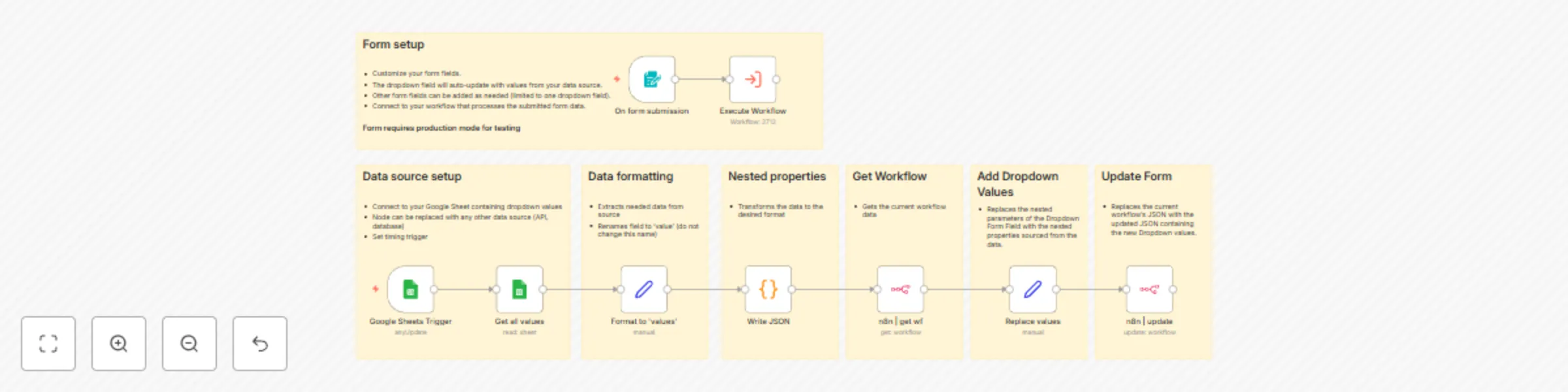
This workflow creates a customizable form with a dynamic dropdown field that automatically updates its options from an external data source. ### How it works - The workflow polls an external data source (Google Sheets in this example) at regular intervals - New values are processed and formatted for the dropdown - The form automatically updates with the new dropdown options ### Set up steps **Configure your data source:** - Default setup uses Google Sheets - replace with credentials for your sheet - set up the update frequency - Or modify to use any other data source (API, database, etc.) **Adjust the form configuration:** - Customize the form title and description - Add or modify form fields as needed - The template includes the dropdown field by default **Connect form submissions:** - Use the "Execute Workflow" node to process form submissions This template provides a foundation for creating dynamic forms that stay synchronized with your data sources, making it ideal for situations where dropdown options need to reflect current data.
Obsidian notes read aloud using AI: available as a podcast feed
**How it works:** - Send notes from Obsidian via Webhook to start the audio conversion - OpenAI converts your text to natural-sounding audio and generates episode descriptions - Audio files are stored in Cloudinary and automatically attached to your notes in Obsidian - A professional podcast feed is generated, compatible with all major podcast platforms (Apple, Spotify, Google) **Set up steps:** - Install and configure the [Post Webhook Plugin](https://github.com/Masterb1234/obsidian-post-webhook/) in Obsidian - Set up Custom Auth credentials in n8n for Cloudinary using the following JSON: ```json { "name": "Cloudinary API", "type": "httpHeaderAuth", "authParameter": { "type": "header", "key": "Authorization", "value": "Basic {{Buffer.from('your_api_key:your_api_secret').toString('base64')}}" } } ``` - Configure podcast feed metadata (title, author, cover image, etc.) Note: The second flow is a generic Podcast Feed module that can be reused in any '[...]-to-Podcast' workflow. It generates a standard RSS feed from Google Sheets data and podcast metadata, making it compatible with all major podcast platforms.
Get Airtable data via AI and Obsidian notes
I am submitting this workflow for the Obsidian community to showcase the potential of integrating Obsidian with n8n. While straightforward, it serves as a compelling demonstration of the potential unlocked by integrating Obsidian with n8n. **How it works** This workflow lets you retrieve specific Airtable data you need in seconds, directly within your Obsidian note, using n8n. By highlighting a question in Obsidian and sending it to a webhook via the [Post Webhook Plugin](https://github.com/Masterb1234/obsidian-post-webhook/), you can fetch specific data from your Airtable base and instantly insert the response back into your note. The workflow leverages OpenAI’s GPT model to interpret your query, extract relevant data from Airtable, and format the result for seamless integration into your note. **Set up steps** - Install the [Post Webhook Plugin](https://github.com/Masterb1234/obsidian-post-webhook/): Add this plugin to your Obsidian vault from the plugin store or GitHub. - Set up the n8n Webhook: Copy the webhook URL generated in this workflow and insert it into the Post Webhook Plugin's settings in Obsidian. - Configure Airtable Access: Link your Airtable account and specify the desired base and table to pull data from. - Test the Workflow: Highlight a question in your Obsidian note, use the “Send Selection to Webhook” command, and verify that data is returned as expected.
Send emails via Gmail from Obsidian
## How it Works - This n8n template makes it possible to send emails directly from your Obsidian notes. - It leverages the power of the [Obsidian Post Webhook plugin](https://github.com/Masterb1234/obsidian-post-webhook/), allowing seamless integration between your notes and the email workflow. ## What it does: - Receives note content and metadata from Obsidian via a Webhook. - Parses YAML frontmatter to define email recipients, subject, and more. - Automatically processes attachments, encoding them into an email-friendly format. - Sends emails via Gmail and confirms the status back to Obsidian. - Includes a testing feature to verify everything works before going live. ## Set-up Steps - Webhook Configuration: Set your n8n POST Webhook URL in the Obsidian [Obsidian Post Webhook plugin](https://github.com/Masterb1234/obsidian-post-webhook/) settings. - Email Integration: Submit the Gmail credentials in n8n email nodes. - Test the Workflow: Run a test from Obsidian to ensure the template functions correctly. - Activate and Enjoy: Start sending customized emails with attachments from your notes in no time!