D

Danielle Gomes

3
Workflows

Workflows by Danielle Gomes

Workflow preview: Daily news digest: summarize RSS feeds with OpenAI and deliver to WhatsApp
Free advanced

Daily news digest: summarize RSS feeds with OpenAI and deliver to WhatsApp

This n8n workflow collects and summarizes news from multiple RSS feeds, using OpenAI to generate a concise summary that can be sent to WhatsApp or other destinations. Perfect for automating your daily news digest. 🔁 Workflow Breakdown: Schedule Trigger Start the workflow on your desired schedule (daily, hourly, etc.). 🟨 Note: Set the trigger however you wish. RSS Feeds (My RSS 01–04) Fetches articles from four different RSS sources. 🟨 Note: You can add as many RSS feeds as you want. Edit Fields (Edit Fields1–3) Normalizes RSS fields (title, link, etc.) to ensure consistency across different sources. Merge (append mode) Combines the RSS items into a single unified list. Filter Optionally filter articles by keywords, date, or categories. Limit Limits the analysis to the 10 most recent articles. 🟨 Note: This keeps the result concise and avoids overloading the summary. Aggregate Prepares the selected news for summarization by combining them into a single content block. OpenAI (Message Assistant) Summarizes the aggregated news items in a clean and readable format using AI. Send Summary to WhatsApp Sends the AI-generated summary to a WhatsApp endpoint via webhook (yoururlapi.com). You can replace this with an email service, Google Drive, or any other destination. 🟨 Note: You can send it to your WhatsApp API, email, drive, etc. No Operation (End) Final placeholder to safely close the workflow. You may expand from here if needed.

D
Danielle Gomes
Personal Productivity
6 Jun 2025
22284
0
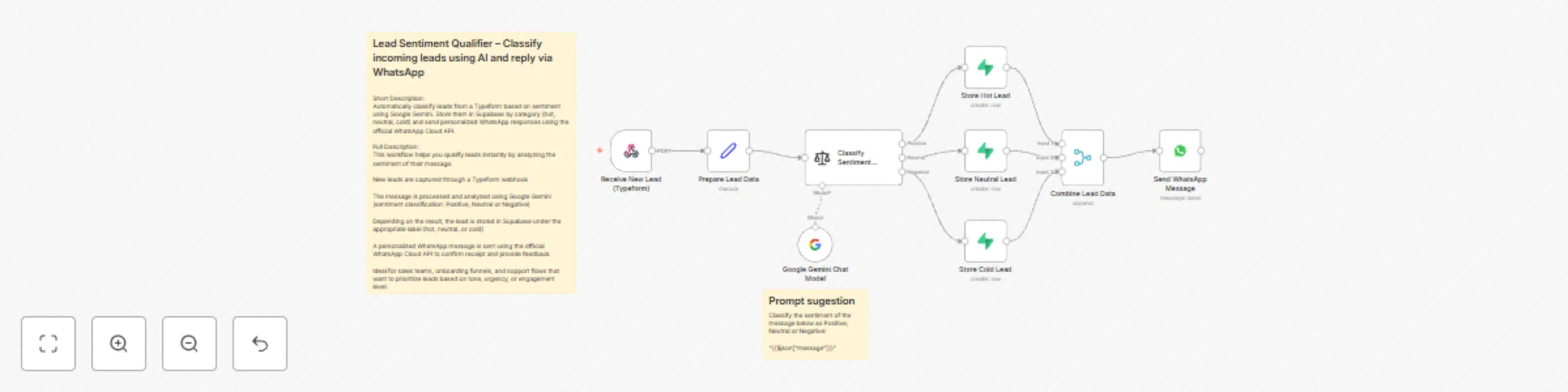
Workflow preview: Classify lead sentiment with Google Gemini and send WhatsApp responses via Typeform & Supabase
Free intermediate

Classify lead sentiment with Google Gemini and send WhatsApp responses via Typeform & Supabase

Automatically classify incoming leads based on the sentiment of their message using Google Gemini, store them in Supabase by category, and send tailored WhatsApp messages via the official WhatsApp Cloud API. ✅ Use Case: This workflow is ideal for sales, onboarding, and customer support teams who want to: Understand the tone and urgency of each lead Prioritize hot leads instantly Send smart, automatic WhatsApp replies based on user sentiment 🧠 How it works: Capture lead via a Typeform webhook Clean and structure the data (name, email, message, etc.) Run sentiment analysis using Google Gemini to classify the message as: Positive → Hot Lead Neutral → Warm Lead Negative → Cold Lead Store lead data in Supabase under the corresponding category Merge data to unify flow paths Send WhatsApp message using the official WhatsApp Cloud API, with a custom reply for each sentiment result 🔧 Tools used: Typeform (incoming data) Google Gemini (AI-based sentiment classification) Supabase (database) WhatsApp Cloud API (response automation) 🏷 Tags: AI, Sentiment Analysis, Lead Qualification, Supabase, WhatsApp, Gemini, Typeform, CRM, Automation, Customer Engagement

D
Danielle Gomes
Lead Generation
22 May 2025
1329
0

Workflow preview: Create AI-powered WhatsApp quiz bot with GPT-4o-mini and Supabase storage
Free advanced

Create AI-powered WhatsApp quiz bot with GPT-4o-mini and Supabase storage

## Quiz Assistant via WhatsApp with Supabase and OpenAI Create a **quiz assistant** that helps users study a topic of their choice through **WhatsApp**. Using **Supabase** and **OpenAI**, this workflow captures missing user data, stores it, and delivers dynamic quizzes tailored to each topic. --- ## Main Use Cases * Guide users through personalized study sessions * Collect and store user preferences (name + topic) * Automate quiz creation with AI * Deliver interactive content via WhatsApp --- ## How It Works This workflow is composed of three main paths: --- ### 1. User Info Collection * Triggered by an incoming WhatsApp message * Retrieves existing user data from Supabase * Checks if the **name** and **topic** are already defined * If not, sends WhatsApp prompts to collect missing info * Updates Supabase with new entries --- ### 2. AI Quiz Generation * Once name and topic are confirmed, the **Merge node** consolidates all inputs * Data is sent to the **AI Agent** (OpenAI Chat + Memory) * The agent generates a quiz based on the selected topic --- ### 3. Response Delivery * The quiz is sent back to the user via WhatsApp * Flow ends, ready to restart with the next interaction

D
Danielle Gomes
Personal Productivity
17 May 2025
1406
0