AgentGatePay
Workflows by AgentGatePay
Monitor cryptocurrency payments across multiple blockchains with AgentGatePay
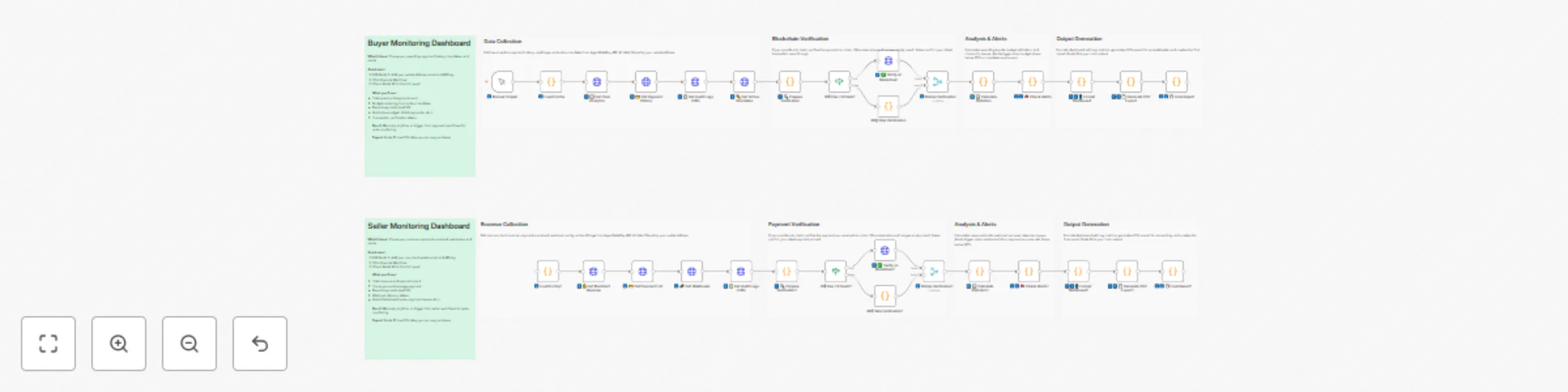
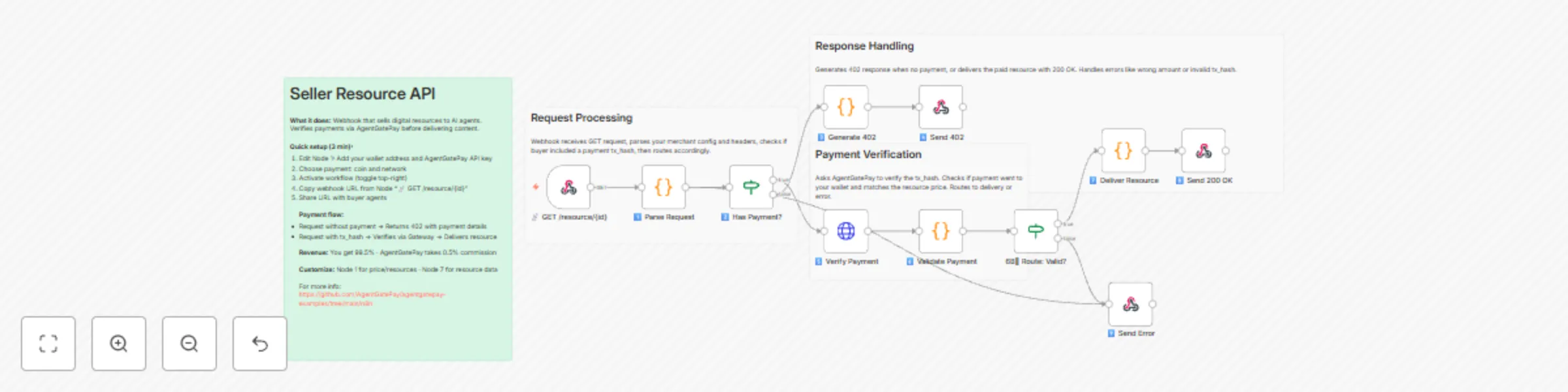
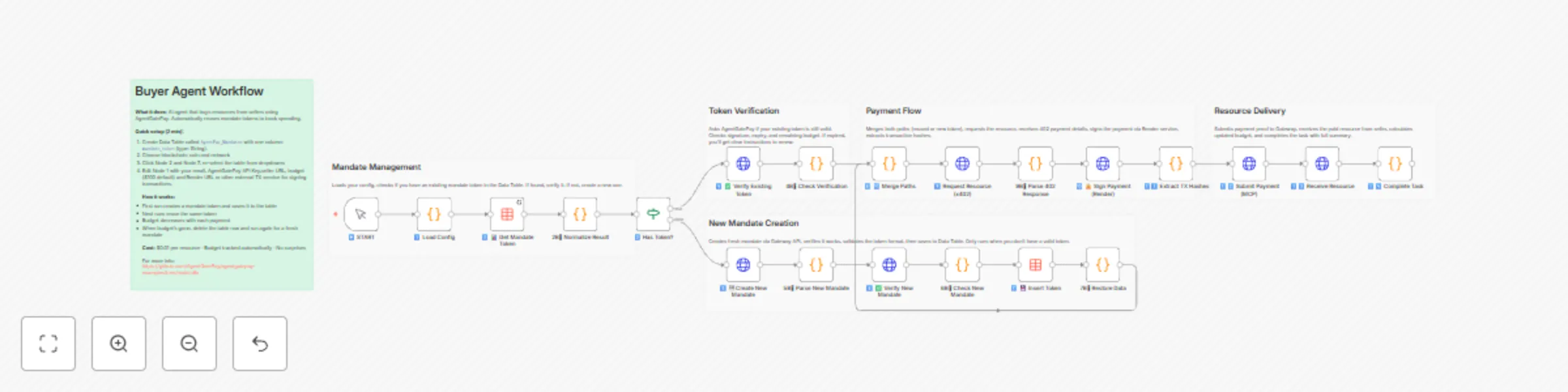
# AgentGatePay N8N Quick Start Guide **Get your AI agents paying for resources autonomously in under 10 minutes.** > **⚠️ BETA VERSION**: These templates are currently in beta. We're actively adding features and improvements based on user feedback. Expect updates for enhanced functionality, additional blockchain networks, and new payment options. --- ## What You'll Build - **Buyer Agent**: Automatically pays for API resources using **USDC, USDT, or DAI** on **Ethereum, Base, Polygon, or Arbitrum** blockchains - **Seller API**: Accepts multi-token payments and delivers resources - **Monitoring**: Track spending and revenue in real-time across all chains and tokens **Supported Tokens:** - USDC (6 decimals) - Recommended - USDT (6 decimals) - DAI (18 decimals) **Supported Blockchains:** - Ethereum (mainnet) - Base (recommended for low gas fees ~$0.001) - Polygon - Arbitrum --- ## Prerequisites (5 minutes) ### 1. Create AgentGatePay Accounts **Buyer Account** (agent that pays): ```bash curl -X POST https://api.agentgatepay.com/v1/users/signup \ -H "Content-Type: application/json" \ -d '{ "email": "[email protected]", "password": "SecurePass123!", "user_type": "agent" }' ``` **Seller Account** (receives payments): ```bash curl -X POST https://api.agentgatepay.com/v1/users/signup \ -H "Content-Type: application/json" \ -d '{ "email": "[email protected]", "password": "SecurePass123!", "user_type": "merchant" }' ``` **Save both API keys** - shown only once! ### 2. Deploy Transaction Signing Service (2 minutes) **One-Click Render Deploy:** 1. Click: [](https://render.com/deploy?repo=https://github.com/AgentGatePay/TX) 2. Enter: - `AGENTGATEPAY_API_KEY`: Your buyer API key - `WALLET_PRIVATE_KEY`: Your wallet private key (0x...) 3. Deploy → Copy service URL: `https://your-app.onrender.com` ### 3. Fund Wallet - Send **USDC, USDT, or DAI** to your buyer wallet - Default: **Base network** (lowest gas fees) - Need ~$1 in tokens for testing + ~$0.01 ETH for gas (on Ethereum) or ~$0.001 on Base --- ## Installation (3 minutes) ### Step 1: Import Templates **In N8N:** 1. Go to **Workflows** → **Add Workflow** 2. Click **⋮** (three dots) → **Import from File** 3. Import all 3 workflows: - `🤖 Create a Cryptocurrency-Powered API for Selling Digital Resources with AgentGatePay` - `💲Create a Cryptocurrency-Powered API for Selling Digital Resources with AgentGatePay` - `📊 AgentGatePay - Monitoring Dashboard` ### Step 2: Create Data Table **In N8N Settings:** 1. Go to **Settings** → **Data** → **Data Tables** 2. Create table: `AgentPay_Mandates` 3. Add column: `mandate_token` (type: String) 4. Save --- ## Configuration (2 minutes) ### Configure Seller API First **Open:** `💲Seller Resource API - CLIENT TEMPLATE` **Edit Node 1** (Parse Request): ```javascript const SELLER_CONFIG = { merchant: { wallet_address: "0xYourSellerWallet...", // ← Your seller wallet api_key: "pk_live_xyz789..." // ← Your seller API key }, catalog: { "demo-resource": { id: "demo-resource", price_usd: 0.01, // $0.01 per resource description: "Demo API Resource" } } }; ``` **Activate workflow** → Copy webhook URL ### Configure Buyer Agent **Open:** `🤖 Buyer Agent - CLIENT TEMPLATE` **Edit Node 1** (Load Config): ```javascript const CONFIG = { buyer: { email: "[email protected]", // ← Your buyer email api_key: "pk_live_abc123...", // ← Your buyer API key budget_usd: 100, // $100 mandate budget mandate_ttl_days: 7 // 7-day validity }, seller: { api_url: "https://YOUR-N8N.app.n8n.cloud/webhook/YOUR-WEBHOOK-ID" // ← Seller webhook base URL ONLY (see README.md for extraction instructions) }, render: { service_url: "https://your-app.onrender.com" // ← Your Render URL } }; ``` --- ## Run Your First Payment (1 minute) ### Execute Buyer Agent 1. Open **Buyer Agent** workflow 2. Click **Execute Workflow** 3. Watch the magic happen: - Mandate created ($100 budget) - Resource requested (402 Payment Required) - Payment signed (2 transactions: merchant + commission) - Payment verified on blockchain - Resource delivered **Total time:** ~5-8 seconds ### Verify on Blockchain Check transactions on BaseScan: ``` https://basescan.org/address/YOUR_BUYER_WALLET ``` You'll see: - **TX 1:** Commission to AgentGatePay (0.5% = $0.00005) - **TX 2:** Payment to seller (99.5% = $0.00995) --- ## Monitor Activity - Choose Buyer/Seller or both ### Buyer Monitoring **Open:** `📊 AgentGatePay - Monitoring Dashboard` **Edit Node 1:** Set your buyer wallet address and API key **Execute** → See: - Mandate budget remaining - Payment history - Total spent - Average transaction size ### Seller Monitoring **Open:** `📊 AgentGatePay - Monitoring Dashboard` **Edit Node 1:** Set your seller wallet address and API key **Execute** → See: - Total revenue - Commission breakdown - Top payers - Payment count --- ## How It Works ### Payment Flow ``` 1. Buyer Agent requests resource ↓ 2. Seller returns 402 Payment Required (includes: wallet address, price, token, chain) ↓ 3. Buyer signs TWO blockchain transactions via Render: - Merchant payment (99.5%) - Gateway commission (0.5%) ↓ 4. Buyer resubmits request with transaction hashes ↓ 5. Seller verifies payment with AgentGatePay API ↓ 6. Seller delivers resource ``` ### Key Concepts **AP2 Mandate:** - Pre-authorized spending authority - Budget limit ($100 in example) - Time limit (7 days in example) - Stored in N8N Data Table for reuse **x402 Protocol:** - HTTP 402 "Payment Required" status code - Seller specifies payment details - Buyer pays and retries with proof **Two-Transaction Model:** - Transaction 1: Merchant receives 99.5% - Transaction 2: Gateway receives 0.5% - Both verified on blockchain --- ## Customization ### Change Resource Price Edit seller Node 1: ```javascript catalog: { "expensive-api": { id: "expensive-api", price_usd: 1.00, // ← Change price description: "Premium API access" } } ``` ### Add More Resources ```javascript catalog: { "basic": { id: "basic", price_usd: 0.01, description: "Basic API" }, "pro": { id: "pro", price_usd: 0.10, description: "Pro API" }, "enterprise": { id: "enterprise", price_usd: 1.00, description: "Enterprise API" } } ``` Buyer requests by ID: `?resource_id=pro` ### Change Blockchain and Token By default, templates use **Base + USDC**. To change: **Edit buyer Node 1** (Load Config): ```javascript const CONFIG = { buyer: { /* ... */ }, seller: { /* ... */ }, render: { /* ... */ }, payment: { chain: "polygon", // Options: ethereum, base, polygon, arbitrum token: "DAI" // Options: USDC, USDT, DAI } }; ``` **Important:** 1. Ensure your wallet has the selected token on the selected chain 2. Update Render service to support the chain (add RPC URL) 3. Gas fees vary by chain. **Token Decimals:** - USDC/USDT: 6 decimals (automatic conversion) - DAI: 18 decimals (automatic conversion) ### Schedule Monitoring Replace "Execute Workflow" trigger with **Schedule Trigger**: - Buyer monitoring: Every 1 hour - Seller monitoring: Every 6 hours Add **Slack/Email** node to send alerts. --- ## Troubleshooting ### "Mandate expired" **Fix:** Delete mandate from Data Table → Re-execute workflow ### "Transaction not found" **Fix:** Wait 10-15 seconds for blockchain confirmation → Retry ### "Render service unavailable" **Fix:** Render free tier spins down after 15 min → First request takes ~5 sec (cold start) ### "Insufficient funds" **Fix:** Send more tokens (USDC/USDT/DAI) to buyer wallet - Check balance on blockchain explorer (BaseScan for Base, Etherscan for Ethereum, etc.) ### "Webhook not responding" **Fix:** Ensure seller workflow is **Active** (toggle in top-right) --- ## Production Checklist Before going live: - [ ] Use separate wallet for agent (not your main wallet) - [ ] Set conservative mandate budgets ($10-100) - [ ] Monitor spending daily (use monitoring workflows) - [ ] Upgrade Render to paid tier ($7/mo) for no cold starts - [ ] Set up Slack/email alerts for low balance - [ ] Test with small amounts first ($0.01-0.10) - [ ] Keep API keys secure (use N8N credentials manager) - [ ] Review transactions on blockchain explorer weekly --- ## Summary You just built: - Autonomous payment agent (buys resources automatically) - Monetized API (sells resources for **USDC, USDT, or DAI**) - **Multi-chain support** (Ethereum, Base, Polygon, Arbitrum) - Real blockchain transactions (verified on-chain) - Budget management (AP2 mandates) - Monitoring dashboard (track spending/revenue) **Total setup time:** ~10 minutes **Total cost:** $0 (Render free tier + AgentGatePay free) --- **Ready to scale?** Connect multiple agents, add more resources, integrate with your existing systems! **Questions?** Check `README.md` or contact [email protected] Website: https://www.agentgatepay.com
Create a cryptocurrency-powered API for selling resources with AgentGatePay
# AgentGatePay N8N Quick Start Guide **Get your AI agents paying for resources autonomously in under 10 minutes.** > **⚠️ BETA VERSION**: These templates are currently in beta. We're actively adding features and improvements based on user feedback. Expect updates for enhanced functionality, additional blockchain networks, and new payment options. --- ## What You'll Build - **Buyer Agent**: Automatically pays for API resources using **USDC, USDT, or DAI** on **Ethereum, Base, Polygon, or Arbitrum** blockchains - **Seller API**: Accepts multi-token payments and delivers resources - **Monitoring**: Track spending and revenue in real-time across all chains and tokens **Supported Tokens:** - USDC (6 decimals) - Recommended - USDT (6 decimals) - DAI (18 decimals) **Supported Blockchains:** - Ethereum (mainnet) - Base (recommended for low gas fees ~$0.001) - Polygon - Arbitrum --- ## Prerequisites (5 minutes) ### 1. Create AgentGatePay Accounts **Buyer Account** (agent that pays): ```bash curl -X POST https://api.agentgatepay.com/v1/users/signup \ -H "Content-Type: application/json" \ -d '{ "email": "[email protected]", "password": "SecurePass123!", "user_type": "agent" }' ``` **Seller Account** (receives payments): ```bash curl -X POST https://api.agentgatepay.com/v1/users/signup \ -H "Content-Type: application/json" \ -d '{ "email": "[email protected]", "password": "SecurePass123!", "user_type": "merchant" }' ``` **Save both API keys** - shown only once! ### 2. Deploy Transaction Signing Service (2 minutes) **One-Click Render Deploy:** 1. Click: [](https://render.com/deploy?repo=https://github.com/AgentGatePay/TX) 2. Enter: - `AGENTGATEPAY_API_KEY`: Your buyer API key - `WALLET_PRIVATE_KEY`: Your wallet private key (0x...) 3. Deploy → Copy service URL: `https://your-app.onrender.com` ### 3. Fund Wallet - Send **USDC, USDT, or DAI** to your buyer wallet - Default: **Base network** (lowest gas fees) - Need ~$1 in tokens for testing + ~$0.01 ETH for gas (on Ethereum) or ~$0.001 on Base --- ## Installation (3 minutes) ### Step 1: Import Templates **In N8N:** 1. Go to **Workflows** → **Add Workflow** 2. Click **⋮** (three dots) → **Import from File** 3. Import all 3 workflows: - `🤖 Create a Cryptocurrency-Powered API for Selling Digital Resources with AgentGatePay` - `💲Create a Cryptocurrency-Powered API for Selling Digital Resources with AgentGatePay` - `📊 AgentGatePay - Monitoring Dashboard` ### Step 2: Create Data Table **In N8N Settings:** 1. Go to **Settings** → **Data** → **Data Tables** 2. Create table: `AgentPay_Mandates` 3. Add column: `mandate_token` (type: String) 4. Save --- ## Configuration (2 minutes) ### Configure Seller API First **Open:** `💲Seller Resource API - CLIENT TEMPLATE` **Edit Node 1** (Parse Request): ```javascript const SELLER_CONFIG = { merchant: { wallet_address: "0xYourSellerWallet...", // ← Your seller wallet api_key: "pk_live_xyz789..." // ← Your seller API key }, catalog: { "demo-resource": { id: "demo-resource", price_usd: 0.01, // $0.01 per resource description: "Demo API Resource" } } }; ``` **Activate workflow** → Copy webhook URL ### Configure Buyer Agent **Open:** `🤖 Buyer Agent - CLIENT TEMPLATE` **Edit Node 1** (Load Config): ```javascript const CONFIG = { buyer: { email: "[email protected]", // ← Your buyer email api_key: "pk_live_abc123...", // ← Your buyer API key budget_usd: 100, // $100 mandate budget mandate_ttl_days: 7 // 7-day validity }, seller: { api_url: "https://YOUR-N8N.app.n8n.cloud/webhook/YOUR-WEBHOOK-ID" // ← Seller webhook base URL ONLY (see README.md for extraction instructions) }, render: { service_url: "https://your-app.onrender.com" // ← Your Render URL } }; ``` --- ## Run Your First Payment (1 minute) ### Execute Buyer Agent 1. Open **Buyer Agent** workflow 2. Click **Execute Workflow** 3. Watch the magic happen: - Mandate created ($100 budget) - Resource requested (402 Payment Required) - Payment signed (2 transactions: merchant + commission) - Payment verified on blockchain - Resource delivered **Total time:** ~5-8 seconds ### Verify on Blockchain Check transactions on BaseScan: ``` https://basescan.org/address/YOUR_BUYER_WALLET ``` You'll see: - **TX 1:** Commission to AgentGatePay (0.5% = $0.00005) - **TX 2:** Payment to seller (99.5% = $0.00995) --- ## Monitor Activity - Choose Buyer/Seller or both ### Buyer Monitoring **Open:** `📊 AgentGatePay - Monitoring Dashboard` **Edit Node 1:** Set your buyer wallet address and API key **Execute** → See: - Mandate budget remaining - Payment history - Total spent - Average transaction size ### Seller Monitoring **Open:** `📊 AgentGatePay - Monitoring Dashboard` **Edit Node 1:** Set your seller wallet address and API key **Execute** → See: - Total revenue - Commission breakdown - Top payers - Payment count --- ## How It Works ### Payment Flow ``` 1. Buyer Agent requests resource ↓ 2. Seller returns 402 Payment Required (includes: wallet address, price, token, chain) ↓ 3. Buyer signs TWO blockchain transactions via Render: - Merchant payment (99.5%) - Gateway commission (0.5%) ↓ 4. Buyer resubmits request with transaction hashes ↓ 5. Seller verifies payment with AgentGatePay API ↓ 6. Seller delivers resource ``` ### Key Concepts **AP2 Mandate:** - Pre-authorized spending authority - Budget limit ($100 in example) - Time limit (7 days in example) - Stored in N8N Data Table for reuse **x402 Protocol:** - HTTP 402 "Payment Required" status code - Seller specifies payment details - Buyer pays and retries with proof **Two-Transaction Model:** - Transaction 1: Merchant receives 99.5% - Transaction 2: Gateway receives 0.5% - Both verified on blockchain --- ## Customization ### Change Resource Price Edit seller Node 1: ```javascript catalog: { "expensive-api": { id: "expensive-api", price_usd: 1.00, // ← Change price description: "Premium API access" } } ``` ### Add More Resources ```javascript catalog: { "basic": { id: "basic", price_usd: 0.01, description: "Basic API" }, "pro": { id: "pro", price_usd: 0.10, description: "Pro API" }, "enterprise": { id: "enterprise", price_usd: 1.00, description: "Enterprise API" } } ``` Buyer requests by ID: `?resource_id=pro` ### Change Blockchain and Token By default, templates use **Base + USDC**. To change: **Edit buyer Node 1** (Load Config): ```javascript const CONFIG = { buyer: { /* ... */ }, seller: { /* ... */ }, render: { /* ... */ }, payment: { chain: "polygon", // Options: ethereum, base, polygon, arbitrum token: "DAI" // Options: USDC, USDT, DAI } }; ``` **Important:** 1. Ensure your wallet has the selected token on the selected chain 2. Update Render service to support the chain (add RPC URL) 3. Gas fees vary by chain. **Token Decimals:** - USDC/USDT: 6 decimals (automatic conversion) - DAI: 18 decimals (automatic conversion) ### Schedule Monitoring Replace "Execute Workflow" trigger with **Schedule Trigger**: - Buyer monitoring: Every 1 hour - Seller monitoring: Every 6 hours Add **Slack/Email** node to send alerts. --- ## Troubleshooting ### "Mandate expired" **Fix:** Delete mandate from Data Table → Re-execute workflow ### "Transaction not found" **Fix:** Wait 10-15 seconds for blockchain confirmation → Retry ### "Render service unavailable" **Fix:** Render free tier spins down after 15 min → First request takes ~5 sec (cold start) ### "Insufficient funds" **Fix:** Send more tokens (USDC/USDT/DAI) to buyer wallet - Check balance on blockchain explorer (BaseScan for Base, Etherscan for Ethereum, etc.) ### "Webhook not responding" **Fix:** Ensure seller workflow is **Active** (toggle in top-right) --- ## Production Checklist Before going live: - [ ] Use separate wallet for agent (not your main wallet) - [ ] Set conservative mandate budgets ($10-100) - [ ] Monitor spending daily (use monitoring workflows) - [ ] Upgrade Render to paid tier ($7/mo) for no cold starts - [ ] Set up Slack/email alerts for low balance - [ ] Test with small amounts first ($0.01-0.10) - [ ] Keep API keys secure (use N8N credentials manager) - [ ] Review transactions on blockchain explorer weekly --- ## Summary You just built: - Autonomous payment agent (buys resources automatically) - Monetized API (sells resources for **USDC, USDT, or DAI**) - **Multi-chain support** (Ethereum, Base, Polygon, Arbitrum) - Real blockchain transactions (verified on-chain) - Budget management (AP2 mandates) - Monitoring dashboard (track spending/revenue) **Total setup time:** ~10 minutes **Total cost:** $0 (Render free tier + AgentGatePay free) --- **Ready to scale?** Connect multiple agents, add more resources, integrate with your existing systems! **Questions?** Check `README.md` or contact [email protected] Website: https://www.agentgatepay.com
Create autonomous payment agents using AgentGatePay and multi-chain tokens
# AgentGatePay N8N Quick Start Guide **Get your AI agents paying for resources autonomously in under 10 minutes.** > **⚠️ BETA VERSION**: These templates are currently in beta. We're actively adding features and improvements based on user feedback. Expect updates for enhanced functionality, additional blockchain networks, and new payment options. --- ## What You'll Build - **Buyer Agent**: Automatically pays for API resources using **USDC, USDT, or DAI** on **Ethereum, Base, Polygon, or Arbitrum** blockchains - **Seller API**: Accepts multi-token payments and delivers resources - **Monitoring**: Track spending and revenue in real-time across all chains and tokens **Supported Tokens:** - USDC (6 decimals) - Recommended - USDT (6 decimals) - DAI (18 decimals) **Supported Blockchains:** - Ethereum (mainnet) - Base (recommended for low gas fees ~$0.001) - Polygon - Arbitrum --- ## Prerequisites (5 minutes) ### 1. Create AgentGatePay Accounts **Buyer Account** (agent that pays): ```bash curl -X POST https://api.agentgatepay.com/v1/users/signup \ -H "Content-Type: application/json" \ -d '{ "email": "[email protected]", "password": "SecurePass123!", "user_type": "agent" }' ``` **Seller Account** (receives payments): ```bash curl -X POST https://api.agentgatepay.com/v1/users/signup \ -H "Content-Type: application/json" \ -d '{ "email": "[email protected]", "password": "SecurePass123!", "user_type": "merchant" }' ``` **Save both API keys** - shown only once! ### 2. Deploy Transaction Signing Service (2 minutes) **One-Click Render Deploy:** 1. Click: [](https://render.com/deploy?repo=https://github.com/AgentGatePay/TX) 2. Enter: - `AGENTGATEPAY_API_KEY`: Your buyer API key - `WALLET_PRIVATE_KEY`: Your wallet private key (0x...) 3. Deploy → Copy service URL: `https://your-app.onrender.com` ### 3. Fund Wallet - Send **USDC, USDT, or DAI** to your buyer wallet - Default: **Base network** (lowest gas fees) - Need ~$1 in tokens for testing + ~$0.01 ETH for gas (on Ethereum) or ~$0.001 on Base --- ## Installation (3 minutes) ### Step 1: Import Templates **In N8N:** 1. Go to **Workflows** → **Add Workflow** 2. Click **⋮** (three dots) → **Import from File** 3. Import all 4 workflows: - `🤖 Create a Cryptocurrency-Powered API for Selling Digital Resources with AgentGatePay` - `💲Create a Cryptocurrency-Powered API for Selling Digital Resources with AgentGatePay` - `📊 Buyer Agent [Monitoring] - AgentGatePay Autonomous Payment Workflow` - `💲 Seller Agent [Monitoring] - AgentGatePay Autonomous Payment Workflow` ### Step 2: Create Data Table **In N8N Settings:** 1. Go to **Settings** → **Data** → **Data Tables** 2. Create table: `AgentPay_Mandates` 3. Add column: `mandate_token` (type: String) 4. Save --- ## Configuration (2 minutes) ### Configure Seller API First **Open:** `💲Seller Resource API - CLIENT TEMPLATE` **Edit Node 1** (Parse Request): ```javascript const SELLER_CONFIG = { merchant: { wallet_address: "0xYourSellerWallet...", // ← Your seller wallet api_key: "pk_live_xyz789..." // ← Your seller API key }, catalog: { "demo-resource": { id: "demo-resource", price_usd: 0.01, // $0.01 per resource description: "Demo API Resource" } } }; ``` **Activate workflow** → Copy webhook URL ### Configure Buyer Agent **Open:** `🤖 Buyer Agent - CLIENT TEMPLATE` **Edit Node 1** (Load Config): ```javascript const CONFIG = { buyer: { email: "[email protected]", // ← Your buyer email api_key: "pk_live_abc123...", // ← Your buyer API key budget_usd: 100, // $100 mandate budget mandate_ttl_days: 7 // 7-day validity }, seller: { api_url: "https://YOUR-N8N.app.n8n.cloud/webhook/YOUR-WEBHOOK-ID" // ← Seller webhook base URL ONLY (see README.md for extraction instructions) }, render: { service_url: "https://your-app.onrender.com" // ← Your Render URL } }; ``` --- ## Run Your First Payment (1 minute) ### Execute Buyer Agent 1. Open **Buyer Agent** workflow 2. Click **Execute Workflow** 3. Watch the magic happen: - Mandate created ($100 budget) - Resource requested (402 Payment Required) - Payment signed (2 transactions: merchant + commission) - Payment verified on blockchain - Resource delivered **Total time:** ~5-8 seconds ### Verify on Blockchain Check transactions on BaseScan: ``` https://basescan.org/address/YOUR_BUYER_WALLET ``` You'll see: - **TX 1:** Commission to AgentGatePay (0.5% = $0.00005) - **TX 2:** Payment to seller (99.5% = $0.00995) --- ## Monitor Activity ### Buyer Monitoring **Open:** `📊 Buyer Monitoring - AUDIT LOGS` **Edit Node 1:** Set your buyer wallet address and API key **Execute** → See: - Mandate budget remaining - Payment history - Total spent - Average transaction size ### Seller Monitoring **Open:** `💲 Seller Monitoring - AUDIT LOGS` **Edit Node 1:** Set your seller wallet address and API key **Execute** → See: - Total revenue - Commission breakdown - Top payers - Payment count --- ## How It Works ### Payment Flow ``` 1. Buyer Agent requests resource ↓ 2. Seller returns 402 Payment Required (includes: wallet address, price, token, chain) ↓ 3. Buyer signs TWO blockchain transactions via Render: - Merchant payment (99.5%) - Gateway commission (0.5%) ↓ 4. Buyer resubmits request with transaction hashes ↓ 5. Seller verifies payment with AgentGatePay API ↓ 6. Seller delivers resource ``` ### Key Concepts **AP2 Mandate:** - Pre-authorized spending authority - Budget limit ($100 in example) - Time limit (7 days in example) - Stored in N8N Data Table for reuse **x402 Protocol:** - HTTP 402 "Payment Required" status code - Seller specifies payment details - Buyer pays and retries with proof **Two-Transaction Model:** - Transaction 1: Merchant receives 99.5% - Transaction 2: Gateway receives 0.5% - Both verified on blockchain --- ## Customization ### Change Resource Price Edit seller Node 1: ```javascript catalog: { "expensive-api": { id: "expensive-api", price_usd: 1.00, // ← Change price description: "Premium API access" } } ``` ### Add More Resources ```javascript catalog: { "basic": { id: "basic", price_usd: 0.01, description: "Basic API" }, "pro": { id: "pro", price_usd: 0.10, description: "Pro API" }, "enterprise": { id: "enterprise", price_usd: 1.00, description: "Enterprise API" } } ``` Buyer requests by ID: `?resource_id=pro` ### Change Blockchain and Token By default, templates use **Base + USDC**. To change: **Edit buyer Node 1** (Load Config): ```javascript const CONFIG = { buyer: { /* ... */ }, seller: { /* ... */ }, render: { /* ... */ }, payment: { chain: "polygon", // Options: ethereum, base, polygon, arbitrum token: "DAI" // Options: USDC, USDT, DAI } }; ``` **Important:** 1. Ensure your wallet has the selected token on the selected chain 2. Update Render service to support the chain (add RPC URL) 3. Gas fees vary by chain. **Token Decimals:** - USDC/USDT: 6 decimals (automatic conversion) - DAI: 18 decimals (automatic conversion) ### Schedule Monitoring Replace "Execute Workflow" trigger with **Schedule Trigger**: - Buyer monitoring: Every 1 hour - Seller monitoring: Every 6 hours Add **Slack/Email** node to send alerts. --- ## Troubleshooting ### "Mandate expired" **Fix:** Delete mandate from Data Table → Re-execute workflow ### "Transaction not found" **Fix:** Wait 10-15 seconds for blockchain confirmation → Retry ### "Render service unavailable" **Fix:** Render free tier spins down after 15 min → First request takes ~5 sec (cold start) ### "Insufficient funds" **Fix:** Send more tokens (USDC/USDT/DAI) to buyer wallet - Check balance on blockchain explorer (BaseScan for Base, Etherscan for Ethereum, etc.) ### "Webhook not responding" **Fix:** Ensure seller workflow is **Active** (toggle in top-right) --- ## Production Checklist Before going live: - [ ] Use separate wallet for agent (not your main wallet) - [ ] Set conservative mandate budgets ($10-100) - [ ] Monitor spending daily (use monitoring workflows) - [ ] Upgrade Render to paid tier ($7/mo) for no cold starts - [ ] Set up Slack/email alerts for low balance - [ ] Test with small amounts first ($0.01-0.10) - [ ] Keep API keys secure (use N8N credentials manager) - [ ] Review transactions on blockchain explorer weekly --- ## Summary You just built: - Autonomous payment agent (buys resources automatically) - Monetized API (sells resources for **USDC, USDT, or DAI**) - **Multi-chain support** (Ethereum, Base, Polygon, Arbitrum) - Real blockchain transactions (verified on-chain) - Budget management (AP2 mandates) - Monitoring dashboard (track spending/revenue) **Total setup time:** ~10 minutes **Total cost:** $0 (Render free tier + AgentGatePay free) --- **Ready to scale?** Connect multiple agents, add more resources, integrate with your existing systems! **Questions?** Check `README.md` or contact [email protected] Website: https://www.agentgatepay.com