A

Adrian

2
Workflows

Workflows by Adrian
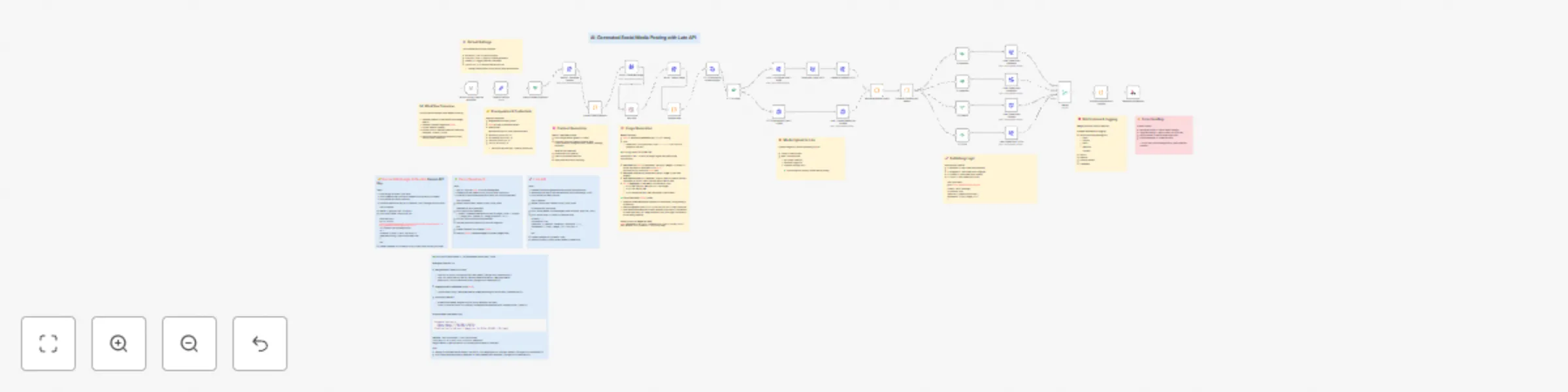
Workflow preview: Generate & publish social media content with Gemini, Kie.ai, and Late API
Free advanced

Generate & publish social media content with Gemini, Kie.ai, and Late API

## 📘 Overview This workflow automates **end-to-end social media publishing** powered by **Late API**. It generates text content with **Google Gemini**, creates branded visuals with **Kie.ai**, uploads media to **Late**, and publishes across multiple platforms (Facebook, Instagram, LinkedIn, TikTok). It’s a production-ready automation for marketing teams who want to save hours of work by letting AI handle both copywriting and design — all inside n8n. ## ⚙️ How it works 1. **Generate text content** → Google Gemini produces platform-optimized copy (tone & length adapted to each network). 2. **Generate visuals** → Kie.ai Seedream v4 creates branded 1080x1080 images. 3. **Upload to Late** → media is stored using Late’s upload API (small & large file handling). 4. **Publish** → posts are created via Late API on enabled platforms with correct `{ platform, accountId }` mapping. 5. **Notify** → success logs are sent via Slack, Discord, Email, and Webhook. ## 🛠 Setup Steps - **Time to setup:** ~10–15 minutes - **Steps:** 1. Add your **API keys** in n8n Credentials: - Google Gemini API (PaLM) - Kie.ai (Seedream) - Late API 2. Insert your **Account IDs** (Facebook, Instagram, LinkedIn, TikTok) into the **Default Settings** node. 3. Choose which platforms to enable (`ENABLE_FACEBOOK`, `ENABLE_INSTAGRAM`, etc.). 4. Set your **Business Type** and **Content Topic** (e.g., “a tech company” / “new product launch”). 5. Execute the workflow. ## 📝 Notes - **Sticky Notes** are included in the workflow to guide each section: Overview, Prerequisites, Default Settings, Content Generation, Image Generation, Media Upload, Publishing Logic, Notifications, Error Handling. - All API keys are handled via **Credentials** (no hardcoding). - Fallback content is included in case Gemini fails to parse. - Large image files (>4MB) are handled with Late’s multipart upload flow. ## 💸 Cost per Flow (Estimated) - **Late API**: $0.00 within Free/Unlimited plans, or ≈ $0.11/post on Build plan ($13/120 posts). - **Google Gemini**: ~$0.0001–$0.0004 per post (≈200 tokens in/out). - **Kie.ai (Seedream)**: ≈ $0.01–$0.02 per generated image. ➡️ **Total: ~$0.01 – $0.12 per post**, depending mainly on your Late plan & Kie.ai credits. ## 🎯 Use cases - Marketing teams automating cross-platform campaigns. - Solo founders posting content daily without design/copy effort. - Agencies scaling social media management with AI + automation. ## 📢 Credits - Built by **Adrian (RoboMarketing)** for the **n8n Arena Challenge – September 2025**. - Powered by: - [Gemini API](https://ai.google.dev/gemini-api/docs/get-started) - [Kie.ai Seedream](https://kie.ai/seedream-api) - [Late API](https://getlate.dev/docs)

A
Adrian
Social Media
26 Sep 2025
1201
0

Workflow preview: Conversational WhatsApp assistant with Gemini AI and Pinecone memory
Free advanced

Conversational WhatsApp assistant with Gemini AI and Pinecone memory

## 📋 Description This template creates an intelligent AI assistant for WhatsApp that can: - **Respond naturally** to messages using Google Gemini AI - **Remember previous conversations** for each user - **Access a knowledge base** for answering frequently asked questions - **Automatically save** all conversations for long-term memory ## 🛠️ Requirements ### 1. **WAMM.pro Account** (FREE tier available) - **What is WAMM.pro?** - A platform that enables WhatsApp automation using proprietary API technology - **Free tier:** 50 messages/month - **PRO tier:** Unlimited messages + advanced features - **Link:** [wamm.pro](https://wamm.pro) ### 2. **Pinecone Account** (for AI memory) - For storing conversations and knowledge base - Free tier available ### 3. **Google AI Account** (for Gemini) - For the conversational AI model ### 4. **OpenAI Account** (for embeddings) - For generating memory vectors ## 🚀 Step-by-step Setup ### **Step 1: WAMM.pro Configuration** 1. **Create account** at [wamm.pro](https://wamm.pro) 2. **Account Manager** → **Add WhatsApp profile** 3. **Scan QR code** with your WhatsApp 4. **Note down:** `Instance ID` and `Access Token` ### **Step 2: Webhook Configuration** 1. **In WAMM.pro:** Integrations → Webhooks → Messages Webhooks 2. **Add Webhook** with the n8n URL 3. **Required configuration:** - **From others:** ✅ Relevant + ✅ Without media + ✅ Exclude no text - **To others:** ✅ Relevant + ✅ Without media + ✅ Exclude no text - **To myself:** ✅ None (to avoid responding to own messages) ### **Step 3: Pinecone Configuration** 1. **Create 2 indexes:** - `historywa` - for conversation memory - `knowledge` - for knowledge base 2. **Index settings:** - **Dimensions:** 3072 - **Metric:** cosine - **Embedding model:** text-embedding-3-large ### **Step 4: n8n Configuration** 1. **Configure credentials:** - **WAMM:** Instance ID + Access Token - **Pinecone:** API Key - **Google Gemini:** API Key - **OpenAI:** API Key for embeddings ## 🔧 How it Works ### **Workflow Flow:** ``` 📱 WhatsApp Message ↓ (webhook) 🎯 AI Agent (Gemini) ↓ (uses tools) 📚 Memory Tool + Knowledge Tool ↓ (response generated) 📤 WAMM Send Message ↓ (saves) 💾 Pinecone Memory Storage ``` ### **Available AI Tools:** 1. **Memory Tool** - Searches previous conversations with the user 2. **Knowledge Tool** - Searches the general knowledge base ### **Special Features:** - **Natural conversations** - AI doesn't mention "searching history" - **Persistent context** - Remembers names, preferences, previous conversations - **User language detection** - Automatically responds in user's language - **Organized memory** - Each user has their own memory space ## 📊 Benefits ✅ **Zero maintenance** - Runs automatically ✅ **Scalable** - Supports multiple users simultaneously ✅ **Intelligent memory** - Uses similarity search for relevant context ✅ **Extensible** - Easy to add new features ✅ **Cost-effective** - Free tiers available for all services ## 🎯 Use Cases - **Automated customer support** with memory - **Personal assistant** for WhatsApp - **Business chatbot** with specific knowledge - **Conversation automation** with persistent context ## 🔒 Security - **Data** stored in Pinecone as vector embeddings - **No plain text** message storage - **Each user** has separate memory space - **API keys** secured in n8n credentials ## 📈 Possible Extensions - **CRM** integrations - **Scheduling** and reminders - **Advanced multi-language** support - **Analytics** and conversation reports - **Custom knowledge bases** per user --- **💡 Tip:** For optimal results, populate the knowledge base with frequently asked questions specific to your business!

A
Adrian
Support Chatbot
19 Jul 2025
1156
0