{"workflow":{"id":12908,"name":"Generate technical n8n workflow reports with GPT-4.1 and Google Docs","views":15,"recentViews":0,"totalViews":15,"createdAt":"2026-01-22T11:35:06.819Z","description":"## Who is this workflow for?\n\nThis workflow is designed for technical teams, automation owners, process auditors, and anyone who needs to document n8n workflows in a consistent, fast, and professional way—without manual work.\n\n## What problem does it solve? / Use case\n\nDocumenting n8n workflows is often slow and error-prone: you need to review nodes, configurations, connections, internal logic, and embedded code.\n\nThis workflow automates that process by generating a complete technical report, structured and ready to share, ensuring documentation is:\n\n- consistent \n- easy to update \n- easy to review \n- accessible in Google Drive \n\n## What this workflow does\n\n- Lets you select an n8n workflow to document \n- Extracts its structure, nodes, connections, and settings \n- Normalizes the JSON to remove noise and keep what matters \n- Generates a HTML technical report using an LLM (OpenAI GPT-4.1) \n- Detects whether Code nodes exist \n- If Code nodes exist, analyzes their logic and adds an extra technical section \n- Creates a final Google Docs document inside a Google Drive folder \n\n## High-level flow\n\n1. Manual workflow start \n2. Target workflow selection \n3. Workflow normalization (cleanup + structure) \n4. Main report generation with OpenAI \n5. Code node extraction \n6. Condition: Code nodes exist or not \n7. (Optional) technical analysis of Code nodes with OpenAI \n8. Merge main report + code analysis \n9. Create the final document in Google Docs \n\n## Setup\n\n### OpenAI\n\nConfigure OpenAI credentials (API Key).\n\nThe workflow uses OpenAI nodes to:\n\n- generate the main report \n- analyze Code nodes (if any) \n\n### Google Drive\n\n- Configure Google Drive OAuth2 credentials with write permissions \n- Define a destination folder using a folder ID (e.g., `YOUR_FOLDER_ID`) \n- The workflow uploads the final HTML as a Google Docs document \n\n### n8n (access to the target workflow)\n\nIf your instance requires it, configure access to read internal workflows.\n\nThe workflow fetches the selected workflow using an n8n Get Workflow node.\n\n## How to customize this workflow\n\n- **Report format:** adjust the prompt in the Generate Report node to change sections, style, or level of detail \n- **Output folder:** replace `YOUR_FOLDER_ID` with the real Drive folder ID \n- **Documentation strategy:**\n - generate shorter reports for small workflows \n - split large reports if the workflow is very big \n- **Automated triggering:** replace the manual start with a webhook trigger if you want to use an external application \n\n## Final outcome\n\nA system that automatically generates a professional technical Google Docs document containing:\n\n- workflow description \n- global configuration \n- node-by-node breakdown \n- routing logic (conditions and branches) \n- required credentials \n- operational requirements \n- risks and observations \n- additional Code node analysis (if applicable) \n\n## Do you want this workflow in Spanish?\n\n📧 jrvillaverde@virodria.es \n🔗 https://www.linkedin.com/in/ramonvillaverde \n\n\n","workflow":{"id":"exOYTSuZ3nUTQLmY","meta":{"instanceId":"c7b7d723f5e92a227cab613f1524a0ed1cdc60b15aaf52a8036573084c641ec7","templateCredsSetupCompleted":true},"name":"Workflow Operation Report Generator","tags":[{"id":"HfER5l2FvgTxes63","name":"MONCHO","createdAt":"2025-11-01T19:49:45.970Z","updatedAt":"2025-11-01T19:49:45.970Z"}],"nodes":[{"id":"8b465181-5298-405e-b3cc-ffdad3791441","name":"Sticky Note","type":"n8n-nodes-base.stickyNote","position":[-2240,-416],"parameters":{"width":1008,"height":1168,"content":"# Workflow Operation Report Generator\nThis will probably sound familiar. You design a great workflow, but you don’t add any sticky notes or document it. After some time, you want to modify some of its settings, but you no longer remember exactly what each node was supposed to do.\n\nThe solution to that annoying problem is this workflow. Its purpose is to generate a report, in a Google Docs document, based on a structured analysis of the workflow selected by the user.\n\n## **How it works / What it does**\n1. **Manual trigger**: The workflow starts manually.\n2. **Select and fetch the workflow to document**: Retrieves the structured information of the selected workflow.\n3. **JSON normalization and cleanup**: The selected workflow is cleaned and transformed to keep only the relevant (and safe) information needed to generate the technical documentation.\n4. **Documentation report generation**: A professional HTML report is created using an LLM (OpenAI GPT-4.1).\n5. **Code node analysis**: If the workflow contains Code nodes, they are analyzed and the result is added to the main report.\n6. **Final document creation**: The HTML report is uploaded as a Google Docs document in Google Drive.\n\n## **How to set it up**\n1. **Add the nodes in the following order**:\n * Manual Trigger\n * n8n node “Select Workflow” (choose the desired workflow)\n * Code node “Normalize Workflow JSON”\n * OpenAI node (Message a model) “Generate Report” (add system prompt and user prompt)\n * Code node “Collect Code Node Info”\n * If node “Are there Code Nodes?”\n * OpenAI node (Message a model) “Analyze Code Nodes” (add system prompt and user prompt)\n * Edit Fields (Set) node “Merge Report and Code Node Analysis”\n * HTTP Request node “Create Google Docs Document” (including Code node analysis)\n * HTTP Request node “Create Google Docs Document_1” (without including Code node analysis)\n2. **Configure credentials** for n8n, OpenAI, and Google Drive.\n3. **Run a test execution** to make sure the document is generated and archived.\n\n## **Requirements**\n* **Credentials**:\n * n8n API key\n * OpenAI API key\n * Google Drive (OAuth2) with read/write permissions\n* **Access**:\n * Write access to the target Google Drive folders\n\n## **How to customize the workflow**\n* **Automate the trigger**: Use a Webhook Trigger to run it on-demand from external apps.\n* **Change the prompts (system and user) in the OpenAI nodes** to generate different types of content.\n"},"typeVersion":1},{"id":"76ba8d62-bdbb-460d-b234-fbe0e0cc82f4","name":"Select Workflow","type":"n8n-nodes-base.n8n","position":[-1440,-864],"parameters":{"operation":"get","workflowId":{"__rl":true,"mode":"list","value":"exOYTSuZ3nUTQLmY","cachedResultName":"Documentador de workflows V1_inglés (#exOYTSuZ3nUTQLmY)"},"requestOptions":{}},"credentials":{"n8nApi":{"id":"sG3PNFVIjVAOL35c","name":"n8n Templates"}},"typeVersion":1},{"id":"8f9890e2-71ef-4926-9f46-235c052c8618","name":"Manual Trigger","type":"n8n-nodes-base.manualTrigger","position":[-1664,-864],"parameters":{},"typeVersion":1},{"id":"fc39a272-721c-4729-8f34-c46b988f1b03","name":"Normalize Workflow JSON","type":"n8n-nodes-base.code","position":[-1216,-864],"parameters":{"jsCode":"/**\n * ============================================================\n * Node: Normalize Workflow JSON\n * Goal:\n * - Clean and normalize an n8n workflow for documentation\n * - Remove noise and sensitive data\n * - PRESERVE the code of Code nodes (jsCode) intact\n * - Prepare a structure that is easy for LLMs to consume\n * ============================================================\n */\n\n/**\n * Returns an object with only the specified keys.\n * Used to avoid carrying unnecessary fields.\n */\nfunction pick(obj, keys) {\n const out = {};\n for (const k of keys) {\n if (obj && Object.prototype.hasOwnProperty.call(obj, k)) {\n out[k] = obj[k];\n }\n }\n return out;\n}\n\n/**\n * Trims long strings to avoid blowing up the LLM context.\n * IMPORTANT: This is NOT applied to jsCode (see below).\n */\nfunction safeString(v, max = 5000) {\n if (v == null) return v;\n const s = typeof v === \"string\" ? v : JSON.stringify(v);\n return s.length > max ? s.slice(0, max) + \"…\" : s;\n}\n\n/**\n * Converts n8n's connections structure (very nested)\n * into a flat list of edges.\n * This makes it easier to reconstruct the real execution flow.\n */\nfunction flattenConnections(connections) {\n const edges = [];\n if (!connections || typeof connections !== \"object\") return edges;\n\n for (const fromNodeName of Object.keys(connections)) {\n const byType = connections[fromNodeName];\n if (!byType || typeof byType !== \"object\") continue;\n\n for (const connType of Object.keys(byType)) {\n const groups = byType[connType];\n if (!Array.isArray(groups)) continue;\n\n for (let fromOutputIndex = 0; fromOutputIndex < groups.length; fromOutputIndex++) {\n const targets = groups[fromOutputIndex];\n if (!Array.isArray(targets)) continue;\n\n for (const t of targets) {\n if (!t || typeof t !== \"object\") continue;\n edges.push({\n from: fromNodeName,\n to: t.node,\n connectionType: connType,\n fromOutputIndex,\n toInputIndex: typeof t.index === \"number\" ? t.index : null,\n toType: t.type || null,\n });\n }\n }\n }\n }\n return edges;\n}\n\n/**\n * =========================\n * MAIN\n * =========================\n */\n\n// The workflow usually comes in items[0].json\nconst raw = items?.[0]?.json;\nif (!raw) {\n return [{ json: { error: \"Workflow not found in items[0].json\" } }];\n}\n\n/**\n * Some n8n nodes return the workflow wrapped in { workflow: {...} }\n * Here we normalize it so we always work with the same structure.\n */\nconst wf =\n raw.workflow && typeof raw.workflow === \"object\" && raw.workflow.nodes\n ? raw.workflow\n : raw;\n\n// Workflow name (fallbacks for safety)\nconst workflowName = wf.name || raw.name || \"Unnamed workflow\";\n\n/**\n * Trimming configuration:\n * - DEFAULT_MAX_STRING: normal strings (URLs, text, etc.)\n * - MAX_JS_CODE: JavaScript code\n *\n * MAX_JS_CODE = null -> jsCode is never trimmed\n * This is KEY for the two-call LLM strategy.\n */\nconst DEFAULT_MAX_STRING = 8000;\nconst MAX_JS_CODE = null;\n\n/**\n * Node normalization:\n * - Keep only useful fields for documentation\n * - Clean long parameters\n * - Keep jsCode intact\n */\nconst nodes = Array.isArray(wf.nodes) ? wf.nodes : [];\nconst cleanedNodes = nodes.map((n) => {\n // Basic node metadata\n const base = pick(n, [\n \"id\",\n \"name\",\n \"type\",\n \"typeVersion\",\n \"position\",\n \"disabled\",\n \"notes\",\n \"notesInFlow\",\n \"retryOnFail\",\n \"continueOnFail\",\n \"alwaysOutputData\",\n \"executeOnce\",\n ]);\n\n // Node parameters (the most important part for documentation)\n const params = n?.parameters ?? {};\n\n /**\n * Controlled parameter trimming:\n * - normal strings -> standard trim\n * - parameters.jsCode -> DO NOT trim\n */\n const paramsTrimmed = JSON.parse(\n JSON.stringify(params, (key, value) => {\n if (typeof value !== \"string\") return value;\n\n if (key === \"jsCode\") {\n if (MAX_JS_CODE == null) return value; // keep code intact\n return safeString(value, MAX_JS_CODE);\n }\n\n return safeString(value, DEFAULT_MAX_STRING);\n })\n );\n\n base.parameters = paramsTrimmed;\n\n /**\n * Quick marker for triggers.\n * Useful so the LLM can identify flow entry points.\n */\n const isTrigger =\n typeof n?.type === \"string\" && n.type.toLowerCase().includes(\"trigger\");\n base.isTrigger = isTrigger;\n\n return base;\n});\n\n/**\n * Explicit extraction of Code nodes.\n * This allows the \"Code-only\" LLM to work with an input\n * that is small and very focused.\n */\nconst codeNodes = cleanedNodes\n .filter((n) => n.type === \"n8n-nodes-base.code\")\n .map((n) => {\n const jsCode = n?.parameters?.jsCode ?? null;\n\n return {\n id: n.id,\n name: n.name,\n type: n.type,\n jsCode, // keep code intact\n lineCount: typeof jsCode === \"string\" ? jsCode.split(\"\\n\").length : 0,\n charCount: typeof jsCode === \"string\" ? jsCode.length : 0,\n };\n });\n\n/**\n * Connection processing:\n * - edges: flat and easy-to-explain version\n * - connections: original structure (in case the LLM needs detail)\n */\nconst connections =\n wf.connections && typeof wf.connections === \"object\"\n ? wf.connections\n : {};\nconst edges = flattenConnections(connections);\n\n/**\n * Minimal workflow settings useful for documentation\n */\nconst settings =\n wf.settings && typeof wf.settings === \"object\"\n ? pick(wf.settings, [\n \"timezone\",\n \"saveDataErrorExecution\",\n \"saveDataSuccessExecution\",\n \"saveManualExecutions\",\n \"executionTimeout\",\n ])\n : {};\n\n/**\n * Final output:\n * - nodes: normalized nodes\n * - codeNodes: direct input for the Code-only LLM\n * - edges: flow reconstruction\n */\nreturn [\n {\n json: {\n workflowName,\n workflowId: wf.id ?? raw.id ?? null,\n active:\n typeof wf.active === \"boolean\"\n ? wf.active\n : typeof raw.active === \"boolean\"\n ? raw.active\n : null,\n nodeCount: cleanedNodes.length,\n edgeCount: edges.length,\n nodes: cleanedNodes,\n codeNodes,\n edges,\n connections,\n settings,\n },\n },\n];\n"},"typeVersion":2},{"id":"6b13daa6-58d1-433c-b277-315bd2a775fe","name":"Generate Report","type":"@n8n/n8n-nodes-langchain.openAi","maxTries":5,"position":[-992,-864],"parameters":{"modelId":{"__rl":true,"mode":"list","value":"gpt-4.1","cachedResultName":"GPT-4.1"},"options":{},"responses":{"values":[{"role":"system","content":"=## Role\nYou are an expert technical and functional documentation writer, specialized in automation with n8n. Your goal is to transform an n8n workflow JSON into a complete, clear, and well-structured documentation document following professional software engineering standards.\n\n### Mission\nBased on the provided JSON:\n1. **Purpose:** Explain the “why” of the workflow (business value).\n2. **Architecture:** Describe the logic by following the “connections” graph.\n3. **Technical Configuration:** Detail parameters, especially translating n8n expressions (those starting with “=” and containing JS code) into clear natural language.\n4. **Governance:** Identify credentials, environment variables, and error-handling settings.\n\n### Technical Analysis Rules (Sources of Truth)\n* **Critical Path:** Do not list nodes alphabetically. Follow the workflow from the trigger through the connection indexes (main[0], etc.).\n* **Expression Interpretation:** If a parameter contains code inside curly braces, analyze the embedded JS. Explain which source nodes it references and what transformation it performs.\n* **Global Settings:** Review the “settings” object in the JSON to identify time zones, error handling, or timeouts applied to the entire workflow.\n* **Flow Control Nodes:** Explain in detail the conditions of IF, Switch, or Filter nodes, indicating which value is evaluated and what success/failure criteria exist.\n\n### What NOT to do\n* Do not invent endpoints or secrets.\n* If a value is sensitive and not hidden, replace it with [CONFIDENTIAL/REDACTED].\n* Do not assume external integrations that are not explicitly present in the node.\n\n### Output Format (Strict HTML)\nDeliver the document exclusively in HTML (using tags h2, h3, p, ul, li, table, strong). Do not use Markdown blocks.\n\n**Title (Centered):** `n8n Workflow Technical Documentation: {{ $json.workflowName }}
`\n\n**Required Structure:**\n1. **Executive Summary** Problem solved and main data flow.\n2. **Workflow Global Configuration** (Extracted from “settings”) Retries, error handling, and status (active/inactive).\n3. **Workflow Overview** High-level stages.\n4. **Node-by-node (Detailed)**\n * For each node:\n * Node name.\n * Type.\n * Version.\n * Function (input/output logic).\n * Key configuration: Parameters and translation of JS expressions into human-readable language.\n * Errors/risks (if applicable).\n5. **Routing Logic** Explanation of branches and conditions.\n6. **Credentials Management** Table with Node | Service | Credential Type | Usage.\n7. **Deployment and Operations Requirements**\n * Variables, dependencies, permissions, environment considerations.\n8. **Risk Analysis and Observations** Based on the JSON (e.g., missing error nodes, dependency on external APIs, lack of retries, improvement proposals).\n\nBetween each section, add a line break.\n\n### Behavior in case of ambiguity\nIf the JSON is partial or connection data is missing, state: “Information not available in the original JSON”. Do not make creative assumptions.\n"},{"content":"=Variable name = \"contexto_1\" \nVariable value \"contexto_1\" = {{ JSON.stringify($json) }}\n\nYour task is to analyze exclusively the \"contexto_1\" variable and generate a complete documentation document in Markdown, following exactly the instructions from the system prompt.\n\nSpecific instructions\n\nUse only the information contained in the \"contexto_1\" variable.\n\nReconstruct the real workflow using `connections`.\n\nDescribe each node with its function, relevant configuration, and role within the workflow.\n\nClearly identify the required credentials, which nodes use them, and what access they are used for.\n\nDo not invent information or values.\n\nIf any data cannot be inferred, state it explicitly.\n\nOutput format\n\nReturn only the final document in HTML (no Markdown), with the sections defined in the system prompt, in the specified order and with no additional comments. Use `h1`, `h2`, `h3`, `p`, `ul`, `li`, `pre`, `code`, `strong`.\n"}]},"builtInTools":{}},"credentials":{"openAiApi":{"id":"bzfwebkGJBJ1tLRj","name":"OpenAi Templates"}},"retryOnFail":true,"typeVersion":2.1,"waitBetweenTries":3000},{"id":"8e81363f-c4a6-4782-b50e-0318a692025a","name":"Collect Code Node Info","type":"n8n-nodes-base.code","position":[-640,-864],"parameters":{"jsCode":"/**\n * Extract Code nodes (n8n Code node type) from a previously normalized workflow payload.\n * This produces a compact output focused only on JavaScript code blocks (jsCode),\n * useful for documentation, auditing, or sending to a \"code-only\" LLM step.\n */\n\n// Read the normalized nodes list from the \"Normalize Workflow JSON\" node output.\n// Fallback to an empty array if it's missing.\nconst nodes = $('Normalize Workflow JSON').first().json.nodes ?? [];\n\n/**\n * Build a minimal list of Code nodes:\n * - Keep only nodes with type \"n8n-nodes-base.code\"\n * - Extract basic identifiers plus the embedded JavaScript code (jsCode)\n */\nconst codeNodes = nodes\n .filter(n => n.type === 'n8n-nodes-base.code')\n .map(n => ({\n id: n.id,\n name: n.name,\n jsCode: n.parameters?.jsCode ?? null\n }));\n\n/**\n * Return a summary plus the extracted code nodes:\n * - codeNodeCount: number of Code nodes found\n * - codeNodes: array with { id, name, jsCode }\n */\nreturn [\n {\n json: {\n codeNodeCount: codeNodes.length,\n codeNodes\n }\n }\n];\n"},"typeVersion":2},{"id":"7fb03fd1-fc0e-4d46-922d-7481f0a8e58e","name":"Are there Code Nodes?","type":"n8n-nodes-base.if","position":[-416,-864],"parameters":{"options":{},"conditions":{"options":{"version":3,"leftValue":"","caseSensitive":true,"typeValidation":"strict"},"combinator":"and","conditions":[{"id":"d27d4e55-a86c-4039-8721-f5d08f6982fd","operator":{"type":"number","operation":"gt"},"leftValue":"={{ $json.codeNodeCount }}","rightValue":0}]}},"typeVersion":2.3},{"id":"f3d08594-41f5-4944-85b2-43c87756660c","name":"Analyze Code Nodes","type":"@n8n/n8n-nodes-langchain.openAi","maxTries":5,"position":[-192,-992],"parameters":{"modelId":{"__rl":true,"mode":"list","value":"gpt-4.1","cachedResultName":"GPT-4.1"},"options":{},"responses":{"values":[{"role":"system","content":"=# Role\nYou are an expert software technical analyst specialized in n8n. Your task is EXCLUSIVELY to interpret n8n \"Code\" node scripts (JavaScript) and perform a forensic analysis of the code to explain its logic, inputs, and outputs.\n\n## Analysis Rules:\n1. **Execution context:** Identify whether the code processes items individually or operates on the full array (`$input.all()`).\n2. **Dependencies:** Identify whether the script references other workflow nodes (`$node`) or global variables (`$vars`).\n3. **JS logic:** Translate the algorithmic logic (loops, mappings, filters) into easy-to-understand logical steps.\n4. **Data handling:** Describe which properties from the input JSON are kept, which are removed, and which are created from scratch.\n5. **No hallucination:** If the code uses a variable that is not defined within the script, flag it as **\"External Dependency Required\"**.\n\n## Mandatory output format (Strict HTML):\nDeliver a document exclusively in HTML (using tags `h2`, `h3`, `p`, `ul`, `li`, `strong`, `code`). Do not use Markdown code blocks (```).\n\nThe only title of the document must be: `Existing code nodes in the workflow
`\n\n**Structure for each node:**\n\n\n Node: [NODE_NAME]
\n \n - ID: [NODE_ID]
\n - Summary: Brief description (1 sentence) of what the script does.
\n - Execution mode: (Individual execution or batch processing).
\n - Expected inputs: Specific fields the script looks for in the input JSON object.
\n - Outputs: Structure of the object returned by the script.
\n - Logical steps:\n
\n - Step 1...
\n - Step 2...
\n
\n \n - Errors/Risks: Potential failures (e.g., missing null validation, dependency on non-existing nodes, memory limits with large arrays).
\n
\n\n"},{"content":"=/**\n * Input:\n * - \"code_nodes\": array of n8n Code nodes with: id, name, jsCode, lineCount, charCount\n *\n * Objective:\n * - Analyze exclusively \"code_nodes\"\n * - Explain each script in a verifiable way\n */\n\nVariable \"code_nodes\" =\n{{ JSON.stringify($json.codeNodes) }}\n\nInstructions:\n1) Iterate through \"code_nodes\" in order.\n2) For each node:\n - \"Summary\": 3 to 6 sentences describing the purpose of the script and its outcome.\n - \"Inputs\": list of data the script READS (e.g., `items[0].json`, `$json.field`, variables, env if present, etc.). If it cannot be determined, state it.\n - \"Outputs\": list of data the script RETURNS or EMITS (e.g., `return [{ json: {...}}]`, added properties, expected structure).\n - \"Steps\": numbered list in plain text (one action per line) describing the internal flow.\n - \"Risks\": potential failures, fragile assumptions, side effects, or maintenance pain points.\n"}]},"builtInTools":{}},"credentials":{"openAiApi":{"id":"bzfwebkGJBJ1tLRj","name":"OpenAi Templates"}},"retryOnFail":true,"typeVersion":2.1,"waitBetweenTries":3000},{"id":"db52b906-31b9-4cee-8fdc-6a034e552fe6","name":"Merge Report and Code Node Analysis","type":"n8n-nodes-base.set","position":[160,-992],"parameters":{"options":{},"assignments":{"assignments":[{"id":"a54ab032-fc83-4340-8050-08a82fb473f5","name":"=complete_text","type":"string","value":"={{ $('Generate Report').item.json.output[0].content[0].text }}\n
\n\n{{ $json.output[0].content[0].text }}"}]}},"typeVersion":3.4},{"id":"f40e3040-a542-4e7b-a3ae-be40f58e4508","name":"Create Google Docs Document","type":"n8n-nodes-base.httpRequest","maxTries":5,"position":[384,-992],"parameters":{"url":"https://www.googleapis.com/upload/drive/v3/files?uploadType=multipart&supportsAllDrives=true","body":"=--foo_bar_baz\nContent-Type: application/json; charset=UTF-8\n\n{\n \"name\": \"{{ $('Normalize Workflow JSON').item.json.workflowName }}_Technical Documentation\",\n \"mimeType\": \"application/vnd.google-apps.document\",\n \"parents\": [\"YOUR_FOLDER_ID\"]\n}\n\n--foo_bar_baz\nContent-Type: text/html; charset=UTF-8\n\n{{ $json.complete_text }}\n\n--foo_bar_baz--","method":"POST","options":{},"sendBody":true,"sendQuery":true,"contentType":"raw","sendHeaders":true,"authentication":"predefinedCredentialType","rawContentType":"multipart/related; boundary=foo_bar_baz","queryParameters":{"parameters":[{"name":"uploadType","value":"multipart"},{"name":"supportsAllDrives","value":"true"}]},"headerParameters":{"parameters":[{}]},"nodeCredentialType":"googleDriveOAuth2Api"},"credentials":{"googleDriveOAuth2Api":{"id":"GopGXk6ePxiXToO9","name":"Google Drive Templates"}},"retryOnFail":true,"typeVersion":4.2,"waitBetweenTries":3000},{"id":"b1b2949f-e722-4a63-870c-af0a2a20858e","name":"Create Google Docs Document_1","type":"n8n-nodes-base.httpRequest","maxTries":5,"position":[-192,-736],"parameters":{"url":"https://www.googleapis.com/upload/drive/v3/files?uploadType=multipart&supportsAllDrives=true","body":"=--foo_bar_baz\nContent-Type: application/json; charset=UTF-8\n\n{\n \"name\": \"{{ $('Normalize Workflow JSON').item.json.workflowName }}_Technical documentation\",\n \"mimeType\": \"application/vnd.google-apps.document\",\n \"parents\": [\"YOUR_FOLDER_ID\"]\n}\n\n--foo_bar_baz\nContent-Type: text/html; charset=UTF-8\n\n{{ $('Generate Report').item.json.output[0].content[0].text }}\n\n--foo_bar_baz--","method":"POST","options":{},"sendBody":true,"sendQuery":true,"contentType":"raw","sendHeaders":true,"authentication":"predefinedCredentialType","rawContentType":"multipart/related; boundary=foo_bar_baz","queryParameters":{"parameters":[{"name":"uploadType","value":"multipart"},{"name":"supportsAllDrives","value":"true"}]},"headerParameters":{"parameters":[{}]},"nodeCredentialType":"googleDriveOAuth2Api"},"credentials":{"googleDriveOAuth2Api":{"id":"GopGXk6ePxiXToO9","name":"Google Drive Templates"}},"retryOnFail":true,"typeVersion":4.2,"waitBetweenTries":3000},{"id":"d3b0c444-8a78-4ec5-8b1b-d27bc9cb44c2","name":"Sticky Note1","type":"n8n-nodes-base.stickyNote","position":[-816,160],"parameters":{"color":4,"width":432,"height":576,"content":""},"typeVersion":1},{"id":"c4ece376-1f70-4502-83c0-789426846a31","name":"Sticky Note2","type":"n8n-nodes-base.stickyNote","position":[80,160],"parameters":{"color":4,"width":416,"height":576,"content":""},"typeVersion":1},{"id":"5ce1fb6b-317c-4f96-b3fc-8df1b53d58c6","name":"Sticky Note3","type":"n8n-nodes-base.stickyNote","position":[-368,160],"parameters":{"color":4,"width":432,"height":576,"content":""},"typeVersion":1},{"id":"c9aa3930-fa5e-4a0f-b002-96c776298c5f","name":"Sticky Note4","type":"n8n-nodes-base.stickyNote","position":[512,160],"parameters":{"color":4,"width":432,"height":576,"content":""},"typeVersion":1},{"id":"3294717d-60bc-45f0-aff9-acae03c831f5","name":"Sticky Note5","type":"n8n-nodes-base.stickyNote","position":[960,160],"parameters":{"color":4,"width":432,"height":576,"content":"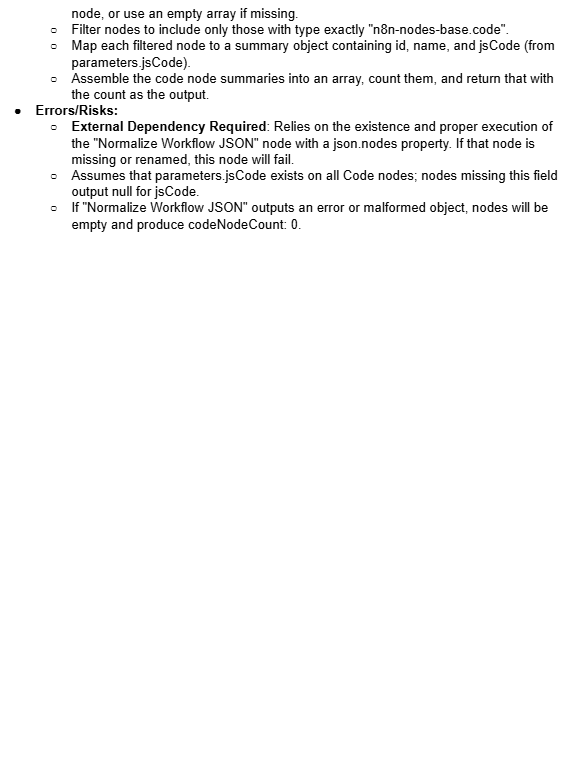"},"typeVersion":1},{"id":"45f2ec60-9bfa-4701-b933-79fdf6590511","name":"Sticky Note6","type":"n8n-nodes-base.stickyNote","position":[-816,-432],"parameters":{"color":4,"width":432,"height":576,"content":"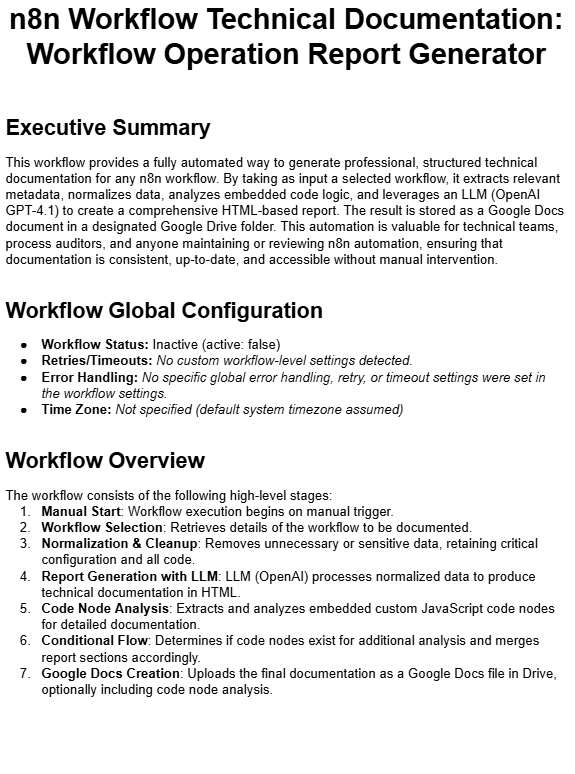"},"typeVersion":1},{"id":"92a8797d-e0e2-4e63-bedb-e07c4a3fc855","name":"Sticky Note7","type":"n8n-nodes-base.stickyNote","position":[80,-432],"parameters":{"color":4,"width":416,"height":576,"content":"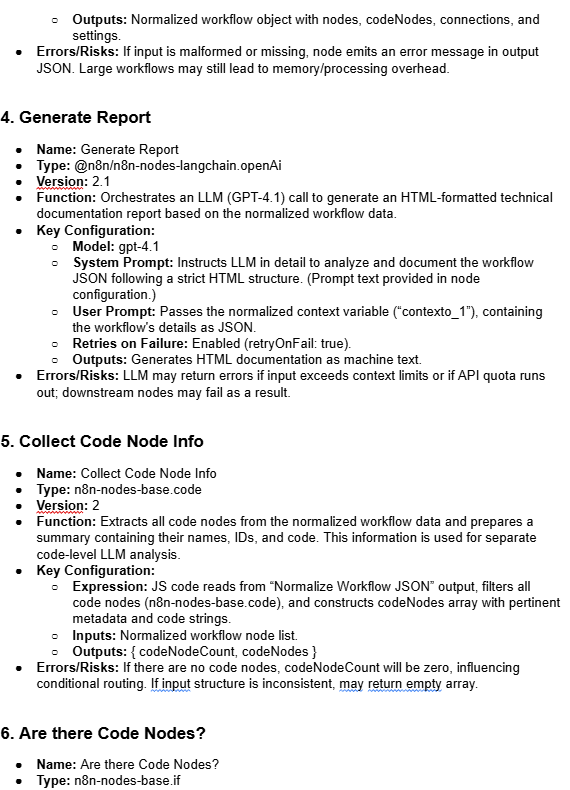"},"typeVersion":1},{"id":"d117c5df-fb89-49e3-aa6e-4bf3b21dc5e8","name":"Sticky Note8","type":"n8n-nodes-base.stickyNote","position":[-368,-432],"parameters":{"color":4,"width":432,"height":576,"content":"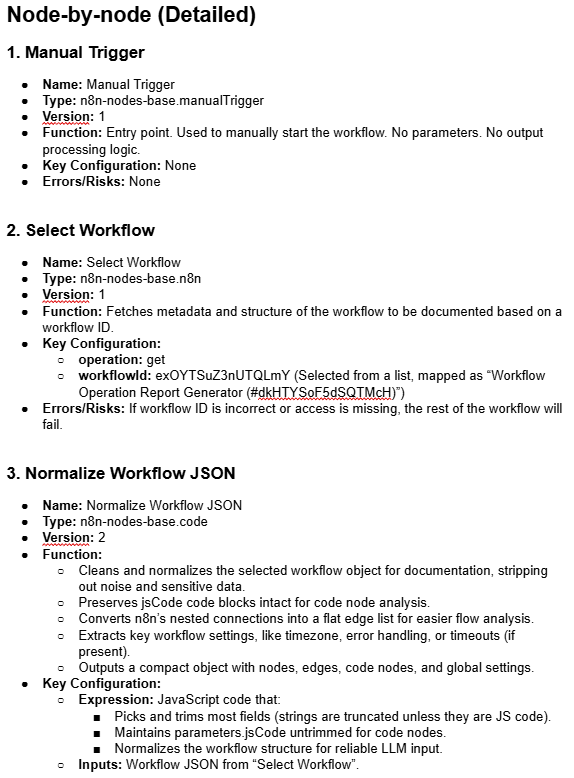"},"typeVersion":1},{"id":"d4199004-d219-4957-9218-5632e9da3da8","name":"Sticky Note9","type":"n8n-nodes-base.stickyNote","position":[512,-432],"parameters":{"color":4,"width":432,"height":576,"content":""},"typeVersion":1},{"id":"10d65d74-680c-4ebd-aa20-c29a493d8c40","name":"Sticky Note10","type":"n8n-nodes-base.stickyNote","position":[960,-432],"parameters":{"color":4,"width":432,"height":576,"content":""},"typeVersion":1},{"id":"763e8235-e2a4-402d-ae84-cf3a019ccc1e","name":"Sticky Note11","type":"n8n-nodes-base.stickyNote","position":[128,-544],"parameters":{"color":6,"width":320,"height":96,"content":"\n\n## FINAL REPORT EXAMPLE"},"typeVersion":1}],"active":false,"pinData":{},"settings":{"callerPolicy":"workflowsFromSameOwner","availableInMCP":false,"executionOrder":"v1"},"versionId":"31dbe834-f542-48e3-a4fe-00edbdade14f","connections":{"Manual Trigger":{"main":[[{"node":"Select Workflow","type":"main","index":0}]]},"Generate Report":{"main":[[{"node":"Collect Code Node Info","type":"main","index":0}]]},"Select Workflow":{"main":[[{"node":"Normalize Workflow JSON","type":"main","index":0}]]},"Analyze Code Nodes":{"main":[[{"node":"Merge Report and Code Node Analysis","type":"main","index":0}]]},"Are there Code Nodes?":{"main":[[{"node":"Analyze Code Nodes","type":"main","index":0}],[{"node":"Create Google Docs Document_1","type":"main","index":0}]]},"Collect Code Node Info":{"main":[[{"node":"Are there Code Nodes?","type":"main","index":0}]]},"Normalize Workflow JSON":{"main":[[{"node":"Generate Report","type":"main","index":0}]]},"Create Google Docs Document_1":{"main":[[]]},"Merge Report and Code Node Analysis":{"main":[[{"node":"Create Google Docs Document","type":"main","index":0}]]}}},"lastUpdatedBy":1,"workflowInfo":{"nodeCount":22,"nodeTypes":{"n8n-nodes-base.if":{"count":1},"n8n-nodes-base.n8n":{"count":1},"n8n-nodes-base.set":{"count":1},"n8n-nodes-base.code":{"count":2},"n8n-nodes-base.stickyNote":{"count":12},"n8n-nodes-base.httpRequest":{"count":2},"n8n-nodes-base.manualTrigger":{"count":1},"@n8n/n8n-nodes-langchain.openAi":{"count":2}}},"status":"published","readyToDemo":null,"user":{"name":"José Ramón Villaverde","username":"joseramonvillaverde","bio":"Consultant in Process Automation and Generative AI. I help individuals and companies become more efficient in their administrative and organizational tasks. ","verified":false,"links":["https://www.linkedin.com/in/ramonvillaverde/"],"avatar":"https://gravatar.com/avatar/cf29753b93a15537c4325d11c2a926c881d6c183d3cb05d6e8c9cd29ae2e147a?r=pg&d=retro&size=200"},"nodes":[{"id":19,"icon":"file:httprequest.svg","name":"n8n-nodes-base.httpRequest","codex":{"data":{"alias":["API","Request","URL","Build","cURL"],"resources":{"generic":[{"url":"https://n8n.io/blog/2021-the-year-to-automate-the-new-you-with-n8n/","icon":"☀️","label":"2021: The Year to Automate the New You with n8n"},{"url":"https://n8n.io/blog/why-business-process-automation-with-n8n-can-change-your-daily-life/","icon":"🧬","label":"Why business process automation with n8n can change your daily life"},{"url":"https://n8n.io/blog/automatically-pulling-and-visualizing-data-with-n8n/","icon":"📈","label":"Automatically pulling and visualizing data with n8n"},{"url":"https://n8n.io/blog/learn-how-to-automatically-cross-post-your-content-with-n8n/","icon":"✍️","label":"Learn how to automatically cross-post your content with n8n"},{"url":"https://n8n.io/blog/automatically-adding-expense-receipts-to-google-sheets-with-telegram-mindee-twilio-and-n8n/","icon":"🧾","label":"Automatically Adding Expense Receipts to Google Sheets with Telegram, Mindee, Twilio, and n8n"},{"url":"https://n8n.io/blog/running-n8n-on-ships-an-interview-with-maranics/","icon":"🛳","label":"Running n8n on ships: An interview with Maranics"},{"url":"https://n8n.io/blog/what-are-apis-how-to-use-them-with-no-code/","icon":" 🪢","label":"What are APIs and how to use them with no code"},{"url":"https://n8n.io/blog/5-tasks-you-can-automate-with-notion-api/","icon":"⚡️","label":"5 tasks you can automate with the new Notion API "},{"url":"https://n8n.io/blog/world-poetry-day-workflow/","icon":"📜","label":"Celebrating World Poetry Day with a daily poem in Telegram"},{"url":"https://n8n.io/blog/automate-google-apps-for-productivity/","icon":"💡","label":"15 Google apps you can combine and automate to increase productivity"},{"url":"https://n8n.io/blog/automate-designs-with-bannerbear-and-n8n/","icon":"🎨","label":"Automate Designs with Bannerbear and n8n"},{"url":"https://n8n.io/blog/how-uproc-scraped-a-multi-page-website-with-a-low-code-workflow/","icon":" 🕸️","label":"How uProc scraped a multi-page website with a low-code workflow"},{"url":"https://n8n.io/blog/building-an-expense-tracking-app-in-10-minutes/","icon":"📱","label":"Building an expense tracking app in 10 minutes"},{"url":"https://n8n.io/blog/5-workflow-automations-for-mattermost-that-we-love-at-n8n/","icon":"🤖","label":"5 workflow automations for Mattermost that we love at n8n"},{"url":"https://n8n.io/blog/how-to-use-the-http-request-node-the-swiss-army-knife-for-workflow-automation/","icon":"🧰","label":"How to use the HTTP Request Node - The Swiss Army Knife for Workflow Automation"},{"url":"https://n8n.io/blog/learn-how-to-use-webhooks-with-mattermost-slash-commands/","icon":"🦄","label":"Learn how to use webhooks with Mattermost slash commands"},{"url":"https://n8n.io/blog/how-a-membership-development-manager-automates-his-work-and-investments/","icon":"📈","label":"How a Membership Development Manager automates his work and investments"},{"url":"https://n8n.io/blog/a-low-code-bitcoin-ticker-built-with-questdb-and-n8n-io/","icon":"📈","label":"A low-code bitcoin ticker built with QuestDB and n8n.io"},{"url":"https://n8n.io/blog/how-to-set-up-a-ci-cd-pipeline-with-no-code/","icon":"🎡","label":"How to set up a no-code CI/CD pipeline with GitHub and TravisCI"},{"url":"https://n8n.io/blog/automations-for-activists/","icon":"✨","label":"How Common Knowledge use workflow automation for activism"},{"url":"https://n8n.io/blog/creating-scheduled-text-affirmations-with-n8n/","icon":"🤟","label":"Creating scheduled text affirmations with n8n"},{"url":"https://n8n.io/blog/how-goomer-automated-their-operations-with-over-200-n8n-workflows/","icon":"🛵","label":"How Goomer automated their operations with over 200 n8n workflows"},{"url":"https://n8n.io/blog/aws-workflow-automation/","label":"7 no-code workflow automations for Amazon Web Services"}],"primaryDocumentation":[{"url":"https://docs.n8n.io/integrations/builtin/core-nodes/n8n-nodes-base.httprequest/"}]},"categories":["Development","Core Nodes"],"nodeVersion":"1.0","codexVersion":"1.0","subcategories":{"Core Nodes":["Helpers"]}}},"group":"[\"output\"]","defaults":{"name":"HTTP Request","color":"#0004F5"},"iconData":{"type":"file","fileBuffer":"data:image/svg+xml;base64,PHN2ZyB3aWR0aD0iNDAiIGhlaWdodD0iNDAiIHZpZXdCb3g9IjAgMCA0MCA0MCIgZmlsbD0ibm9uZSIgeG1sbnM9Imh0dHA6Ly93d3cudzMub3JnLzIwMDAvc3ZnIj4KPHBhdGggZmlsbC1ydWxlPSJldmVub2RkIiBjbGlwLXJ1bGU9ImV2ZW5vZGQiIGQ9Ik00MCAyMEM0MCA4Ljk1MzE0IDMxLjA0NjkgMCAyMCAwQzguOTUzMTQgMCAwIDguOTUzMTQgMCAyMEMwIDMxLjA0NjkgOC45NTMxNCA0MCAyMCA0MEMzMS4wNDY5IDQwIDQwIDMxLjA0NjkgNDAgMjBaTTIwIDM2Ljk0NThDMTguODg1MiAzNi45NDU4IDE3LjEzNzggMzUuOTY3IDE1LjQ5OTggMzIuNjk4NUMxNC43OTY0IDMxLjI5MTggMTQuMTk2MSAyOS41NDMxIDEzLjc1MjYgMjcuNjg0N0gyNi4xODk4QzI1LjgwNDUgMjkuNTQwMyAyNS4yMDQ0IDMxLjI5MDEgMjQuNTAwMiAzMi42OTg1QzIyLjg2MjIgMzUuOTY3IDIxLjExNDggMzYuOTQ1OCAyMCAzNi45NDU4Wk0xMi45MDY0IDIwQzEyLjkwNjQgMjEuNjA5NyAxMy4wMDg3IDIzLjE2NCAxMy4yMDAzIDI0LjYzMDVIMjYuNzk5N0MyNi45OTEzIDIzLjE2NCAyNy4wOTM2IDIxLjYwOTcgMjcuMDkzNiAyMEMyNy4wOTM2IDE4LjM5MDMgMjYuOTkxMyAxNi44MzYgMjYuNzk5NyAxNS4zNjk1SDEzLjIwMDNDMTMuMDA4NyAxNi44MzYgMTIuOTA2NCAxOC4zOTAzIDEyLjkwNjQgMjBaTTIwIDMuMDU0MTlDMjEuMTE0OSAzLjA1NDE5IDIyLjg2MjIgNC4wMzA3OCAyNC41MDAxIDcuMzAwMzlDMjUuMjA2NiA4LjcxNDA4IDI1LjgwNzIgMTAuNDA2NyAyNi4xOTIgMTIuMzE1M0gxMy43NTAxQzE0LjE5MzMgMTAuNDA0NyAxNC43OTQyIDguNzEyNTQgMTUuNDk5OCA3LjMwMDY0QzE3LjEzNzcgNC4wMzA4MyAxOC44ODUxIDMuMDU0MTkgMjAgMy4wNTQxOVpNMzAuMTQ3OCAyMEMzMC4xNDc4IDE4LjQwOTkgMzAuMDU0MyAxNi44NjE3IDI5LjgyMjcgMTUuMzY5NUgzNi4zMDQyQzM2LjcyNTIgMTYuODQyIDM2Ljk0NTggMTguMzk2NCAzNi45NDU4IDIwQzM2Ljk0NTggMjEuNjAzNiAzNi43MjUyIDIzLjE1OCAzNi4zMDQyIDI0LjYzMDVIMjkuODIyN0MzMC4wNTQzIDIzLjEzODMgMzAuMTQ3OCAyMS41OTAxIDMwLjE0NzggMjBaTTI2LjI3NjcgNC4yNTUxMkMyNy42MzY1IDYuMzYwMTkgMjguNzExIDkuMTMyIDI5LjM3NzQgMTIuMzE1M0gzNS4xMDQ2QzMzLjI1MTEgOC42NjggMzAuMTA3IDUuNzgzNDYgMjYuMjc2NyA0LjI1NTEyWk0xMC42MjI2IDEyLjMxNTNINC44OTI5M0M2Ljc1MTQ3IDguNjY3ODQgOS44OTM1MSA1Ljc4MzQxIDEzLjcyMzIgNC4yNTUxM0MxMi4zNjM1IDYuMzYwMjEgMTEuMjg5IDkuMTMyMDEgMTAuNjIyNiAxMi4zMTUzWk0zLjA1NDE5IDIwQzMuMDU0MTkgMjEuNjAzIDMuMjc3NDMgMjMuMTU3NSAzLjY5NDg0IDI0LjYzMDVIMTAuMTIxN0M5Ljk0NjE5IDIzLjE0MiA5Ljg1MjIyIDIxLjU5NDMgOS44NTIyMiAyMEM5Ljg1MjIyIDE4LjQwNTcgOS45NDYxOSAxNi44NTggMTAuMTIxNyAxNS4zNjk1SDMuNjk0ODRDMy4yNzc0MyAxNi44NDI1IDMuMDU0MTkgMTguMzk3IDMuMDU0MTkgMjBaTTI2LjI3NjYgMzUuNzQyN0MyNy42MzY1IDMzLjYzOTMgMjguNzExIDMwLjg2OCAyOS4zNzc0IDI3LjY4NDdIMzUuMTA0NkMzMy4yNTEgMzEuMzMyMiAzMC4xMDY4IDM0LjIxNzkgMjYuMjc2NiAzNS43NDI3Wk0xMy43MjM0IDM1Ljc0MjdDOS44OTM2OSAzNC4yMTc5IDYuNzUxNTUgMzEuMzMyNCA0Ljg5MjkzIDI3LjY4NDdIMTAuNjIyNkMxMS4yODkgMzAuODY4IDEyLjM2MzUgMzMuNjM5MyAxMy43MjM0IDM1Ljc0MjdaIiBmaWxsPSIjM0E0MkU5Ii8+Cjwvc3ZnPgo="},"displayName":"HTTP Request","typeVersion":4,"nodeCategories":[{"id":5,"name":"Development"},{"id":9,"name":"Core Nodes"}]},{"id":20,"icon":"fa:map-signs","name":"n8n-nodes-base.if","codex":{"data":{"alias":["Router","Filter","Condition","Logic","Boolean","Branch"],"details":"The IF node can be used to implement binary conditional logic in your workflow. You can set up one-to-many conditions to evaluate each item of data being inputted into the node. That data will either evaluate to TRUE or FALSE and route out of the node accordingly.\n\nThis node has multiple types of conditions: Bool, String, Number, and Date & Time.","resources":{"generic":[{"url":"https://n8n.io/blog/learn-to-automate-your-factorys-incident-reporting-a-step-by-step-guide/","icon":"🏭","label":"Learn to Automate Your Factory's Incident Reporting: A Step by Step Guide"},{"url":"https://n8n.io/blog/2021-the-year-to-automate-the-new-you-with-n8n/","icon":"☀️","label":"2021: The Year to Automate the New You with n8n"},{"url":"https://n8n.io/blog/why-business-process-automation-with-n8n-can-change-your-daily-life/","icon":"🧬","label":"Why business process automation with n8n can change your daily life"},{"url":"https://n8n.io/blog/create-a-toxic-language-detector-for-telegram/","icon":"🤬","label":"Create a toxic language detector for Telegram in 4 step"},{"url":"https://n8n.io/blog/no-code-ecommerce-workflow-automations/","icon":"store","label":"6 e-commerce workflows to power up your Shopify s"},{"url":"https://n8n.io/blog/how-to-build-a-low-code-self-hosted-url-shortener/","icon":"🔗","label":"How to build a low-code, self-hosted URL shortener in 3 steps"},{"url":"https://n8n.io/blog/automate-your-data-processing-pipeline-in-9-steps-with-n8n/","icon":"⚙️","label":"Automate your data processing pipeline in 9 steps"},{"url":"https://n8n.io/blog/how-to-get-started-with-crm-automation-and-no-code-workflow-ideas/","icon":"👥","label":"How to get started with CRM automation (with 3 no-code workflow ideas"},{"url":"https://n8n.io/blog/5-tasks-you-can-automate-with-notion-api/","icon":"⚡️","label":"5 tasks you can automate with the new Notion API "},{"url":"https://n8n.io/blog/automate-google-apps-for-productivity/","icon":"💡","label":"15 Google apps you can combine and automate to increase productivity"},{"url":"https://n8n.io/blog/automation-for-maintainers-of-open-source-projects/","icon":"🏷️","label":"How to automatically manage contributions to open-source projects"},{"url":"https://n8n.io/blog/how-uproc-scraped-a-multi-page-website-with-a-low-code-workflow/","icon":" 🕸️","label":"How uProc scraped a multi-page website with a low-code workflow"},{"url":"https://n8n.io/blog/5-workflow-automations-for-mattermost-that-we-love-at-n8n/","icon":"🤖","label":"5 workflow automations for Mattermost that we love at n8n"},{"url":"https://n8n.io/blog/why-this-product-manager-loves-workflow-automation-with-n8n/","icon":"🧠","label":"Why this Product Manager loves workflow automation with n8n"},{"url":"https://n8n.io/blog/sending-automated-congratulations-with-google-sheets-twilio-and-n8n/","icon":"🙌","label":"Sending Automated Congratulations with Google Sheets, Twilio, and n8n "},{"url":"https://n8n.io/blog/how-to-set-up-a-ci-cd-pipeline-with-no-code/","icon":"🎡","label":"How to set up a no-code CI/CD pipeline with GitHub and TravisCI"},{"url":"https://n8n.io/blog/benefits-of-automation-and-n8n-an-interview-with-hubspots-hugh-durkin/","icon":"🎖","label":"Benefits of automation and n8n: An interview with HubSpot's Hugh Durkin"},{"url":"https://n8n.io/blog/aws-workflow-automation/","label":"7 no-code workflow automations for Amazon Web Services"}],"primaryDocumentation":[{"url":"https://docs.n8n.io/integrations/builtin/core-nodes/n8n-nodes-base.if/"}]},"categories":["Core Nodes"],"nodeVersion":"1.0","codexVersion":"1.0","subcategories":{"Core Nodes":["Flow"]}}},"group":"[\"transform\"]","defaults":{"name":"If","color":"#408000"},"iconData":{"icon":"map-signs","type":"icon"},"displayName":"If","typeVersion":2,"nodeCategories":[{"id":9,"name":"Core Nodes"}]},{"id":38,"icon":"fa:pen","name":"n8n-nodes-base.set","codex":{"data":{"alias":["Set","JS","JSON","Filter","Transform","Map"],"resources":{"generic":[{"url":"https://n8n.io/blog/learn-to-automate-your-factorys-incident-reporting-a-step-by-step-guide/","icon":"🏭","label":"Learn to Automate Your Factory's Incident Reporting: A Step by Step Guide"},{"url":"https://n8n.io/blog/2021-the-year-to-automate-the-new-you-with-n8n/","icon":"☀️","label":"2021: The Year to Automate the New You with n8n"},{"url":"https://n8n.io/blog/automatically-pulling-and-visualizing-data-with-n8n/","icon":"📈","label":"Automatically pulling and visualizing data with n8n"},{"url":"https://n8n.io/blog/database-monitoring-and-alerting-with-n8n/","icon":"📡","label":"Database Monitoring and Alerting with n8n"},{"url":"https://n8n.io/blog/automatically-adding-expense-receipts-to-google-sheets-with-telegram-mindee-twilio-and-n8n/","icon":"🧾","label":"Automatically Adding Expense Receipts to Google Sheets with Telegram, Mindee, Twilio, and n8n"},{"url":"https://n8n.io/blog/no-code-ecommerce-workflow-automations/","icon":"store","label":"6 e-commerce workflows to power up your Shopify s"},{"url":"https://n8n.io/blog/how-to-build-a-low-code-self-hosted-url-shortener/","icon":"🔗","label":"How to build a low-code, self-hosted URL shortener in 3 steps"},{"url":"https://n8n.io/blog/automate-your-data-processing-pipeline-in-9-steps-with-n8n/","icon":"⚙️","label":"Automate your data processing pipeline in 9 steps"},{"url":"https://n8n.io/blog/how-to-get-started-with-crm-automation-and-no-code-workflow-ideas/","icon":"👥","label":"How to get started with CRM automation (with 3 no-code workflow ideas"},{"url":"https://n8n.io/blog/5-tasks-you-can-automate-with-notion-api/","icon":"⚡️","label":"5 tasks you can automate with the new Notion API "},{"url":"https://n8n.io/blog/automate-google-apps-for-productivity/","icon":"💡","label":"15 Google apps you can combine and automate to increase productivity"},{"url":"https://n8n.io/blog/how-uproc-scraped-a-multi-page-website-with-a-low-code-workflow/","icon":" 🕸️","label":"How uProc scraped a multi-page website with a low-code workflow"},{"url":"https://n8n.io/blog/building-an-expense-tracking-app-in-10-minutes/","icon":"📱","label":"Building an expense tracking app in 10 minutes"},{"url":"https://n8n.io/blog/the-ultimate-guide-to-automate-your-video-collaboration-with-whereby-mattermost-and-n8n/","icon":"📹","label":"The ultimate guide to automate your video collaboration with Whereby, Mattermost, and n8n"},{"url":"https://n8n.io/blog/5-workflow-automations-for-mattermost-that-we-love-at-n8n/","icon":"🤖","label":"5 workflow automations for Mattermost that we love at n8n"},{"url":"https://n8n.io/blog/learn-to-build-powerful-api-endpoints-using-webhooks/","icon":"🧰","label":"Learn to Build Powerful API Endpoints Using Webhooks"},{"url":"https://n8n.io/blog/how-a-membership-development-manager-automates-his-work-and-investments/","icon":"📈","label":"How a Membership Development Manager automates his work and investments"},{"url":"https://n8n.io/blog/a-low-code-bitcoin-ticker-built-with-questdb-and-n8n-io/","icon":"📈","label":"A low-code bitcoin ticker built with QuestDB and n8n.io"},{"url":"https://n8n.io/blog/how-to-set-up-a-ci-cd-pipeline-with-no-code/","icon":"🎡","label":"How to set up a no-code CI/CD pipeline with GitHub and TravisCI"},{"url":"https://n8n.io/blog/benefits-of-automation-and-n8n-an-interview-with-hubspots-hugh-durkin/","icon":"🎖","label":"Benefits of automation and n8n: An interview with HubSpot's Hugh Durkin"},{"url":"https://n8n.io/blog/how-goomer-automated-their-operations-with-over-200-n8n-workflows/","icon":"🛵","label":"How Goomer automated their operations with over 200 n8n workflows"},{"url":"https://n8n.io/blog/aws-workflow-automation/","label":"7 no-code workflow automations for Amazon Web Services"}],"primaryDocumentation":[{"url":"https://docs.n8n.io/integrations/builtin/core-nodes/n8n-nodes-base.set/"}]},"categories":["Core Nodes"],"nodeVersion":"1.0","codexVersion":"1.0","subcategories":{"Core Nodes":["Data Transformation"]}}},"group":"[\"input\"]","defaults":{"name":"Edit Fields"},"iconData":{"icon":"pen","type":"icon"},"displayName":"Edit Fields (Set)","typeVersion":3,"nodeCategories":[{"id":9,"name":"Core Nodes"}]},{"id":565,"icon":"fa:sticky-note","name":"n8n-nodes-base.stickyNote","codex":{"data":{"alias":["Comments","Notes","Sticky"],"categories":["Core Nodes"],"nodeVersion":"1.0","codexVersion":"1.0","subcategories":{"Core Nodes":["Helpers"]}}},"group":"[\"input\"]","defaults":{"name":"Sticky Note","color":"#FFD233"},"iconData":{"icon":"sticky-note","type":"icon"},"displayName":"Sticky Note","typeVersion":1,"nodeCategories":[{"id":9,"name":"Core Nodes"}]},{"id":826,"icon":"file:n8n.svg","name":"n8n-nodes-base.n8n","codex":{"data":{"alias":["Workflow","Execution"],"resources":{"primaryDocumentation":[{"url":"https://docs.n8n.io/integrations/builtin/core-nodes/n8n-nodes-base.n8n/"}],"credentialDocumentation":[{"url":"https://docs.n8n.io/api/authentication/"}]},"categories":["Development","Core Nodes"],"nodeVersion":"1.0","codexVersion":"1.0","subcategories":{"Core Nodes":["Helpers","Other Trigger Nodes"]}}},"group":"[\"transform\"]","defaults":{"name":"n8n"},"iconData":{"type":"file","fileBuffer":"data:image/svg+xml;base64,PHN2ZyB4bWxucz0iaHR0cDovL3d3dy53My5vcmcvMjAwMC9zdmciIGZpbGw9Im5vbmUiIHZpZXdCb3g9IjAgMCAyMzAgMTIwIj48cGF0aCBmaWxsPSIjRUE0QjcxIiBmaWxsLXJ1bGU9ImV2ZW5vZGQiIGQ9Ik0yMDQgNDhjLTExLjE4MyAwLTIwLjU4LTcuNjQ5LTIzLjI0NC0xOGgtMjcuNTA4YTEyIDEyIDAgMCAwLTExLjgzNiAxMC4wMjdsLS45ODcgNS45MTlBMjMuOTQgMjMuOTQgMCAwIDEgMTMyLjYyNiA2MGEyMy45NCAyMy45NCAwIDAgMSA3Ljc5OSAxNC4wNTRsLjk4NyA1LjkxOUExMiAxMiAwIDAgMCAxNTMuMjQ4IDkwaDMuNTA4QzE1OS40MiA3OS42NDkgMTY4LjgxNyA3MiAxODAgNzJjMTMuMjU1IDAgMjQgMTAuNzQ1IDI0IDI0cy0xMC43NDUgMjQtMjQgMjRjLTExLjE4MyAwLTIwLjU4LTcuNjQ5LTIzLjI0NC0xOGgtMy41MDhjLTExLjczMiAwLTIxLjc0NC04LjQ4Mi0yMy42NzMtMjAuMDU0bC0uOTg3LTUuOTE5QTEyIDEyIDAgMCAwIDExNi43NTIgNjZoLTkuNTA4QzEwNC41OCA3Ni4zNTEgOTUuMTgzIDg0IDg0IDg0cy0yMC41OC03LjY0OS0yMy4yNDQtMThINDcuMjQ0QzQ0LjU4IDc2LjM1MSAzNS4xODMgODQgMjQgODQgMTAuNzQ1IDg0IDAgNzMuMjU1IDAgNjBzMTAuNzQ1LTI0IDI0LTI0YzExLjE4MyAwIDIwLjU4IDcuNjQ5IDIzLjI0NCAxOGgxMy41MTJDNjMuNDIgNDMuNjQ5IDcyLjgxNyAzNiA4NCAzNnMyMC41OCA3LjY0OSAyMy4yNDQgMThoOS41MDhhMTIgMTIgMCAwIDAgMTEuODM2LTEwLjAyN2wuOTg3LTUuOTE5QzEzMS41MDQgMjYuNDgyIDE0MS41MTYgMTggMTUzLjI0OCAxOGgyNy41MDhDMTgzLjQyIDcuNjQ5IDE5Mi44MTcgMCAyMDQgMGMxMy4yNTUgMCAyNCAxMC43NDUgMjQgMjRzLTEwLjc0NSAyNC0yNCAyNG0wLTEyYzYuNjI3IDAgMTItNS4zNzMgMTItMTJzLTUuMzczLTEyLTEyLTEyLTEyIDUuMzczLTEyIDEyIDUuMzczIDEyIDEyIDEyTTI0IDcyYzYuNjI3IDAgMTItNS4zNzMgMTItMTJzLTUuMzczLTEyLTEyLTEyLTEyIDUuMzczLTEyIDEyIDUuMzczIDEyIDEyIDEybTcyLTEyYzAgNi42MjctNS4zNzMgMTItMTIgMTJzLTEyLTUuMzczLTEyLTEyIDUuMzczLTEyIDEyLTEyIDEyIDUuMzczIDEyIDEybTk2IDM2YzAgNi42MjctNS4zNzMgMTItMTIgMTJzLTEyLTUuMzczLTEyLTEyIDUuMzczLTEyIDEyLTEyIDEyIDUuMzczIDEyIDEyIiBjbGlwLXJ1bGU9ImV2ZW5vZGQiLz48L3N2Zz4="},"displayName":"n8n","typeVersion":1,"nodeCategories":[{"id":5,"name":"Development"},{"id":9,"name":"Core Nodes"}]},{"id":834,"icon":"file:code.svg","name":"n8n-nodes-base.code","codex":{"data":{"alias":["cpde","Javascript","JS","Python","Script","Custom Code","Function"],"details":"The Code node allows you to execute JavaScript in your workflow.","resources":{"primaryDocumentation":[{"url":"https://docs.n8n.io/integrations/builtin/core-nodes/n8n-nodes-base.code/"}]},"categories":["Development","Core Nodes"],"nodeVersion":"1.0","codexVersion":"1.0","subcategories":{"Core Nodes":["Helpers","Data Transformation"]}}},"group":"[\"transform\"]","defaults":{"name":"Code"},"iconData":{"type":"file","fileBuffer":"data:image/svg+xml;base64,PHN2ZyB3aWR0aD0iNTEyIiBoZWlnaHQ9IjUxMiIgdmlld0JveD0iMCAwIDUxMiA1MTIiIGZpbGw9Im5vbmUiIHhtbG5zPSJodHRwOi8vd3d3LnczLm9yZy8yMDAwL3N2ZyI+CjxnIGNsaXAtcGF0aD0idXJsKCNjbGlwMF8xMTcxXzQ0MSkiPgo8cGF0aCBkPSJNMTcwLjI4MyA0OEgxOTYuNUMyMDMuMTI3IDQ4IDIwOC41IDQyLjYyNzQgMjA4LjUgMzZWMTJDMjA4LjUgNS4zNzI1OCAyMDMuMTI3IDAgMTk2LjUgMEgxNzAuMjgzQzEyNi4xIDAgOTAuMjgzIDM1LjgxNzIgOTAuMjgzIDgwVjE3NkM5MC4yODMgMjA2LjkyOCA2NS4yMTA5IDIzMiAzNC4yODMgMjMySDIzQzE2LjM3MjYgMjMyIDExIDIzNy4zNzIgMTEgMjQ0VjI2OEMxMSAyNzQuNjI3IDE2LjM3MjQgMjgwIDIyLjk5OTYgMjgwTDM0LjI4MyAyODBDNjUuMjEwOSAyODAgOTAuMjgzIDMwNS4wNzIgOTAuMjgzIDMzNlY0NDBDOTAuMjgzIDQ3OS43NjQgMTIyLjUxOCA1MTIgMTYyLjI4MyA1MTJIMTk2LjVDMjAzLjEyNyA1MTIgMjA4LjUgNTA2LjYyNyAyMDguNSA1MDBWNDc2QzIwOC41IDQ2OS4zNzMgMjAzLjEyNyA0NjQgMTk2LjUgNDY0SDE2Mi4yODNDMTQ5LjAyOCA0NjQgMTM4LjI4MyA0NTMuMjU1IDEzOC4yODMgNDQwVjMzNkMxMzguMjgzIDMwOS4wMjIgMTI4LjAxMSAyODQuNDQzIDExMS4xNjQgMjY1Ljk2MUMxMDYuMTA5IDI2MC40MTYgMTA2LjEwOSAyNTEuNTg0IDExMS4xNjQgMjQ2LjAzOUMxMjguMDExIDIyNy41NTcgMTM4LjI4MyAyMDIuOTc4IDEzOC4yODMgMTc2VjgwQzEzOC4yODMgNjIuMzI2OSAxNTIuNjEgNDggMTcwLjI4MyA0OFoiIGZpbGw9IiNGRjk5MjIiLz4KPHBhdGggZD0iTTMwNSAzNkMzMDUgNDIuNjI3NCAzMTAuMzczIDQ4IDMxNyA0OEgzNDIuOTc5QzM2MC42NTIgNDggMzc0Ljk3OCA2Mi4zMjY5IDM3NC45NzggODBWMTc2QzM3NC45NzggMjAyLjk3OCAzODUuMjUxIDIyNy41NTcgNDAyLjA5OCAyNDYuMDM5QzQwNy4xNTMgMjUxLjU4NCA0MDcuMTUzIDI2MC40MTYgNDAyLjA5OCAyNjUuOTYxQzM4NS4yNTEgMjg0LjQ0MyAzNzQuOTc4IDMwOS4wMjIgMzc0Ljk3OCAzMzZWNDMyQzM3NC45NzggNDQ5LjY3MyAzNjAuNjUyIDQ2NCAzNDIuOTc5IDQ2NEgzMTdDMzEwLjM3MyA0NjQgMzA1IDQ2OS4zNzMgMzA1IDQ3NlY1MDBDMzA1IDUwNi42MjcgMzEwLjM3MyA1MTIgMzE3IDUxMkgzNDIuOTc5QzM4Ny4xNjEgNTEyIDQyMi45NzggNDc2LjE4MyA0MjIuOTc4IDQzMlYzMzZDNDIyLjk3OCAzMDUuMDcyIDQ0OC4wNTEgMjgwIDQ3OC45NzkgMjgwSDQ5MEM0OTYuNjI3IDI4MCA1MDIgMjc0LjYyOCA1MDIgMjY4VjI0NEM1MDIgMjM3LjM3MyA0OTYuNjI4IDIzMiA0OTAgMjMyTDQ3OC45NzkgMjMyQzQ0OC4wNTEgMjMyIDQyMi45NzggMjA2LjkyOCA0MjIuOTc4IDE3NlY4MEM0MjIuOTc4IDM1LjgxNzIgMzg3LjE2MSAwIDM0Mi45NzkgMEgzMTdDMzEwLjM3MyAwIDMwNSA1LjM3MjU4IDMwNSAxMlYzNloiIGZpbGw9IiNGRjk5MjIiLz4KPC9nPgo8ZGVmcz4KPGNsaXBQYXRoIGlkPSJjbGlwMF8xMTcxXzQ0MSI+CjxyZWN0IHdpZHRoPSI1MTIiIGhlaWdodD0iNTEyIiBmaWxsPSJ3aGl0ZSIvPgo8L2NsaXBQYXRoPgo8L2RlZnM+Cjwvc3ZnPgo="},"displayName":"Code","typeVersion":2,"nodeCategories":[{"id":5,"name":"Development"},{"id":9,"name":"Core Nodes"}]},{"id":838,"icon":"fa:mouse-pointer","name":"n8n-nodes-base.manualTrigger","codex":{"data":{"resources":{"generic":[],"primaryDocumentation":[{"url":"https://docs.n8n.io/integrations/builtin/core-nodes/n8n-nodes-base.manualworkflowtrigger/"}]},"categories":["Core Nodes"],"nodeVersion":"1.0","codexVersion":"1.0"}},"group":"[\"trigger\"]","defaults":{"name":"When clicking ‘Execute workflow’","color":"#909298"},"iconData":{"icon":"mouse-pointer","type":"icon"},"displayName":"Manual Trigger","typeVersion":1,"nodeCategories":[{"id":9,"name":"Core Nodes"}]},{"id":1250,"icon":"file:openAi.svg","name":"@n8n/n8n-nodes-langchain.openAi","codex":{"data":{"alias":["LangChain","ChatGPT","Sora","DallE","whisper","audio","transcribe","tts","assistant"],"resources":{"primaryDocumentation":[{"url":"https://docs.n8n.io/integrations/builtin/app-nodes/n8n-nodes-langchain.openai/"}]},"categories":["AI","Langchain"],"subcategories":{"AI":["Agents","Miscellaneous","Root Nodes"]}}},"group":"[\"transform\"]","defaults":{"name":"OpenAI"},"iconData":{"type":"file","fileBuffer":"data:image/svg+xml;base64,PHN2ZyB3aWR0aD0iNDAiIGhlaWdodD0iNDAiIHZpZXdCb3g9IjAgMCA0MCA0MCIgZmlsbD0ibm9uZSIgeG1sbnM9Imh0dHA6Ly93d3cudzMub3JnLzIwMDAvc3ZnIj4KPHBhdGggZD0iTTM2Ljg2NzEgMTYuMzcxOEMzNy43NzQ2IDEzLjY0OCAzNy40NjIxIDEwLjY2NDIgMzYuMDEwOCA4LjE4NjYxQzMzLjgyODIgNC4zODY1MyAyOS40NDA3IDIuNDMxNDkgMjUuMTU1NiAzLjM1MTUxQzIzLjI0OTMgMS4yMDM5NiAyMC41MTA1IC0wLjAxNzMxNDggMTcuNjM5MiAwLjAwMDE4NTUzM0MxMy4yNTkxIC0wLjAwOTgxNDY4IDkuMzcyNzMgMi44MTAyNSA4LjAyNTIgNi45Nzc4M0M1LjIxMTM5IDcuNTU0MSAyLjc4MjU4IDkuMzE1MzggMS4zNjEzIDExLjgxMTdDLTAuODM3NDkzIDE1LjYwMTggLTAuMzM2MjMyIDIwLjM3OTQgMi42MDEzMyAyMy42Mjk0QzEuNjkzODEgMjYuMzUzMiAyLjAwNjMyIDI5LjMzNzEgMy40NTc2IDMxLjgxNDZDNS42NDAxNSAzNS42MTQ3IDEwLjAyNzcgMzcuNTY5NyAxNC4zMTI4IDM2LjY0OTdDMTYuMjE3OSAzOC43OTczIDE4Ljk1NzkgNDAuMDE4NSAyMS44MjkyIDM5Ljk5OThDMjYuMjExOCA0MC4wMTEgMzAuMDk5NCAzNy4xODg1IDMxLjQ0NjkgMzMuMDE3MUMzNC4yNjA4IDMyLjQ0MDkgMzYuNjg5NiAzMC42Nzk2IDM4LjExMDggMjguMTgzM0M0MC4zMDcxIDI0LjM5MzIgMzkuODA0NiAxOS42MTk0IDM2Ljg2ODMgMTYuMzY5M0wzNi44NjcxIDE2LjM3MThaTTIxLjgzMTcgMzcuMzg2QzIwLjA3OCAzNy4zODg1IDE4LjM3OTIgMzYuNzc0NyAxNy4wMzI5IDM1LjY1MDlDMTcuMDk0MSAzNS42MTg1IDE3LjIwMDQgMzUuNTU5NyAxNy4yNjkxIDM1LjUxNzJMMjUuMjM0MyAzMC45MTcxQzI1LjY0MTggMzAuNjg1OCAyNS44OTE4IDMwLjI1MjEgMjUuODg5MyAyOS43ODMzVjE4LjU1NDNMMjkuMjU1NiAyMC40OTgxQzI5LjI5MTkgMjAuNTE1NiAyOS4zMTU3IDIwLjU1MDYgMjkuMzIwNyAyMC41OTA2VjI5Ljg4OTZDMjkuMzE1NyAzNC4wMjQ3IDI1Ljk2NjggMzcuMzc3MiAyMS44MzE3IDM3LjM4NlpNNS43MjY0IDMwLjUwNzFDNC44NDc2MyAyOC45ODk2IDQuNTMxMzcgMjcuMjEwOCA0LjgzMjYzIDI1LjQ4NDVDNC44OTEzOCAyNS41MTk1IDQuOTk1MTMgMjUuNTgzMiA1LjA2ODg4IDI1LjYyNTdMMTMuMDM0MSAzMC4yMjU4QzEzLjQzNzggMzAuNDYyMSAxMy45Mzc4IDMwLjQ2MjEgMTQuMzQyOCAzMC4yMjU4TDI0LjA2NjggMjQuNjEwN1YyOC40OTgzQzI0LjA2OTMgMjguNTM4MyAyNC4wNTA1IDI4LjU3NyAyNC4wMTkzIDI4LjYwMkwxNS45Njc5IDMzLjI1MDlDMTIuMzgxNSAzNS4zMTU5IDcuODAxNDQgMzQuMDg4NCA1LjcyNzY1IDMwLjUwNzFINS43MjY0Wk0zLjYzMDEgMTMuMTIwNUM0LjUwNTEyIDExLjYwMDQgNS44ODY0IDEwLjQzNzkgNy41MzE0NCA5LjgzNDE1QzcuNTMxNDQgOS45MDI5IDcuNTI3NjkgMTAuMDI0MSA3LjUyNzY5IDEwLjEwOTJWMTkuMzEwNkM3LjUyNTE5IDE5Ljc3ODEgNy43NzUxOSAyMC4yMTE5IDguMTgxNDUgMjAuNDQzMUwxNy45MDU0IDI2LjA1N0wxNC41MzkxIDI4LjAwMDhDMTQuNTA1MyAyOC4wMjMzIDE0LjQ2MjggMjguMDI3IDE0LjQyNTMgMjguMDEwOEw2LjM3MjY2IDIzLjM1ODJDMi43OTM4MyAyMS4yODU2IDEuNTY2MzEgMTYuNzA2OCAzLjYyODg1IDEzLjEyMTdMMy42MzAxIDEzLjEyMDVaTTMxLjI4ODIgMTkuNTU2OUwyMS41NjQyIDEzLjk0MTdMMjQuOTMwNiAxMS45OTkyQzI0Ljk2NDMgMTEuOTc2NyAyNS4wMDY4IDExLjk3MjkgMjUuMDQ0MyAxMS45ODkyTDMzLjA5NyAxNi42MzhDMzYuNjgyMSAxOC43MDkzIDM3LjkxMDggMjMuMjk1NyAzNS44Mzk1IDI2Ljg4MDhDMzQuOTYzMyAyOC4zOTgzIDMzLjU4MzIgMjkuNTYwOCAzMS45Mzk1IDMwLjE2NThWMjAuNjg5NEMzMS45NDMyIDIwLjIyMTkgMzEuNjk0NSAxOS43ODk0IDMxLjI4OTQgMTkuNTU2OUgzMS4yODgyWk0zNC42MzgzIDE0LjUxNDJDMzQuNTc5NSAxNC40NzggMzQuNDc1OCAxNC40MTU1IDM0LjQwMiAxNC4zNzNMMjYuNDM2OCA5Ljc3Mjg5QzI2LjAzMzEgOS41MzY2NCAyNS41MzMxIDkuNTM2NjQgMjUuMTI4MSA5Ljc3Mjg5TDE1LjQwNDEgMTUuMzg4VjExLjUwMDRDMTUuNDAxNiAxMS40NjA0IDE1LjQyMDQgMTEuNDIxNyAxNS40NTE2IDExLjM5NjdMMjMuNTAzIDYuNzUxNThDMjcuMDg5NCA0LjY4Mjc5IDMxLjY3NDUgNS45MTQwNiAzMy43NDIgOS41MDE2NEMzNC42MTU4IDExLjAxNjcgMzQuOTMyIDEyLjc5MDUgMzQuNjM1OCAxNC41MTQySDM0LjYzODNaTTEzLjU3NDEgMjEuNDQzMUwxMC4yMDY1IDE5LjQ5OTRDMTAuMTcwMiAxOS40ODE5IDEwLjE0NjUgMTkuNDQ2OCAxMC4xNDE1IDE5LjQwNjhWMTAuMTA3OUMxMC4xNDQgNS45Njc4MSAxMy41MDI4IDIuNjEyNzQgMTcuNjQyOSAyLjYxNTI0QzE5LjM5NDIgMi42MTUyNCAyMS4wODkyIDMuMjMwMjUgMjIuNDM1NSA0LjM1MDI4QzIyLjM3NDMgNC4zODI3OCAyMi4yNjkzIDQuNDQxNTMgMjIuMTk5MiA0LjQ4NDAzTDE0LjIzNDEgOS4wODQxM0MxMy44MjY2IDkuMzE1MzggMTMuNTc2NiA5Ljc0Nzg5IDEzLjU3OTEgMTAuMjE2N0wxMy41NzQxIDIxLjQ0MDZWMjEuNDQzMVpNMTUuNDAyOSAxNy41MDA2TDE5LjczNDIgMTQuOTk5M0wyNC4wNjU1IDE3LjQ5OTNWMjIuNTAwN0wxOS43MzQyIDI1LjAwMDdMMTUuNDAyOSAyMi41MDA3VjE3LjUwMDZaIiBmaWxsPSJibGFjayIvPgo8L3N2Zz4K"},"displayName":"OpenAI","typeVersion":2,"nodeCategories":[{"id":25,"name":"AI"},{"id":26,"name":"Langchain"}]}],"categories":[{"id":35,"name":"Document Extraction"},{"id":49,"name":"AI Summarization"}],"image":[]}}