W

Wyeth

6
Workflows

Workflows by Wyeth

Workflow preview: INST - the n8n installer: deploy workflows with automatic credential mapping
Free advanced

INST - the n8n installer: deploy workflows with automatic credential mapping

## INST: The n8n Workflow Installer This workflow provides everything you need to package and deploy multiple workflows from a **single workflow you distribute**. That's right, now you can package up dozens of workflows and send your client(s) a single workflow to run, that will create them all and auto-assign all the credentials. This workflow installs 3 files when you run it, demonstrating the functionality. Just make your own mods to the system, repackage it, and you are ready to go! --- ## Requirements - An n8n instance with API access enabled and an access key - Optional: GitHub and OpenAI access keys --- ## What This Workflow Does - Installs 3 additional workflows, demonstrating the functionality - One of the workflows is a packager, that you configure for your own needs - Two example workflows demonstrate functionality, and can be deleted --- ## Step-by-Step Setup 1. **Run the Workflow** This will get the example and tool workflows on your instance. 2. **Package Your Content** Configure the packager, then run it to produce a base64-compressed version of your files. 3. **Customize the Installer** Make your own copy of the installer, and set the base64 payload. 4. **Deploy the Installer** Export your installer script. Now, anyone you send it to will get all your packaged workflows when they execute it. --- ## How to Use This Workflow This workflow is meant to be reused and adapted. You can: - Integrate it into a deployment pipeline - Turn it into a subworkflow for dynamic installs - Extend it to include triggers, permission settings, or test runs If you frequently deploy or share n8n assets, this installer gives you a repeatable way to do it with confidence.

W
Wyeth
DevOps
6 Aug 2025
104
0
Workflow preview: Learn n8n interactively, lesson 1: data flow, execution & debugging
Free advanced

Learn n8n interactively, lesson 1: data flow, execution & debugging

# Learn n8n: Interactive Lesson 1 This interactive tutorial teaches you how to build in **n8n** from scratch, using a live walkthrough with real-time examples. Rather than static documentation, this guided workflow explains key n8n concepts while you execute each step. It is ideal for developers new to n8n but experienced with programming, JSON, and APIs. --- ## Requirements - An active n8n instance (cloud or self-hosted) - Basic programming experience (JavaScript or TypeScript, JSON, and APIs) - Web browser with console access (for log inspection) --- ## What This Workflow Covers - Triggers, Form nodes, and data flow - How n8n executes nodes one step at a time - How data moves between nodes (variables, context, side effects) - Merge, Split, Aggregate, and Loop patterns - Code nodes in single vs multiple execution modes - Debugging using Logs and console output --- ## Step-by-Step Setup 1. **Manual Setup** Before starting, create your n8n account and optionally enable dark mode. A video link is included with suggested background material. 2. **Form-Based Progression** The tutorial uses `Form Trigger` and `Form` nodes as interactive checkpoints. You will execute the workflow, follow the browser prompts, and observe what happens in the visual editor. 3. **Live Code and Flow Examples** Key concepts like branching, merging, and data references are shown in action. Sticky notes in the workflow explain what to look for and how things work. 4. **Execution Behavior** You will see how multiple items affect execution count, and how to control it using options like Execute Once, batching, and aggregation. 5. **Debugging with Logs** Toward the end, the workflow encourages you to inspect inputs and outputs of each node, and use `console.log()` inside Code nodes to understand the data being passed around. --- ## How to Use This Workflow This workflow is meant to be a long-term reference. If you get stuck building in n8n, return to it. Each section focuses on a core concept such as how data flows, how execution counts behave, or how to merge parallel branches. You can copy and paste working examples from this tutorial directly into your own workflows to solve common problems. This is not just a lesson. It's a toolbox.

W
Wyeth
Engineering
19 Jul 2025
1053
0
Workflow preview: Convert JSON objects to base64 strings with file processing
Free intermediate

Convert JSON objects to base64 strings with file processing

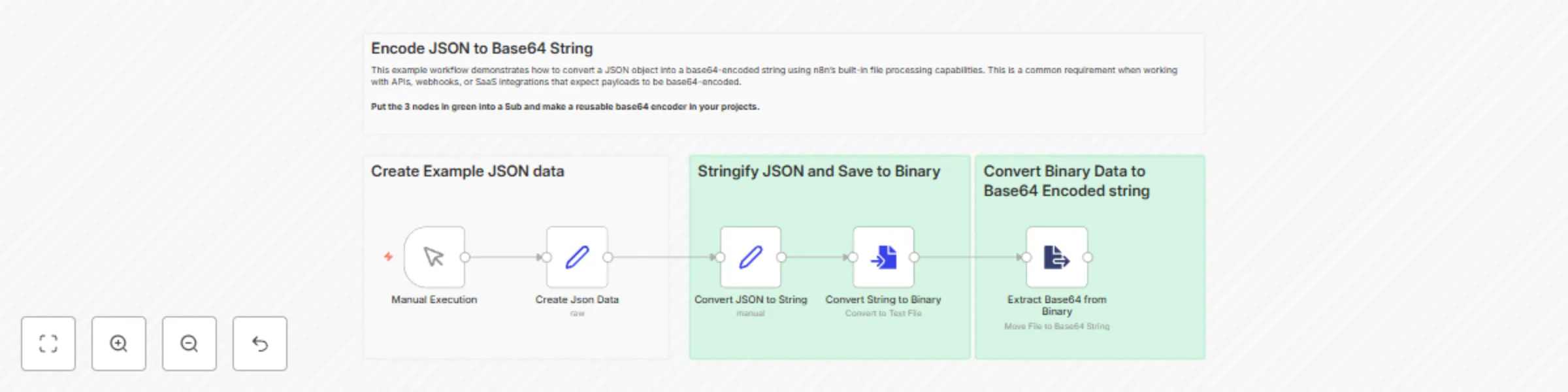
## Encode JSON to Base64 String in n8n This example workflow demonstrates how to convert a JSON object into a base64-encoded string using n8n’s built-in file processing capabilities. This is a common requirement when working with APIs, webhooks, or SaaS integrations that expect payloads to be base64-encoded. > **Tip:** The three green-highlighted nodes (Stringify → Convert to File → Extract from File) can be wrapped in a Subworkflow to create a reusable Base64 encoder in your own projects. --- ## 🔧 Requirements - Any running n8n instance (local or cloud) - No credentials or external services required --- ## What This Workflow Does 1. Generates example JSON data 2. Converts the JSON to a string 3. Saves the string as a binary file 4. Extracts the file’s contents as a base64 string 5. Outputs the base64 string on the final node --- ## Step-by-Step Setup 1. **Manual Trigger** Start the workflow using the `Manual Execution` node. This is useful for testing and development. 2. **Create JSON Data** The `Create Json Data` node uses raw mode to construct a sample object with all major JSON types: strings, numbers, booleans, nulls, arrays, nested objects, etc. 3. **Convert to String** The `Convert to String` node uses the expression `={{ JSON.stringify($json) }}` to flatten the object into a single string field named `json_text`. 4. **Convert to File** The `Convert to File` node takes the `json_text` value and saves it to a UTF-8 encoded binary file in the property `encoded_text`. 5. **Extract from File** This node takes the binary file and extracts its contents as a base64-encoded string. The result is saved in the `base64_text` field. --- ## Customization Tips - Replace the sample JSON in the `Create Json Data` node with your own payload structure. - To make this reusable, extract the three core nodes into a Subworkflow or wrap them in a custom Function. - Use the `base64_text` output field to post to APIs, store in databases, or include in webhook responses.

W
Wyeth
File Management
15 Jul 2025
491
0
Workflow preview: Add TypeScript Intellisense support to code nodes with JSDoc
Free intermediate

Add TypeScript Intellisense support to code nodes with JSDoc

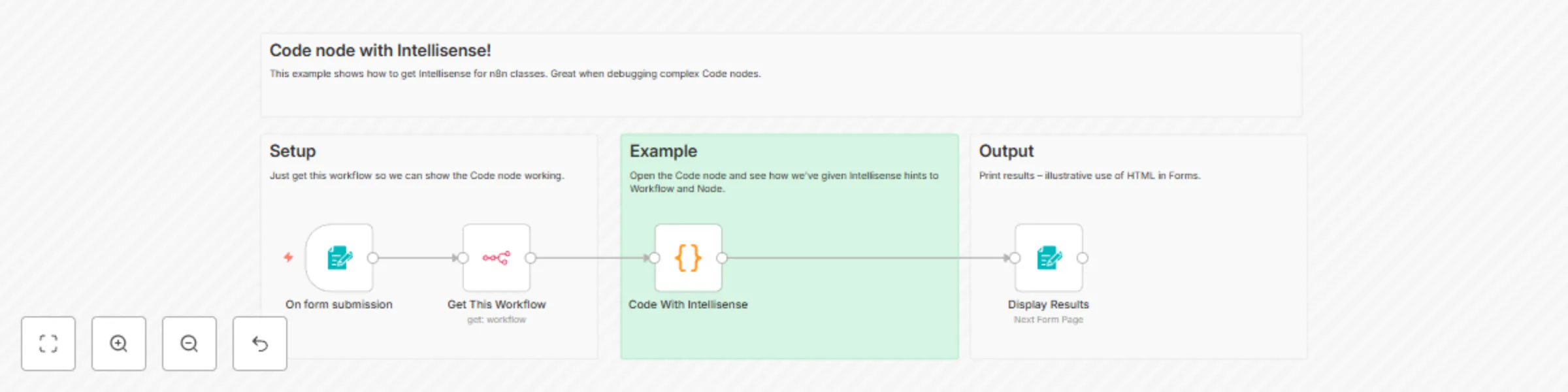
Are you writing complex Code nodes and need Intellisense support? Follow this simple pattern to get autocomplete for any n8n or custom classes. ![Screenshot 20250702 121647.png](fileId:1661)

W
Wyeth
Engineering
3 Jul 2025
222
0
Workflow preview: Create debug breakpoints and logs with Slack interactive messages
Free intermediate

Create debug breakpoints and logs with Slack interactive messages

How it Works: You can now use the Slack node to create conditional breakpoints! This example shows the loop stop on 4 (of 10) and then you can hit "continue" in Slack when you are ready. *You could extend this with a Form node and inject values you type in on the fly.* Slack was already the best place to debug log n8n, and now it just got better!

W
Wyeth
Engineering
1 Jul 2025
176
0
Workflow preview: Process multiple files with forms: a tutorial on binary data and loops
Free intermediate

Process multiple files with forms: a tutorial on binary data and loops

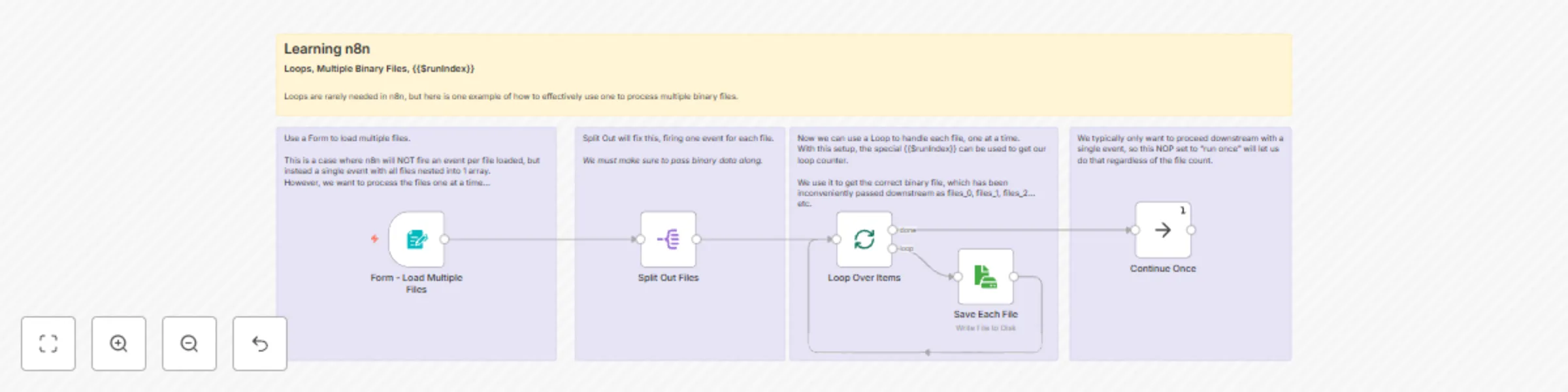
Let a user load multiple files with a Form node, and process the binary data. A very important workflow for many tools. This is a learning example of several core concepts that are hard to grasp in n8n: - $binary data - Loop and $runIndex - Split Out The Save File deomonstrates how to access the binary data correctly, but could be swapped to POST the files to an AI, for example.

W
Wyeth
File Management
28 Jun 2025
4627
0