A

Antonio Cheong

1
Workflow

Workflows by Antonio Cheong

Workflow preview: Run Apache Airflow DAG and retrieve XCom value
Free intermediate

Run Apache Airflow DAG and retrieve XCom value

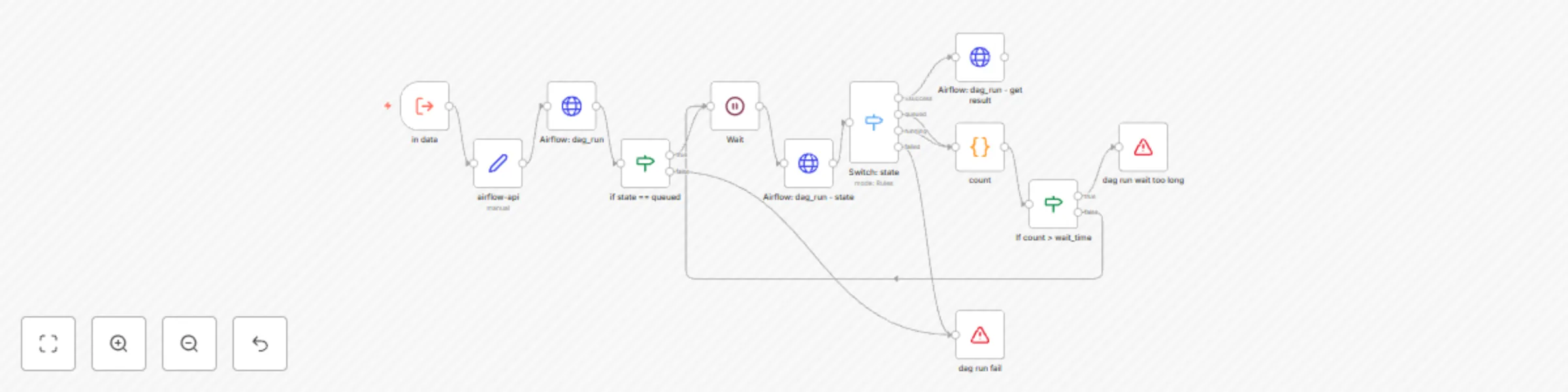
# Run Apache Airflow DAG and Retrieve XCom Value ## What this workflow does This workflow integrates the Apache Airflow API [DAGRun](https://airflow.apache.org/docs/apache-airflow/2.10.5/stable-rest-api-ref.html#tag/DAGRun) and [XCom](https://airflow.apache.org/docs/apache-airflow/2.10.5/stable-rest-api-ref.html#tag/XCom). It enables n8n to trigger Airflow DAGs and retrieve the execution results. ## Preparation: 1. **Update Airflow API Link Prefix** - Navigate to the `airflow-api` node. - Update the prefix of the Airflow API link in the format: `http(s)://ip:port`. - Example: `https://airflow.example.com` 2. **Configure Authentication** - Go to the `Airflow: dag_run` node. - Update the `Basic Auth` credentials with your Airflow username and password. - Repeat this step for `Airflow: dag_run - state` and `Airflow: dag_run - get result` nodes. **Security Note:** Using Basic Authentication requires storing credentials in plaintext. If possible, consider using API Keys or Tokens for enhanced security. - An example is setting Airflow's [API Authentication](https://airflow.apache.org/docs/apache-airflow-providers-fab/stable/auth-manager/api-authentication.html) to [basic\_auth](https://airflow.apache.org/docs/apache-airflow-providers-fab/stable/auth-manager/api-authentication.html#basic-authentication). Choose other authentication methods if needed. - Ensure the user account has the following permissions: `can create on DAG Runs`, `can read on DAG Runs`, `can read on XComs`, `can edit on DAGs`, and `can read on DAGs`. ## How to Use: To execute this workflow, use the **Execute Sub-workflow** node with the following input parameters: - **dag\_id**: The DAG ID (name) in Airflow that you want to trigger. - **task\_id**: The Task ID (name) from which you want to retrieve the XCom return\_value. - **conf**: Input data for the Airflow DAG run. - **wait**: Delay (in seconds) between each `Airflow: dag_run - state` check. - **wait\_time**: The maximum time (in seconds) to wait for `Airflow: dag_run - state` before returning an error. ## Output: - The workflow returns the XCom result from `Airflow: dag_run - get result`. - The XCom `return_value` is stored in the `value` field.

A
Antonio Cheong
Engineering
27 Feb 2025
725
0