Automated LinkedIn posts with AI-generated content using OpenAI GPT
# LinkedIn Auto-Post Agent for n8n
🚀 **Automate your LinkedIn presence with AI-powered content generation**
This n8n workflow automatically generates and publishes engaging LinkedIn posts using OpenAI's GPT models. Perfect for professionals and businesses who want to maintain an active LinkedIn presence without manual effort.
## ✨ Features
- **🤖 AI-Powered Content**: Generate professional LinkedIn posts using OpenAI GPT-3.5-turbo or GPT-4
- **⏰ Automated Scheduling**: Post content automatically on weekdays at 9 AM (customizable)
- **🎯 Manual Trigger**: Generate and post content on-demand
- **🔒 Secure**: All credentials stored securely in n8n's encrypted credential system
- **📊 Error Handling**: Built-in retry logic and error notifications
- **🎨 Customizable**: Easily modify prompts, scheduling, and content parameters
## 🏗️ Architecture
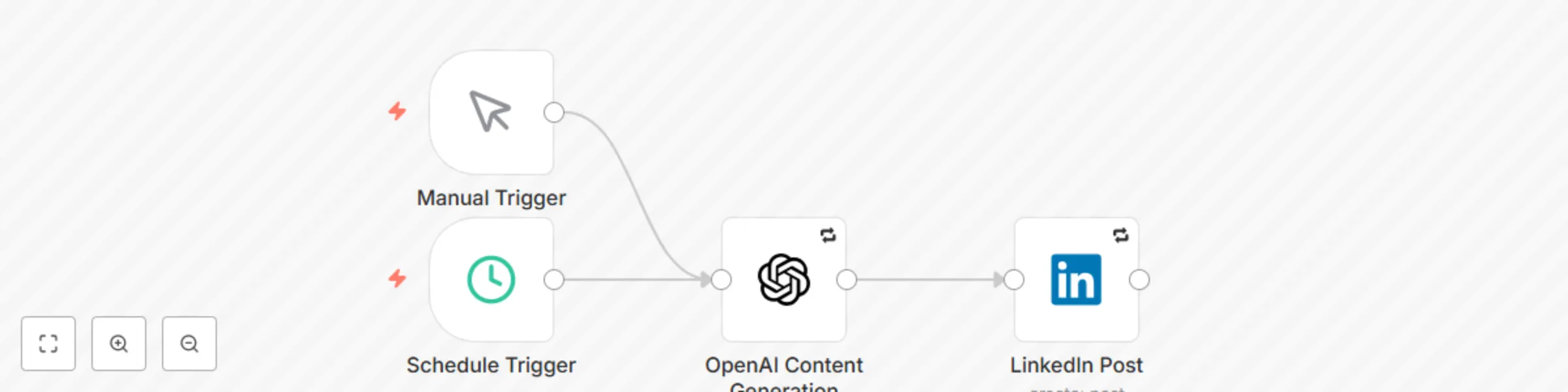
This workflow uses a streamlined 3-node architecture:
```
Schedule/Manual Trigger → OpenAI Content Generation → LinkedIn Post
```
### Node Details
1. **Schedule Trigger**: Automatically triggers the workflow (default: weekdays at 9 AM)
2. **Manual Trigger**: Allows on-demand content generation
3. **OpenAI Content Generation**: Creates LinkedIn-optimized content using AI
4. **LinkedIn Post**: Publishes the generated content to LinkedIn
## 📋 Prerequisites
- n8n instance (self-hosted or cloud)
- OpenAI API account and API key
- LinkedIn account with API access
- Basic familiarity with n8n workflows
## 🚀 Quick Start
### 1. Import the Workflow
1. Download the `linkedin-auto-post-agent.json` file
2. In your n8n instance, go to **Workflows** → **Import from File**
3. Select the downloaded JSON file
4. Click **Import**
### 2. Set Up Credentials
#### OpenAI API Credentials
1. Go to **Credentials** in your n8n instance
2. Click **Create New Credential**
3. Select **OpenAI**
4. Enter your OpenAI API key
5. Name it "OpenAI API" and save
#### LinkedIn OAuth2 Credentials
1. Create a LinkedIn App at [LinkedIn Developer Portal](https://developer.linkedin.com/)
2. Configure OAuth 2.0 settings:
- **Redirect URL**: `https://your-n8n-instance.com/rest/oauth2-credential/callback`
- **Scopes**: `r_liteprofile`, `w_member_social`
3. In n8n, create new **LinkedIn OAuth2** credentials
4. Enter your LinkedIn App's Client ID and Client Secret
5. Complete the OAuth authorization flow
### 3. Configure the Workflow
1. Open the imported workflow
2. Click on the **OpenAI Content Generation** node
3. Select your OpenAI credentials
4. Customize the content prompt if desired
5. Click on the **LinkedIn Post** node
6. Select your LinkedIn OAuth2 credentials
7. Save the workflow
### 4. Test the Workflow
1. Click the **Manual Trigger** node
2. Click **Execute Node** to test content generation
3. Verify the generated content in the LinkedIn node output
4. Check your LinkedIn profile to confirm the post was published
### 5. Activate Automated Posting
1. Click the **Active** toggle in the top-right corner
2. The workflow will now run automatically based on the schedule
## ⚙️ Configuration Options
### Scheduling
The default schedule posts content on weekdays at 9 AM. To modify:
1. Click the **Schedule Trigger** node
2. Modify the **Cron Expression**: `0 9 * * 1-5`
- `0 9 * * 1-5`: Weekdays at 9 AM
- `0 12 * * *`: Daily at noon
- `0 9 * * 1,3,5`: Monday, Wednesday, Friday at 9 AM
### Content Customization
Modify the OpenAI prompt to change content style:
1. Click the **OpenAI Content Generation** node
2. Edit the **System Message** to adjust tone and style
3. Modify the **User Message** to change topic focus
#### Example Prompts
**Professional Development Focus**:
```
Create a LinkedIn post about professional growth, skill development, or career advancement. Keep it under 280 characters and include 2-3 relevant hashtags.
```
**Industry Insights**:
```
Generate a LinkedIn post sharing an industry insight or trend in technology. Make it thought-provoking and include relevant hashtags.
```
**Motivational Content**:
```
Write an inspiring LinkedIn post about overcoming challenges or achieving goals. Keep it positive and engaging with appropriate hashtags.
```
### Model Selection
Choose between OpenAI models based on your needs:
- **gpt-3.5-turbo**: Cost-effective, good quality
- **gpt-4**: Higher quality, more expensive
- **gpt-4-turbo**: Latest model with improved performance
## 🔧 Advanced Configuration
### Error Handling
The workflow includes built-in error handling:
- **Retry Logic**: 3 attempts with 1-second delays
- **Continue on Fail**: Workflow continues even if individual nodes fail
- **Error Notifications**: Optional email/Slack notifications on failures
### Content Review Workflow (Optional)
To add manual content review before posting:
1. Add a **Wait** node between OpenAI and LinkedIn nodes
2. Configure webhook trigger for approval
3. Add conditional logic based on approval status
### Rate Limiting
To respect API limits:
- OpenAI: 3 requests per minute (default)
- LinkedIn: 100 posts per day per user
- Adjust scheduling frequency accordingly
## 📊 Monitoring and Analytics
### Execution History
1. Go to **Executions** in your n8n instance
2. Filter by workflow name to see all runs
3. Click on individual executions to see detailed logs
### Key Metrics to Monitor
- **Success Rate**: Percentage of successful executions
- **Content Quality**: Review generated posts periodically
- **API Usage**: Monitor OpenAI token consumption
- **LinkedIn Engagement**: Track post performance on LinkedIn
## 🛠️ Troubleshooting
### Common Issues
**OpenAI Node Fails**
- Verify API key is correct and has sufficient credits
- Check if you've exceeded rate limits
- Ensure the model name is spelled correctly
**LinkedIn Node Fails**
- Verify OAuth2 credentials are properly configured
- Check if LinkedIn app has required permissions
- Ensure the content doesn't violate LinkedIn's posting policies
**Workflow Doesn't Trigger**
- Confirm the workflow is marked as "Active"
- Verify the cron expression syntax
- Check n8n's timezone settings
### Debug Mode
1. Enable **Save Manual Executions** in workflow settings
2. Run the workflow manually to see detailed execution data
3. Check each node's input/output data
## 🔒 Security Best Practices
- Store all API keys in n8n's encrypted credential system
- Regularly rotate API keys (monthly recommended)
- Use environment variables for sensitive configuration
- Enable execution logging for audit trails
- Monitor for unusual API usage patterns
## 📈 Optimization Tips
### Content Quality
- Review and refine prompts based on output quality
- A/B test different prompt variations
- Monitor LinkedIn engagement metrics
- Adjust posting frequency based on audience response
### Cost Optimization
- Use gpt-3.5-turbo for cost-effective content generation
- Set appropriate token limits (200 tokens recommended)
- Monitor OpenAI usage in your dashboard
### Performance
- Keep workflows simple with minimal nodes
- Use appropriate retry settings
- Monitor execution times and optimize if needed
## 🤝 Contributing
We welcome contributions to improve this workflow:
1. Fork the repository
2. Create a feature branch
3. Make your improvements
4. Submit a pull request
## 📄 License
This project is licensed under the MIT License - see the LICENSE file for details.
## 🆘 Support
If you encounter issues or have questions:
1. Check the troubleshooting section above
2. Review n8n's official documentation
3. Join the n8n community forum
4. Create an issue in this repository
## 🔗 Useful Links
- [n8n Documentation](https://docs.n8n.io/)
- [OpenAI API Documentation](https://platform.openai.com/docs)
- [LinkedIn API Documentation](https://docs.microsoft.com/en-us/linkedin/)
- [n8n Community Forum](https://community.n8n.io/)
---
**Happy Automating! 🚀**
*This workflow helps you maintain a consistent LinkedIn presence while focusing on what matters most - your business and professional growth.*