Generate multilingual Shopify product descriptions with Gemini 2.5 Vision AI
# Shopify Multilingual Product Copy with n8n & Gemini 2.5 Flash-Lite
Use for free
**Created by** <Weiser22> · **Last update** 2025-09-02
**Categories:** E-commerce, Product Content, Translation, Computer Vision
## Description
Generate language-specific Shopify product copy (ES, DE, EN, FR, IT, PT) from each product’s main image and metadata. The workflow performs a vision analysis to extract objective, verifiable details, then produces product names, descriptions, and handles per language, and stores the results in Google Sheets for review or publishing.
## Good to know
- **Model:** `models/gemini-2.5-flash-lite` (supports image input). Confirm pricing/limits in your account before scaling.
- **Image requirement:** products should have `images[0].src`; add a fallback if some products lack a primary image.
- **Sheets mapping:** the sheet node uses Auto-map; ensure your matching column aligns with the field you emit (`id` vs `product_id`).
- **Strict output:** the Agent enforces a multilingual JSON contract (`es,de,en,fr,it,pt`), each with `shopify_product_name`, `shopify_description`, `handle`.
## How it works
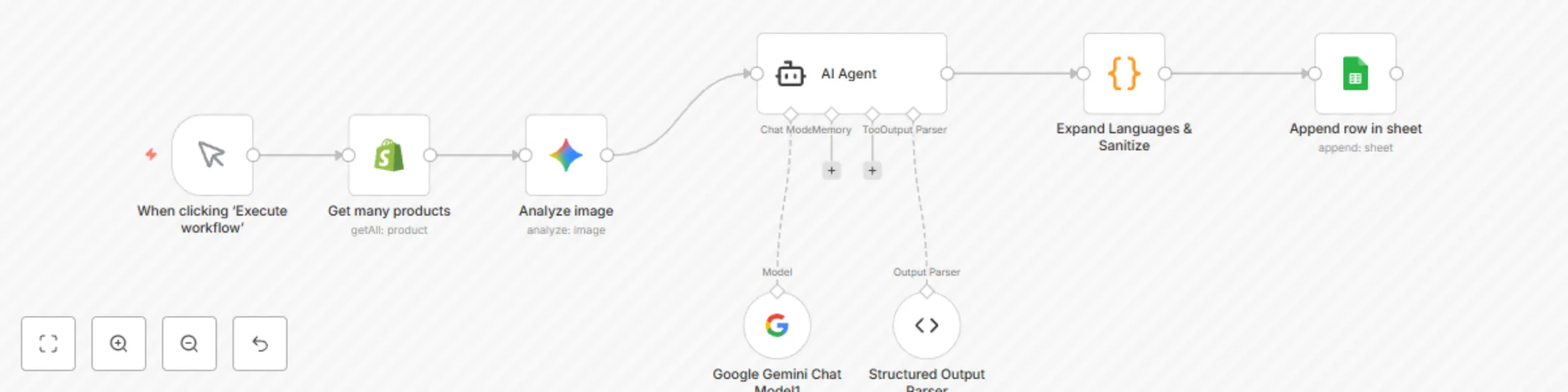
- **Manual Trigger:** start a test run on demand.
- **Get many products (Shopify):** fetch products and their images.
- **Analyze image (Gemini Vision):** send `images[0].src` with an objective, 3–5 sentence prompt.
- **AI Agent (Gemini Chat):** merge Shopify fields + vision text under anti-hallucination rules and a strict JSON schema.
- **Structured Output Parser:** validates the exact JSON shape.
- **Expand Languages & Sanitize (Code):** split into 6 items and normalize handles/HTML content as needed.
- **Append row in sheet (Google Sheets):** add one row per language to your spreadsheet.
## Requirements
- Shopify Access Token with product read permissions.
- Google AI Studio (Gemini) API key for Vision + Chat Model nodes.
- Google Sheets credentials (OAuth or Service Account) with access to the target spreadsheet.
## How to use
1. **Connect credentials:** Shopify, Gemini (same key for Vision and Chat), and Google Sheets.
2. **Configure nodes:**
- **Get many products:** adjust `limit`/filters.
- **Analyze image:** verify `={{ $json.images[0].src }}` resolves to a public image URL.
- **AI Agent & Parser:** keep the strict JSON contract as provided.
- **Code (Expand & Sanitize):** emits `product_id`, `lang`, `handle`, `shopify_product_name`, `shopify_description`, `base_handle_es`.
- **Google Sheets (Append):** set `documentId` and tab name; confirm the matching column.
3. **Run a test:** execute the workflow and confirm six rows per product (one per language) appear in the sheet.
## Data contract (Agent output)
```json
{
"es": {"shopify_product_name": "", "shopify_description": "", "handle": ""},
"de": {"shopify_product_name": "", "shopify_description": "", "handle": ""},
"en": {"shopify_product_name": "", "shopify_description": "", "handle": ""},
"fr": {"shopify_product_name": "", "shopify_description": "", "handle": ""},
"it": {"shopify_product_name": "", "shopify_description": "", "handle": ""},
"pt": {"shopify_product_name": "", "shopify_description": "", "handle": ""}
}
```
## Customising this workflow
- **Publish to Shopify:** after review in Sheets, add a `product.update` step to write finalized copy/handles.
- **Handle policy:** tweak slug rules (diacritics, separators, max length) in the Code node to match store conventions.
- **No-image fallback:** add an IF/Switch to skip vision when `images[0].src` is missing and generate copy from title + body only.
- **Tone/length:** adjust temperature and token limits on the Chat Model for brand-fit.
## Troubleshooting
- **No rows in Sheets:** confirm spreadsheet ID, tab name, Auto-map status, and that the matching column matches your emitted field.
- **Vision errors:** ensure `images[0].src` is reachable.
- **Parser failures:** the Agent must return **bare JSON** with the six root keys and three fields per language—no extra text.