W

Wan Dinie

4
Workflows

Workflows by Wan Dinie

Workflow preview: Send daily Malaysian weather alerts with Perplexity AI, Firecrawl and Telegram
Free advanced

Send daily Malaysian weather alerts with Perplexity AI, Firecrawl and Telegram

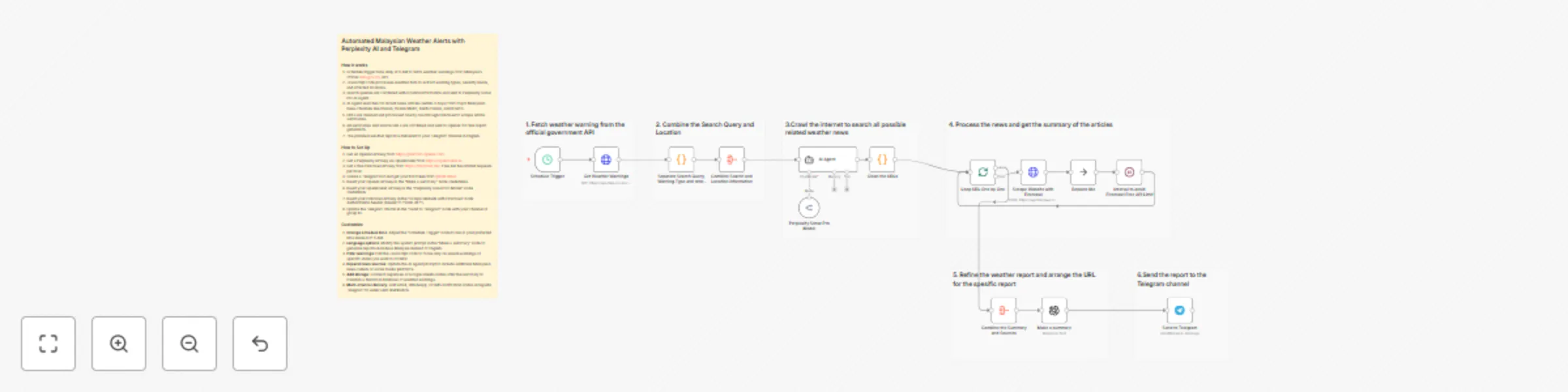
## Automated Malaysian Weather Alerts with Perplexity AI, Firecrawl and Telegram This n8n template automates daily weather monitoring by fetching official government warnings and searching for related news coverage, then delivering comprehensive reports directly to Telegram. Use cases include monitoring severe weather conditions, tracking flood warnings across Malaysian states, staying updated on weather-related news, and receiving automated daily weather briefings for emergency preparedness. ### Good to know - Firecrawl free tier allows limited scraping requests per hour. Consider the 3-second interval between requests to avoid rate limits. - OpenAI costs apply for content summarization - GPT-4.1 mini balances quality and affordability. - After testing multiple AI models (GPT, Gemini), **Perplexity Sonar Pro Search proved most effective** for finding recent, relevant weather news from Malaysian sources. - The workflow focuses on major Malaysian news outlets like Utusan, Harian Metro, Berita Harian, and Kosmo. ### How it works 1. Schedule Trigger runs daily at 9 AM to fetch weather warnings from Malaysia's official data.gov.my API. 2. JavaScript code processes weather data to extract warning types, severity levels, and affected locations. 3. Search queries are aggregated and combined with location information. 4. Perplexity Sonar Pro AI Agent searches for recent news articles (within 3 days) from Malaysian news channels. 5. URLs are cleaned and processed one by one through a loop to manage API limits. 6. Firecrawl scrapes each news article and extracts summaries from main content. 7. All summaries and source URLs are combined and sent to OpenAI for final report generation. 8. The polished weather report is delivered to your Telegram channel in English. ### How to use - The schedule trigger is set for 9 AM but can be adjusted to any preferred time. - Replace the Telegram chat ID with your channel or group ID. - The workflow automatically filters out "No Advisory" warnings to avoid unnecessary notifications. - Modify the search query timeout and batch processing based on your API limits. ### Requirements - OpenAI API key (get one at [https://platform.openai.com](https://platform.openai.com)) - Perplexity API via OpenRouter (get access at [https://openrouter.ai](https://openrouter.ai)) - Firecrawl API key (get free tier at [https://firecrawl.dev](https://firecrawl.dev)) - Telegram Bot token and channel/group ID ### Customizing this workflow - **Expand news sources**: Modify the AI Agent prompt to include additional Malaysian news outlets or social media sources. - **Language options**: Change the final report language from English to Bahasa Malaysia by updating the "Make a summary" system prompt. - **Alert filtering**: Adjust the JavaScript code to focus on specific warning types (e.g., only severe warnings or specific states). - **Storage integration**: Connect to Supabase or Google Sheets to maintain a historical database of weather warnings and news. - **Multi-channel delivery**: Add more notification nodes to send alerts via email, WhatsApp, or SMS alongside Telegram.

W
Wan Dinie
Miscellaneous
28 Dec 2025
33
0
Workflow preview: Generate multiple profile picture avatars with free public APIs (no keys)
Free intermediate

Generate multiple profile picture avatars with free public APIs (no keys)

## Simple Profile Picture Generator (No API Keys Needed) Finding the perfect profile picture can be time-consuming and frustrating. Whether you need avatars for testing, placeholder images for development, or simply want to explore different styles before committing to a design, browsing multiple avatar services one by one is tedious. This workflow solves that universal problem by generating 12 different avatar styles instantly from a single trigger, giving you a complete gallery to choose from in seconds. ### How it works 1. Trigger the workflow manually. 2. The workflow generates a unique seed (random number or custom keyword) and randomly selects a gender. 3. The simple JavaScript code generates 12 different avatar URLs from multiple free APIs using the same seed for consistency. 4. All avatar URLs are passed to an HTML generator that creates a responsive gallery. 5. The final HTML displays all 12 avatar styles in a grid with metadata (seed and gender). 6. Each avatar includes a download button for easy saving. ### How to Set Up 1. No API keys required. All avatar services used are completely free and public. 2. Simply import the workflow and click "Execute Workflow" to generate your avatar gallery. 3. The workflow works immediately without any configuration needed. 4. The JavaScript code is beginner-friendly, meaning you can understand it just by reading through it. ### Customize 1. If you are an advanced user, you can **use custom seed instead of random**: In the "Generate APIs" node (line 1), change `const userInput = '';` to `const userInput = 'your-name';` to generate consistent avatars based on your chosen keyword. 2. **Set fixed gender**: In the "Generate APIs" node (line 4), change `const gender = Math.random() > 0.5 ? 'male' : 'female';` to `const gender = 'female';` or `const gender = 'male';` for consistent gender across compatible APIs. 3. **Add or remove avatar APIs**: Edit the `apis` array in the "Generate APIs" node to include your preferred avatar services or remove unwanted styles. 4. **Change avatar size**: Replace `size=200` or `&size=200` with your desired dimensions (e.g., `size=300`) in the API URLs within the "Generate APIs" node.

W
Wan Dinie
Content Creation
25 Dec 2025
53
0
Workflow preview: Generate blog posts and social media content with GPT-4.1 and Pexels images
Free advanced

Generate blog posts and social media content with GPT-4.1 and Pexels images

## AI Content Generator with Auto Pexels Image Matching This n8n template demonstrates how to use AI to generate engaging content and automatically find matching royalty-free images based on the content context. Use cases are many: Try creating blog posts with hero images, generating social media content with visuals or drafting email newsletters with relevant photos. ### Good to know - At time of writing, Pexels offers free API access with up to 200 requests per hour. See [Pexels API](https://www.pexels.com/api) for updated info. - OpenAI API costs vary by model. GPT-4.1 mini is cheaper while normal GPT-4.1 and above offer deeper content generation but cost more per request. - Using the floating JavaScript node can reduce token usage by processing content and keyword extraction in a single prompt. ### How it works 1. We'll collect a content topic or idea via a manual form trigger. 2. OpenAI generates initial content based on your input topic. 3. The AI extracts suitable keywords from the generated content to find matching images. 4. The keywords are sent to Pexels API, which searches for relevant royalty-free stock images. 5. OpenAI creates the final polished content that complements the selected image. 6. The result is displayed as a formatted HTML template combining content and image together. ### How to use - The manual trigger node is used as an example, but feel free to replace this with other triggers such as webhook or even a form. - You can batch-generate multiple pieces of content by looping through a list, but of course, the processing will take longer and cost more. ### Requirements - OpenAI API key (get one at [https://platform.openai.com](https://platform.openai.com)) - Pexels API key (get free access at [https://www.pexels.com/api](https://www.pexels.com/api)) - Valid content topics or ideas to generate from ### Customizing this workflow - **Optimize token usage**: Connect the floating "Extract Content and Image Keyword" JavaScript node to process everything in one prompt and minimize API costs. If you use this option, update the expressions in the "Pexels Image Search" node and "Create Suitable Content Including Image" node to reference the extracted keywords from the JS node. - Upgrade to GPT-4.1, GPT-5.1, or GPT-5.2 for more advanced and creative content generation. - Change the HTML template output to other formats like Markdown, plain text, or JSON for different publishing platforms. - For long term, store the results in a database like Supabase or Google Sheets if you are planning to reuse the contents.

W
Wan Dinie
Content Creation
25 Dec 2025
261
0
Workflow preview: Generate product ideas from website content with FireCrawl and GPT-4.1
Free intermediate

Generate product ideas from website content with FireCrawl and GPT-4.1

## AI Website Analyzer to Product Ideas with FireCrawl and GPT-4.1 This n8n template demonstrates how to use AI to analyze any website and generate product ideas or summaries based on the website's content and purpose. Use cases are many: Try analyzing competitor websites, discovering product opportunities, understanding business models, or generating insights from landing pages! ### Good to know - At time of writing, Firecrawl offers up to 500 free API calls. See [Firecrawl Pricing](https://www.firecrawl.dev/pricing) for updated info. - OpenAI API costs vary by model. GPT-3.5 is cheaper while GPT-4 and above offer deeper analysis but cost more per request. ### How it works 1. We'll collect a website URL via a manual form trigger. 2. The URL is sent to the Firecrawl API, which deeply crawls and analyzes the website content. 3. Firecrawl returns the scraped data, including page structure, content, and metadata. 4. The scraped data is then sent to OpenAI's API with a custom prompt. 5. OpenAI generates an AI-powered summary analyzing what the website is doing, its purpose, and potential product ideas. 6. The final output is displayed or can be stored for further use. ### How to use - The manual trigger node is used as an example, but feel free to replace this with other triggers such as webhook or even a form. - You can analyze multiple URLs by looping through a list, but of course, the processing will take longer and cost more. ### Requirements - Firecrawl API key (get free 500 calls at [https://firecrawl.dev](https://firecrawl.dev)) - OpenAI API key for AI analysis - Valid website URLs to analyze ### Customizing this workflow - Change the output format from HTML to JSON, Markdown, or plain text by editing the Firecrawl parameters. - Modify the AI prompt to focus on specific aspects like pricing strategy, target audience, or UX analysis. - Upgrade to GPT-4.1, GPT-5.1, or GPT-5.2 for more advanced and detailed analysis. - Add a webhook trigger to analyze websites automatically from other apps or services. - Store results in a database like Supabase or Google Sheets for tracking competitor analysis over time.

W
Wan Dinie
Market Research
23 Dec 2025
38
0