Kamran habib
Workflows by Kamran habib
Detect Reddit problems & auto-comment solutions with Google Gemini & Sheets
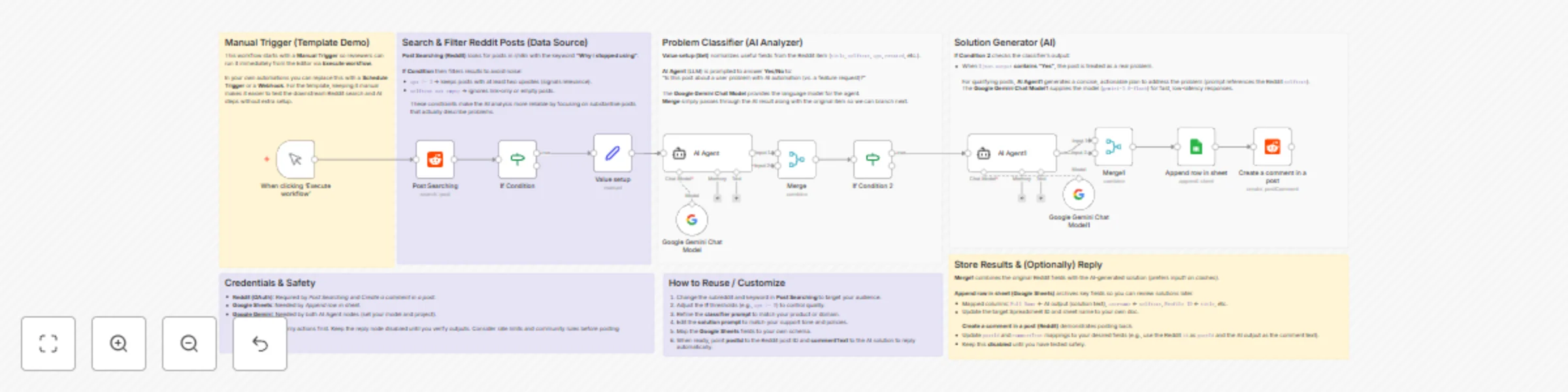
# | N8N Workflow | AI Reddit Problem Detection & Auto-Solution Commenter 🤖 *This n8n workflow automates Reddit community engagement by detecting posts that discuss problems and automatically replying with AI-generated solutions — powered by Google Gemini.* *It’s designed for developers, automation creators, and brands who want to provide helpful, automated responses to Reddit users discussing issues in their niche.* ## How It Works - The workflow starts with a Manual Trigger (When clicking ‘Execute workflow’). - Search for a Post: It scans the r/n8n subreddit (or any subreddit you set) for recent posts containing the keyword “Why I stopped using”. - Filter Posts (If Node): Filters posts that have 2 or more upvotes and non-empty text, ensuring only quality discussions are analyzed. - Edit Fields: Extracts post details such as title, body text, upvotes, creation time, and subreddit ID for AI processing. **AI Agent + Google Gemini Chat Model:** - The first AI node analyzes the post and decides whether it’s describing a problem or frustration related to AI automation. - Gemini responds with “Yes” or “No.” **Conditional Branch (If1 Node):** - If “Yes,” the post is confirmed as discussing a problem. - The workflow then triggers the second AI Agent. **AI Agent 2 + Gemini:** - The second AI node uses Gemini to generate a helpful and concise solution addressing the issue mentioned in the Reddit post (for example, offering a fix, suggestion, or new idea). **Merge & Log Data:** - The AI’s findings (post details + solution) are merged and saved into a connected Google Sheet for tracking community insights. **Comment on Reddit:** - The workflow automatically posts the AI-generated solution as a comment reply on the original Reddit thread, engaging users directly. ## How To Use - Import the provided JSON workflow into your n8n dashboard. - Set up the required credentials: - Reddit OAuth2 API – for searching and posting comments. - Google Gemini (PaLM) API – for AI text analysis and solution generation. - Google Sheets API – for logging post data and AI results. - Adjust the subreddit name, search keyword, or prompts to fit your niche. - Click Execute Workflow to run the automation. ## Requirements - Reddit Developer Account (OAuth2 credentials). - Google Gemini (PaLM) API account for AI processing. - Google Sheets account for saving analysis results. ## How To Customize - Change the search keyword (e.g., “help with automation,” “issue with API,” etc.). - Modify the AI prompts to tailor the solution style (technical, friendly, educational, etc.). - Edit the Google Sheet fields to capture more or fewer details. - Enable/disable the comment node if you want to manually approve replies before posting. - Adjust the Gemini model name (e.g., models/gemini-2.0-flash) or parameters for faster or more creative responses.
Twitter content automation with Gemini AI for tweets, images, and engagement
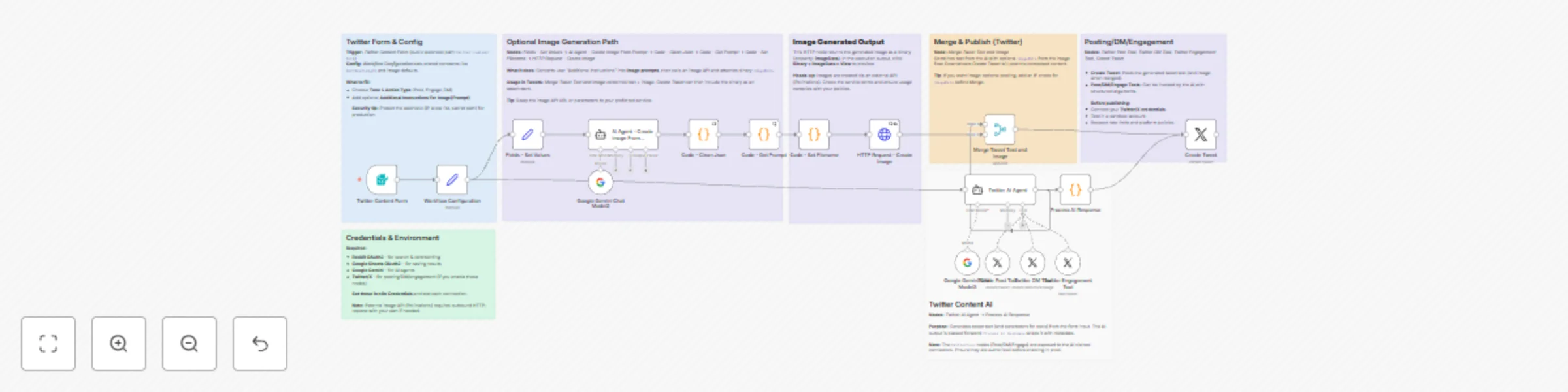
### ## | N8N Workflow | AI-Powered Twitter Automation with Content Generation and Engagement 🚀 *This n8n template automates Twitter (X) activity — from generating tweet content with AI to engaging with posts and even sending DMs — all powered by Google Gemini or OpenRouter AI.* *It’s designed for creators, marketers, brands, and agencies who want to automate social media presence with authentic, on-brand AI content and engagement.* ## How It Works - The workflow begins with a form trigger, where users input their topic, tone, and action type (Tweet, Engage, or DM). - Those inputs are passed into Workflow Configuration, which sets key parameters like max tweet length and model URLs. Depending on your chosen action: - Post Tweet: AI generates a tweet under 280 characters and can attach an image. - Engage with Posts: AI can like, retweet, or reply to niche-relevant content. - Send Direct Message: AI drafts a personalized DM for outreach or networking. - If your workflow includes visuals, the AI Agent - Create Image From Prompt node builds a detailed image prompt (based on your topic and instructions) and sends it to Google Gemini or other image APIs. - The HTTP Request - Create Image node generates a custom image via an external model (default: Pollinations.ai). - Finally, all tweet text and image data merge together in Merge Tweet Text and Image, before being posted directly via the Create Tweet node. ## How To Use - Download and Import the JSON workflow into your n8n interface. - Set up the following credentials: - OpenRouter API for text generation. - Google Gemini (PaLM) for chat and image prompt creation. - Twitter OAuth2 API for posting and engagement actions. - Configure your form input fields (Topic, Tone, Action, Instructions). Enable or disable the nodes you want: - Create Tweet → To post automatically. - Twitter Engagement Tool → For likes/retweets/replies. - Twitter DM Tool → For automated DMs. - Trigger the Twitter Content Form via n8n’s web interface. - Enter your content preferences and submit. - The workflow generates your tweet text, optionally creates a matching image, and posts or saves it automatically. ## Requirements A Twitter Developer Account (with OAuth2 credentials). A Google Gemini or OpenRouter account with text and image model access. (Optional) Connection to Pollinations or another AI image generation API. ## How To Customize - Update “Fields – Set Values” node to change: - Default image size (1080 × 1920 px). - Model name (e.g., “flux”, “turbo”, “kontext”). - Modify Workflow Configuration to tweak AI parameters like: - imageGenerationChance (default: 0.3). - maxTweetLength (default: 280). - Replace Google Gemini Chat Model with any supported model such as OpenAI GPT-4 or Mistral. - Adjust AI Agent - Create Image From Prompt system message for your preferred image style or guidelines. - Toggle which Twitter actions are active — Post, Engage, or DM — to tailor automation to your goals.