Vasyl Pavlyuchok
Workflows by Vasyl Pavlyuchok
Daily news curation with Gemini AI: auto-filter & publish to Notion & Telegram
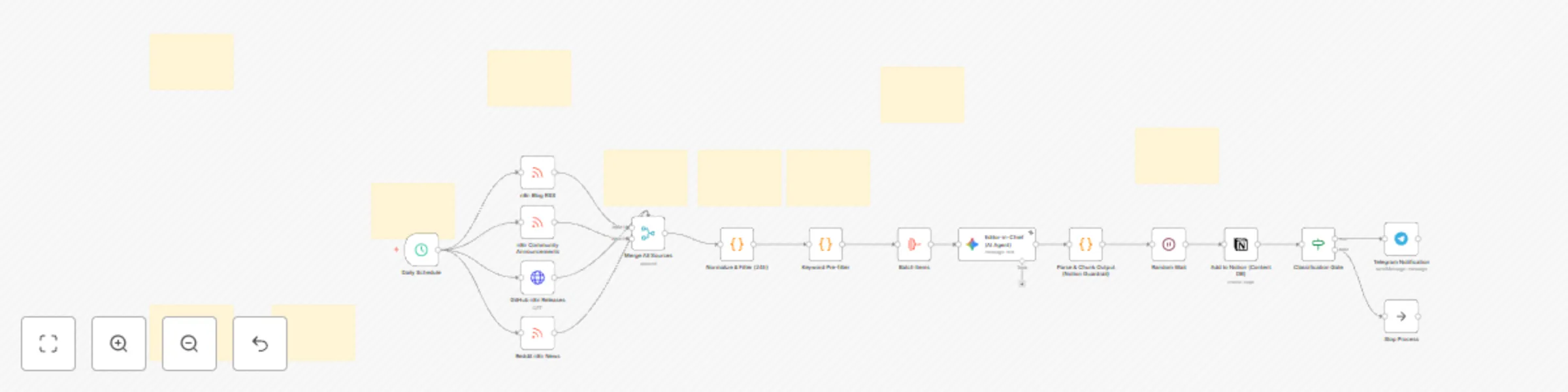
## What this template does This workflow creates a daily “n8n News Radar” briefing: - Pulls the latest n8n ecosystem updates from Blog, Community, GitHub Releases, and Reddit. - Filters to the last 24 hours + keyword relevance. - Uses a Gemini “Editor-in-Chief” agent to semantically deduplicate topics and score them (only Score 3+ pass). - Saves curated topics to a Notion database. - Sends urgent alerts (Score 4+) to Telegram. ## How it works (high level) 1) Scheduled trigger (daily) or Manual trigger (testing) 2) Data ingestion from 4 sources (RSS + GitHub API) 3) Normalize + filter (24h) 4) Keyword pre-filter (reduce noise + LLM cost) 5) Batch items → Gemini agent (dedupe + scoring + Spanish strategic summary) 6) Parse JSON output + Notion-safe chunking 7) Save to Notion 8) If Score >= 4 → send Telegram alert ## Setup steps (after import) 1) Connect these credentials in n8n: - Google Gemini (AI Agent) - Notion (Content DB) - Telegram (alerts) 2) Replace placeholders inside nodes: - **Add to Notion (Content DB)** → `databaseId.value` = `YOUR_NOTION_DATABASE_ID` - **Telegram Notification** → `chatId` = `YOUR_TELEGRAM_CHAT_ID_OR_@channelusername` ## Requirements - An n8n instance (Cloud or self-hosted) - Google Gemini API access - A Notion database with the properties used by the Notion node - A Telegram bot + target chat/channel
Monitor YouTube channels and send daily updates to Discord via RSS (no API key)
Automatically track your favorite YouTube creators and get a daily summary of new videos delivered to Discord. Unlike complex YouTube API integrations, this workflow uses efficient RSS feeds, meaning **you don't need a Google Cloud API Key** or worry about quota limits. ## How it works The workflow is scheduled to run daily (default 8:30 AM) to: 1. **Define Channels:** It takes a list of "Channel IDs" you want to monitor. 2. **Fetch RSS:** It retrieves the latest video feed for each channel. 3. **Filter:** It applies a strict date filter to pass only videos published in the last 24 hours. 4. **Notify:** Sends a notification to your Discord server with the Video Title, Date, and Link. ## Setup steps ### 1. Add your Channels 1. Open the node named **"Define Channel IDs"**. 2. Replace the example IDs with the Channel IDs you want to track. * *Note: The template comes pre-loaded with some Spanish AI channels as a demo. Feel free to remove them!* * *Tip: If you don't know a Creator's Channel ID (e.g. UC...), use a free online "YouTube Channel ID Finder".* ### 2. Connect Discord 1. Create a Webhook in your Discord Server (Server Settings > Integrations > Webhooks). 2. Open the **"Discord Notification"** node. 3. Create a new credential and paste your Webhook URL. *Note: This template is a lightweight alternative to database-backed trackers. It relies on the daily trigger frequency to avoid duplicates.*
Automated MIT AI news delivery to Discord with deduplication
Stay ahead of the curve with the latest Artificial Intelligence research from MIT, delivered directly to your Discord server—clean, filtered, and duplicate-free. This workflow is perfect for AI agencies, researchers, and tech teams who want to stay informed without the noise. ## How it works This workflow runs automatically every day (default 9:00 AM) to: 1. **Fetch** the official MIT News RSS feed for the "Artificial Intelligence" topic. 2. **Filter** articles to keep only those published in the last 24 hours. 3. **Deduplicate** content using an internal **n8n Data Table**. It checks if the article link has already been sent to prevent spamming old news. 4. **Notify** your team on Discord with a clean, formatted message including the Title, Author, Date, and Link. ## Setup steps ### 1. Create the Data Table (Mandatory) This workflow relies on n8n Data Tables to track sent articles. Before running: 1. Go to your n8n Dashboard > **Data Tables**. 2. Create a new table named: `mit_ai_news_sent` 3. Add these exact columns: * `creator` (Type: String) * `title` (Type: String) * `link` (Type: String) * `pubDate` (Type: Date) ### 2. Connect the Table 1. Import this template. 2. Open the orange nodes named **"Avoid Duplicated Articles"** and **"Register New Article"**. 3. Select the `mit_ai_news_sent` table you just created from the list. ### 3. Configure Discord 1. Create a Webhook in your Discord Server (Server Settings > Integrations > Webhooks). 2. Open the **"MIT AI Articles"** node. 3. Create a new Credential and paste your Webhook URL.
Daily AI research summary from arXiv with Gemini AI, Notion & Telegram alerts
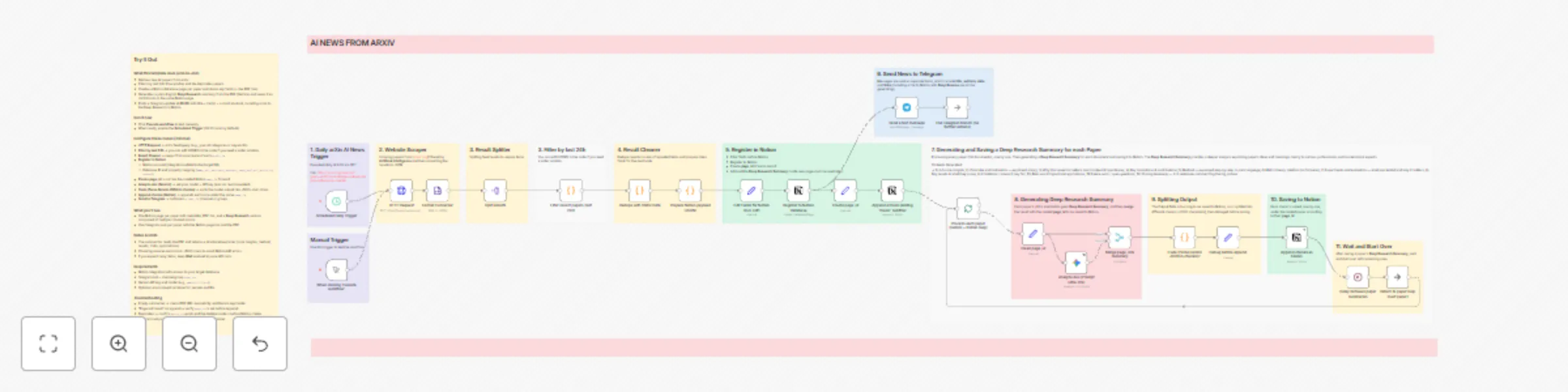
## What this template does This workflow turns the arXiv AI feed into a daily research assistant. Every morning it fetches the latest Artificial Intelligence papers from [arXiv.org](arXiv.org), deduplicates them, stores one page per paper in Notion (with metadata + PDF link), generates a **Deep Research Summary** of each PDF using Gemini, and finally posts a short update to a Telegram channel with links to both the paper and the Notion summary. ## Who is this for & what problem it solves This template is designed for founders, researchers, builders and curious professionals who want to stay up-to-date with AI research without reading every paper in full. It solves the “information overload” problem: instead of manually checking arXiv and skimming PDFs, you get a curated daily feed with human-style explanations stored in your own Notion database. ## Use Cases * Daily AI research digest for solo founders or small teams. * Private “AI research hub” in Notion for your company or lab. * Telegram channel that shares the latest AI papers plus plain-English summaries. * Personal learning pipeline: track, tag and revisit important papers over time. ## How it works (workflow overview) 1. Scheduled trigger runs every day at 08:00. 2. HTTP Request pulls the latest AI papers from arXiv’s API. 3. Results are converted from XML to JSON and cleaned. 4. A time-window filter keeps only recent papers and removes duplicates. 5. For each paper, a Notion page is created (metadata + PDF URL). 6. Gemini reads the PDF and returns a structured, multi-chunk summary. 7. Each chunk is appended to the same Notion page as rich-text blocks. 8. A Telegram message is sent with title, short abstract, PDF link and Notion link. ## Setup (step-by-step) 1. Create a Notion database and connect your Notion integration. 2. Map the properties in the **Register to Notion Database** node (title, arxiv_id, abstract, authors, categories/tags, published date, pdf URL). 3. Add your Gemini API key and model in the **Analyze doc (Prompt Ultra-Pro)** node. 4. Add your Telegram bot token and **chat_id** in the **Send a text message** node. 5. (Optional) Adjust the arXiv query in **HTTP Request** to focus on your preferred AI categories or keywords. 6. Enable the **Scheduled Daily Trigger** when you’re ready to run it in production. ## Customization options * Change the arXiv search query (keywords, categories, max_results). * Modify the time window logic (e.g. 24h, 48h, or no filter). * Adapt the Notion properties to your own schema (status, tags, priority, etc.). * Switch the messaging channel (Telegram, Discord, Slack) using similar nodes.