D

digi-stud.io

2
Workflows

Workflows by digi-stud.io

Workflow preview: Fetch hierarchical data records from Airtable with multi-level relationships
Free advanced

Fetch hierarchical data records from Airtable with multi-level relationships

# Airtable Hierarchical Record Fetcher ## Description This n8n workflow retrieves an Airtable record along with its related child records in a hierarchical structure. It can fetch up to 3 levels of linked records and assembles them into a comprehensive JSON object, making it ideal for complex data relationships and nested record structures. ## Features - **Multi-level Record Fetching**: Retrieves parent record, linked child records (level 2), and optionally grandchild records (level 3) - **API Call Optimization**: Uses Airtable's `filterByFormula` to minimize API calls by fetching multiple related records in single requests - **Selective Level 3 Fetching**: Only fetches level 3 records for specified linked fields to optimize performance - **Rich Text Processing**: Converts Airtable's pseudo-markdown rich text fields to HTML format - **Hierarchical JSON Output**: Organizes all data in a structured, nested JSON format - **Flexible Configuration**: Customizable depth and field selection per execution ## Input Parameters The workflow accepts a JSON array with the following structure: ```json [ { "base_id": "appN8nPMGoLNuzUbY", "table_id": "tblLVOwpYIe0fGQ52", "record_id": "reczMh1Pp5l94HdYf", "level_3": [ "fldRaFra1rLta66cD", "fld3FxCaYk8AVaEHt" ], "to_html": true } ] ``` ### Parameter Details | Parameter | Type | Required | Description | |-----------|------|----------|-------------| | `base_id` | string | Yes | Airtable base identifier | | `table_id` | string | Yes | Airtable table identifier for the main record | | `record_id` | string | Yes | Airtable record identifier to fetch | | `level_3` | array | No | Array of field IDs from level 2 records for which to fetch level 3 children | | `to_html` | boolean | No | Convert rich text fields from pseudo-markdown to HTML (default: false). This requires `marked` npm package. | ## Output Structure The workflow returns a hierarchical JSON object with the following structure: ```json { "id": "recXXXXXXX", "field_1": ..., "field_2": ..., "level2_child": [ { "id": "recXXXXXXX", "field_a": ..., "field_b": ..., "level3_child": [ { "id": "recXXXXXXX", "field_y": ..., "field_z": ..., }, ... ] }, ... ] } ```

d
digi-stud.io
Engineering
7 Jul 2025
196
0
Workflow preview: Manipulate PDF with Adobe developer API
Free advanced

Manipulate PDF with Adobe developer API

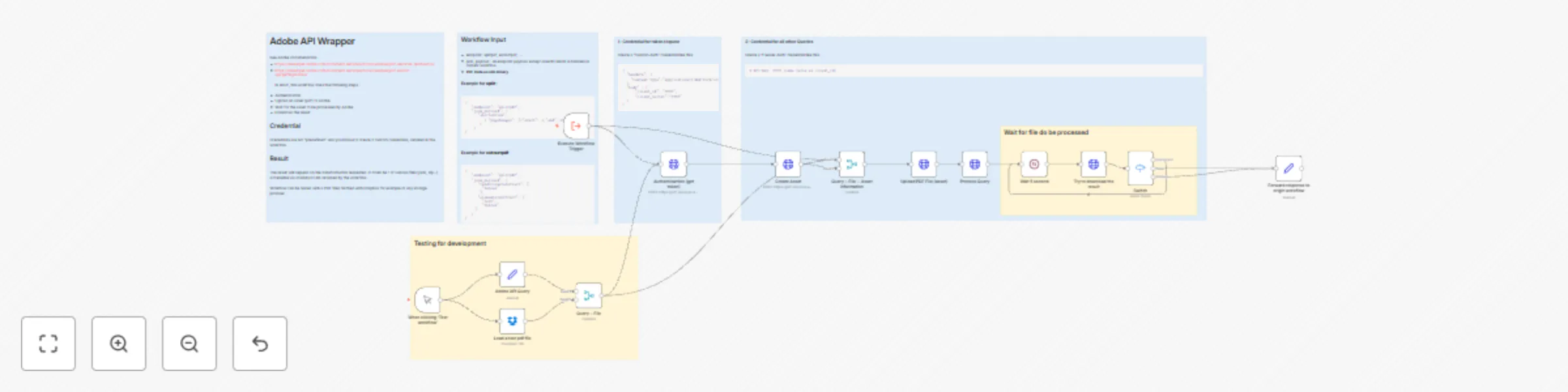
## Adobe developer API Did you know that Adobe provides an API to perform all sort of manipulation on PDF files : - Split PDF, Combine PDF - OCR - Insert page, delete page, replace page, reorder page - Content extraction (text content, tables, pictures) - ... The free tier allows up to 500 PDF operation / month. As it comes directly from Adobe, it works often better than other alternatives. Adobe documentation: - [https://developer.adobe.com/document-services/docs/overview/pdf-services-api/howtos/](https://developer.adobe.com/document-services/docs/overview/pdf-services-api/howtos/) - [https://developer.adobe.com/document-services/docs/overview/pdf-extract-api/gettingstarted/](https://developer.adobe.com/document-services/docs/overview/pdf-extract-api/gettingstarted/) ## What does this workflow do The API is a bit painful to use. To perform a transformation on a PDF it requires to - Authenticate and get a temporal token - Register a new asset (file) - Upload you PDF to the registered asset - Perform a query according to the transformation requested - Wait for the query to be proccessed by Adobe backend - Download the result This workflow is a generic wrapper to perform all these steps for any transformation endpoint. I usually use it from other workflow with an `Execute Workflow` node. Examples are given in the workflow. ## Example use case This service is useful for example to **clean PDF data for an AI / RAG system**. My favorite use-case is to extract table as images and forward images to an AI for image recognition / description which is often more accuarate than feedind raw tabular data to a LLM.

d
digi-stud.io
Document Extraction
23 Sep 2024
4581
0