U

ueharayuuki

3
Workflows

Workflows by ueharayuuki
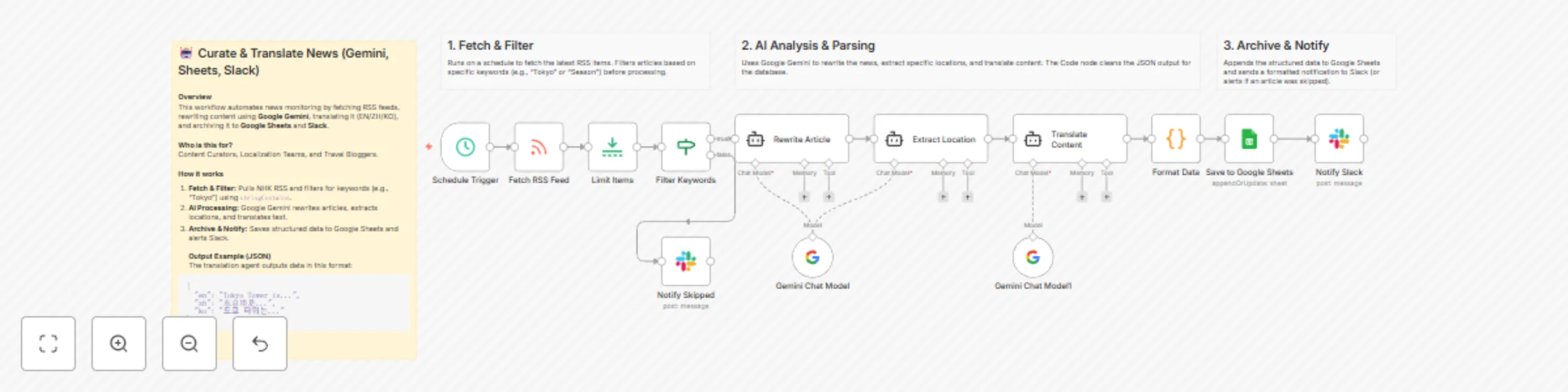
Workflow preview: Curate & translate news from RSS using Google Gemini, Sheets, and Slack
Free advanced

Curate & translate news from RSS using Google Gemini, Sheets, and Slack

## 🤖 Automated Multi-lingual News Curator & Archiver **Overview** This workflow automates news monitoring by fetching RSS feeds, rewriting content using AI, translating it (EN/ZH/KO), and archiving it. **Who is this for?** Content Curators, Localization Teams, and Travel Bloggers. **How it works** 1. **Fetch & Filter:** Pulls NHK RSS and filters for keywords (e.g., "Tokyo"). 2. **AI Processing:** Google Gemini rewrites articles, extracts locations, and translates text. 3. **Archive & Notify:** Saves structured data to Google Sheets and alerts Slack. **Setup Requirements** 1. **Credentials:** Google Gemini, Google Sheets, Slack. 2. **Google Sheet:** Create headers: `title`, `summary`, `location`, `en`, `zh`, `ko`, `url`. 3. **Slack:** Configure Channel IDs. **Customization** - **RSS Read:** Change feed URL. - **If Node:** Update filter keywords. - **AI Agent:** Adjust system prompts for tone. ## 1. Fetch & Filter Runs on a schedule to fetch the latest RSS items. Filters articles based on specific keywords (e.g., "Tokyo" or "Season") before processing. ## 2. AI Analysis & Parsing Uses Google Gemini to rewrite the news, extract specific locations, and translate content. The Code node cleans the JSON output for the database. ## 3. Archive & Notify Appends the structured data to Google Sheets and sends a formatted notification to Slack (or alerts if an article was skipped). **Output Example (JSON)** The translation agent outputs data in this format: ```json { "en": "Tokyo Tower is...", "zh": "东京塔是...", "ko": "도쿄 타워는..." }

u
ueharayuuki
Content Creation
27 Nov 2025
57
0

Workflow preview: Daily habit RPG: Gamified Gmail reminders with quest system and progress tracking
Free advanced

Daily habit RPG: Gamified Gmail reminders with quest system and progress tracking

Who's it for This template is perfect for anyone struggling with habit consistency who wants a fun, engaging way to maintain daily routines. It's ideal for productivity enthusiasts, fitness beginners, remote workers, students, or anyone who loves gamification and RPG elements. If you've ever wished your daily tasks felt more like an adventure game, this workflow is for you. How it works The workflow runs automatically every morning at your chosen time (default: 6 AM) and transforms your daily habits into an RPG adventure: 1. Daily Trigger - Scheduled to run every morning 2. Player Stats Generation - Creates random level, XP, and streak data (in production, connect to a database) 3. Quest Generation - Assigns daily "quests" based on the day of week (weekday routines, weekend specials, Monday goals) 4. Quote Fetching - Gets a motivational quote from a free API 5. Achievement Processing - Checks for milestone achievements (7-day streak, 30-day streak, level 10) 6. Email Creation - Builds a beautiful HTML email with game-like design 7. Email Delivery - Sends the quest email via Gmail 8. Stats Logging - Records execution statistics The system includes different habit sets for weekdays and weekends, random bonus quests, a rank system (D to SSS), achievement unlocks, and progress tracking with visual elements like progress bars. Setup steps Setup takes approximately 5 minutes: 1. Import the workflow into your n8n instance 2. Connect Gmail - Click "Create New" in the Gmail node credentials and authenticate via OAuth2 3. Update recipient email - Change "[email protected]" to your actual email in the "Send Quest Email" node 4. Customize habits (optional) - Edit the quest arrays in the "Generate Daily Quests" node 5. Test the workflow - Click "Execute Workflow" to send a test email 6. Activate - Toggle the workflow to "Active" when ready for daily automation Requirements * Gmail account with OAuth2 authentication * n8n instance (cloud or self-hosted) * No external API keys required (uses free Quotable API) * No database required (uses random data for demonstration) How to customize the workflow Modify Daily Habits Edit the questDatabase object in the "Generate Daily Quests" node: * Add your own habits with custom names * Adjust XP and coin rewards * Change difficulty levels (Easy, Medium, Hard, Epic, Bonus) * Set different quests for weekdays vs weekends Visual Customization In the "Create Email Template" node: * Modify color schemes in the CSS * Adjust font sizes and layouts * Change emoji icons for quests * Update achievement thresholds Timing and Schedule In the "Daily Morning Trigger" node: * Change the trigger hour (default: 6 AM) * Adjust timezone if needed * Set different schedules for weekdays/weekends Motivational Content * Update daily motivation messages for each day of the week * Customize achievement names and descriptions * Modify rank titles and progression * Add your own fallback quotes This workflow brings the addictive nature of RPG games to your daily habits, making routine tasks feel like an epic adventure. Perfect for anyone who wants to level up their life, one quest at a time!

u
ueharayuuki
Personal Productivity
10 Nov 2025
213
0

Workflow preview: Automate weather reports with GPT-4 Mini and Open-Meteo API to Gmail and Slack
Free advanced

Automate weather reports with GPT-4 Mini and Open-Meteo API to Gmail and Slack

This workflow provides a comprehensive weather reporting system with two main functionalities: a scheduled daily summary and an interactive AI agent for dynamic queries. ## Who's it for? This template is ideal for anyone who wants to stay updated on the weather, from individuals planning their day to teams needing automated daily briefings. It's also a great example for developers and n8n users who want to explore the capabilities of AI Agents and integrating external APIs in their workflows. ## What it does / How it works This workflow operates in two distinct modes: 1. **Scheduled Daily Summary:** * The workflow triggers automatically every day at 9:00 AM (customizable) or can be run manually. * It fetches the latest weather data for a specified location (default is near Chiba, Japan) from the Open-Meteo API. * It then formats a message with the day's maximum and minimum temperatures. * Finally, it sends this summary to a designated Gmail address and a Slack channel. 2. **AI-Powered Forecasts via Chat:** * When you send a message to the Chat Trigger webhook, it activates the AI Agent. * The AI Agent, powered by an OpenAI model, understands natural language questions like "What's the humidity right now?" or "Will it be warmer tomorrow?". * The agent uses an HTTP Request tool to fetch real-time, specific data from the weather API to answer your question. * The generated answer is then sent back to you via both Gmail and Slack. ## How to set up 1. **Configure Credentials:** Add your credentials for OpenAI, Gmail, and Slack in the credentials menu. 2. **Set Your Location:** In the `Fetch Weather Data` and `HTTP Request Tool for AI` nodes, update the `latitude` and `longitude` in the URL to your desired location. 3. **Update Email and Slack:** * In the `Send Email Summary` and `Send AI Response via Email` nodes, change the recipient email address to your own. * In the `Send Slack Summary` and `Send AI Response via Slack` nodes, select your desired Slack channel. 4. **Adjust the Schedule:** Modify the `Schedule Trigger` node to change the time or frequency of the daily summary. 5. **Activate the Workflow:** Click the "Active" toggle in the top-right corner to enable the workflow. ## How to customize the workflow * **Change the Message:** You can easily customize the notification message in the `Format Daily Summary` node (for the summary) and in the `Send...` nodes for both flows. * **Add More Data:** The Open-Meteo API provides a wealth of data. You can fetch additional information like precipitation, wind speed, or UV index by modifying the URL in the HTTP Request nodes. * **Integrate Other Services:** Add other notification nodes like Discord, Telegram, or Microsoft Teams to send the weather reports to more platforms.

u
ueharayuuki
Personal Productivity
10 Nov 2025
272
0