Tsubasa Shukuwa
Workflows by Tsubasa Shukuwa
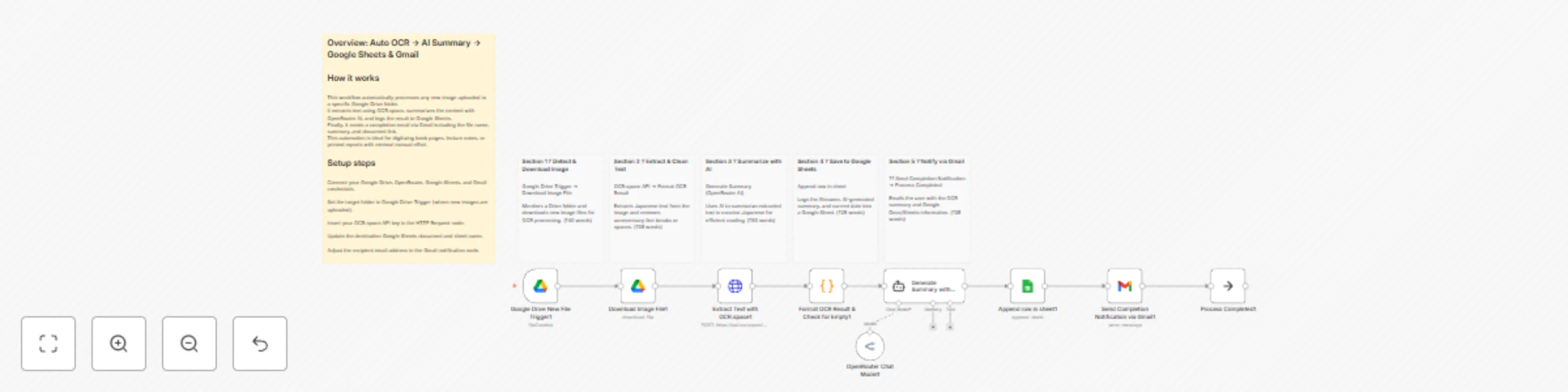
Extract text from Google Drive images with OCR.space, OpenRouter AI summary to sheets & Gmail
## How it works This workflow automatically detects new image files uploaded to a Google Drive folder, extracts Japanese text using OCR, summarizes it with AI, and records the result in Google Sheets. Finally, it sends a completion email notification with the file name and summary. **Workflow steps:** 1. **Google Drive New File Trigger** – Watches a specific Google Drive folder for new image uploads. 2. **Download Image File** – Downloads the newly uploaded image for processing. 3. **Extract Text with OCR.space** – Sends the image to the OCR.space API to extract text (Japanese supported). 4. **Format OCR Result & Check for Empty** – Cleans and validates the extracted text. 5. **Generate Summary with OpenRouter AI** – Uses an AI model to generate a short summary of the text. 6. **OpenRouter Chat Model** – Connects the AI Agent to the OpenRouter language model. 7. **Append row in sheet** – Adds the file name, AI summary, and processing date to Google Sheets. 8. **Send Completion Notification via Gmail** – Sends an email with the summarized content and Google Sheets link. 9. **Process Completed** – Marks the workflow’s successful end. --- ## Setup steps 1. Connect your **Google Drive**, **Google Sheets**, and **Gmail** accounts through credentials. 2. Set your **OCR.space API key** in the HTTP Request node. 3. Add your **OpenRouter API key** credential for the AI node. 4. Replace the **Google Sheet ID** and **folder ID** with your own. 5. Customize the **Gmail recipient** and email message as needed. 6. Adjust the **polling frequency** (e.g., every 1 minute) depending on your workflow needs. --- ## Ideal for - Digitizing and summarizing handwritten or printed book pages. - Automatically extracting and archiving text from scanned reports or notes. - Businesses or educators automating document reading and summarization tasks. --- ⚙️ **Note:** Each node includes a clear **English Sticky Note** above it for easier understanding and documentation.
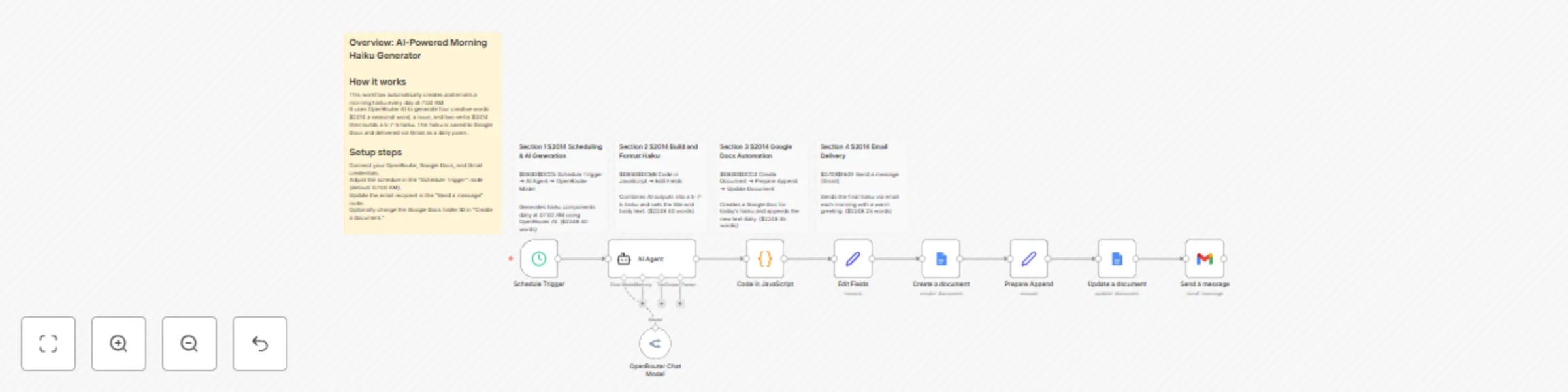
Daily morning haiku generation with OpenRouter AI, Google Docs and Gmail
## How it works This workflow automatically generates a new haiku poem every morning using AI, formats it in 5-7-5 structure, saves it to Google Docs, and sends it to your email inbox. **Workflow steps:** 1. **Schedule Trigger** – Runs daily at 7:00 AM. 2. **AI Agent** – Asks AI to output four words (*kigo*, *noun*, *verb1*, *verb2*) in JSON format. 3. **Code in JavaScript** – Builds a 5-7-5 haiku using the AI-generated words and sets today’s title. 4. **Edit Fields** – Prepares document fields (title and body) for Google Docs. 5. **Create a document** – Creates a new Google Document for the haiku. 6. **Prepare Append** – Collects the document ID and haiku text for appending. 7. **Update a document** – Inserts the haiku into the existing Google Doc. 8. **Send a message** – Sends the haiku of the day to your Gmail inbox. 9. **OpenRouter Chat Model** – Connects the OpenRouter model used by the AI Agent. --- ## Setup steps 1. Connect your **OpenRouter API key** as a credential (used in the AI Agent node). 2. Update your **Google Docs folder ID** and Gmail account credentials. 3. Change the **email recipient address** in the “Send a message” node. 4. Adjust the **Schedule Trigger** time as you like. 5. Run the workflow once to test and verify document creation and email delivery. --- ## Ideal for - Writers and poets who want daily creative inspiration. - Individuals seeking a fun morning ritual. - Educators demonstrating AI text generation in a practical example. --- ⚙️ **Note:** Each node includes an **English Sticky Note** above it for clarity and documentation.
Track government grants with OpenRouter AI, RSS feeds, Google Sheets & Gmail
## How it works This workflow automatically fetches the latest public grant information from the Ministry of Health, Labour and Welfare (MHLW) RSS feed. It uses AI to summarize and structure each grant post into a clear format, stores the results in Google Sheets, and sends a formatted HTML summary via Gmail. **Workflow summary** 1. Schedule Trigger – Runs the flow daily or weekly. 2. RSS Feed Reader – Fetches the latest MHLW news and updates. 3. Text Classifier (AI) – Categorizes the item as “Grant/Subsidy”, “Labor-related”, or “Other”. 4. AI Agent – Extracts structured data such as title, summary, deadline, amount, target, and URL. 5. Google Sheets – Appends or updates the database using the grant title as the key. 6. Code Node – Builds an HTML report summarizing new entries. 7. Gmail – Sends a daily digest email to your inbox. --- ## Setup steps 1. Add your **OpenRouter API key** as a credential (used in the AI Agent). 2. Replace the **Google Sheets ID** and sheet name with your own. 3. Update the **recipient email** address in the Gmail node. 4. Adjust the **schedule trigger** to match your preferred frequency. 5. (Optional) Add more RSS feeds if you want to monitor other sources. --- ## Ideal for - Consultants or administrators tracking subsidy and grant programs - Small business owners who want automatic updates - Anyone who wants a daily AI-summarized government grant digest --- ⚙️ **Note:** Detailed explanations and setup hints are included as **Sticky Notes** above each node inside the workflow.