T

Tom Sekula

1
Workflow

Workflows by Tom Sekula

Workflow preview: Simple Bluesky multi-image post using native Bluesky API
Free advanced

Simple Bluesky multi-image post using native Bluesky API

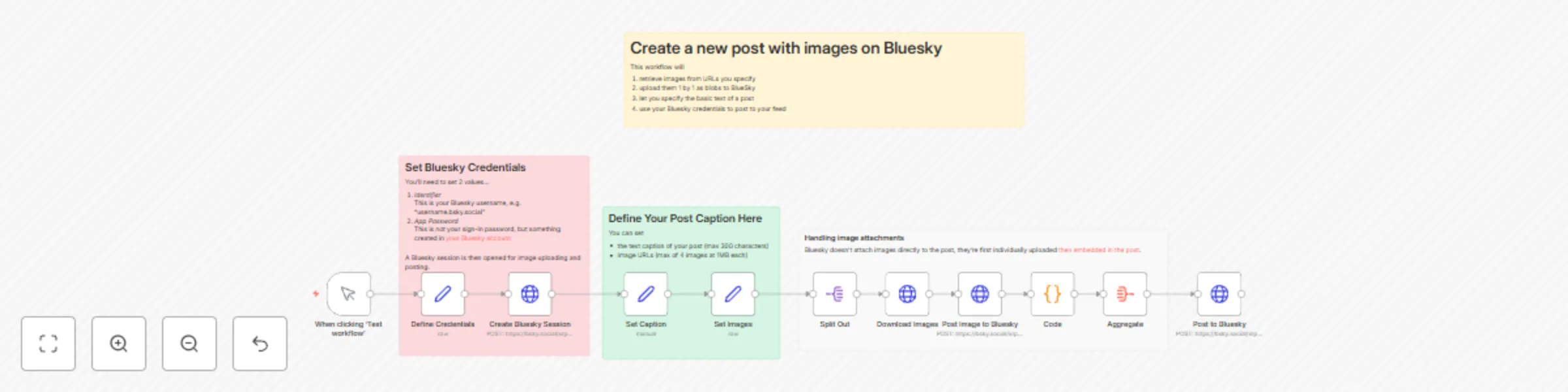
## Who is this workflow for? This workflow is the baseline workflow for anyone who needs to automate the process of posting 1-4 images to Bluesky using the Bluesky API. It is ideal for anyone looking to streamline their social media posting process, saving time and ensuring consistent content delivery. ## Use Case / Problem Solved Manually posting images and captions on Instagram can be time-consuming, especially for businesses and content creators managing multiple accounts. This workflow automates the process from image preparation to publishing, reducing manual effort and increasing efficiency. ## What this workflow does 1. Trigger Initialization: The workflow starts with a manual trigger that can be adapted to other triggers (e.g., HTTP webhook or schedule). 2. Set Parameters: The workflow includes a node that sets essential parameters, such as the Bluesky account ID, image URLs, and caption. 3. Prepare Bluesky Session: A node creates the authenticated session data used by the upload and post operations later in the workflow. 4. Publish Media: Nodes retrieve image files from the specified URLS and uploads them as blobs to Bluesky, a necessary pre-requisite for a Bluesky post to have images attached. 5. Post text caption + images: A node does the final call to the Bluesky API, including the text caption and relevant image references. ## Setup 1. Sign-in to Bluesky and create an [App Password](https://bsky.app/settings/app-passwords) 2. Add your username and App Password to the *Define Credentials* node. 3. Set the caption (text content) of your post in the *Set Caption* node. 4. Set 1-4 image URLs in the *Set Images* node 5. Adapt the initial trigger as needed to fit your workflow's requirements (e.g., schedule, webhook). 6. Adapt the caption and images nodes to accept dynamic parameters. ## Limitations This workflow assumes a minimum of 1 image URL to function. If you want a text-only post, remove the whole `embed` section from the JSON in last *Post to Bluesky* node, as well as relevant image attachment nodes. The 300-character limit in Bluesky includes the caption + hashtags + image alt text. Going over 300 will return a `Record/description must not be longer than 300 graphemes` error.

T
Tom Sekula
Social Media
21 Nov 2024
3022
0