T

Tran Trung Nghia

2
Workflows

Workflows by Tran Trung Nghia
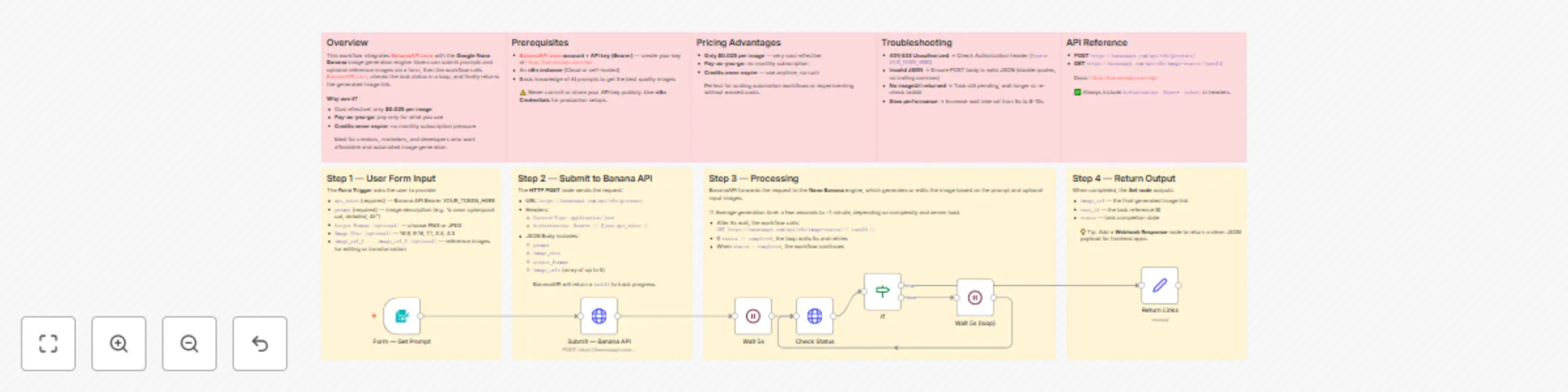
Workflow preview: Generate AI images with text prompts using BananaAPI and Nano Banana Engine
Free advanced

Generate AI images with text prompts using BananaAPI and Nano Banana Engine

# Cheap Nano Banana API - AI Image Generator with BananaAPI.com ## Overview This workflow integrates **BananaAPI.com** with the **Nano Banana** image engine to generate or edit AI images from **text prompts** and optional **reference images**. Users simply fill out a form with their prompt and preferences, the workflow submits the request to BananaAPI, polls the status until it is complete, and then returns the final image link. **Why use it?** - Super affordable: only **$0.025 per image** - **Pay-as-you-go** pricing — no monthly subscription - **Credits never expire** — use anytime, no pressure Perfect for creators, marketers, and developers looking for a cost-effective AI image generator inside n8n. --- ## Prerequisites - A **BananaAPI.com account + API key** (Bearer token). Sign up at [BananaAPI.com](https://bananaapi.com/api). - An **n8n instance** (Cloud or self-hosted). - Basic knowledge of crafting **AI prompts** for better quality results. ⚠️ Important: Never expose your API key in public workflows. Use **n8n Credentials** for production setups. --- ## Setup Instructions ### 1. Obtain API Key - Create an account at BananaAPI.com, generate your API key, and keep it safe. ### 2. Configure the Form The **Form Trigger** collects the following fields: - `api_token` (required) — Banana API key - `prompt` (required) — image description (e.g., *“a neon cyberpunk cat, detailed, 4k”*) - `Output Format [optional]` — choose PNG or JPEG - `Image Size [optional]` — 16:9, 9:16, 1:1, 3:4, 4:3 - `image_url_1 ... image_url_5 [optional]` — reference images for editing/transform ### 3. Workflow Execution 1. User fills the form and submits. 2. Workflow sends a **POST** request to `https://bananaapi.com/api/n8n/generate/`. 3. BananaAPI forwards the job to **Nano Banana**. 4. Workflow waits 5s, then polls status via `image-status/{taskId}`. 5. If `status != completed`, loop until ready. 6. Once completed, workflow returns the final image URL. ### 4. Outputs The workflow returns: - `image_url` — the generated image link - `task_id` — task reference ID - `status` — job status (completed/pending) 💡 Tip: Add a **Webhook Response** node to return clean JSON for frontend apps. --- ## Customization Tips - **Enhance prompts** with details like style (photorealistic, cartoon, cyberpunk), lighting, or action for better results. - Use `image_url_1` with a strong prompt to create **image editing** flows. - Adjust **wait time** (5s → 8–10s) to optimize polling frequency. - Add validation to ensure required fields are always filled in. --- ## API Reference - **POST** `https://bananaapi.com/api/n8n/generate/` - **GET** `https://bananaapi.com/api/n8n/image-status/{taskId}` Docs: [BananaAPI Docs](https://bananaapi.com/api) ✅ Always include `Authorization: Bearer <token>` in headers. --- ## Pricing Advantages - **$0.025 per image** — cheaper than most alternatives - **Pay-as-you-go** — no monthly subscription required - **Credits never expire** — full flexibility to use anytime This makes BananaAPI + Nano Banana one of the most **budget-friendly** AI image solutions for automation workflows. --- ## Troubleshooting - **401/403 Unauthorized** → Check Authorization header (`Bearer token`). - **Invalid JSON** → Ensure POST body is valid JSON (double quotes, no trailing commas). - **No imageUrl returned** → Task still pending; wait longer or verify taskId. - **Slow performance** → Increase wait interval (8–10s). --- ## Security Best Practices - Do not hardcode API tokens in public workflows. - Use **n8n Credentials** for storing tokens securely. - Hide sensitive fields in forms or use Webhooks for controlled access.

T
Tran Trung Nghia
Content Creation
8 Sep 2025
3567
0

Workflow preview: Generate AI videos from text or images with Veo 3 API and VietVid.com
Free intermediate

Generate AI videos from text or images with Veo 3 API and VietVid.com

# Veo 3 Video Generator via VietVid.com API (n8n) ## Overview This workflow leverages the **VietVid.com Veo3 model** to generate AI videos from simple text descriptions or optional images. Users interact via a **form interface**, inputting a prompt (e.g., a scene description), choosing aspect ratio and model, then the system automatically submits the request to the VietVid API, monitors the generation status in real time, and retrieves the final video output. It’s ideal for **content creators, marketers, and developers** exploring **text-to-video AI creation**, supporting intelligent video generation with minimal setup. --- ## Prerequisites - A **VietVid.com account and API key**: Register at [VietVid.com](https://vietvid.com) to obtain your free or paid API key. - An active **n8n instance** (cloud or self-hosted) with HTTP Request, Wait, and form submission capabilities. - Basic knowledge of **AI prompts for video generation** to achieve optimal results. --- ## Setup Instructions ### 1. Obtain API Key - Register at **VietVid.com** and generate your API key. - Store it securely—**do not share publicly**. ### 2. Configure the Form - In the **Form Trigger** node, ensure the following fields are available: - `text_prompt` — video description (e.g., *“A serene mountain landscape at sunset with birds flying”*) - `ImageURL [optional]` — optional image input for image-to-video - `api_Token` — your VietVid API key - `aspect_Ratio [16:9,9:16]` — dropdown to select ratio - `model` — choose between `veo3` and `veo3_fast` ### 3. Test the Workflow - Click **Execute Workflow** in n8n. - Access the generated form URL. - Submit your **prompt, API key, and options**. - The workflow will **poll the VietVid API every 10 seconds** until the video is ready. ### 4. Handle Outputs - The final **Set node** formats and displays the video links: - `720p_link` — always available when ready. - `1080p_link` — available only for **16:9 aspect ratio**. --- ## Customization Tips - **Enhance prompts**: Add details like style (*realistic, cinematic, animated*), duration, actions, and camera/lighting for better results. - **Stability**: Fix the `seeds` value (e.g., `50000`) for more consistent characters. - **Webhook Response**: Add a **Webhook Response node** to return a clean JSON payload for frontend integrations. - **Adjust polling delay**: Modify Wait node (8–15s) if needed to balance speed vs. API calls.

T
Tran Trung Nghia
Content Creation
3 Sep 2025
1355
0