Monitor GitHub releases with Gemini AI Chinese translation & Slack notifications
## Overview
This n8n template monitors specified GitHub repositories. When a new release is published, it automatically fetches the information, uses AI (Google Gemini by default) to summarize and translate it into Chinese, and sends a formatted notification to a designated Slack channel.
**Core Features:**
* **Automated Monitoring**: Checks for updates on a predefined schedule.
* **Intelligent Processing**: Uses AI to extract key information and translate.
* **Error Handling**: Sends an error notification if fetching RSS for a single repository fails, without affecting others.
* **Duplicate Prevention**: Remembers the last processed release ID using Redis to ensure only new content is pushed.
## Prerequisites
* **Slack**: Configure your Slack app credentials in n8n.
* **Redis**: Have an available Redis service and configure its credentials in n8n.
* **AI Provider (Gemini)**: Configure credentials for Google Gemini (or your chosen AI model) in n8n.
## Configuration Instructions
After importing the template, you need to modify the following key nodes:
1. **`Cron Trigger`**:
* Adjust the `Rule` setting to change the update check frequency (default is `0 */10 9-23 * * *`, checking every 10 minutes between 9 AM and 11 PM daily).
2. **`GitHub Config` (Repository List - Code Node)**:
* Edit the JavaScript array within this node's code area.
* Modify or add the repositories you want to follow. Each repository object needs a `name` (custom display name) and `github` (format: `owner/repo`).
* Example:
```javascript
{
"name": "n8n", // Custom display name
"github": "n8n-io/n8n" // GitHub path
},
{
"name": "LobeChat",
"github": "lobehub/lobe-chat"
}
// ... add more repositories
```
3. **`Redis` and `Redis2` (Redis Connection)**:
* Select your configured Redis credentials in both nodes.
4. **`Gemini` (AI Model)**:
* Select your configured Google Gemini credentials.
* (Optional) Replace with a different supported AI model node and select its credentials.
5. **`Information Extractor` (AI Processing & Translation)**:
* **Main Configuration**: Review the `System Prompt`. By default, it asks the AI to extract information and translate it into **Chinese**. Modify this prompt if you need a different language or summary style.
6. **`Send Message` and `Send Error` (Slack Notifications)**:
* Select your configured Slack credentials in both Slack nodes.
* Set the target `Channel ID` for notifications.
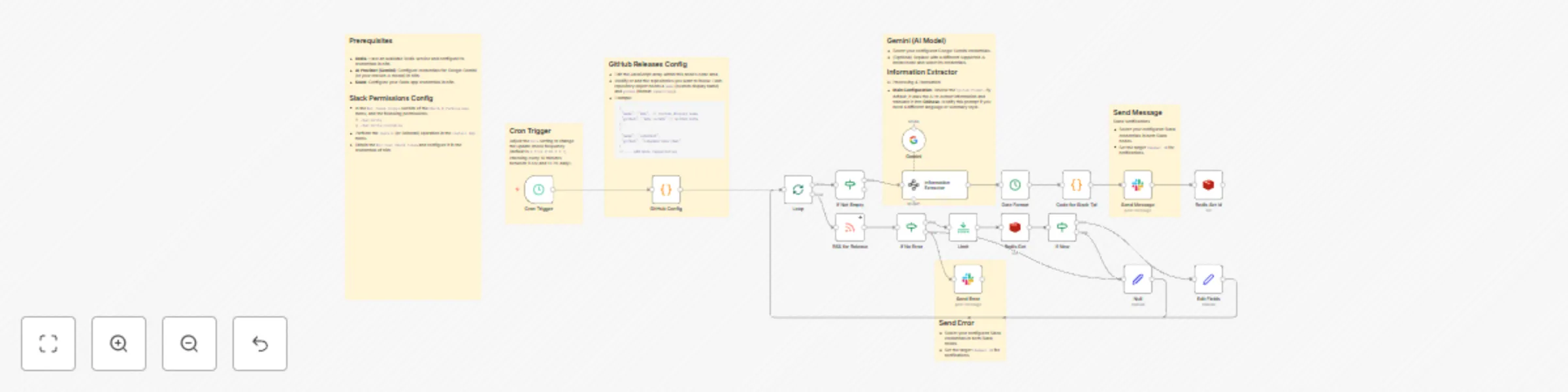
## Workflow Overview
1. **Start**: `Cron Trigger` initiates the workflow on schedule.
2. **Load Config**: `GitHub Config` provides the list of repositories to monitor.
3. **Loop**: The `Loop` node iterates through each repository.
4. **Fetch & Check**:
* The `RSS` node attempts to fetch the repository's releases feed.
* `If No Error` checks for success:
* **Failure**: `Send Error` posts an error to Slack, skips this repository.
* **Success**: Continues.
5. **Check for New Release**:
* The `Redis` node retrieves the last recorded Release ID for this repository.
* The `If New` node compares the latest Release ID with the recorded ID:
* **Different IDs (New Release)**: Proceeds to processing.
* **Same ID (Already Processed)**: Skips this repository.
6. **Process & Notify (Only for New Releases)**:
* `Information Extractor` (with `Gemini`) extracts, summarizes, and translates the content.
* The `Code` node formats the information into Slack Block Kit.
* `Send Message` sends the formatted message to Slack.
* The `Redis2` node stores the current Release ID in Redis.
7. **End**: The workflow finishes after processing all repositories.
## Conclusion
Once configured, this template automates GitHub release monitoring, uses AI to distill key information, and delivers it efficiently to your Slack workspace.