H

Hassan

5
Workflows

Workflows by Hassan

Workflow preview: Generate personalized email icebreakers with GPT-4.1 and Instantly.ai integration
Free advanced

Generate personalized email icebreakers with GPT-4.1 and Instantly.ai integration

# AI-Powered Personalized Cold Email Icebreaker Generator ## Overview This intelligent automation system transforms generic cold outreach into highly personalized email campaigns by automatically scraping prospect websites, analyzing their content with AI, and generating unique, conversational icebreakers that reference specific, non-obvious details about each business. The workflow integrates seamlessly with Instantly.ai to deliver campaigns that achieve significantly higher response rates compared to traditional cold email approaches. The system processes leads from your n8n data table, validates contact information, scrapes multiple pages from each prospect's website, uses GPT-4.1 to synthesize insights, and crafts personalized openers that make recipients believe you've done deep research on their business—all without manual intervention. ## Key Benefits **🎯 Hyper-Personalization at Scale**: Generate unique icebreakers for 30+ leads per execution that reference specific details about each prospect's business, creating the impression of manual research while automating 100% of the process. **💰 Dramatically Higher Response Rates**: Personalized cold emails using this system typically achieve 4-5% response rates for campaigns, directly translating to more booked meetings and closed deals. **⏱️ Massive Time Savings**: What would take 10-15 minutes of manual research per prospect (website review, note-taking, icebreaker writing) now happens in 30-45 seconds automatically, freeing your team to focus on conversations instead of research. **🧠 AI-Powered Intelligence**: Dual GPT model approach uses GPT-4.1-mini for efficient content summarization and GPT-4.1 for creative icebreaker generation, ensuring both cost efficiency and high-quality output with a distinctive "spartan" tone that converts. **🔄 Built-In Error Handling**: Comprehensive retry logic (5 attempts with 5-second delays) and graceful failure management ensure the workflow continues processing even when websites are down or inaccessible, automatically removing problem records from your queue. **🗃️ Clean Data Management**: Automatically removes processed leads from your database after successful campaign addition, preventing duplicate outreach and maintaining organized lead lists for future campaigns. **📊 Batch Processing Control**: Processes leads in configurable batches (default 30) to manage API costs and rate limits while maintaining efficiency, with easy scaling for larger lists. **🔌 Instantly.ai Integration**: Direct API integration pushes leads with custom variables into your campaigns automatically, supporting skip_if_in_campaign logic to prevent duplicate additions and maintain clean campaign lists. ## How It Works **Stage 1: Lead Acquisition & Validation** The workflow begins with a manual trigger, allowing you to control when processing starts. It queries your n8n data table and retrieves up to 30 records filtered by Email_Status. The Limit node caps this at 30 items to control processing costs and API usage. Records then pass through the "Only Websites & Emails" filter, which uses strict validation to ensure both organization_website_url and email fields exist and contain data—eliminating invalid records before expensive AI processing occurs. **Stage 2: Intelligent Web Scraping** Valid leads enter the Loop Over Items batch processor, which handles them sequentially to manage API rate limits. For each lead, the workflow fetches their website homepage using the HTTP Request node with retry logic (5 attempts, 5-second waits) and "always output data" enabled to capture even failed requests. The If node checks response names for error indicators, if errors are detected, the problematic record is immediately deleted from the database via Delete row(s) to prevent future processing waste. Successfully scraped HTML content passes through the Markdown converter, which transforms it into clean markdown format that AI models can analyze more effectively. **Stage 3: AI Content Analysis** The markdown content flows into the first AI node, "Summarize Website Page," which uses GPT-4.1-mini (cost-efficient for summarization tasks) with a specialized system prompt. The AI reads the scraped content and generates a comprehensive two-paragraph abstract similar in detail to an academic paper abstract, focusing on what the business does, their projects, services, and unique differentiators. The output is structured JSON with an "abstract" field. Multiple page summaries (if the workflow is extended to scrape additional pages) are collected by the Aggregate node, which combines all abstracts into a single array for comprehensive analysis. **Stage 4: Personalized Icebreaker Generation** The aggregated summaries, along with prospect profile data (name, headline, company), flow into the "Generate Multiline Icebreaker" node powered by GPT-4.1 (higher intelligence for creative writing). This node uses an advanced system prompt with specific rules: write in a spartan/laconic tone, avoid special characters and hyphens, use the format "Really Loved {thing}, especially how you're {doing/managing/handling} {otherThing}," reference small non-obvious details (never generic compliments like "Love your website!"), shorten company names and locations naturally. The prompt includes a few-shot example teaching the AI the exact style and depth expected. Temperature is set to 0.5 for creative but consistent output. **Stage 5: Campaign Deployment & Cleanup** The generated icebreaker is formatted into Instantly.ai's API structure and sent via HTTP POST to the "Sending ice breaker to instantly" node. The payload includes the lead's email, first name, last name, company name, the personalized icebreaker as the "personalization" field, website URL, and supports custom_variables for additional personalization fields. The API call uses skip_if_in_campaign: true to prevent duplicate additions. After successful campaign addition, the Delete row(s)1 node removes the processed record from your data table, maintaining a clean queue. The Loop Over Items node then processes the next lead until all 30 are complete. ## Required Setup & Database Structure **n8n Data Table Requirements:** - Table Name: Configurable (default "Real estate") - Required Columns: - `id` (unique identifier for each record) - `first_name` (prospect's first name) - `last_name` (prospect's last name) - `email` (valid email address) - `organization_website_url` (full URL with https://) - `Headline` (job title/company descriptor) - `Email_Status` (filter field for processing control) **API Credentials:** - OpenAI API Key (connected as "Sycorda" credential) - Access to GPT-4.1-mini model - Access to GPT-4.1 model - Sufficient credits for batch processing (approximately $0.01-0.03 per lead) - Instantly.ai API Key - Campaign ID (replace the placeholder "00000000-0000-0000-0000-000000000000") - Active campaign with proper email accounts configured **Environment Setup:** - n8n instance with @n8n/n8n-nodes-langchain package installed - Stable internet connection for web scraping - Adequate execution timeout limits (recommended 5+ minutes for 30 leads) ## Business Use Cases **B2B Service Providers**: Agencies, consultancies, and professional services firms can personalize outreach by referencing prospect's specific service offerings, client types, or operational approach to book discovery calls and consultations. **SaaS Companies**: Software vendors across any vertical can use this to demonstrate product value through highly relevant cold outreach that references prospect pain points, tech stack, or business model visible on their websites. **Marketing & Creative Agencies**: Agencies offering design, content creation, SEO, or digital marketing services can personalize outreach by referencing prospects' current marketing approach, website quality, or brand positioning. **E-commerce & Retail**: Online retailers and D2C brands can reach potential wholesale partners, distributors, or B2B clients by mentioning their product lines, target markets, or unique value propositions. **Financial Services**: Fintech companies, accounting firms, and financial advisors can personalize cold outreach by referencing prospect's business size, industry focus, or financial complexity to offer relevant solutions. **Recruitment & Staffing**: Agencies can reach potential clients by mentioning their hiring needs, company growth, team structure, or industry specialization visible on career pages and about sections. **Technology & Development**: Software development agencies, IT consultancies, and tech vendors can reference prospect's current technology stack, digital transformation initiatives, or technical challenges to position relevant solutions. **Education & Training**: Corporate training providers, coaching services, and educational platforms can personalize outreach by mentioning company culture, team development focus, or learning initiatives referenced on websites. ## Revenue Potential Same icebreaker approach used by leading cold email experts delivers **4-5% higher reply rates** compared to generic outreach templates. By investing approximately $0.11-0.18 per personalized lead (AI processing + email sending costs), businesses achieve response rates of 4-5% versus the industry standard non-personalized campaigns. **Scalability**: Process 30 leads (or any much you want just replace the number 30 with your number) and in minutes with minimal manual oversight, allowing sales teams to maintain high personalization quality while reaching hundreds of prospects weekly. The automation handles the research-intensive work, letting your team focus on high-value conversations with engaged prospects. ## Difficulty Level & Build Time **Difficulty**: Intermediate **Estimated Build Time**: 2-3 hours for complete setup **Technical Requirements**: - Familiarity with n8n node configuration - Basic understanding of API integrations - JSON data structure knowledge - OpenAI prompt engineering basics **Setup Complexity Breakdown:** - Data table creation and population: 30 minutes - Workflow node configuration: 45 minutes - OpenAI credential setup and testing: 20 minutes - Instantly.ai API integration: 25 minutes - Prompt optimization and testing: 45 minutes - Error handling verification: 15 minutes **Maintenance Requirements**: Minimal once configured. Monthly tasks include monitoring OpenAI costs, updating prompts based on performance data, and refilling the data table with new leads. ## Detailed Setup Steps **Step 1: Create Your Data Table** 1. In n8n, navigate to your project 2. Create a new data table with a name relevant to your industry 3. Add columns: id (auto), first_name (text), last_name (text), email (text), organization_website_url (text), Headline (text), Email_Status (text) 4. Import your lead list via CSV or manual entry 5. Set Email_Status to blank or a specific value you'll filter by **Step 2: Configure OpenAI Credentials** 1. Obtain an OpenAI API key from platform.openai.com 2. In n8n, go to Credentials → Add Credential → OpenAI 3. Name it "Sycorda" (or update all OpenAI nodes with your credential name) 4. Paste your API key and test the connection 5. Ensure your OpenAI account has access to GPT-4.1 models **Step 3: Import and Configure the Workflow** 1. Copy the provided workflow JSON 2. In n8n, create a new workflow and paste the JSON 3. Update the "Get row(s)" node: - Select your data table - Configure the Email_Status filter condition - Adjust limit if needed (default 30) 4. Verify the "Loop Over Items" node has reset: false **Step 4: Configure Website Scraping** 1. In "Request web page for URL1" node, verify: - URL expression references correct field: `{{ $('Get row(s)').item.json.organization_website_url }}` - Retry settings: 5 attempts, 5000ms wait - "Always Output Data" is enabled 2. Test with a single lead to verify HTML retrieval **Step 5: Customize AI Prompts for Your Industry** 1. In "Summarize Website Page" node: - Review the system prompt - Adjust the abstract detail level if needed - Keep JSON output enabled 2. In "Generate Multiline Icebreaker" node: - **CRITICAL**: Update the few-shot example with your target industry specifics - Customize the tone guidance to match your brand voice - Modify the icebreaker format template if desired - Adjust temperature (0.5 default; lower for consistency, higher for variety) - Update the profile format to match your industry (change "Property Manager or Real estate" references) **Step 6: Set Up Instantly.ai Integration** 1. Log into your Instantly.ai account 2. Navigate to Settings → API Key and copy your key 3. Create or select the campaign where leads will be added 4. Copy the Campaign ID from the URL (format: 00000000-0000-0000-0000-000000000000) 5. In the "Sending ice breaker to instantly" node: - Update the JSON body with your api_key - Replace the campaign_id placeholder - Adjust skip_if_in_workspace and skip_if_in_campaign flags 6. Map the lead fields correctly: - email: `{{ $('Loop Over Items').item.json.email }}` - first_name: `{{ $('Loop Over Items').item.json.first_name }}` - last_name: `{{ $('Loop Over Items').item.json.last_name }}` - personalization: `{{ $json.message.content.icebreaker }}` - company_name: Extract from Headline or add to data table - website: `{{ $('Loop Over Items').item.json.organization_website_url }}` **Step 7: Test and Validate** 1. Start with 3-5 test leads in your data table 2. Execute the workflow manually 3. Verify each stage: - Data retrieval from table - Website scraping success - AI summary generation - Icebreaker quality and format - Instantly.ai lead addition - Database cleanup 4. Check your Instantly.ai campaign to confirm leads appear with custom variables 5. Review error handling by including one lead with an invalid website **Step 8: Scale and Monitor** 1. Increase batch size in the Limit node (30 → 50+ if needed) 2. Add more leads to your data table 3. Set up execution logs to monitor costs 4. Track response rates in Instantly.ai 5. A/B test prompt variations to optimize icebreaker performance 6. Consider scheduling automatic execution with n8n's Schedule Trigger ## Advanced Customization Options **Multi-Page Scraping**: Extend the workflow to scrape additional pages (about, services, portfolio) by adding multiple HTTP Request nodes after the first scrape, then modify the Aggregate node to combine all page summaries before icebreaker generation. **Industry-Specific Prompts**: Create separate workflow versions with customized prompts for different verticals or buyer personas to maximize relevance and response rates for each segment. **Dynamic Campaign Routing**: Add Switch or If nodes after icebreaker generation to route leads to different Instantly.ai campaigns based on company size, location, or detected business focus from the AI analysis. **Sentiment Analysis**: Insert an additional OpenAI node after summarization to analyze the prospect's website tone and adjust your icebreaker style accordingly (formal vs. casual, technical vs. conversational). **CRM Integration**: Replace or supplement the data table with direct CRM integration (HubSpot, Salesforce, Pipedrive) to pull leads and push results back, creating a fully automated lead enrichment pipeline. **Competitor Mention Detection**: Add a specialized prompt to the summarization phase that identifies if prospects mention competitors or specific pain points, then use this intelligence in the icebreaker for even higher relevance. **LinkedIn Profile Enrichment**: Add Clay or Clearbit integration before the workflow to enrich email lists with LinkedIn profile data, then reference recent posts or career changes in the icebreaker alongside website insights. **A/B Testing Framework**: Duplicate the "Generate Multiline Icebreaker" node with different prompt variations and use a randomizer to split leads between versions, then track performance in Instantly.ai to identify the highest-converting approach. **Webhook Trigger**: Replace the manual trigger with a webhook that fires when new leads are added to your data table or CRM, creating a fully automated lead-to-campaign pipeline that requires zero manual intervention. **Cost Optimization**: Replace GPT-4.1 models with GPT-4o-mini or Claude models for cost savings if response quality remains acceptable, or implement a tiered approach where only high-value leads get premium model processing.

H
Hassan
Lead Nurturing
16 Oct 2025
137
0

Workflow preview: AI-powered Instagram content repurposing with OpenAI GPT-4O & Perplexity Research
Free advanced

AI-powered Instagram content repurposing with OpenAI GPT-4O & Perplexity Research

## Overview Transform competitor Instagram content into optimized scripts for your own channel with this fully automated AI-powered content intelligence system. This workflow monitors Instagram profiles in your niche (AI/automation/tech), downloads their videos, transcribes the content, analyzes it for valuable tools and technologies, enriches it with web research, and rewrites it into polished, engagement-optimized scripts ready for your content team. It's like having a 24/7 content research team that never sleeps, turning competitor content into fresh opportunities for your channel. ## Key Benefits **🎯 Automated Competitive Intelligence** - Monitor unlimited Instagram profiles and automatically capture their latest content the moment they post, ensuring you never miss trending topics in your niche. **🤖 AI-Powered Content Analysis** - GPT-4O intelligently filters videos to identify only those discussing relevant tools, technologies, or AI solutions, saving hours of manual review time. **✍️ Professional Script Rewriting** - Automatically transforms competitor scripts into unique, high-quality content optimized for your brand voice with engagement-focused CTAs that drive comments and DMs. **🔍 Deep Research Integration** - Enriches every script with fresh facts from Perplexity AI's web search, adding unique insights and credibility that sets your content apart from simple reposts. **📊 Comprehensive Data Tracking** - Stores all video metadata (views, likes, comments, duration) alongside original and rewritten scripts for performance analysis and content strategy optimization. **⚡ Scalable Batch Processing** - Process multiple Instagram profiles in a single execution with built-in error handling, ensuring the workflow continues even if individual videos fail to process. **💰 Revenue-Generating Lead Magnet** - Built-in CTA system ("comment [keyword] for the link") creates engagement and captures leads directly into your DMs for monetization opportunities. **🔄 100% Repurposable Output** - Every processed video becomes a ready-to-use script with step-by-step guides, tool information, and engagement hooks perfect for reels, shorts, or TikToks. ## How It Works ### Phase 1: Content Discovery & Extraction The workflow begins by reading your curated list of Instagram profiles from a Google Sheet. These should be competitors or influencers in your niche (AI, automation, tech tools, etc.). For each profile, the system uses the Scrape Creators API to fetch their most recent post, specifically targeting video content. It extracts multiple video quality URLs and prepares them for download. ### Phase 2: Video Processing & Transcription Once a video is identified, the workflow downloads it directly from Instagram's servers using the highest quality version available. The video file is then passed to OpenAI's Whisper transcription model, which converts the audio into accurate text transcripts. This happens automatically even for videos with background music, multiple speakers, or accents. ### Phase 3: Intelligent Content Filtering The raw transcript is analyzed by GPT-4O using a sophisticated prompt that determines if the content is relevant to your niche. The AI identifies: - Whether the video discusses tools, technologies, or AI solutions (verdict: true/false) - Specific tool names mentioned - Step-by-step instructions for using the tools - A search query for additional research - Suggestions for making the content more engaging for an AI/automation audience If the content isn't relevant, the workflow skips it and moves to the next profile, saving API costs and processing time. ### Phase 4: Deep Research & Fact-Finding For relevant content, the system automatically queries Perplexity AI using the generated search prompt. Perplexity searches the web in real-time to find three interesting, peculiar, or unique facts about the tool or technology. This adds depth and credibility to your final script that the original content likely didn't have. ### Phase 5: Professional Script Rewriting The final AI step combines everything: the original transcript, the step-by-step guide, the Perplexity research, and the improvement suggestions. GPT-4O rewrites the entire script in your brand voice (casual, spartan, straightforward) at approximately 100 words. The new script: - Opens with a strong hook - Presents the tool/technology clearly - Includes the researched facts naturally - Provides value-driven instructions - Ends with a specific CTA (e.g., "Comment 'AI' and I'll send the link") ### Phase 6: Data Storage & Loop Execution All data is written back to your Google Sheet including video metadata (ID, timestamp, caption, engagement metrics), the original transcript, and the rewritten script. The workflow then loops back to process the next Instagram profile in your list, continuing until all profiles have been processed. ## Required Setup ### Google Sheets Database Create a Google Sheet with two tabs: 1. **"profiles" tab** - Column: "Instagram Handles" (without @ symbol, e.g., "aiautomationhub") 2. **"phantom output" tab** - Columns: id, timeStamp, caption, commentcount, videoUrl, likesCount, videoViewsCount, Username, Duration, original Script, rewritten Script, style, Updated ### API Credentials Required - **Scrape Creators API** - For Instagram data extraction (handles, posts, videos) - **OpenAI API Key** - For Whisper transcription and GPT-4O script analysis/rewriting - **Perplexity API Key** - For real-time web research and fact-finding - **Google Sheets OAuth** - For reading profiles and writing processed data ### Software Requirements - n8n instance (cloud or self-hosted) - Internet connection for API calls - Sufficient OpenAI credits (approximately $0.05-0.15 per video processed) ## Business Use Cases **Content Creation Agencies** - Offer content repurposing services to clients, turning competitor research into ready-to-post scripts at scale. **Social Media Managers** - Monitor competitor content and generate fresh ideas for your own channels without manual research. **Course Creators** - Identify trending tools in your niche and create educational content around them before competitors do. **Affiliate Marketers** - Discover new tools to promote, complete with ready-made scripts and CTAs for lead generation. **SaaS Companies** - Track how competitors explain similar products and optimize your own messaging based on what works. **Newsletter Operators** - Find trending topics and tools to feature, with scripts easily adaptable to written content. ## Revenue Potential **Direct Sales**: Sell this workflow template for $97-$297 depending on setup complexity and included support. **Subscription Service**: Offer managed content intelligence as a service at $197-$497/month, processing unlimited profiles for clients. **Agency Upsell**: Use this as a lead generation tool (the CTA system) to build an email/DM list, then sell content creation services at $500-$2,000 per client/month. **Course Integration**: Include as a bonus tool in a content creation course priced at $497-$997, increasing perceived value. **White-Label Licensing**: License to agencies for $997-$2,997 with white-label rights for their client base. **Time Savings ROI**: If a content team spends 2 hours per video on research and scripting at $50/hour, this workflow saves $100 per video. Processing 20 videos weekly = $104,000 annual savings. ## Difficulty Level & Build Time **Difficulty**: Intermediate-Advanced - Requires understanding of API authentication - Needs basic JSON knowledge for data mapping - Involves prompt engineering for optimal AI outputs **Build Time**: 3-4 hours for experienced n8n users, 6-8 hours for beginners - Setup and API credential configuration: 1 hour - Node connection and data flow: 1-2 hours - Prompt optimization and testing: 1-2 hours - Google Sheets schema creation: 30 minutes - End-to-end testing with real profiles: 1-2 hours **Maintenance**: Low - Occasional prompt tweaks as AI models evolve ## Detailed Setup Steps 1. **Create Google Sheets Database** - Create new Google Sheet named "Instagram Content Intelligence" - Add tab "profiles" with column "Instagram Handles" - Add tab "phantom output" with all required columns (see schema above) - Populate profiles tab with 5-10 Instagram handles in your niche 2. **Obtain API Credentials** - Sign up for Scrape Creators (https://scrapecreators.com) and get API key - Create OpenAI account and generate API key with GPT-4O and Whisper access - Sign up for Perplexity AI API (https://perplexity.ai) and get API key - Connect Google Sheets via OAuth in n8n 3. **Import Workflow to n8n** - Copy the JSON workflow provided - In n8n, click "Import from File" or paste JSON - All nodes will appear but show credential errors 4. **Configure Credentials** - Click each node with a red error icon - Add your respective API credentials (Scrape Creators, OpenAI, Perplexity, Google Sheets) - Test each connection to ensure validity 5. **Map Google Sheets** - In "Get row(s) in sheet1" node, select your Google Sheet and "profiles" tab - In "Update Entries2" node, select your Google Sheet and "phantom output" tab - Verify column mappings match your sheet structure 6. **Customize AI Prompts** - Review "Filter & Generate Suggestions" prompt - adjust for your specific niche - Review "Write New Script" prompt - modify tone, length, and CTA format to match your brand - Test with sample transcripts to optimize output quality 7. **Test with Single Profile** - Add one Instagram handle to your profiles sheet - Click "Execute workflow" manually - Monitor each node's output to verify data flow - Check that final script appears in Google Sheet 8. **Scale to Multiple Profiles** - Add 10-20 Instagram profiles to your sheet - Run full workflow and monitor for errors - Review output quality across different content types - Adjust batch size if rate limits are hit 9. **Set Up Scheduling (Optional)** - Replace Manual Trigger with Schedule Trigger - Set to run daily at optimal times (e.g., 6 AM when fresh posts exist) - Enable error notifications to catch failures 10. **Implement DM Automation (Advanced)** - Connect Instagram API or tools like ManyChat - Monitor comments for keywords from your CTA - Auto-send tool links via DM to engaged users ## Advanced Customization Options **Multi-Language Support**: Add language detection node and conditional branches for different script formats per language. **Engagement Scoring**: Implement scoring algorithm based on likes, comments, views to prioritize which videos to repurpose first. **Content Categorization**: Add classification layer to tag scripts by category (productivity tools, AI models, automation platforms) for better organization. **Thumbnail Analysis**: Integrate vision AI to analyze which thumbnail styles perform best and suggest designs for your repurposed content. **Sentiment Analysis**: Add sentiment detection to understand emotional tone and adjust rewritten scripts to match or improve engagement potential. **A/B Script Variants**: Generate 2-3 script variations per video with different hooks/CTAs for split testing performance. **Competitor Trend Dashboard**: Build a connected dashboard showing trending tools, engagement patterns, and content gaps in your niche. **Auto-Publishing Integration**: Connect to Instagram API or scheduling tools to automatically post rewritten content with approval workflows. **Voice Cloning Integration**: Add ElevenLabs API to generate audio using your voice profile, making videos fully production-ready. **Multi-Platform Expansion**: Extend to TikTok, YouTube Shorts, LinkedIn by adjusting script length and platform-specific CTAs.

H
Hassan
Content Creation
10 Oct 2025
256
0

Workflow preview: Personalized LinkedIn outreach with GPT-4O, PhantomBuster & Google Sheets
Free advanced

Personalized LinkedIn outreach with GPT-4O, PhantomBuster & Google Sheets

## Overview This sophisticated n8n workflow transforms raw LinkedIn leads into personalized, high-converting connection requests using GPT-4O AI and PhantomBuster automation. The system processes LinkedIn profile data, generates authentic icebreakers, and automatically sends connection requests twice daily, creating a hands-off lead generation machine that maintains human authenticity while scaling outreach efforts. ## Key Benefits **🤖 AI-Powered Personalization** Generate unique, human-like icebreakers for every LinkedIn connection request using GPT-4O, ensuring each outreach feels personal and authentic rather than automated. **⚡ Automated Workflow Execution** Run your entire lead generation pipeline automatically twice daily (10 AM and 5 PM) USA Time with zero manual intervention required. **📊 Smart Data Management** Seamlessly manage leads across multiple Google Sheets with automatic data cleanup, duplicate prevention, and organized lead tracking. **🎯 PhantomBuster Integration** Leverage PhantomBuster's powerful LinkedIn automation to send connection requests at scale while maintaining platform compliance. **📈 Scalable Processing** Process leads in optimized batches of 10 to maintain quality while scaling your outreach efforts effectively and remain within LinkedIn’s weekly connection request limits. **📧 Real-Time Monitoring** Receive email notifications whenever connection requests are sent, keeping you informed of your campaign progress. **🔄 Continuous Operation** Self-maintaining system that processes new leads, cleans up completed tasks, and prepares for the next cycle automatically. **💼 Professional Template System** Uses proven icebreaker templates that follow the format: "Hey [name], loved seeing [personalized detail]. I'm also into [relevant connection], thought I'd connect." ## How It Works ### Phase 1: Lead Acquisition & Processing The workflow begins with scheduled triggers that activate twice daily. Upon activation, the system first cleans up previously processed leads from the source Google Sheet to prevent duplicates. It then retrieves fresh LinkedIn profile data including names, titles, company information, locations, and profile URLs. ### Phase 2: AI-Powered Personalization Engine Retrieved leads are processed in batches of 10 through a sophisticated GPT-4O integration. The AI analyzes each LinkedIn profile and generates personalized icebreakers following a proven template structure. The system is specifically programmed to paraphrase LinkedIn information rather than copy it directly, ensuring messages feel human-written rather than automated. ### Phase 3: Data Storage & Campaign Launch Processed leads with their AI-generated icebreakers are stored in a dedicated Google Sheet for tracking and analysis. The system then aggregates all processed data and triggers a PhantomBuster agent that executes the actual LinkedIn connection requests using the personalized messages. ### Phase 4: Cleanup & Notification After successful campaign launch, the system removes processed leads from the source sheet, sends email confirmation notifications, and prepares for the next scheduled execution cycle. ## Required Setup & Dependencies **Core Integrations:** - Google Sheets API access with OAuth2 authentication - OpenAI API key for GPT-4O access - PhantomBuster account with API key and configured LinkedIn agent - Gmail account for notifications **Google Sheets Structure:** - Source Sheet: Contains raw LinkedIn data (firstName, lastName, title, companyName, location, etc.) - Destination Sheet: Stores processed leads with icebreakers and tracking information **PhantomBuster Configuration:** - LinkedIn connection request automation agent - Proper agent ID configuration in the HTTP request node - Valid API key with sufficient credits ## Business Use Cases **Sales Development Representatives (SDRs)** Automate personalized outreach to potential clients while maintaining the human touch that drives connection acceptance rates. **Recruitment Agencies** Scale candidate outreach with personalized messages that reference specific experience and skills from LinkedIn profiles. **Business Development** Generate partnerships and collaboration opportunities through targeted, personalized connection requests to industry leaders. **Coaches & Consultants** Build professional networks by connecting with potential clients using AI-generated icebreakers that reference their specific challenges and opportunities. **Marketing Agencies** Develop client relationships through personalized outreach that demonstrates understanding of their business and industry. ## Revenue Potential **Direct Lead Generation:** - Process 20 leads daily (10 per execution × 2 runs) - Average 25% connection acceptance rate = 5 new connections daily - Convert 10% of connections to qualified leads = 15 qualified leads monthly - Close 20% of qualified leads at $2,000 average deal size = $6,000 monthly revenue **Agency Services:** - Offer as white-label service to clients at $500-1,500 monthly recurring revenue per client - Manage 10-20 client accounts for $5,000-30,000 monthly recurring revenue **SaaS Model:** - Package as LinkedIn automation SaaS with tiered pricing ($49-299/month) - Target 100+ subscribers for $5,000-30,000 monthly recurring revenue ## Difficulty Level & Build Time **Difficulty:** Intermediate to Advanced **Estimated Build Time:** 4-6 hours **Technical Requirements:** Understanding of API integrations, Google Sheets operations, and basic workflow logic **Setup Complexity:** - API key management and authentication setup - Google Sheets structure creation and permission configuration - PhantomBuster agent setup and testing - AI prompt engineering for optimal icebreaker generation ## Detailed Setup Steps ### 1. Google Sheets Preparation Create two Google Sheets: - **Source Sheet:** Structure with columns for firstName, lastName, location, title, companyName, titleDescription, linkedInProfileUrl - **Destination Sheet:** Include all source columns plus id, photo_url, icebreaker, email_status fields ### 2. API Credentials Configuration - **OpenAI:** Generate API key with GPT-4O access - **Google Sheets:** Set up OAuth2 credentials in n8n - **PhantomBuster:** Create account, set up LinkedIn connection agent, obtain API key - **Gmail:** Configure OAuth2 for notification emails ### 3. PhantomBuster Agent Setup - Create LinkedIn connection request automation agent - Configure with proper message templates and targeting parameters - Test agent functionality and note the agent ID for n8n configuration ### 4. Workflow Import & Configuration - Import the provided n8n workflow JSON - Update all credential references to match your configured accounts - Modify Google Sheet IDs in all relevant nodes - Update PhantomBuster agent ID and API key in HTTP request node ### 5. AI Prompt Optimization - Review and customize the GPT-4O prompt for your specific use case - Test icebreaker generation with sample data - Adjust tone and style parameters as needed ### 6. Schedule Configuration - Set appropriate trigger times based on your target timezone - Consider LinkedIn usage patterns for optimal engagement ### 7. Testing & Validation - Run workflow manually with test data - Verify Google Sheets integration and data flow - Test PhantomBuster integration with small batch - Confirm email notifications are working ## Advanced Customization Options ### Enhanced AI Personalization - Integrate additional data sources (company websites, news articles) for richer context - Add industry-specific icebreaker templates - Implement A/B testing for message variations ### CRM Integration - Connect to Salesforce, HubSpot, or Pipedrive for seamless lead management - Add lead scoring based on profile analysis - Implement automated follow-up sequences ### Analytics & Reporting - Add detailed tracking and analytics dashboard - Implement conversion tracking from connection to closed deal - Generate automated performance reports ### Multi-Platform Expansion - Extend to Twitter/X and Instagram outreach - Add email finder integration for multi-channel campaigns - Implement unified contact management across platforms ### Advanced Filtering - Add AI-powered lead qualification before outreach - Implement company size, industry, and role-based filtering - Add sentiment analysis for optimal timing This workflow represents a complete, production-ready solution that can immediately start generating leads and revenue while providing a foundation for advanced customization and scaling.

H
Hassan
Lead Generation
30 Sep 2025
530
0
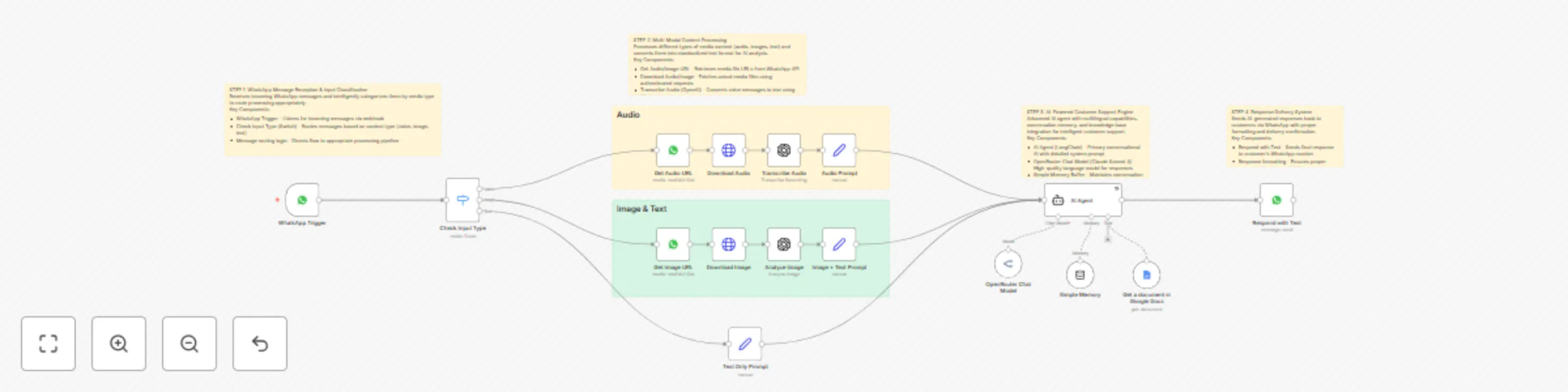
Workflow preview: WhatsApp customer support with Claude AI, Google Docs & multilingual capabilities
Free advanced

WhatsApp customer support with Claude AI, Google Docs & multilingual capabilities

## Overview Transform your customer support operations with an intelligent WhatsApp automation system that handles text, voice, and image messages across multiple languages. This comprehensive solution uses advanced AI to provide instant, accurate responses by accessing your company's knowledge base, while maintaining conversation context and supporting both English and Roman Urdu communications. Perfect for businesses serving diverse markets who need 24/7 customer support without the overhead costs. ## Key Benefits **🤖 Multi-Modal AI Processing** Handle text messages, voice notes, and images seamlessly. The system automatically transcribes audio, analyzes images, and processes all content types through a single intelligent pipeline. **🌍 True Multilingual Support** Native support for English and Roman Urdu with intelligent language detection and matching responses. The AI automatically detects the customer's language and responds accordingly, making it perfect for South Asian markets. **📚 Dynamic Knowledge Base Integration** Real-time access to your Google Docs knowledge base ensures customers always receive current, accurate information about your products and services. No more outdated responses or manual updates needed. **💭 Conversation Memory & Context** Advanced memory system maintains conversation history for natural, contextual interactions. Customers can have flowing conversations without repeating information, improving satisfaction rates. **⚡ Instant Response Times** Automated responses within seconds of receiving messages, dramatically improving customer satisfaction and reducing response time from hours to seconds. **🔄 Zero Manual Intervention** Fully automated system that works 24/7 without human oversight. Handles inquiries, provides information, and maintains professional communication standards automatically. **📊 Scalable Architecture** Built on enterprise-grade n8n platform with robust error handling and retry mechanisms. Can handle thousands of concurrent conversations without performance degradation. **💰 Cost-Effective Operations** Replace expensive customer support teams with intelligent automation. Reduce operational costs by up to 80% while improving response quality and availability. ## How It Works ### Phase 1: Message Reception & Classification The system begins with a WhatsApp webhook trigger that captures all incoming messages in real-time. An intelligent switch node immediately analyzes each message to determine its content type - whether it's a text message, voice note, or image with optional caption. This classification is crucial as each media type requires different processing approaches to extract meaningful information. ### Phase 2: Advanced Media Processing For voice messages, the system retrieves the audio file URL, downloads the content using authenticated requests, and processes it through OpenAI's Whisper transcription service to convert speech to text. Image messages follow a similar pattern - the system downloads the image and uses GPT-4 Vision to analyze and describe the visual content in detail. Text messages are processed directly, while all media types are ultimately converted to standardized text format for consistent AI processing. ### Phase 3: Intelligent Response Generation The processed content is fed into a sophisticated AI agent powered by Claude Sonnet 4 via OpenRouter. This agent operates with a comprehensive system prompt that defines its role as a professional customer support representative with specific instructions for tone, language handling, and response protocols. The agent has access to a Google Docs tool that allows it to retrieve real-time information from your company's knowledge base. ### Phase 4: Contextual Memory Management A memory buffer system maintains conversation history for each unique phone number, allowing for natural, flowing conversations where the AI remembers previous interactions and can reference earlier parts of the conversation. This creates a more human-like experience and reduces customer frustration from having to repeat information. ### Phase 5: Response Delivery Generated responses are automatically sent back to the customer's WhatsApp number using the WhatsApp Business API, completing the conversation loop. The system maintains proper formatting and ensures message delivery confirmation. ## Required Setup & Database Requirements ### API Credentials Needed: - **WhatsApp Business API**: For receiving and sending messages - **OpenAI API**: For audio transcription and image analysis - **OpenRouter API**: For Claude Sonnet 4 language model access - **Google Docs API**: For knowledge base integration - **n8n Cloud/Self-hosted instance**: For workflow execution ### Knowledge Base Setup: - **Google Docs Document**: Structured company information document - **Document Permissions**: Shared with the Google service account - **Content Organization**: FAQ format with clear sections for products, services, pricing, and contact information ### WhatsApp Configuration: - **Business Phone Number**: Verified WhatsApp Business account - **Webhook URL**: Configured to point to n8n webhook endpoint - **Message Templates**: Pre-approved for business communications ## Business Use Cases **E-commerce Support**: Handle product inquiries, order status checks, and return policies across multiple languages, perfect for businesses serving diverse customer bases. **Service Business Automation**: Appointment scheduling, service explanations, and pricing inquiries for consultancies, agencies, and professional services. **Restaurant & Food Industry**: Menu inquiries, order modifications, and delivery status updates with support for local language preferences. **Real Estate**: Property inquiries, showing appointments, and market information with ability to process property images sent by clients. **Healthcare & Wellness**: Appointment booking, service explanations, and general inquiries while maintaining professional communication standards. **Education & Training**: Course information, enrollment processes, and student support with multilingual capabilities for international programs. ## Revenue Potential **Direct Cost Savings**: $3,000-8,000/month in customer support staff salaries **Increased Conversion**: 25-40% improvement in lead response rates due to instant replies **Extended Availability**: 24/7 operation captures international and after-hours inquiries worth $2,000-5,000/month additional revenue **Scalability**: Handle 10x more inquiries without proportional cost increases **Customer Satisfaction**: Improved response times lead to 15-30% increase in customer retention **ROI Timeline**: Typical payback period of 2-3 months with ongoing monthly savings of $4,000-12,000 depending on business size. ## Difficulty Level & Build Time **Complexity**: Intermediate to Advanced (7/10) **Estimated Build Time**: 4-6 hours for experienced n8n users **Setup Time**: 2-3 hours for API configurations and testing **Maintenance**: Minimal - primarily updating knowledge base content **Skills Required**: - n8n workflow building experience - API credential management - WhatsApp Business API familiarity - Basic understanding of AI language models ## Detailed Setup Steps ### 1. API Account Setup (60 minutes) Create and configure accounts for WhatsApp Business, OpenAI, OpenRouter, and Google Cloud Platform. Obtain all necessary API keys and configure proper permissions for each service. ### 2. n8n Credential Configuration (30 minutes) Add all API credentials to your n8n instance using the credential manager. Test each connection to ensure proper authentication and access permissions. ### 3. WhatsApp Business Integration (45 minutes) Configure your WhatsApp Business account with webhook URLs pointing to your n8n instance. Set up phone number verification and message template approvals. ### 4. Knowledge Base Creation (90 minutes) Structure your Google Docs knowledge base with comprehensive information about your business. Include FAQs, product details, pricing, and contact information in an organized format. ### 5. Workflow Import & Testing (60 minutes) Import the n8n workflow, configure all node parameters with your specific credentials and settings, then conduct thorough testing with different message types and languages. ### 6. Production Deployment (30 minutes) Deploy the workflow to production, monitor initial performance, and fine-tune system prompts based on real customer interactions. ## Advanced Customization Options **Custom Language Support**: Extend beyond English and Roman Urdu by modifying the system prompt and adding language detection for additional languages like Arabic, Hindi, or French. **Integration Expansions**: Connect additional data sources like CRM systems, databases, or e-commerce platforms to provide more comprehensive customer information. **Advanced Analytics**: Add logging nodes to track conversation metrics, response times, and customer satisfaction scores for continuous improvement. **Multi-Channel Support**: Extend the system to handle Telegram, Facebook Messenger, or other messaging platforms using similar processing logic. **Escalation Protocols**: Implement human handoff triggers for complex queries that require personal attention, with automatic notification systems for support teams. **Custom AI Models**: Swap Claude Sonnet 4 for other models like GPT-4, Gemini, or open-source alternatives based on your specific needs and budget requirements. This automation system represents the future of customer support - intelligent, scalable, and incredibly cost-effective while maintaining the personal touch that customers expect from quality businesses.

H
Hassan
Support Chatbot
28 Sep 2025
1438
0

Workflow preview: AI sales assistant with GPT & Claude: qualify leads, book meetings
Free advanced

AI sales assistant with GPT & Claude: qualify leads, book meetings

# Lead Qualification & Meeting Booking System This workflow creates a sophisticated AI-powered sales assistant that automatically qualifies website visitors, schedules meetings, and manages the entire lead-to-booking pipeline without human intervention. The system acts as "Hassan," a friendly sales representative who engages prospects through natural conversation and converts interest into booked appointments with remarkable efficiency. ## Benefits: **Complete Sales Automation** - Engages website visitors 24/7, qualifies leads through intelligent conversation, and books meetings automatically without any manual oversight **AI-Powered Lead Qualification** - Uses advanced conversational AI with SPIN Selling and Challenger Sale methodologies to identify high-value prospects and overcome objections naturally **Smart Calendar Integration** - Automatically checks availability, prevents double-bookings, and sends professional confirmation emails with meeting details **Intelligent Data Management** - Tracks all interactions, prevents duplicate outreach, and maintains comprehensive conversation summaries for follow-up optimization **Scalable Conversion System** - Processes unlimited website visitors simultaneously while maintaining personalized, human-like interactions for maximum conversion rates **Revenue-Focused Approach** - Specifically designed to identify prospects interested in AI automation services and guide them toward high-value consulting calls ## How It Works: ### Website Visitor Engagement: - Captures incoming chat messages from website visitors in real-time - Initiates conversations using a trained AI persona that feels authentically human - Gradually qualifies interest in AI automation services through strategic questioning ### Intelligent Lead Processing: - Collects essential contact information (name, email, company) within first few exchanges - Cross-references visitor history to provide personalized follow-up experiences - Updates comprehensive database with conversation summaries and lead scoring ### Advanced Qualification System: - Uses proven sales methodologies (SPIN, Challenger) to overcome objections naturally - Identifies pain points, budget indicators, and timeline requirements through conversation - Accesses company knowledge base to answer specific questions about services and pricing ### Automated Meeting Booking: - Seamlessly transitions qualified prospects to calendar booking when interest is confirmed - Checks real-time calendar availability to prevent conflicts and optimize scheduling - Creates calendar events with proper attendee management and meeting details ### Professional Follow-Up Automation: - Sends branded confirmation emails with meeting links and company information - Maintains conversation context across multiple touchpoints for consistency - Provides detailed handoff information to sales team for optimal meeting preparation ## Required Database Setup: Before running this workflow, create a Google Sheets database with these exact column headers: **Essential Columns:** - **Name** - Prospect's full name (collected during qualification) - **Email** - Primary email address (used for matching and updates) - **Summary** - Detailed conversation summary with key insights - **Date** - Timestamp of interaction for tracking and follow-up **Setup Instructions:** 1. Create a new Google Sheet with these column headers in the first row 2. Name the sheet "Web Chat Bot Convo Summary" 3. Connect your Google Sheets OAuth credentials in n8n 4. Update the document ID in the workflow nodes The merge logic uses the Email column to prevent duplicate entries and update existing records with new conversation data. ## Business Use Cases: **Service-Based Businesses** - Automatically qualify and book high-value consultation calls without hiring additional sales staff **Digital Agencies** - Scale lead generation for AI automation services while maintaining personalized prospect experiences **Consultants & Coaches** - Convert website traffic into booked discovery calls with intelligent qualification and objection handling **B2B SaaS Companies** - Identify enterprise prospects and schedule product demos through natural conversation flow ## Revenue Potential: This system can generate $10,000-$50,000+ monthly by converting website visitors into qualified meetings. A single automated booking for AI automation services typically ranges from $3,000-$15,000 in project value, making the ROI calculation extremely attractive. **Conversion Metrics:** - Typically converts 15-25% of engaged website visitors into qualified meetings - Saves 20+ hours weekly of manual lead qualification and follow-up - Eliminates scheduling back-and-forth and missed appointment opportunities ## Difficulty Level: Advanced **Estimated Build Time:** 3-4 hours **Monthly Operating Cost:** ~$50-100 (AI API usage + integrations) ## Set Up Steps: ### Configure AI Services: - Add OpenAI API credentials for conversational AI and Claude Sonnet for specialized tasks - Set up appropriate rate limiting and cost controls for sustainable operation - Customize the AI persona and conversation flow for your specific business ### Database Configuration: - Create Google Sheets database with provided column structure - Connect Google Sheets OAuth credentials for seamless data management - Configure the merge logic for duplicate prevention and record updates ### Calendar Integration Setup: - Connect Google Calendar OAuth with proper permissions for event creation - Configure calendar checking logic to prevent double-bookings - Set up meeting link generation and attendee management ### Email Automation: - Connect Gmail OAuth for sending confirmation emails - Customize the branded email template with your company information - Test email delivery and formatting across different clients ### Conversation Optimization: - Customize AI prompts for your specific industry and service offerings - Adjust qualification questions to identify your ideal customer profile - Set up objection handling responses that align with your sales methodology ### Advanced Configuration: - Configure memory management for consistent multi-session conversations - Set up proper error handling and fallback responses - Implement conversation logging and analytics for optimization ### Testing & Launch: - Test the complete flow with sample conversations and edge cases - Verify calendar integration, email delivery, and data logging - Deploy with monitoring to track performance and optimize conversion rates ## Advanced Customization: - **Multi-Language Support** - Adapt conversations for international prospects - **Industry-Specific Qualification** - Customize questioning for different market segments - **Integration Expansion** - Connect to CRM systems, Slack notifications, or other business tools - **Advanced Analytics** - Track conversion funnels, conversation quality, and ROI metrics - **A/B Testing Framework** - Test different conversation approaches and optimize for higher conversion This system transforms your website from a passive information source into an active sales machine that works around the clock to generate qualified meetings and drive revenue growth.

H
Hassan
Lead Nurturing
28 Sep 2025
2300
0