Extract LinkedIn profile data & generate follow-ups with Vision AI and Google Forms
**The problem**
Ever attend a networking event and find yourself taking screenshots of people's LinkedIn?
Sounds counter-intuitive because you *are* connecting on LinkedIn. But you find it hard to keep track of everyone you've met.
You also don't want to miss diligently updating your CRM with details and insights.
**The solution **
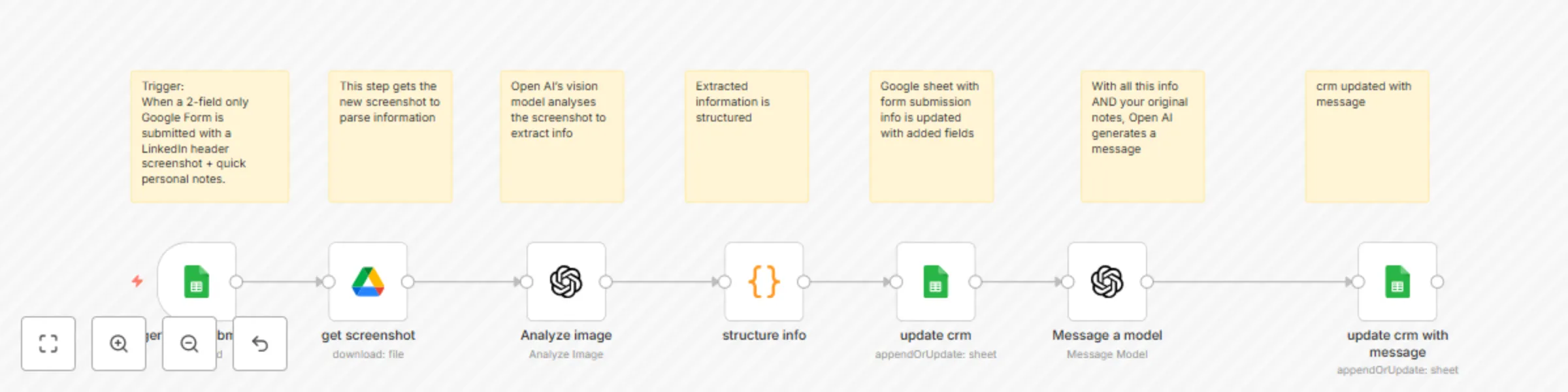
There's no need for yet another app. Continue taking screenshots. Just share them on a 2-field only Google Form: screenshot + your quick notes about the person.
Create a shortcut to the Google Form link on your phone homescreen. Voila! You have app-like access without the need for an app.
Once you submit with just these 2 pieces of info, AI parses the image AND crafts a follow-up message. Within minutes!
Just open your spreadsheet to have all that information consolidated - automatically - for your review.
Promote yourself from do-er to manager.
**Who should use it?**
Anyone really. If you find yourself meeting people but want to be more meticulous or efficient staying on top, use this.
**How to set it up**
- Time: ~10 minutes end-to-end.
- Import the provided workflow JSON in n8n.
- Connect credentials: Google Drive (read), Google Sheets (write), OpenAI.
- Configure key information: Google Sheets and relevant columns
- Configure Open AI models based on your cost/ efficiency requirements
- Confirm column headers in your Sheet match the variables (or update the variables).
- Test with one screenshot.
**Pro-tip: Add that Google Form link as a shortcut on your phone's home screen. Get app-like convenience without downloading yet another app.**