Qualify & reach out to B2B leads with Groq AI, Apollo, Gmail & Sheets
*This workflow contains community nodes that are only compatible with the self-hosted version of n8n.*
🎯 How it works
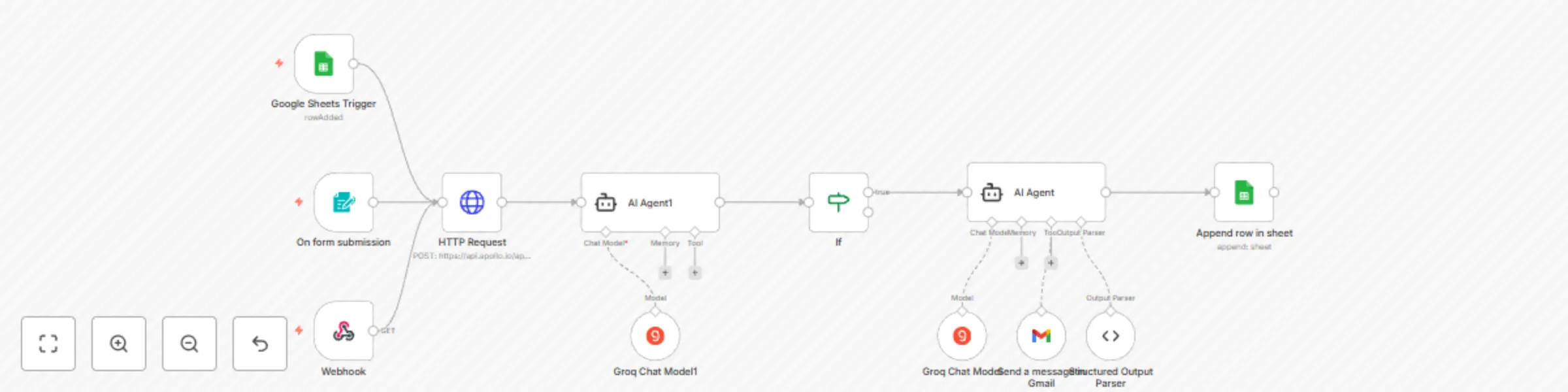
This workflow captures new lead information from a web form, enriches it with Apollo.io data, qualifies the lead using AI, and—if the lead is strong—automatically sends a personalized outreach email via Gmail and logs the result in Google Sheets.
🛠️ Key Features
📩 Lead form capture with validation
🔍 Enrichment via Apollo API
🤖 Lead scoring using AI (LangChain + Groq)
📧 Dynamic email generation & sending via Gmail
📊 Logging leads with job title & org into Google Sheets
✅ Conditional email sending (score ≥ 6 only)
🧪 Set up steps
- Estimated time: 15–20 minutes
- Add your Apollo API Key to the HTTP Header credential (never hardcode!)
- Connect your Gmail account for sending emails
- Connect your Google Sheets account and set up the correct spreadsheet & sheet name
- Enable LangChain/Groq credentials for lead scoring and AI-generated emails
- Update the form endpoint to your live webhook if needed
📌 Sticky Notes
- Add the following mandatory sticky notes inside your workflow:
- FormTrigger Node:
"Collects lead info via form. Ensure your form is connected to this endpoint."
- HTTP Request Node:
"Enrich lead using Apollo.io API. Add your API key via header-based authentication."
- AI Agent (Lead Score):
"Scores lead from 1-10 based on job title and industry match. Only leads with score ≥ 6 proceed."
- AI Agent (Email Composer):
"Generates a concise, polite email using lead’s job title & company. Modify tone if needed."
- Google Sheets Append:
"Logs enriched lead with job title, org, and LinkedIn URL. Customize sheet structure if needed."
- Gmail Node:
"Sends personalized outreach email if lead passes score threshold. Uses AI-generated content."
💸 Free or Paid?
Free – No paid API services are required (Apollo has a free tier).