M

Martijn Smit

1
Workflow

Workflows by Martijn Smit

Workflow preview: Todoist weekly email of completed tasks
Free intermediate

Todoist weekly email of completed tasks

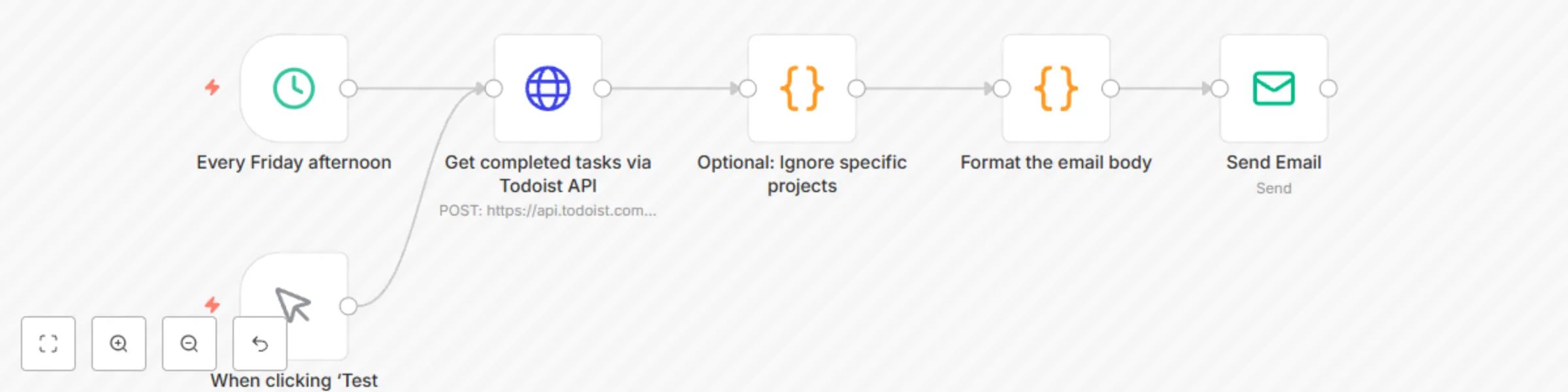
This workflow template helps Todoist users get a weekly overview of their completed tasks via email, making it easier to review their past week. ### Why use this workflow? Todoist doesn’t provide completed task reports or filters in its built-in reports or n8n app. This workflow solves that by using Todoist’s public API to fetch your completed tasks. ### How it works * Runs every Friday afternoon (or manually). * Uses the Todoist public API to retrieve completed tasks. * Excludes specific projects you set (e.g., a grocery list). * Sends an email summary, grouping tasks by the day they were completed. ### Set up steps 1. Copy your Todoist API token ([found here](https://app.todoist.com/app/settings/integrations/developer)). 2. Create a **Todoist API** credential in n8n. 3. Create an **SMTP** credential in n8n. - Alternatively, use a preferred email service like Brevo, Mailjet, etc. 4. Import this workflow template. 5. In the **Get completed tasks via Todoist API** step, select your Todoist API credential. 6. In the **Send Email** step: - Select your SMTP credential. - Set the sender and recipient email addresses. 7. Run the workflow manually and check your inbox! ### Ignoring specific projects If you do not want your grocery list, workouts, or other tasks from specific Todoist projects showing up in your weekly summary, modify the step called **Optional: Ignore specific projects** and change this line: ``` const ignoredProjects = ['2335544024']; ``` This should be an array with the `id` of each project you'd like to ignore. You can find a list of your projects (inc. their Ids) by visiting this link: [https://api.todoist.com/rest/v2/projects](https://api.todoist.com/rest/v2/projects)

M
Martijn Smit
Personal Productivity
27 Jan 2025
1039
0