S

Simeon

2
Workflows

Workflows by Simeon

Workflow preview: Reddit API Hub: Manage posts, comments & subreddits via server-sent events
Free advanced

Reddit API Hub: Manage posts, comments & subreddits via server-sent events

## 🔄 Reddit Content Operations via MCP Server ### 🧑‍💼 Who is this for? This workflow is built for content creators, marketers, Reddit automation enthusiasts, and AI agent developers who want structured, programmable access to Reddit content. If you're researching niche communities, tracking trends, or automating Reddit engagement — this is for you. ### 💡 What problem is this workflow solving? Reddit has valuable content scattered across subreddits, but manual analysis or engagement is inefficient. This workflow acts as a centralized API interface to: - Query and manage Reddit posts - Create, fetch, delete, and reply to comments - Analyze subreddit metadata and behavior - Enable AI agents to autonomously operate on Reddit data It does this using an **MCP (Model Context Protocol) Server** over **Server-Sent Events (SSE)**. ### ⚙️ What this workflow does This template sets up a custom **MCP Server** that listens for JSON-based operation commands sent via SSE. Based on the operation, it routes the request to one of the following branches: #### 🟥 Post CRUD - Create a new Reddit post - Search posts across subreddits - Fetch posts by ID - Delete existing posts #### 🟩 Comment CRUD - Create or reply to comments - Fetch multiple comments from posts - Delete specific comments #### 🟦 Subreddit Read Operations - Get information about subreddits - List subreddit posts - Retrieve subreddit rules ### 🛠 Setup 1. Import this workflow into your **self-hosted n8n instance**. 2. Configure Reddit credentials (OAuth2). 3. Connect your input system to the MCP Server Trigger node via SSE. 4. Send operation payloads to the server like this: ```json { "operation": "post_search", "params": { "query": "AI agents", "subreddit": "machinelearning" } } The workflow will route to the appropriate node based on operation type. 🧩 Supported Operations post_create post_get_many post_search post_delete post_get_by_id comment_create comment_reply comment_get_many comment_delete subreddit_get_about subreddit_get_many subreddit_get_rules ``` ### 🧠 How to customize this workflow to your needs Add new operations to the operation_switch node for additional API functionality. Chain results into Notion, Slack, Airtable, or external APIs. Integrate with OpenAI/GPT to summarize posts or filter content. Add logic to score and sort content by engagement, sentiment, or keywords. ### 🟨 Sticky Notes Each operation group is color-coded (Posts, Comments, Subreddits). Sticky Notes explain the purpose and dependencies of each section. Easy to maintain and extend with clear logical separation. ### ⚠️ This template uses a custom MCP Server node and only works in self-hosted n8n. ### 🖼 Workflow Preview ![Screenshot 20250520 at 11.57.41 PM.png](fileId:1346)

S
Simeon
Social Media
21 May 2025
1361
0
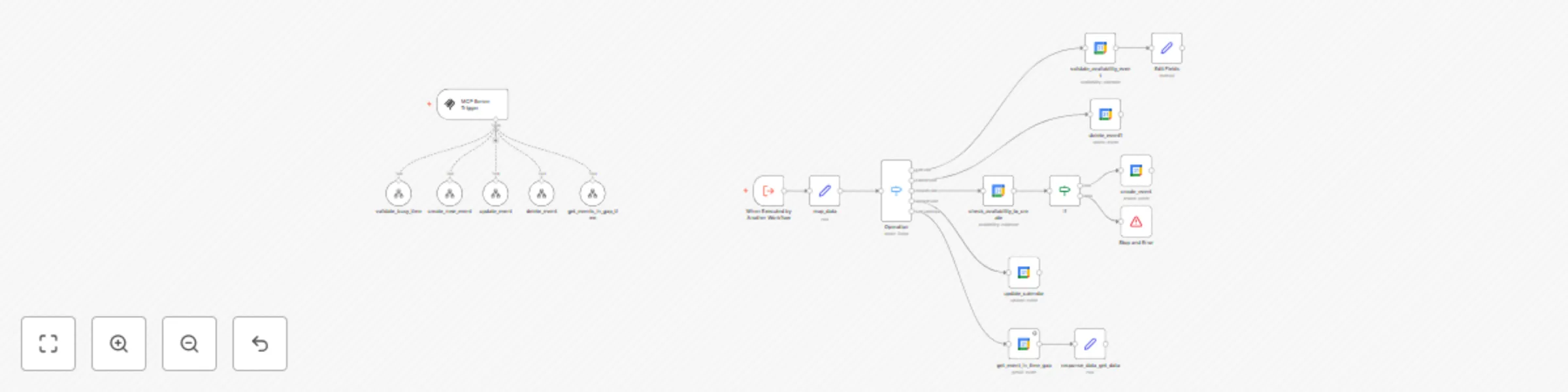
Workflow preview: Context-aware Google Calendar management with MCP protocol
Free advanced

Context-aware Google Calendar management with MCP protocol

## Google Calendar MCP – Context-Aware Calendar Operations This n8n template implements an **MCP (Model Context Protocol)**-compliant module for managing **Google Calendar** events in a context-aware, conflict-free manner. ### 🧠 What It Does This MCP enables structured interaction with Google Calendar based on context and intent, ensuring reliable, reusable operations with awareness of existing data and state. ### ✅ Core Capabilities - **Context-aware event creation** Prevents overlapping by validating time availability before creating new events. - **Gap validation** Checks if a time range is busy or free, enabling smarter scheduling decisions. - **Conditional updates** Only updates events after confirming their existence and current state. - **Safe deletion** Removes events using MCP principles of validation and traceability. ### 🚀 How to Use To use this MCP in your context-aware systems: 1. Deploy the template in your n8n instance. 2. Locate the **Server node** in the workflow — it exposes a **Server-Sent Events (SSE) URL**. 3. Copy that SSE URL. 4. Use that URL as the entry point for your MCP client or orchestrator. This URL acts as the communication bridge, allowing you to interact with the MCP-compliant Google Calendar logic using standard MCP semantics.![Screenshot 20250517 at 2.00.14 PM.png](fileId:1339)

S
Simeon
Personal Productivity
20 May 2025
13163
0