N

NODA shuichi

6
Workflows

Workflows by NODA shuichi
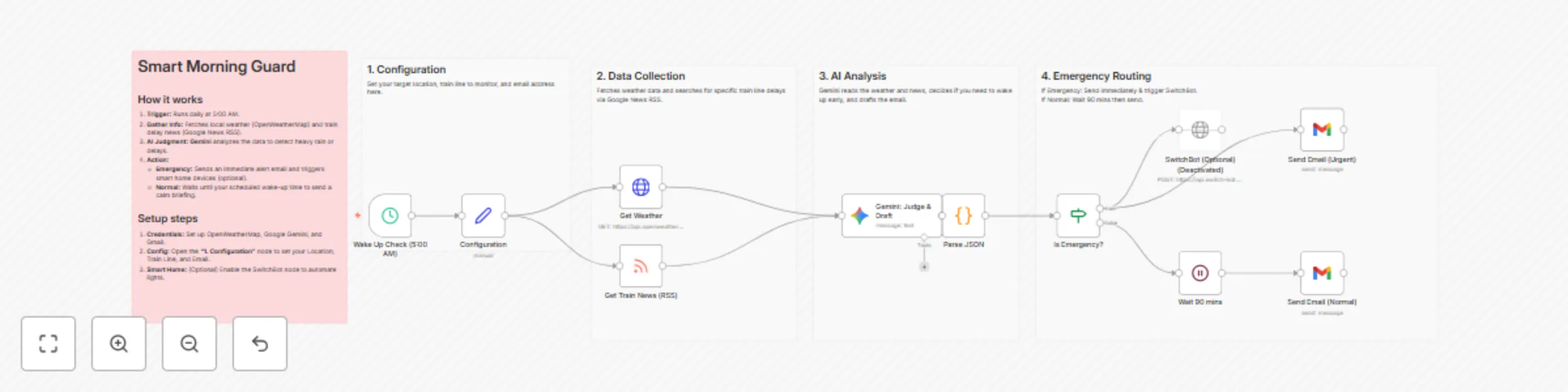
Workflow preview: Adjust morning alarms based on weather and train delays using Google Gemini
Free advanced

Adjust morning alarms based on weather and train delays using Google Gemini

**Description:** An intelligent alarm system that wakes you up early only when necessary. 🛡️🤖 This workflow monitors your local weather and train status every morning at 5:00 AM. It uses Google Gemini to analyze the situation. If there is heavy rain or a train delay, it sends an emergency alert immediately (and can trigger smart home devices). If everything is normal, it waits until your usual wake-up time to send a calm briefing. ## Key Features: AI Context Awareness: Uses Gemini to intelligently judge "Emergency" situations based on weather descriptions and news headlines. Dynamic Notification: Emergency Mode: Immediate Email alert + Optional SwitchBot trigger (e.g., turn on lights). Normal Mode: Delays notification until your scheduled wake-up time (90 mins later). Targeted Monitoring: Searches specific train lines via Google News RSS. ## How it works: Trigger: Runs daily at 5:00 AM. Fetch: Gets weather from OpenWeatherMap and train news from Google News RSS. Judge: Gemini analyzes the data. Action: Routes the notification based on the status (Emergency/Normal). ## Setup Requirements: Credentials: OpenWeatherMap API, Google Gemini API, Gmail. Config: Open the "1. Configuration" node to set your Location, Train Line, and Email.

N
NODA shuichi
Personal Productivity
6 Jan 2026
1
0
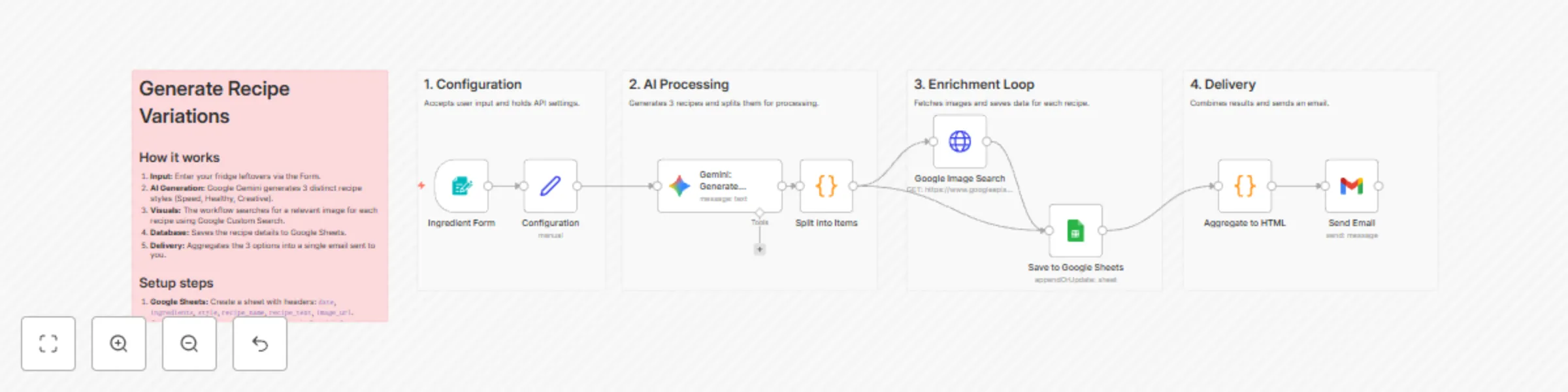
Workflow preview: Generate recipe variations from ingredients using Google Gemini and Google Sheets
Free intermediate

Generate recipe variations from ingredients using Google Gemini and Google Sheets

**Description:** Don't just get a recipe. Get a Strategy. (Speed / Healthy / Creative) 🍳🤖 This workflow solves the "What should I eat?" problem by using Google Gemini to generate 3 distinct recipe variations simultaneously based on your fridge leftovers. It demonstrates advanced n8n concepts like Array Processing and Data Aggregation. ## Key Features: Array Processing: Demonstrates how to handle JSON lists (Gemini outputs an array -> n8n splits it -> API calls run for each item). Aggregation: Shows how to combine processed items back into a single summary email. Visual Enrichment: Automatically searches for recipe images using Google Custom Search. ## How it works: Input: Enter ingredients via the Form Trigger. Generate: Gemini creates 3 JSON objects: "Speed (5min)", "Healthy", and "Creative". Process: The workflow iterates through the 3 recipes, searching for images and logging data to Google Sheets. Aggregate: The results are combined into one HTML comparison table. Deliver: You receive an email with 3 options to choose from. ## Setup Requirements: Google Sheets: Create a sheet named Recipes with headers: date, ingredients, style, recipe_name, recipe_text, image_url. Credentials: Google Gemini API, Google Custom Search (API Key & Engine ID), Gmail, Google Sheets. Configuration: Enter your IDs in the "1. Configuration" node.

N
NODA shuichi
Content Creation
25 Dec 2025
14
0
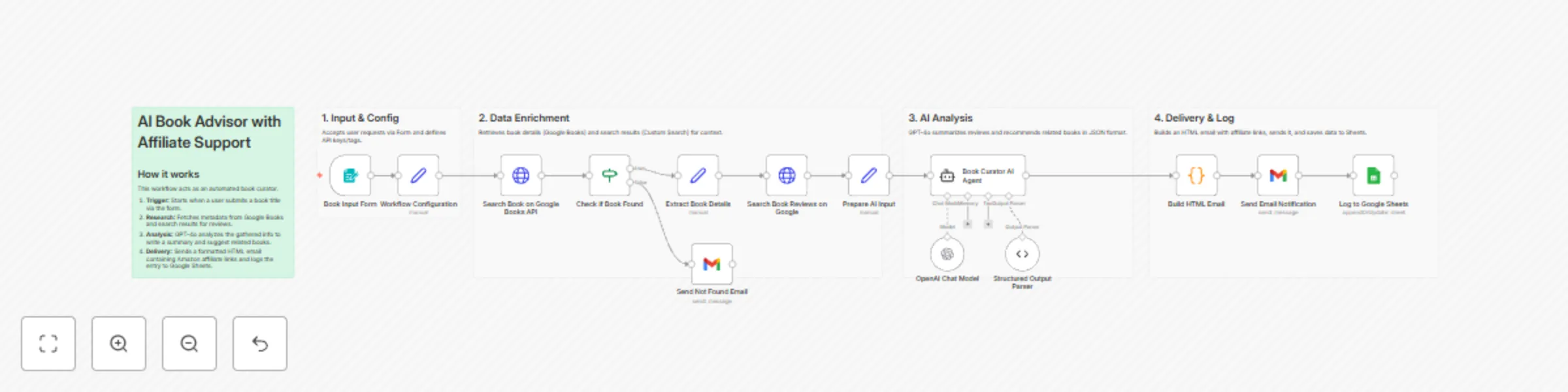
Workflow preview: Generate book summaries with GPT-4o, Google APIs & Amazon Affiliate Links
Free advanced

Generate book summaries with GPT-4o, Google APIs & Amazon Affiliate Links

**Description:** Your personal AI Book Curator that reads reviews, recommends books, and supports affiliate links. 📚🤖 This advanced workflow acts as a complete "Reading Assistant Application" with monetization features. It takes a book title via form, researches it using Google APIs, and employs an OpenAI Agent to generate a summary and recommendations. Why use this template? Monetization Support: Just enter your Amazon Affiliate Tag in the config node, and all email links will automatically include your tag. Organized & Scalable: The workflow is clearly grouped into 4 sections (Input, Enrichment, AI, Delivery) with sticky notes for easy navigation. ## How it works: Input: User submits a book title (e.g., "Atomic Habits"). Research: The workflow fetches book metadata and searches for real-world reviews. Analyze: GPT-4o explains why the book is interesting and suggests 3 related reads. Deliver: Generates a beautiful HTML email with purchase links and logs the request to Google Sheets. ## Setup Requirements: Google Sheets: Create headers: date, book_title, author, ai_comment, user_email. Credentials: OpenAI, Google Custom Search, Gmail, Google Sheets. Config: Open the "1. Input & Config" section to enter API Keys and IDs.

N
NODA shuichi
Market Research
29 Nov 2025
46
0
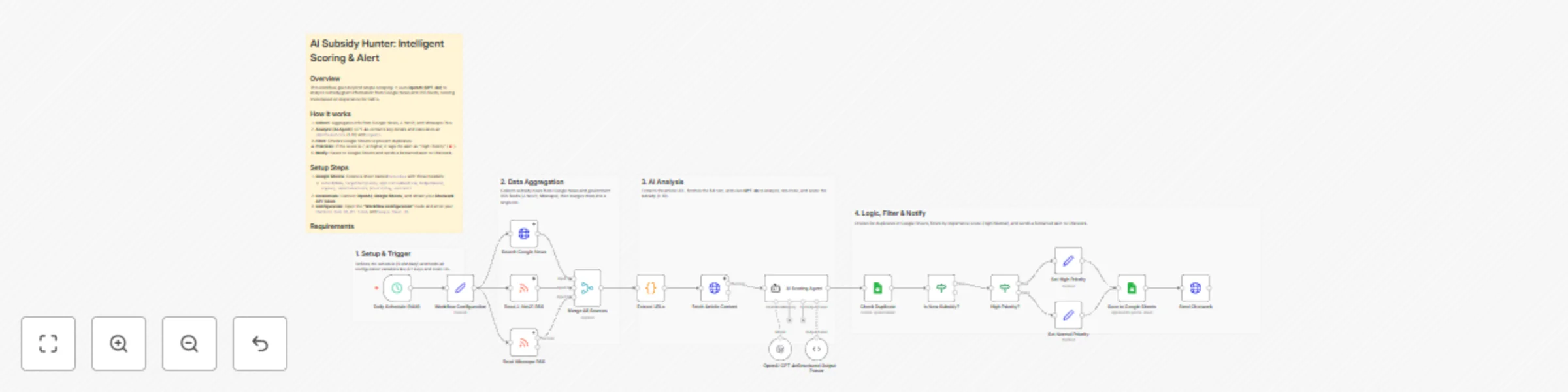
Workflow preview: Subsidy hunter: GPT-4o analysis & scoring with Google News & Chatwork alerts
Free advanced

Subsidy hunter: GPT-4o analysis & scoring with Google News & Chatwork alerts

**Description:** Automate your grant research with an AI Agent that reads, analyzes, and scores opportunities. 🏛️🤖 This advanced workflow transforms the tedious task of finding business subsidies into an automated intelligence stream. Unlike simple keyword scrapers, it uses an OpenAI Agent (GPT-4o) to read full articles, extract key details (deadlines, budgets), and evaluate their importance for SMEs on a 1-10 scale. ## Key Features: Intelligent Scoring: The AI assigns an "Importance Score" and "Urgency" level to each subsidy, filtering out noise. Structured Data Extraction: Converts unstructured news text into clean JSON (Deadlines, Requirements, Agencies). Smart Alerts: High-scoring subsidies (Score 7+) trigger a priority alert (🚨) sent directly to Chatwork. State Management: Uses Google Sheets to track history and prevent duplicate notifications. Organized Layout: Nodes are clearly grouped into sections (Setup, Aggregation, Analysis, Logic) for easy customization. ## How it works: Aggregate: Collects the latest articles from Google News, J-Net21, and Mirasapo Plus RSS feeds. Analyze: The AI Agent reads the content to extract fields like applicationDeadline and targetRecipients, while calculating an importance score. Deduplicate: Checks the URL against a Google Sheet database to ensure only new information is processed. Filter & Tag: High-value items are automatically tagged as "High Priority". Notify: Saves data to Google Sheets and sends a formatted message to Chatwork. ## Setup Requirements: Google Sheets: Create a sheet named Subsidies with the following headers in the first row: subsidyName, targetRecipients, applicationDeadline, budgetAmount, urgency, importanceScore, priorityTag, sourceUrl ## Credentials: OpenAI: API Key (GPT-4o recommended). Chatwork: API Token. Google Sheets: OAuth2 connection. Configuration: Open the "Sticky Note Setup" section (first node) and enter your Chatwork Room ID, Chatwork API Token, and Google Spreadsheet ID.

N
NODA shuichi
Market Research
23 Nov 2025
23
0
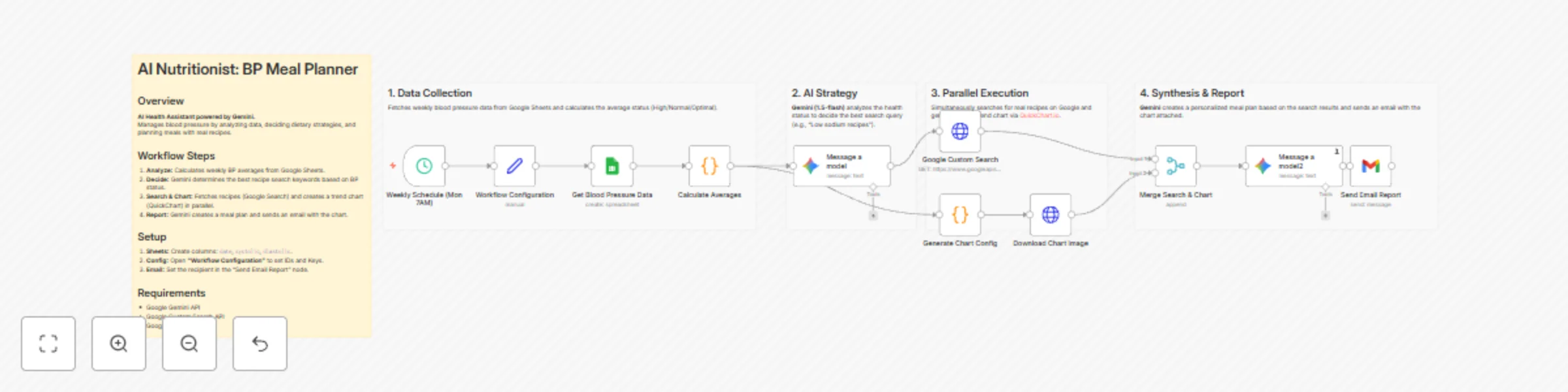
Workflow preview: Generate personalized BP meal plans with Gemini, Google Search, and QuickChart
Free advanced

Generate personalized BP meal plans with Gemini, Google Search, and QuickChart

**Description:** Transform your health data into actionable meal plans with an Advanced AI Chain. 🥗🤖 This workflow goes beyond a simple prompt. It orchestrates a chain of Google Gemini agents to manage your blood pressure. It acts as a personal health assistant that analyzes your data, strategizes a diet plan, and finds real-world recipes. ## Key Features: Dual AI Logic: Uses Gemini (1.5-flash) in two stages—first to decide the search strategy based on BP status (High/Normal), and second to synthesize a 5-day meal plan. Real Recipe Search: Automatically searches Google for recipes that match the AI's dietary strategy (e.g., "Low sodium dinner"). Visual Tracking: Generates a blood pressure trend chart using QuickChart.io and attaches it to the email report. Organized Layout: Nodes are clearly grouped into sections (Data Collection, AI Strategy, Execution, Synthesis) for easy customization. ## How it works: Analyze: Fetches last 7 days of BP data from Google Sheets. Decide: AI determines the best search keywords (e.g., "Dash diet recipes") based on your average BP. Execute: Searches for recipes and generates a chart simultaneously. Synthesize: AI combines the recipes and health stats into a weekly plan. Deliver: Emails the plan and chart to you. ## Setup Requirements: Google Sheets: Create headers: date, systolic, diastolic. Google Gemini API Key Google Custom Search API Key & Engine ID Gmail

N
NODA shuichi
Personal Productivity
23 Nov 2025
9
0
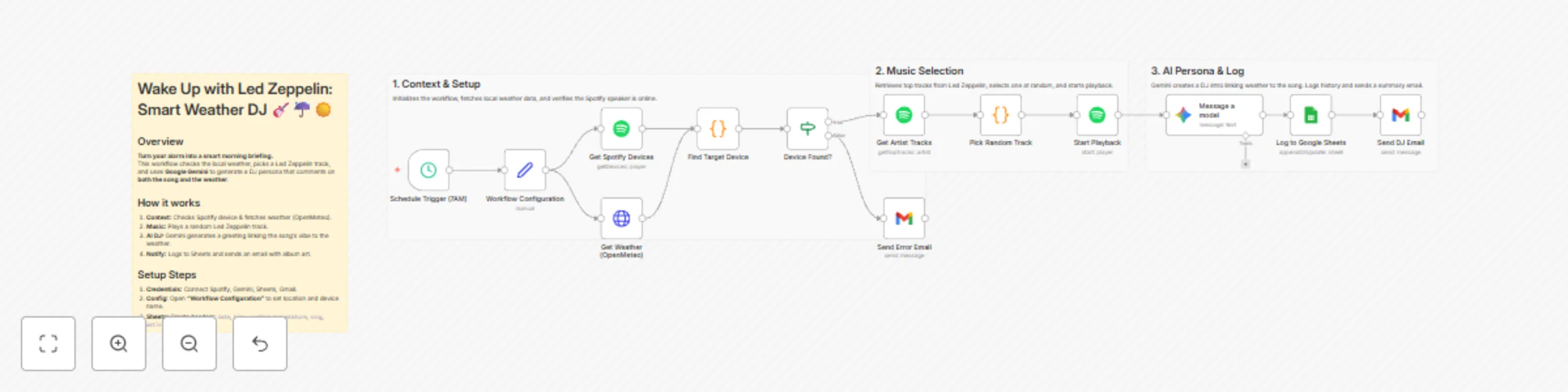
Workflow preview: Create weather-aware morning alarms with Spotify, Gemini AI and OpenMeteo
Free advanced

Create weather-aware morning alarms with Spotify, Gemini AI and OpenMeteo

**Description:** More than an alarm. A smart morning experience that adapts to the weather. 🎸☔️☀️ This workflow demonstrates how to upgrade a simple automation into a smart, context-aware system. By integrating OpenMeteo (Weather API), Google Gemini (AI), and Spotify, it creates a personalized DJ experience for your morning. ## Why is this "Advanced"? Context Awareness: It doesn't just play music; it checks the weather (via OpenMeteo API) to understand the user's environment. AI Persona: Gemini acts as a live DJ, generating commentary that connects the specific Led Zeppelin track to the current weather conditions (e.g., "It's rainy, perfect for 'The Rain Song'"). Data Logging: It logs every wake-up session (Song, Time, Weather) to Google Sheets, creating a personal music history database. Robust Error Handling: Includes logic to detect offline speakers and send fallback alerts. ## How it works: Check Context: Fetches real-time weather data for your location and checks your Spotify speaker status. Select Music: Picks a random track from Led Zeppelin's top hits. Generate: Gemini generates a unique "Good Morning" script combining the song title and the weather. Action: Plays the music, logs the data to Google Sheets, and emails you the AI's greeting with album art. ## Setup Requirements: Spotify Premium Google Gemini API Key Google Sheets: Create a sheet named History with headers: date, time, weather, temperature, song, artist. Gmail

N
NODA shuichi
Personal Productivity
23 Nov 2025
25
0