S

Servify

2
Workflows

Workflows by Servify

Workflow preview: Generate frozen ASMR product videos with Gemini, Veo3, GPT-4o and post to YouTube, TikTok, Instagram and Pinterest
Free advanced

Generate frozen ASMR product videos with Gemini, Veo3, GPT-4o and post to YouTube, TikTok, Instagram and Pinterest

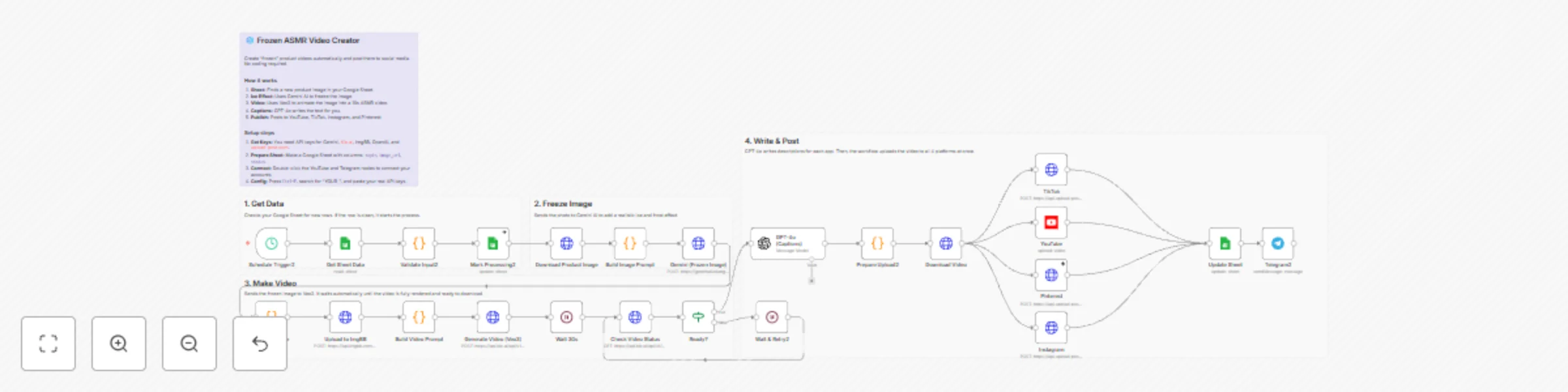
Takes a product image from Google Sheets, adds frozen effect with Gemini, generates ASMR video with Veo3, writes captions with GPT-4o, and posts to 4 platforms automatically. ## How it works 1. Schedule trigger picks first unprocessed row from Google Sheet 2. Downloads product image and sends to Gemini for frozen/ice effect 3. Uploads frozen image to ImgBB (Veo3 needs public URL) 4. Veo3 generates 10-12s ASMR video with ice cracking sounds 5. GPT-4o writes platform-specific titles and captions 6. Uploads simultaneously to YouTube, TikTok, Instagram, Pinterest 7. Updates sheet status and sends Telegram notification ## Setup Replace these placeholders in the workflow: - YOUR_GOOGLE_AI_API_KEY (Gemini) - YOUR_KIE_AI_API_KEY (Veo3) - YOUR_IMGBB_API_KEY (free) - YOUR_UPLOAD_POST_API_KEY - YOUR_GOOGLE_SHEET_ID - YOUR_PINTEREST_BOARD_ID - YOUR_PINTEREST_USERNAME - YOUR_TIKTOK_USERNAME - YOUR_INSTAGRAM_USERNAME - YOUR_TELEGRAM_CHAT_ID ## Google Sheet format | topic | image_url | status | |-------|-----------|--------| | Dior Sauvage — Dior | https://example.com/img.jpg | | Leave status empty. Workflow sets it to `processing` then `uploaded`. ## Requirements - Gemini API key - [Google AI Studio](https://makersuite.google.com/app/apikey) - Kie.ai account - [kie.ai](https://kie.ai) - ImgBB API key - [api.imgbb.com](https://api.imgbb.com/) - OpenAI API key - upload-post.com account with connected TikTok/IG/Pinterest - YouTube channel with OAuth

S
Servify
Content Creation
13 Dec 2025
19
0
Workflow preview: Autonomous meeting scheduler with GPT-4o-mini, Telegram, and Google Calendar
Free advanced

Autonomous meeting scheduler with GPT-4o-mini, Telegram, and Google Calendar

This n8n template demonstrates how to build an autonomous AI assistant that handles real business tasks through natural conversation on Telegram. The example shows meeting scheduling with CRM lookup and calendar management, but the architecture supports any business automation you can imagine - simply add tools and the AI learns to use them automatically. Use cases are many: Try automating appointment scheduling, customer support tickets, invoice generation, lead qualification, email management, report generation, data entry, or task coordination! ## Good to know * OpenAI API costs are minimal at ~$0.001 per conversation with GPT-4o-mini * The AI agent makes autonomous decisions and can chain multiple tool calls to complete complex tasks * Conversation context is not persisted between sessions (can be extended with a memory database) * Calendar availability is checked for business hours (9 AM - 4 PM) by default * The workflow assumes contacts are stored in Google Sheets with Name and Email columns * This is production-ready code that can be deployed immediately for real business use ## How it works * User sends a natural language message to the Telegram bot requesting a meeting * The workflow extracts message content, chat ID, and user information * CRM database is loaded from Google Sheets containing contact information * The AI agent analyzes the request and autonomously decides which tools to use * AI searches CRM for contacts, checks Google Calendar availability, and proposes 3 available time slots * User confirms their preferred time through conversational reply * Upon confirmation, the workflow creates a Google Calendar event with both parties invited * A professional confirmation email is automatically sent via Gmail to the meeting attendee * The entire multi-step process executes autonomously through simple conversation ## How to use * Set up a Google Sheet as your CRM with columns: Name, Email, Phone * Create a Telegram bot via BotFather and get your bot token * Import this workflow and connect your credentials (Telegram, OpenAI, Google Sheets, Calendar, Gmail) * Replace placeholder IDs with your actual Google Sheet ID and Calendar ID in the workflow nodes * Activate the workflow to start listening for Telegram messages * Test with: "Schedule a meeting with [contact name] tomorrow at 2 PM" * Customize the AI Agent system prompt to match your scheduling preferences and timezone ## Requirements * Telegram Bot Token (free from BotFather) * OpenAI API account with GPT-4o-mini access * Google Sheets OAuth2 credentials for CRM database access * Google Calendar OAuth2 credentials for availability checking and event creation * Gmail OAuth2 credentials for sending confirmation emails ## Customising this workflow * Add new tools (APIs, databases, services) and the AI automatically learns to use them - no code changes needed * Replace Telegram with Slack, WhatsApp, or SMS for different communication channels * Extend capabilities beyond scheduling: invoice generation, customer support, lead qualification, report generation * Connect external systems like HubSpot, Salesforce, QuickBooks, Asana, or custom APIs * Add conversation memory by integrating a vector database for context-aware multi-turn conversations * Implement approval workflows where AI drafts actions for human review before execution * Build multiple specialized assistants with different tools and expertise for various business functions

S
Servify
Support Chatbot
24 Nov 2025
177
0