S

shae

2
Workflows

Workflows by shae
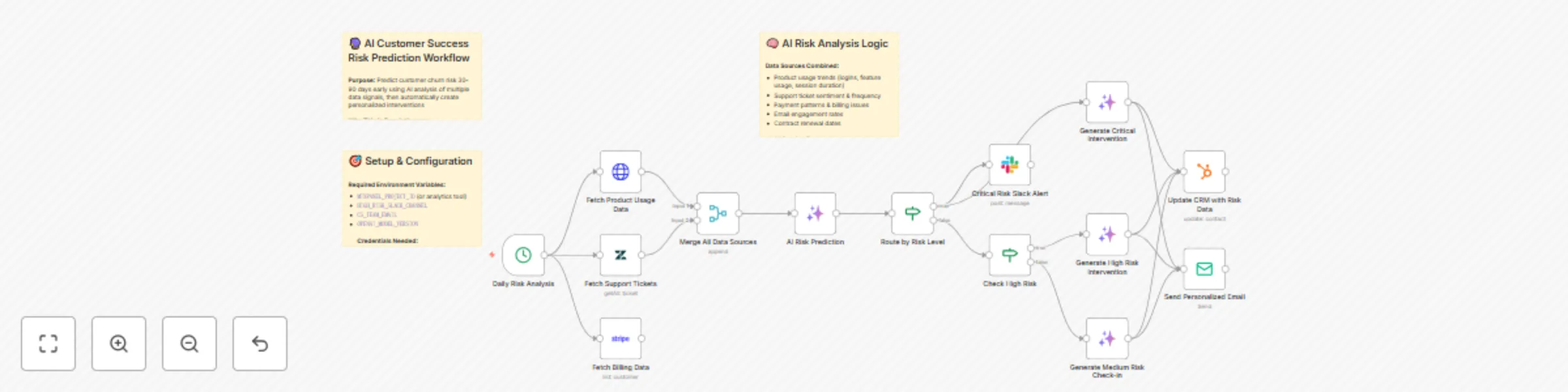
Workflow preview: Predict customer churn risk & create interventions with GPT-4, Zendesk & HubSpot
Free advanced

Predict customer churn risk & create interventions with GPT-4, Zendesk & HubSpot

How it works This AI Customer Success Risk Prediction workflow revolutionizes customer retention by predicting churn risk 30-90 days before it happens. Here's the high-level flow: Daily Data Collection → AI Multi-Signal Analysis → Risk Scoring & Prediction → Smart Risk Routing → AI-Generated Personalized Interventions → CRM Updates & Team Alerts The system automatically gathers data from your product analytics, support system, billing platform, and email tools, then uses GPT-4 to analyze patterns and predict which customers are at risk. It creates personalized intervention strategies and routes them based on urgency level. Set up steps Time to set up: Approximately 45 minutes Prerequisites: Active accounts with your analytics platform, support system, billing provider, CRM, and AI provider Step 1: Import & Configure Workflow (5 minutes) Import the workflow JSON into your n8n instance Review the 3 comprehensive sticky notes for context Understand the AI analysis logic and intervention strategies Step 2: Set Environment Variables (10 minutes) Configure these critical variables: ANALYTICS_API_URL and ANALYTICS_API_KEY HIGH_RISK_SLACK_CHANNEL (for critical alerts) CS_TEAM_EMAIL (intervention sender) CRM_BASE_URL and CALENDAR_BOOKING_URL Step 3: Configure API Credentials (20 minutes) Set up secure credential connections for: OpenAI/Anthropic API (AI analysis engine) Analytics platform (Mixpanel/Amplitude/GA) Support system (Zendesk/Intercom) Billing platform (Stripe/Chargebee) HubSpot CRM (risk data storage) Slack API (team notifications) SMTP/SendGrid (email delivery) Step 4: Customize AI Prompts & Risk Thresholds (8 minutes) Review and adjust the AI analysis prompts for your business Modify risk score thresholds (Critical 90+, High 70-89, Medium 40-69) Customize intervention email templates and tone Set your specific risk factors (usage patterns, support indicators) Step 5: Test & Activate (2 minutes) Run a test execution with sample customer data Verify AI analysis generates appropriate risk scores Check that interventions are routed correctly Activate the daily cron schedule

s
shae
CRM
14 Aug 2025
354
0
Workflow preview: Automated lead capture, scoring & CRM integration with HubSpot, Clearbit & Slack
Free advanced

Automated lead capture, scoring & CRM integration with HubSpot, Clearbit & Slack

How it works This Lead Capture & Auto-Qualification workflow transforms raw leads into qualified prospects through intelligent automation. Here's the high-level flow: Lead Intake → Data Validation → Enrichment → Scoring → Smart Routing → CRM Integration & Notifications The system captures leads from any source, validates the data, enriches it with company intelligence, scores based on qualification criteria, and automatically routes high-value prospects to sales while nurturing lower-priority leads. Set up steps Time to set up: Approximately 30-45 minutes Prerequisites: Active accounts with HubSpot, Clearbit, Apollo, and Slack Step 1: Import Workflow (2 minutes) Copy the workflow JSON and import into your n8n instance The workflow will appear with all nodes and sticky note documentation Step 2: Configure Environment Variables (5 minutes) Set these in your n8n environment: APOLLO_API_URL SLACK_SALES_CHANNEL_ID SLACK_MARKETING_CHANNEL_ID CRM_ASSIGNMENT_URL Step 3: Set Up API Credentials (15 minutes) Create credential connections for: Clearbit API (enrichment) Apollo API (HTTP Header Auth) HubSpot API (CRM integration) Slack API (notifications) Step 4: Customize Scoring Logic (10 minutes) Review the qualification criteria in the Code node Adjust scoring weights based on your ideal customer profile Modify industry targeting and company size thresholds Step 5: Test & Activate (8 minutes) Send test webhook requests to validate the flow Verify CRM contact creation and Slack notifications Activate the workflow for live lead processing

s
shae
Lead Generation
14 Aug 2025
552
0