A

Anthony

5
Workflows

Workflows by Anthony

Workflow preview: Simple expense tracker with n8n chat, AI agent and Google Sheets
Free intermediate

Simple expense tracker with n8n chat, AI agent and Google Sheets

## Use Case It is very convenient to add expenses via simple chat message. This workflow attempts to do exactly this using AI-powered n8n magic! ![20250129 at 17.37.png](fileId:921) Send message to a chat, something like **"car wash; 59.3 usd; 25 jan 2024"** And get a response: **Your expense saved, here is the output of save sub-workflow:{"cost":59.3,"descr":"car wash","date":"2024-01-25","msg":"car wash; 59.3 usd; 25 jan 2024"}** LLM will smartly parse your message to structured JSON and save the expense as a new row into Google Sheet! ## Installation ### 1. Set up Google Sheets: Clone this Sheet: https://docs.google.com/spreadsheets/d/1D0r3tun7LF7Ypb21CmbTKEtn76WE-kaHvBCM5NdgiPU/edit?gid=0#gid=0 (File -> Make a copy) Choose this sheet into "Save expense into Google Sheets" node. ### 2. Fix sub-workflow dropdown: open "Parse msg and save to Sheets" node (which is an n8n sub-workflow executor tool) and make sure the SAME workflow is chosen in the dropdown. it will allow n8n to locate and call "Workflow Input Trigger" properly when needed. ### 3. Activate the workflow to make chat work properly. Sent message to chat, something like "car wash; 59.3 usd; 25 jan 2024" you should get a response: Your expense saved, here is the output of save sub-workflow:{"cost":59.3,"descr":"car wash","date":"2024-01-25","msg":"car wash; 59.3 usd; 25 jan 2024"} and new row in Google sheets should be inserted!

A
Anthony
Personal Productivity
29 Jan 2025
15327
0
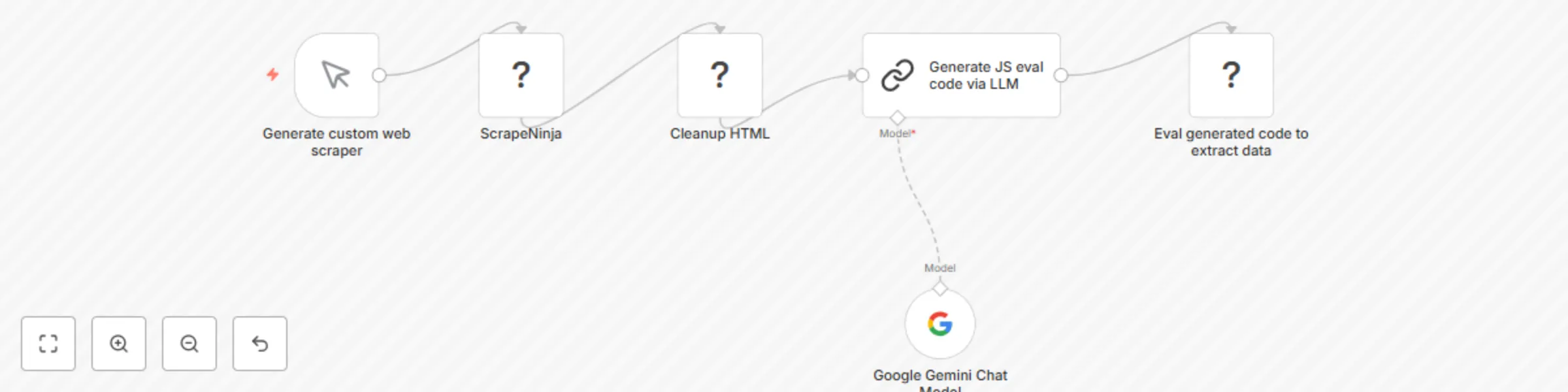
Workflow preview: Scrape any web page into structured JSON data with ScrapeNinja and AI
Free intermediate

Scrape any web page into structured JSON data with ScrapeNinja and AI

Disclaimer: This template only works on self-hosted for now, as it uses a community node. ## Use Case Web scrapers often break due to web page layout changes. This workflow attempts to mitigate this problem by auto-generating web scraping data extractor code via LLM. ## How It Works This workflow leverages ScrapeNinja n8n community node to: - scrape webpage HTML, - feed it into LLM (Google Gemini) and ask to write a JS extractor function code, then it - executes the written JS extractor against scraped HTML to extract useful data from webpage (the code is safely executed in a sandbox) ## Installation To install ScrapeNinja n8n node, in your self-hosted instance, go to Settings -> Community nodes, enter "n8n-nodes-scrapeninja", and install. Make sure you are using at least v0.3.0. See this in action: https://www.linkedin.com/feed/update/urn:li:activity:7289659870935490560/

A
Anthony
Engineering
28 Jan 2025
56950
0

Workflow preview: Find out which Chrome extensions are tracked by Linkedin
Free intermediate

Find out which Chrome extensions are tracked by Linkedin

## What this workflow does **Linkedin tracks which Chrome extensions are installed in your browser.** This workflow uses a huge raw JSON of chrome extension ids, extracted from Linkedin pages, and builds a pretty Google Sheet with the list of these extensions. This workflow web scrapes Google to search for chrome extension id - and extracts the first search result. ## Setup 1. Clone this Google Sheet template: https://docs.google.com/spreadsheets/d/1nVtoqx-wxRl6ckP9rBHSL3xiCURZ8pbyywvEor0VwOY/edit?gid=0#gid=0 2. Get API key for Google SERP API access here: https://rapidapi.com/restyler/api/serp-api1 3. Create n8n header auth for Google SERP API ## Some context and discussion https://www.linkedin.com/feed/update/urn:li:activity:7245006911807393792/ **Follow the author and get the final Google Sheet with 1300+ Chrome extensions:** https://www.linkedin.com/in/anthony-sidashin/

A
Anthony
Market Research
28 Sep 2024
921
0
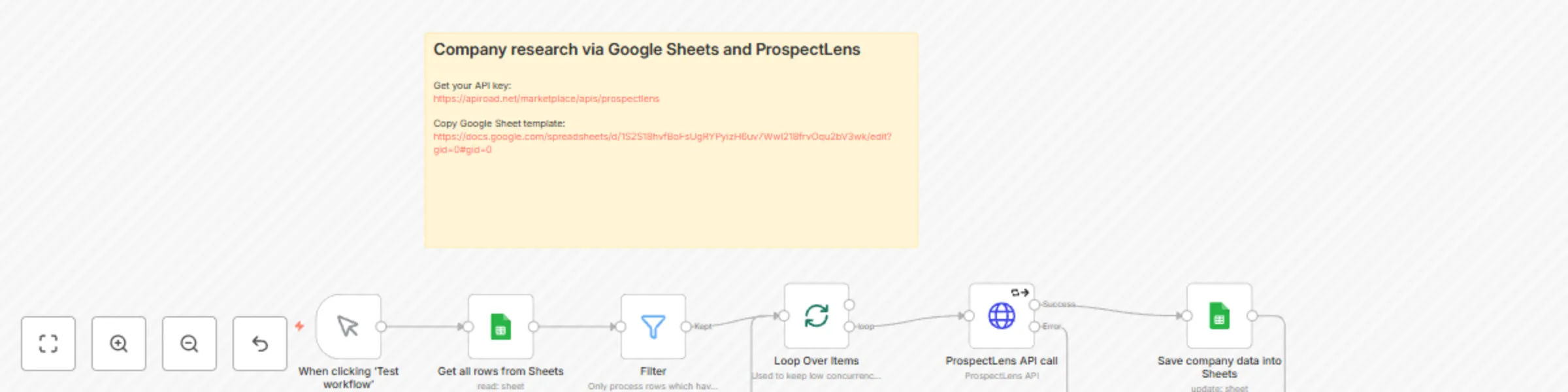
Workflow preview: Automate company research using ProspectLens and Google Sheets
Free intermediate

Automate company research using ProspectLens and Google Sheets

This n8n workflow automates the process of researching companies by gathering relevant data such as traffic volume, foundation details, funding information, founders, and more. The workflow leverages the [ProspectLens API](https://prospectlens.net), which is particularly useful for researching companies commonly found on Crunchbase and LinkedIn. **ProspectLens** is an API that provides very detailed company data. All you need to do is supply the company's domain name. You can obtain your ProspectLens API key here: [https://apiroad.net/marketplace/apis/prospectlens](https://apiroad.net/marketplace/apis/prospectlens) In n8n, create a new "HTTP Header" credential. Set `x-apiroad-key` as the "Name" and enter your APIRoad API key as the "Value". Use this credential in the HTTP Request node of the workflow. ![20240823 at 18.27.png](fileId:832)

A
Anthony
Market Research
23 Aug 2024
5069
0

Workflow preview: Recognize invoices / receipts from Google Drive and put them into Google Sheets
Free intermediate

Recognize invoices / receipts from Google Drive and put them into Google Sheets

This workflow allows you to recognize a folder with receipts or invoices (make sure your files are in .pdf, .png, or .jpg format). The workflow can be triggered via the "Test workflow" button, and it also monitors the folder for new files, automatically recognizing them. ## Video Demo https://youtu.be/mGPt7fqGQD8 ### 1. n8n import glitch After import, the trigger node "When clicking 'Test workflow'" might be disconnected. You need to connect it via 2 arrows to "Google Sheets1" and "Google Drive" nodes. So, the workflow has 2 triggers - via button, and via Google Sheets "new file" event - both of these triggers should be connected to 2 nodes. Here is how it should look like: https://ocr.oakpdf.com/n8n_fix.png ### 2. Set up RapidAPI HTTP auth key Create new "HTTP header" n8n credential and paste your RapidAPI key from https://rapidapi.com/restyler/api/receipt-and-invoice-ocr-api into it. https://ocr.oakpdf.com/n8n_api_key.png Make sure "HTTP Request" node uses this credential. ### 3. Set up your Google Auth You need a Google connection to work with your Google Sheets and Google Drive accounts: https://docs.n8n.io/integrations/builtin/credentials/google/oauth-generic/#finish-your-n8n-credential ### 4. Set up Google Sheets Copy this Google Sheets document: https://docs.google.com/spreadsheets/d/1G0w-OMdFRrtvzOLPpfFJpsBVNqJ9cfRLMKCVWfrTQBg/edit?usp=sharing ## Custom document formats and advanced usage Email: [email protected] Linkedin: https://www.linkedin.com/in/anthony-sidashin/

A
Anthony
Invoice Processing
23 Aug 2024
9711
0