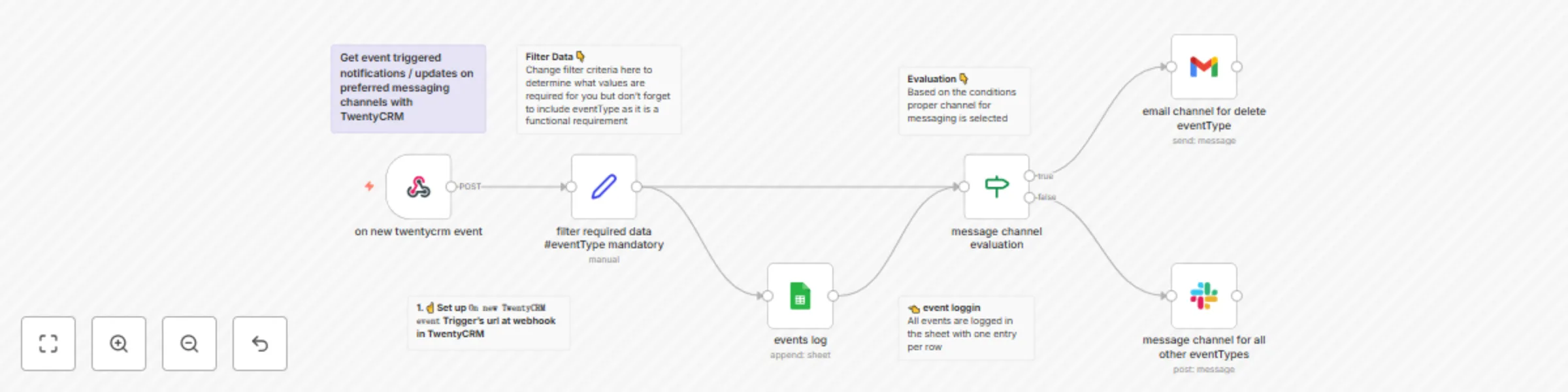
TwentyCRM event based updates on selective messaging channels with logs
# Who is this template for?
This workflow template is designed for **DevOps**, **Engineering**, and **Managed Service Provider** professionals seeking alerts on various channels, with each channel being logically chosen based on the severity of the event.
## How it works
- Each time a new event occurs, the workflow runs (powered by TwentyCRM's native Webhooks feature).
- After filtering for the required data from the webhook, the filtered data is logged using Google Sheets.
- Based on the `eventType` from the webhook, we conditionally select a predefined messaging channel and send updates or alerts through it.
## Set up instructions
1. Complete the `Set up credentials` step when you first open the workflow. You'll need a Google-OAuth2.0 with Gmail API & Google Sheets Scope, Slack with OAuth2.0 - `chat:write` scopes.
2. Set up the Webhook in TwentyCRM, linking the `On new TwentyCRM event` Trigger with your TwentyCRM App.
3. Set the correct channel to send to in the `Post message in channel` step.
4. After testing your workflow, swap the Test URL to Production URL in TwentyCRM and activate your workflow.
Template was created in n8n `v1.63.4`.